Word & Character Counter
Calculate Your Zakat Accurately Based on Your Wealth and Assets with Our Free Zakat Calculator
Table of Contents
- Introduction
- What Is a Word & Character Counter?
- Why Word and Character Count Matters
- How Our Word & Character Counter Works
- Features of the Word & Character Counter – Explained in Detail
- Word Count – What It Means and Why Writers Need It
- Character Count With Spaces vs. Without Spaces
- Sentence Count – How the Tool Detects Sentences
- Paragraph Count – Structure Your Writing Better
- Reading Time – How the Word & Character Counter Estimates It
- How to Use the Word & Character Counter – Step by Step
- Who Should Use a Word & Character Counter?
- Common Use Cases for the Word & Character Counter
- Benefits of Using an Online Word & Character Counter
- Word & Character Counter vs. Manual Counting
- Frequently Asked Questions (FAQs)
- Conclusion
Introduction
Whether you are a student finishing an assignment, a blogger crafting an article, a social media manager writing a caption, or a developer testing a text input field — knowing exactly how many words and characters your text contains is essential. Yet most people either rely on built-in word processors that only show basic word counts, or they waste precious time counting manually. Neither approach is fast, accurate, or feature-rich enough for today’s writing demands.
That is where a word & character counter becomes indispensable. A word & character counter is a specialized online tool that instantly analyzes any text you type or paste and returns a complete profile of your content — word count, character count with spaces, character count without spaces, sentence count, paragraph count, and estimated reading time. All in a single click.
Our free word & character counter is designed to be clean, fast, and reliable. Paste in any text — a blog post, a tweet, an essay, a product description, an email, or even a code snippet — and the word & character counter delivers all six text metrics immediately. No installation, no account, no waiting. Just accurate results, every time.
In this complete guide, we will explain exactly how the word & character counter works, what each metric means, who benefits most from using it, and answer the most common questions users ask. By the end, you will know exactly how to get the most out of our word & character counter for every writing task you face.
What Is a Word & Character Counter?
A word & character counter is an online text analysis tool that processes any input text and returns key metrics about its composition. Unlike the word count feature in Microsoft Word or Google Docs — which only shows a simple word total — a word & character counter provides a multi-dimensional breakdown of your text.
Our word & character counter analyzes six distinct metrics for every text input:
- Word Count — the total number of words in the text
- Characters with Spaces — the total character count including spaces and punctuation
- Characters without Spaces — the character count with all whitespace removed
- Sentence Count — the number of sentences detected in the text
- Paragraph Count — the number of distinct paragraphs in the text
- Reading Time — an estimated time for an average reader to read the entire text
A word & character counter works with any type of text — creative writing, academic essays, SEO content, social media posts, legal documents, marketing copy, code documentation, and more. The tool is language-aware in its character counting (it counts any character regardless of language) and robust enough to handle both short and long-form content.
Why Word and Character Count Matters
Understanding the word and character composition of your text is not just a technical detail — it has real, practical consequences across dozens of professional and academic contexts. Here is why people use a word & character counter regularly:
Academic Writing Universities and schools set strict word limits on essays, reports, dissertations, and exams. Too few words may result in penalties; too many may cause deductions. A word & character counter lets students confirm their word count with precision before submitting.
SEO Content Writing Search engine optimization experts and content writers use a word & character counter to ensure blog posts and articles hit recommended length targets. Most top-ranking pages for competitive keywords exceed 1,500 words. The word & character counter makes hitting those targets easy.
Social Media and Platform Limits Every social media platform enforces character limits:
- Twitter/X: 280 characters per tweet
- LinkedIn posts: 3,000 characters
- Instagram captions: 2,200 characters
- Meta descriptions (SEO): 160 characters
- Google Ads headlines: 30 characters
A word & character counter ensures your content fits within each platform’s limit before you publish — saving embarrassing truncation.
Freelance Writing and Client Work Freelance writers are often paid per word. A reliable word & character counter is essential for accurately billing clients and confirming deliverables meet contracted word counts.
Email and Business Communication Concise emails get better responses. A word & character counter helps professionals trim their messages to the optimal length for professional communication.
How Our Word & Character Counter Works
Our word & character counter uses JavaScript string processing to analyze your text in real time. Here is exactly how each metric is calculated when you click the Calculate button:
Word Count Logic The tool trims leading and trailing whitespace from the text, then splits the remaining text on one or more whitespace characters (/\s+/). Each resulting segment counts as one word. If the text is empty after trimming, word count is 0. This correctly handles single spaces, double spaces, tabs, and line breaks between words.
Characters with Spaces The tool reads the length property of the raw text string. This includes every character — letters, digits, punctuation, symbols, and spaces. This is the most comprehensive character count and reflects how most platforms impose character limits.
Characters without Spaces The tool removes all whitespace characters using a regex (/\s/g) and counts the remaining characters. This is useful for comparing pure content density without whitespace. A word & character counter that provides both metrics gives writers complete control over how they measure their text.
Sentence Count The tool splits the text on sentence-ending punctuation — periods (.), exclamation marks (!), and question marks (?) — using the regex /[.!?]+/. The number of non-empty resulting segments is the sentence count. The + quantifier correctly handles ellipses and multiple punctuation marks without over-counting.
Paragraph Count The tool splits text on one or more consecutive newline characters (/\n+/) and filters out empty segments. Each non-empty block separated by line breaks counts as one paragraph. This accurately reflects how writers structure paragraphs using the Enter key.
Reading Time The word & character counter divides the total word count by 200 — the widely accepted average adult reading speed (200 words per minute). The result is rounded up using Math.ceil(). If the result is 1 minute or less, the tool displays “< 1 min” for clarity.
Features of the Word & Character Counter – Explained in Detail
Our word & character counter packs six powerful text analysis features into a clean, two-panel interface. Here is a detailed look at what each feature does and why it matters:
Feature 1 – Resizable Text Area The text input area is resizable — you can drag the bottom-right corner to make it larger for longer documents. The word & character counter accepts text of any length, from a single word to a full article.
Feature 2 – Instant Calculation Click Calculate and all six metrics appear immediately in the results panel to the right. There is no loading delay — the word & character counter processes your text in milliseconds regardless of length.
Feature 3 – Persistent Results Display The results panel remains visible until you click Clear, so you can compare the numbers against your target requirements without the results disappearing.
Feature 4 – Clean Reset The Clear button resets the text area to empty and resets all six result metrics to 0, giving you a clean slate for a new text input in the word & character counter.
Feature 5 – Responsive Design On mobile devices and tablets, the two-panel layout stacks vertically — the text input appears above the results panel. The word & character counter works perfectly on smartphones, making it useful on the go.
Feature 6 – Default Sample Text The tool includes a sample text by default so you can see how the word & character counter works immediately without needing to paste your own text first. Click Calculate on the default text to see a live demonstration of all six metrics.
Word Count – What It Means and Why Writers Need It
Word count is the single most requested text metric across almost every form of writing. The word & character counter calculates it accurately and instantly.
Common word count targets by content type:
| Content Type | Typical Target |
|---|---|
| Tweet / Social Post | 20–50 words |
| 50–200 words | |
| Blog Introduction | 150–300 words |
| Short Blog Post | 600–1,000 words |
| Standard Blog Post | 1,500–2,500 words |
| Long-form SEO Article | 2,500–5,000 words |
| Academic Essay | Varies by assignment |
| Novel Chapter | 2,000–5,000 words |
Our word & character counter gives you the exact word total for any of these formats instantly — so you always know where you stand relative to your target.
Why word count matters for SEO: Search engines like Google have consistently rewarded comprehensive, long-form content. Most top-ranking pages for competitive keywords contain 2,000 or more words. Content writers and SEO strategists use a word & character counter to verify that their articles meet minimum length thresholds before publishing.
Character Count With Spaces vs. Without Spaces
Many users of a word & character counter are confused about the difference between these two metrics. Here is a clear explanation:
Characters with Spaces counts every single character in your text — including spaces between words, tabs, and line breaks. This is the number that most social media platforms and text input fields use when enforcing their character limits. For example, Twitter’s 280-character limit counts spaces as characters.
Characters without Spaces removes all whitespace before counting. This metric is useful when:
- A platform’s character limit excludes spaces (some SMS systems do this)
- You need to compare text density across different documents
- You are analyzing how much actual content (non-space characters) is present
- You are working with database fields that measure non-whitespace characters
Our word & character counter provides both metrics simultaneously, so you never have to guess which type of count you need. You can see both figures side by side in the results panel and use whichever is relevant to your specific situation.
Sentence Count – How the Tool Detects Sentences
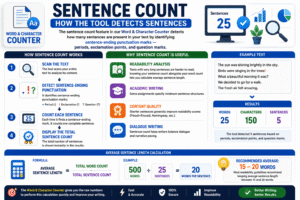
The sentence count feature in our word & character counter detects how many sentences are present in your text by identifying sentence-ending punctuation marks — periods, exclamation points, and question marks.
Why sentence count is useful:
- Readability analysis — texts with very long sentences are harder to read; knowing your sentence count alongside your word count lets you calculate average sentence length
- Academic writing — some assignments specify minimum sentence structures
- Content quality — shorter sentences generally improve readability scores (Flesch-Kincaid, Hemingway, etc.)
- Dialogue writing — sentence count helps writers balance dialogue and narrative pacing
Average sentence length calculation: Divide your word count by your sentence count to get average words per sentence. For example, 500 words in 25 sentences = 20 words per sentence average. Most readability guidelines recommend keeping average sentence length between 15 and 20 words. The word & character counter gives you the raw numbers to perform this calculation quickly.
Paragraph Count – Structure Your Writing Better
Paragraph count is a feature that many competing tools overlook — but our word & character counter includes it as a standard metric.
Why does paragraph count matter?
- Content structure — a well-structured article has a clear ratio of paragraphs to words; excessively long paragraphs hurt readability
- Blog formatting — online readers skim content; short paragraphs of 3–5 sentences are easier to scan
- Word processor formatting — some document formats auto-generate tables of contents based on paragraph structure
- Text comparison — comparing paragraph counts across drafts shows how much your structure has changed
How the word & character counter counts paragraphs: Every block of text separated by at least one line break (Enter key press) is counted as one paragraph. Consecutive blank lines are treated as a single separator, so pressing Enter twice between paragraphs does not create phantom empty paragraphs in the count.
Reading Time – How the Word & Character Counter Estimates It
Reading time is one of the most practically useful metrics in any word & character counter. It tells you — and your readers — approximately how long the text will take to read.
Our word & character counter calculates reading time using the formula:
Reading Time = Word Count ÷ 200 (words per minute), rounded up
200 words per minute is the widely cited average adult reading speed. Research from various sources puts average silent reading speed between 200 and 238 words per minute for adults reading in their native language. Using 200 WPM gives a slightly conservative estimate, which is more useful than underestimating reading time.
How content creators use reading time:
- Blog posts — displaying “5 min read” at the top of an article sets reader expectations and increases time-on-page engagement
- Email marketing — shorter reading times correlate with higher open-to-read completion rates
- Landing pages — knowing your page takes “< 1 min” to read helps optimize conversion-focused copy for brevity
- Presentations — estimating the time to read your slides out loud helps speakers plan presentation pacing
The character counter displays reading time as either “< 1 min” (for short texts) or “X mins” (for longer texts), rounding up to the nearest whole minute.
How to Use the Word & Character Counter – Step by Step
Using our character counter takes under 30 seconds. Here is the complete process:
Step 1 – Enter or Paste Your Text Click inside the large text area labeled “Enter or Paste Text.” You can either type directly into the box or paste text from any source — a document, a webpage, an email draft, or a social media post. The word & character counter accepts any plain text input.
Step 2 – Click “Calculate” Press the blue Calculate button. The word & character counter instantly processes your text and populates all six result fields in the panel on the right.
Step 3 – Read Your Results Review the six metrics:
- Words — your total word count
- Characters (with spaces) — full character count including spaces
- Characters (no spaces) — character count excluding all whitespace
- Sentences — number of detected sentences
- Paragraphs — number of detected paragraphs
- Reading Time — estimated read duration
Step 4 – Adjust Your Text if Needed Go back to the text area, edit your content, and click Calculate again. The word & character counter recalculates all metrics immediately with your updated text.
Step 5 – Clear and Start Fresh Click Clear to reset everything to zero when you are ready to analyze a new piece of text in the word & character counter.
Who Should Use a Word & Character Counter?
Our counter is useful for virtually everyone who works with written text. Here are the specific groups who benefit most:
Students and Academics Meet essay word limits precisely. The word & character counter prevents both under-writing (falling short of the minimum) and over-writing (exceeding the maximum).
Bloggers and Content Writers Confirm article length before publishing. Hit SEO word count targets. Calculate how your post’s reading time compares to competitors using the word & character counter.
SEO Specialists Verify that meta descriptions stay within 160 characters. Confirm title tags are under 60 characters. Check article length for keyword density calculations. The word & character counter is an everyday tool in the SEO workflow.
Social Media Managers Draft posts and captions knowing exactly how many characters you are working with before copying into Instagram, LinkedIn, Twitter, or Facebook using the word & character counter.
Copywriters and Marketers Count characters in ad headlines, email subject lines, and CTA buttons. Ensure compliance with platform character limits using the word & character counter before finalizing ad copy.
Freelance Writers Track word counts for billing purposes. Confirm deliverables meet client specifications. The word & character counter is an essential professional tool for anyone writing for pay.
Developers and QA Testers Test text input fields and APIs for character limit compliance. Generate sample texts of specific lengths and verify them using the word & character counter.
Authors and Fiction Writers Track chapter lengths, scene word counts, and overall manuscript progress using the word & character counter as a lightweight alternative to full word processor tools.
Common Use Cases for the Word & Character Counter
Here are the most frequent real-world scenarios where the counter proves immediately useful:
- Checking a blog post is 1,500+ words for SEO purposes before publishing
- Trimming a tweet to fit within 280 characters before posting
- Confirming an essay meets a 2,000-word minimum requirement
- Estimating reading time to add a “X min read” badge to a Medium article or blog post
- Verifying a meta description stays within 155–160 characters for Google search results
- Counting words in a freelance deliverable before invoicing a client
- Checking a LinkedIn post is under 3,000 characters for full visibility before the “see more” truncation
- Analyzing paragraph structure in a draft to ensure it is scannable and well-structured
- Checking a product description is the right length for an e-commerce platform’s requirements
- Measuring email length to optimize business communication for response rates
In every one of these scenarios, the word & character counter replaces slow manual counting or unreliable built-in tools with an instant, multi-metric analysis.
Benefits of Using an Online Word & Character Counter
There are clear advantages to using our dedicated counter over alternatives like Microsoft Word or Google Docs:
Six Metrics at Once Word processors typically show only word count and basic character count. Our word & character counter provides six metrics simultaneously — words, two character counts, sentences, paragraphs, and reading time — in a single panel.
No Software Required No installation, no subscription, no sign-in. Open a browser and the word & character counter is ready immediately on any device.
Works with Any Text Source Paste text from PDFs, web pages, emails, chat messages, or any other source. The word & character counter analyzes whatever text you give it, regardless of where it came from.
Completely Free The counter is free to use with no usage limits, no ads, and no premium tier required for full access.
Clean, Distraction-Free Interface The word & character counter has a simple two-panel layout — text input on the left, results on the right — with no unnecessary clutter, sidebars, or pop-ups interrupting your workflow.
Mobile-Friendly Use the counter on your phone when drafting social media captions or emails on the go. The responsive design stacks the panels vertically for comfortable mobile use.
Word & Character Counter vs. Manual Counting
Some people still attempt to count words or characters manually. Here is why that approach fails compared to using a word & character counter:
| Factor | Manual Counting | Word & Character Counter |
|---|---|---|
| Speed | Minutes to hours | Instant |
| Accuracy | Error-prone | 100% accurate |
| Metrics | Words only (typically) | 6 metrics simultaneously |
| Character Count | Virtually impossible | Exact, with and without spaces |
| Sentence Count | Time-consuming | Automatic |
| Reading Time | Requires calculation | Automatic |
| Scalability | Breaks down for long texts | Handles any length |
| Cost | Free (but slow) | Free (and instant) |
The conclusion is clear: for any text analysis task beyond the most trivial, a word & character counter is faster, more accurate, and more informative than any manual method. The counter is the right tool for the job every time.
Frequently Asked Questions (FAQs)
Q1: What is a word & character counter and what does it do? A word & character counter is an online tool that analyzes text and returns six key metrics: word count, characters with spaces, characters without spaces, sentence count, paragraph count, and estimated reading time. It is used by writers, students, marketers, SEO professionals, and developers to measure and manage the length and structure of their text content.
Q2: How does the word & character counter count words? The word & character counter trims whitespace from both ends of the text, then splits the remaining content on any whitespace character (spaces, tabs, line breaks). Each resulting segment is counted as one word. This handles multiple consecutive spaces correctly without over-counting.
Q3: What is the difference between “characters with spaces” and “characters without spaces” in the word & character counter? “Characters with spaces” counts every character including spaces, tabs, and line breaks — this is what most platforms use for character limits. “Characters without spaces” removes all whitespace first and counts only letters, digits, punctuation, and symbols. The word & character counter shows both figures simultaneously so you always have the right number for your use case.
Q4: How does the word & character counter calculate reading time? The word & character counter divides the total word count by 200 — the widely accepted average adult reading speed of 200 words per minute — and rounds up to the nearest whole minute. Texts with fewer than 200 words display “< 1 min.”
Q5: Can I paste text from a PDF or Word document into the word & character counter? Yes. Copy text from any source — a PDF, a Word document, a Google Doc, a web page, or an email — and paste it directly into the word & character counter text area. The tool processes plain text, so formatting like bold or italic from the source document is stripped, which actually improves counting accuracy.
Q6: Is there a word or character limit on the word & character counter? No. Our word & character counter has no enforced text length limit. You can paste a short tweet (20 characters) or a full-length manuscript chapter (10,000+ words) and the word & character counter will process it accurately in either case.
Q7: Does the word & character counter work on mobile phones? Yes. The word & character counter is fully responsive. On smaller screens, the text input and results panels stack vertically for comfortable use on smartphones and tablets. All features work identically on mobile.
Q8: Why does my word count in the word & character counter differ from Microsoft Word? Minor differences can occur because different tools handle edge cases differently — such as hyphenated words (counted as one word in some tools and two in others) or numbers with punctuation. Our word & character counter uses the whitespace-split method, which is the most widely used approach and closely matches most modern word processors.
Q9: Can I use the counter to check meta description length for SEO? Absolutely. Paste your meta description into the word & character counter and check the “Characters (with spaces)” metric. Google typically displays meta descriptions up to 155–160 characters. The word & character counter tells you instantly whether your meta description is within this range.
Q10: Is the counter completely free? Yes. The word & character counter is 100% free with no registration, no subscription, and no usage limits. All six text analysis metrics are available to every user at no cost, on any device, at any time.
Conclusion
Words and characters are the building blocks of all written communication — and knowing exactly how many you have at any given moment is a fundamental requirement for writers, editors, students, marketers, developers, and content creators of every kind. Our free online word & character counter gives you complete, instant visibility into every dimension of your text — not just a simple word total, but a full six-metric profile that covers words, two types of character counts, sentences, paragraphs, and reading time.
Whether you are trimming a social media caption to fit a platform’s character limit, confirming that a blog post hits its target word count, checking the reading time of a long-form article, or verifying that an academic essay meets its minimum requirements — our word & character counter delivers the answer in a single click.
The counter is fast, free, mobile-friendly, and requires no account or installation. Paste any text, click Calculate, and get all six metrics instantly. Then adjust your text, recalculate, and repeat until your content is exactly where it needs to be.
Key takeaways from this guide:
- A counter provides six text metrics in a single analysis: words, characters (with and without spaces), sentences, paragraphs, and reading time
- The word & character counter is used by writers, bloggers, SEO professionals, students, social media managers, and developers
- Character count with spaces reflects platform character limits (Twitter, LinkedIn, Google); character count without spaces measures pure content density
- Reading time in the counter is calculated at 200 words per minute, rounded up
- Our word & character counter is completely free, works on all devices, and has no text length limit
- For SEO, social media, academic, and freelance writing — the word & character counter replaces slow, error-prone manual counting with instant, accurate results
Use our counter now — paste your text, click Calculate, and know your word count, character count, sentence count, paragraph count, and reading time in seconds.