Quickly Calculate Date Durations and Future Dates with Our Date Calculator
Table of Contents
- Introduction
- What Is an Hours Calculator?
- Two Modes of the Hours Calculator
- Time Difference Mode — Hours Between Two Clock Times
- Hours Between Dates Mode — Multi-Day Duration
- How the Hours Calculator Handles Midnight and Overnight
- How to Use the Hours Calculator Step by Step
- Understanding Decimal Hours vs. Hours and Minutes
- Hours Calculator in Payroll and Workforce Management
- Hours Calculator in Freelancing and Billing
- Hours Calculator in Healthcare and Patient Care
- Hours Calculator in Logistics and Transportation
- Hours Calculator in Project Management
- Hours Calculator in Education and Research
- Hours Calculator in Personal Productivity
- Hours Calculator in Manufacturing and Operations
- Common Time Calculation Errors the Hours Calculator Prevents
- Frequently Asked Questions (FAQs)
- Conclusion
Introduction
Time management is at the core of every productive personal and professional life. Whether you are tracking work hours for payroll, calculating how long a project phase took, measuring the duration of a shift, or figuring out how many hours span two specific dates and times, accurate time calculation is essential — and surprisingly difficult to do correctly by hand. The Hours Calculator is the precise, instant solution: a digital tool that computes the exact number of hours between any two times or any two date-and-time combinations, giving you a reliable result in seconds without mental arithmetic or manual clock counting.
The Hours Calculator is used every day by employees tracking billable hours, managers computing shift lengths, healthcare workers measuring patient monitoring durations, logistics teams calculating transit times, and anyone who needs to know exactly how much time has passed or will pass between two specific moments. Manual time arithmetic is deceptively error-prone — crossing midnight, spanning multiple days, and converting between minutes and hours all introduce opportunities for calculation mistakes that the Hours Calculator eliminates completely.
In this comprehensive guide, we will explore everything about the Hours Calculator — how it works, both of its calculation modes, the mathematics of time computation, and the wide range of real-world contexts where accurate hour calculation is critical. Whether you are computing a single shift duration or tracking hours across multiple days and dates, this guide provides the complete understanding you need to use the Hours Calculator confidently and effectively.
What Is an Hours Calculator?
An Hours Calculator is a digital tool that computes the exact number of hours between two specified times or date-time combinations, delivering a precise decimal result that accounts for all time arithmetic — including midnight crossings, multi-day spans, and fractional hours.
The Hours Calculator removes the most common sources of manual time calculation error:
- Forgetting that 60 minutes = 1 hour (not 100 — so you cannot subtract times like regular numbers)
- Miscounting hours that cross midnight (e.g., 10 PM to 6 AM)
- Losing track of hours across multiple days
- Confusing AM and PM in multi-day calculations
- Failing to account for partial hours correctly
By handling all of these automatically, the Hours Calculator guarantees accurate results for any time span — from a few minutes to hundreds of hours across multiple days.
The Hours Calculator is used by:
- Employees and managers — computing shift lengths and total worked hours for payroll
- Freelancers and consultants — tracking billable hours for client invoicing
- Healthcare professionals — measuring patient monitoring periods, medication timing, and procedure durations
- Logistics coordinators — calculating transit times, delivery windows, and turnaround hours
- Project managers — tracking phase durations and resource utilization in hours
- Students and researchers — measuring experiment durations, study session lengths, and lab time
- Fitness enthusiasts — tracking training duration and recovery hours between sessions
Two Modes of the Hours Calculator
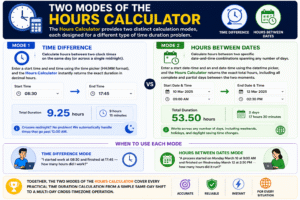
The Hours Calculator provides two distinct calculation modes, each designed for a different type of time duration problem.
Mode 1 — Time Difference For computing the number of hours between two clock times on the same day (or across a single midnight). Enter a start time and end time using the time picker (HH:MM format), and the Hours Calculator instantly returns the exact duration in decimal hours.
Mode 2 — Hours Between Dates For computing the number of hours between two specific date-and-time combinations — spanning any number of days. Enter a start date-time and an end date-time using the datetime picker, and the Hours Calculator returns the exact total hours, including all complete and partial days between the two moments.
When to use each mode:
- Time Difference mode: “I started work at 08:30 and finished at 17:45 — how many hours did I work?”
- Hours Between Dates mode: “A process started on Monday March 10 at 9:00 AM and finished on Wednesday March 12 at 2:30 PM — how many hours did it run?”
Together, the two modes of the Hours Calculator cover every practical time duration calculation from a simple same-day shift to a multi-day cross-timezone operation.
Time Difference Mode — Hours Between Two Clock Times
The Time Difference mode of the Hours Calculator is the fastest way to compute how many hours and fractions of hours separate two points on the clock face.
How it works: The Hours Calculator converts the start time and end time into minutes from midnight, computes the difference, and divides by 60 to produce decimal hours. If the result is negative (indicating the end time is earlier than the start time on the clock face — i.e., the span crosses midnight), the Hours Calculator automatically adds 24 hours to give the correct overnight duration.
Input format: Both the start and end times are entered using the browser’s native time picker in HH:MM format (24-hour or 12-hour depending on the device’s regional settings).
Output format: The Hours Calculator displays the result as a decimal number of hours to one decimal place — for example, “8.5 Hours” or “7.8 Hours.”
Example calculations in Time Difference mode:
| Start | End | Hours Calculator Result |
|---|---|---|
| 08:00 | 16:00 | 8.0 Hours |
| 09:30 | 17:45 | 8.3 Hours |
| 22:00 | 06:30 | 8.5 Hours (overnight) |
| 07:15 | 12:00 | 4.8 Hours |
| 00:00 | 23:59 | 24.0 Hours |
The Time Difference mode is ideal for single-day shift tracking, where you know the start and end clock times and need the exact duration in decimal hours for payroll, billing, or reporting.
Hours Between Dates Mode — Multi-Day Duration
The Hours Between Dates mode of the Hours Calculator handles the more complex case where a time span crosses one or more day boundaries — requiring both a date and a time for each endpoint.
How it works: The Hours Calculator converts both datetime values to milliseconds since the Unix epoch (January 1, 1970), computes the absolute difference in milliseconds, and divides by 3,600,000 (the number of milliseconds in one hour) to give the exact decimal hours.
Input format: Both start and end points use the browser’s datetime-local input — allowing you to select both the date and the time for each endpoint, with precision to the minute.
Output format: The Hours Calculator displays the result as a decimal number of hours — for example, “52.5 Hours” for a span of 2 days and 4.5 hours.
Example calculations in Hours Between Dates mode:
| Start | End | Hours Calculator Result |
|---|---|---|
| Mar 1, 09:00 | Mar 2, 09:00 | 24.0 Hours |
| Mar 10, 08:30 | Mar 12, 17:00 | 56.5 Hours |
| Jan 1, 00:00 | Jan 8, 12:00 | 180.0 Hours |
| Apr 5, 14:00 | Apr 7, 20:30 | 54.5 Hours |
This mode is essential for any multi-day process — from manufacturing runs and clinical monitoring periods to logistics transit times and multi-day event durations — where the Hours Calculator is the only reliable way to get an accurate total.
How the Hours Calculator Handles Midnight and Overnight
Midnight crossing is the most common source of error in manual time calculation, and the Hours Calculator handles it automatically in both modes.
In Time Difference mode: If the end time is earlier on the clock than the start time — indicating the span crossed midnight — the Hours Calculator detects the negative difference and adds 24 hours. For example:
- Start: 22:30, End: 06:00
- Raw difference: 06:00 − 22:30 = −16.5 hours
- Hours Calculator result: −16.5 + 24 = 7.5 hours ✓
This means the Hours Calculator assumes the span is always less than 24 hours in Time Difference mode — suitable for single overnight shifts.
In Hours Between Dates mode: Because both date and time are specified for each endpoint, there is no ambiguity about midnight crossings. The Hours Calculator computes the exact absolute time difference in milliseconds, then converts to hours — handling any number of midnight crossings correctly for spans of days, weeks, or longer.
For multi-night spans (e.g., a 3-day clinical monitoring period or a 5-day logistics transit), always use the Hours Between Dates mode of the Hours Calculator to get a result that correctly counts all intervening hours.
How to Use the Hours Calculator Step by Step
Using the Hours Calculator is immediate and intuitive. Here is a step-by-step guide for both modes.
Time Difference Mode:
- Click the Start time field and enter the start time using the time picker
- Click the End time field and enter the end time
- Press Calculate — the Hours Calculator instantly displays the result
- Read the result: “X.X Hours — Total duration: X.X hours”
- Press Clear to reset and begin a new calculation
Hours Between Dates Mode:
- Click the Start Date & Time field and select the start date and time using the datetime picker
- Click the End Date & Time field and select the end date and time
- Press Calculate — the Hours Calculator computes and displays the total hours
- Read the result: “X.X Hours — Total hours between dates: X.X hours”
- Press Clear to reset both fields
Both modes of the Hours Calculator display results immediately in the result panel alongside the input panel — no page reload, no waiting, no manual conversion required.
Understanding Decimal Hours vs. Hours and Minutes
The Hours Calculator returns results in decimal hours, which is the standard format for payroll, billing, and most professional time tracking systems. Understanding decimal hours is important for interpreting and using the results correctly.
Decimal hours explained:
- 8.0 hours = 8 hours 0 minutes
- 8.5 hours = 8 hours 30 minutes
- 8.25 hours = 8 hours 15 minutes
- 8.75 hours = 8 hours 45 minutes
- 7.8 hours = 7 hours 48 minutes
Converting decimal hours to minutes: Multiply the decimal portion by 60.
0.3 hours × 60 = 18 minutes → 7.3 hours = 7 hours 18 minutes
Why decimal hours are used in the Hours Calculator: Decimal hours allow direct multiplication by an hourly rate: 8.5 hours × $25/hour = $212.50. If hours were expressed in HH:MM format, this multiplication would require a conversion step — decimal hours from the Hours Calculator eliminate this extra step.
Converting back to HH:MM format: If you need hours-and-minutes format from the Hours Calculator decimal result:
- Take the whole number = hours
- Multiply the decimal × 60 = minutes
9.4 hours → 9 hours + (0.4 × 60) = 9 hours 24 minutes
Hours Calculator in Payroll and Workforce Management
Payroll processing is the most intensive professional application of the Hours Calculator, where accurate time computation directly affects employee compensation and legal compliance.
Shift duration calculation The Hours Calculator computes exact shift durations from clock-in and clock-out times — including breaks, overtime, and overnight shifts. For a standard 8-hour shift (08:00–16:00), the result is exactly 8.0 hours. For a shift with varying end times, the Hours Calculator removes the mental arithmetic that leads to payroll errors.
Weekly hours totaling By running the Hours Calculator for each shift in a week and summing the decimal results, payroll administrators get the exact weekly total — identifying overtime thresholds (typically 40 hours/week) with mathematical precision.
Overtime calculation Many payroll systems apply different rates above certain daily or weekly thresholds. The Hours Calculator provides the exact hours worked per shift and per week — enabling correct application of straight-time, time-and-a-half, and double-time rates.
Multi-day or 24-hour shift tracking For healthcare workers, security personnel, or industrial workers on extended shifts, the Hours Between Dates mode of the Hours Calculator accurately computes durations that span multiple days — which simple time subtraction cannot handle.
Night differential computation Many employment contracts pay a premium for hours worked between certain night hours. The Hours Calculator helps verify exactly how many hours of a shift fall within the night-differential window.
Hours Calculator in Freelancing and Billing
Freelancers and independent consultants depend on accurate time tracking for client billing — and the Hours Calculator is the foundational tool for this.
Project time tracking By recording start and end times for each work session and running each through the Hours Calculator, freelancers build an accurate daily and weekly log of billable hours — without relying on memory or imprecise estimates.
Invoice preparation The decimal hours output of the Hours Calculator multiplies directly with the hourly rate to produce invoice amounts: 6.5 hours × $80/hour = $520. This direct multiplication is one of the key reasons decimal hours from the Hours Calculator are the industry standard for freelance billing.
Client reporting When clients request detailed time breakdowns, the Hours Calculator provides the precise duration for each task or session — supporting transparent, defensible billing that builds client trust.
Contract compliance Some freelance contracts specify maximum weekly hours or minimum engagement hours. The Hours Calculator verifies compliance by computing exact totals across any time period.
Hours Calculator in Healthcare and Patient Care
Healthcare is one of the most time-sensitive professional environments, and the Hours Calculator supports a wide range of clinical and administrative time calculations.
Patient monitoring duration ICU and critical care patients require monitoring for specified minimum hours. The Hours Calculator computes the exact monitoring duration from admission time to current time or discharge time — confirming compliance with clinical protocols.
Medication timing Many medications specify dosing intervals in hours (e.g., “every 8 hours,” “after 12 hours”). The Hours Calculator determines exactly when the next dose is due and how many hours have elapsed since the last one.
Procedure and surgery duration Operating room teams use the Hours Calculator to track procedure lengths from incision to closure — data that feeds into surgical logs, anesthesia billing, and staff scheduling.
Nursing shift coverage Hospital HR teams use the Hours Calculator to verify shift coverage — ensuring that every hour of every day and night has adequate nursing staff, and that no nurse exceeds maximum consecutive hours under fatigue management protocols.
Clinical trial time windows Research coordinators use the Hours Calculator to verify that assessments, sample collections, and interventions occur within the specified time windows from baseline events — a critical component of protocol compliance in clinical studies.
Hours Calculator in Logistics and Transportation
The logistics and transportation industry operates on precise time windows, and the Hours Calculator is essential for computing transit durations, turnaround times, and delivery windows.
Transit time calculation From cargo departure to arrival, the Hours Calculator computes exact transit durations — essential for customer commitments, perishable goods management, and customs declaration accuracy.
Driver hours of service compliance Trucking regulations (such as HOS regulations) limit the number of consecutive driving hours and require minimum rest periods. The Hours Calculator helps fleet managers verify compliance by computing exact driving and rest durations from log times.
Turnaround time computation In air freight and maritime shipping, vessel and aircraft turnaround times are computed using the Hours Calculator — from arrival to departure, including loading, refueling, and inspection hours.
Warehouse and distribution center shift management Shift scheduling in 24/7 distribution centers relies on the Hours Calculator to verify shift durations, manage handover times, and compute total labor hours for operational reporting.
Hours Calculator in Project Management
Project management involves constant time tracking across multiple phases, tasks, and resources, and the Hours Calculator supports accurate measurement at every level.
Phase duration tracking Project managers use the Hours Calculator to measure the actual duration of each project phase — comparing actual hours against estimated hours to identify variances and improve future estimates.
Resource utilization measurement By logging start and end times for each resource’s contributions and running them through the Hours Calculator, project managers compute total resource hours — feeding into cost tracking and capacity planning.
Sprint velocity measurement Agile teams use the Hours Calculator to measure actual working hours per sprint, computing team velocity in terms of hours per story point for more accurate future planning.
Deadline countdown in hours For time-critical deliverables with hour-level precision, the Hours Between Dates mode of the Hours Calculator counts down exactly how many hours remain until a deadline — enabling precise last-mile scheduling.
Hours Calculator in Education and Research
Academic and scientific research often requires precise time measurement for experiments, observations, and study sessions, and the Hours Calculator supports this need.
Laboratory experiment timing Reactions, incubations, and observations that run for specified numbers of hours are tracked using the Hours Calculator — ensuring the process runs for exactly the required duration and samples are collected at the correct time points.
Study session tracking Students preparing for examinations use the Hours Calculator to measure total study hours across sessions — setting hour targets and tracking progress toward them.
Survey and data collection windows Research studies with defined data collection windows (e.g., “participants must complete the survey within 48 hours of the intervention”) use the Hours Calculator to verify whether a specific submission timestamp falls within the required window.
Academic calendar hour calculations Universities computing contact hours for course accreditation use the Hours Calculator to sum lecture, lab, and tutorial hours — verifying compliance with minimum contact hour requirements.
Hours Calculator in Personal Productivity
The Hours Calculator has important applications in personal time management — helping individuals measure how they spend their time and make data-driven decisions about productivity.
Time audit and tracking Productivity practitioners recommend periodic time audits — tracking exactly how many hours are spent on each activity over a week. The Hours Calculator computes the duration of each activity from start and end times, building an accurate picture of time allocation.
Sleep duration measurement Tracking sleep hours is a key component of health monitoring. The Hours Calculator’s overnight calculation accurately computes sleep duration from bedtime to wake time — including midnight crossings that trip up manual calculation.
Exercise and training tracking Athletes and fitness enthusiasts use the Hours Calculator to measure workout duration, recovery hours between sessions, and cumulative training hours per week or month.
Screen time awareness Consciously computing hours spent on specific activities — social media, streaming, gaming — using the Hours Calculator makes abstract time use concrete and actionable.
Hours Calculator in Manufacturing and Operations
Manufacturing and industrial operations depend on precise hour measurement for production planning, equipment utilization, and maintenance scheduling.
Machine uptime computation The Hours Calculator measures the exact hours a machine ran from start to stop — feeding into overall equipment effectiveness (OEE) calculations and maintenance cost allocation.
Production run duration From the first unit produced to the last, the Hours Calculator computes total production run time — essential for calculating throughput rates (units per hour) and production efficiency.
Planned maintenance intervals Equipment maintenance often runs on hour-based intervals (e.g., “oil change every 500 operating hours”). The Hours Calculator tracks cumulative run hours from the last maintenance event to schedule the next service.
Shift overlap management In continuous manufacturing operations, the Hours Calculator verifies that shift handovers occur with the correct overlap duration — ensuring uninterrupted production without gaps or excessive double-staffing.

Common Time Calculation Errors the Hours Calculator Prevents
Manual time arithmetic produces these frequent errors, all of which the Hours Calculator eliminates automatically:
- Subtracting times as regular numbers — Calculating 17:30 − 09:45 as “17.30 − 9.45 = 7.85 hours” instead of the correct 7 hours 45 minutes (7.75 hours). The Hours Calculator converts to minutes before computing
- Midnight miscounting — Treating 10 PM to 6 AM as 4 hours instead of 8 hours because of misapplied AM/PM arithmetic. The Hours Calculator detects overnight spans and adjusts automatically
- Forgetting partial hours — Estimating “about 8 hours” when the actual duration is 7 hours 42 minutes. The Hours Calculator computes exactly 7.7 hours for precise billing
- Multi-day span errors — Manually counting hours across 3 days by adding up daily portions — a process that frequently misses hours at day boundaries. The Hours Calculator’s date mode handles this in a single computation
- AM/PM confusion — Misidentifying 12:00 PM (noon) vs. 12:00 AM (midnight) and computing a 12-hour error. The Hours Calculator uses 24-hour internal time representation, eliminating AM/PM ambiguity
Frequently Asked Questions (FAQs)
What is an Hours Calculator? An Hours Calculator is a digital tool that computes the exact number of hours between two specified times or date-time combinations, returning a decimal result that accounts for midnight crossings, multi-day spans, and fractional hours.
What is the difference between the two modes of the Hours Calculator? Time Difference mode computes hours between two clock times (same day or single overnight). Hours Between Dates mode computes hours between two full date-and-time combinations, handling spans of any length across multiple days.
How does the Hours Calculator handle overnight shifts? In Time Difference mode, the Hours Calculator detects when the end time is earlier than the start time (indicating a midnight crossing) and automatically adds 24 hours to produce the correct overnight duration.
What does a decimal result mean in the Hours Calculator? The decimal portion represents a fraction of an hour. For example, 8.5 hours means 8 hours 30 minutes, and 7.75 hours means 7 hours 45 minutes. Multiply the decimal by 60 to convert to minutes.
Can the Hours Calculator handle spans of more than 24 hours? Yes — use the Hours Between Dates mode. Enter the start date-time and end date-time, and the Hours Calculator computes the exact total hours for any duration, from a few minutes to thousands of hours.
Why does the Hours Calculator use decimal hours instead of hours and minutes? Decimal hours can be directly multiplied by hourly rates for billing and payroll calculations. Hours-and-minutes format requires an extra conversion step. The Hours Calculator uses decimal hours for maximum compatibility with payroll, invoicing, and reporting systems.
How accurate is the Hours Calculator? The Hours Calculator computes time differences in milliseconds and converts to hours with floating-point precision, then rounds to one decimal place for display. Results are accurate to the nearest 6 minutes (0.1 hours).
Can I use the Hours Calculator for billing calculations? Yes. Multiply the decimal hours result from the Hours Calculator directly by your hourly rate to get the billing amount — for example, 6.5 hours × $60/hour = $390.
What if my shift spans more than one midnight? Use the Hours Between Dates mode of the Hours Calculator. Enter the exact start and end date-times, and the result will include all hours across all midnight crossings automatically.
Can the Hours Calculator be used for international time zones? The Hours Calculator uses the device’s local time — both inputs should be in the same time zone for accurate results. For cross-timezone calculations, convert both times to UTC before entering them into the Hours Calculator.
Conclusion
The Hours Calculator is one of the most practically useful and universally needed digital calculation tools available — relevant to every person and organization that tracks time, measures durations, or schedules activities with hour-level precision. From the employee computing a shift length for a timesheet, to the freelancer verifying billable hours before sending an invoice, to the healthcare professional tracking patient monitoring duration, to the logistics coordinator computing transit time across multiple days — the Hours Calculator delivers the precise, reliable answer that manual time arithmetic cannot consistently provide.
The two modes of the Hours Calculator complement each other perfectly. Time Difference mode handles the most common case — two clock times on the same day or spanning a single midnight. Hours Between Dates mode handles multi-day spans of any length, with both date and time specified for complete precision. Together, they cover every time duration calculation you are likely to encounter — from a 30-minute meeting to a 500-hour industrial production run.
What makes the Hours Calculator indispensable is the combination of speed and accuracy. Manual clock arithmetic requires knowing month structures, counting across midnight, converting between minutes and hours, and remembering AM/PM rules — all sources of error that compound in multi-step calculations. The Hours Calculator eliminates all of these concerns with a single click, producing a decimal hours result that is immediately usable for payroll, billing, reporting, and planning.
Bookmark this guide, use the Hours Calculator for every time duration task you encounter, and replace the uncertainty of mental time arithmetic with the instant, exact results that only a dedicated digital tool can provide. Whether you count hours once a week or dozens of times a day, the Hours Calculator is the reliable, effortless way to always get the answer right.