Count the Exact Number of Days Between Any Two Dates with Our Free Day Counter
Table of Contents
- Introduction
- What Is a Date Calculator?
- How the Date Calculator Works — Two Modes
- Date Difference Mode — Calculating Days Between Two Dates
- Add / Subtract Mode — Finding a Future or Past Date
- Understanding the Gregorian Calendar — Why Date Math Is Complex
- Leap Years and the Date Calculator
- How to Use the Date Calculator Step by Step
- Date Calculator in Project Management and Business
- Date Calculator in Legal and Contractual Contexts
- Date Calculator in Healthcare and Medicine
- Date Calculator in Education and Academic Planning
- Date Calculator in Personal Finance and Banking
- Date Calculator in Travel and Event Planning
- Date Calculator in Human Resources and Employment
- Date Calculator in Real Estate and Property
- Common Use Cases for Add / Subtract Mode
- Common Mistakes When Calculating Dates Manually
- Frequently Asked Questions (FAQs)
- Conclusion
Introduction
Time is the one resource that flows in one direction, at a fixed rate, affecting every plan, deadline, schedule, and milestone in both personal and professional life. Knowing exactly how many days separate two events, when a deadline will fall after adding a specified number of weeks, or what date occurs 90 days from today — these are the practical, everyday questions that a Date Calculator answers instantly and accurately. Whether you are tracking a project timeline, calculating how many days until an important event, managing a contract expiration, planning a vacation, or computing the age of a document, the Date Calculator eliminates guesswork and gives you a precise numerical answer in seconds.
The Date Calculator is one of the most universally useful digital tools available — relevant to students, professionals, business owners, legal teams, healthcare providers, engineers, project managers, and anyone who works with dates, deadlines, and durations. Unlike mental calendar arithmetic — which is error-prone, especially across month boundaries, leap years, and year transitions — the Date Calculator applies exact date mathematics to every computation, accounting for the varying lengths of months, leap years, and all the other complexities of the Gregorian calendar automatically.
In this comprehensive guide, we will explore everything about the Date Calculator — how it works, both of its key modes, the mathematics of date computation, and the remarkable breadth of real-world applications where accurate date calculation is essential. Whether you are new to date tools or a professional who uses the Date Calculator regularly, this guide provides a thorough, practical understanding of every aspect of date arithmetic and its applications.
What Is a Date Calculator?
A Date Calculator is a digital tool that performs precise arithmetic on calendar dates — computing the exact number of days between two dates, or finding the resulting date after adding or subtracting a specified number of days, weeks, months, or years from a starting date.
The Date Calculator removes the most common source of date arithmetic errors: the irregular lengths of calendar months (28, 29, 30, or 31 days), the occurrence of leap years, and the difficulty of mentally spanning multiple months or years. By handling all of these automatically, the Date Calculator guarantees accurate results for any date range.
The Date Calculator provided here offers two distinct calculation modes:
Mode 1 — Date Difference Enter a start date and an end date; the Date Calculator instantly computes the exact number of days between them, regardless of how many month boundaries, year boundaries, or leap days are crossed.
Mode 2 — Add / Subtract Enter a start date, select Add or Subtract, enter a value, and choose a unit (days, weeks, months, or years); the Date Calculator returns the exact resulting date — accounting for all calendar irregularities automatically.
The Date Calculator is used by:
- Project managers — calculating days between milestones and deadline dates
- Legal professionals — computing contract terms, statute of limitations, and filing deadlines
- Healthcare providers — tracking gestation periods, medication durations, and follow-up schedules
- Students and teachers — planning academic calendars, assignment deadlines, and exam countdowns
- HR professionals — computing notice periods, probation end dates, and leave balances
- Travelers — counting trip lengths, visa validity periods, and booking lead times
- Financial professionals — calculating loan terms, bond maturities, and payment schedules
How the Date Calculator Works — Two Modes
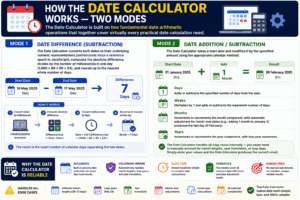
The Date Calculator is built on two fundamental date arithmetic operations that together cover virtually every practical date calculation need.
Mode 1: Date Difference (Subtraction) The Date Calculator converts both dates to their underlying numeric representations (milliseconds since a reference epoch in JavaScript), computes the absolute difference, divides by the number of milliseconds in one day (1,000 × 60 × 60 × 24), and rounds up to the nearest whole number of days. The result is the exact number of calendar days separating the two dates.
Mode 2: Date Addition/Subtraction The Date Calculator takes a start date and modifies it by the specified amount using the appropriate calendar method:
- Days: adds or subtracts the specified number of days from the date
- Weeks: multiplies by 7 and adds or subtracts the equivalent number of days
- Months: increments or decrements the month component, with automatic adjustment for month-end dates (e.g., adding 1 month to January 31 produces the last day of February)
- Years: increments or decrements the year component, with leap year awareness
The Date Calculator handles all edge cases internally — you never need to manually account for month lengths, year transitions, or leap days. Simply enter your values and the Date Calculator produces the correct result.
Date Difference Mode — Calculating Days Between Two Dates
The Date Difference mode of the Date Calculator answers the question: “How many days are between Date A and Date B?” This is one of the most frequently needed date calculations across virtually every profession and personal context.
How to use Date Difference mode:
- Select the Start Date from the calendar picker
- Select the End Date from the calendar picker
- Click Calculate
- The Date Calculator displays the total number of days between the two dates
The Date Calculator computes the absolute difference — whether the end date is after or before the start date, the result is always a positive number of days. Order does not matter; the Date Calculator uses the absolute value of the difference.
What the Date Calculator accounts for in Date Difference mode:
- Variable month lengths — February’s 28 or 29 days, the different lengths of each month
- Leap years — February 29 is counted as a full day when it falls between the start and end dates
- Year crossings — spans that cross January 1 are handled correctly
- Multi-year spans — even spans of many years are computed exactly
Example calculations with the Date Calculator:
- January 1, 2024 → December 31, 2024: 366 days (2024 is a leap year)
- March 15, 2023 → March 15, 2025: 730 days
- June 1, 2025 → September 30, 2025: 121 days
- January 1, 2000 → January 1, 2025: 9,131 days
The Date Calculator displays both the total days and a confirmation message, making it easy to verify the result and communicate it to others.
Add / Subtract Mode — Finding a Future or Past Date
The Add / Subtract mode of the Date Calculator answers the question: “What date will it be in X days/weeks/months/years from Date A?” — or equivalently, “What date was it X units before Date A?”
This mode is essential for planning ahead — computing deadline dates, expiration dates, follow-up dates, contract end dates, and any other future or past date that is defined as a specific duration from a known reference date.
How to use Add / Subtract mode:
- Select the Start Date
- Choose Add (for future date) or Sub (for past date)
- Enter the Value (the number of units to add or subtract)
- Select the Unit: Days, Weeks, Months, or Years
- Click Calculate
- The Date Calculator displays the resulting date in a clear, readable format (e.g., “Jan 15, 2026”)
Unit options in the Date Calculator:
Days — The most precise unit. Adding 90 days to May 1, 2025 gives July 30, 2025 — the Date Calculator counts through all months exactly.
Weeks — Converted to days internally (1 week = 7 days). Adding 12 weeks to a date gives a result exactly 84 days later.
Months — Adds or subtracts calendar months. The Date Calculator adjusts for month-end dates automatically: adding 1 month to January 31 gives February 28 (or 29 in a leap year), not an error.
Years — Adds or subtracts calendar years. The Date Calculator handles leap year edge cases: adding 1 year to February 29, 2024 gives February 28, 2025 (since 2025 has no February 29).
Understanding the Gregorian Calendar — Why Date Math Is Complex
The reason the Date Calculator is so valuable is that manual date arithmetic is genuinely difficult — the Gregorian calendar is irregular in ways that make mental calculation unreliable.
Month length irregularity The twelve months of the Gregorian calendar have four different lengths: 28, 29, 30, or 31 days. There is no simple pattern that makes manual calculation straightforward — you must know which months have which lengths to count correctly. The Date Calculator knows all of these automatically.
Leap years A year is a leap year (with 366 days, including February 29) if it is divisible by 4 — except for century years, which must be divisible by 400. So 2000 was a leap year, but 1900 was not. The Date Calculator applies this rule exactly for every date range, ensuring February 29 is correctly counted in relevant spans.
Variable number of days per year Most years have 365 days, but leap years have 366. A span that crosses February in a leap year has one more day than the same span in a non-leap year. The Date Calculator accounts for this automatically — manual calculation frequently misses this distinction.
Week structure Weeks are fixed at 7 days and do not align with month boundaries or year boundaries. The Date Calculator handles weeks by converting to days, then applying the result to the calendar — ensuring the day-of-week is preserved when adding or subtracting whole numbers of weeks.
Leap Years and the Date Calculator
Leap years are one of the most common sources of error in manual date calculation, and the Date Calculator handles them with complete accuracy.
The leap year rule:
- A year is a leap year if it is divisible by 4 (e.g., 2024, 2028)
- BUT century years (divisible by 100) are NOT leap years (e.g., 1900 was not a leap year)
- UNLESS the century year is also divisible by 400 (e.g., 2000 WAS a leap year)
How leap years affect the Date Calculator:
- Date Difference: If February 29 falls between the start and end dates, it is counted as a full day in the result
- Add/Subtract (Months/Years): When computing a result that would land on February 29 in a non-leap year, the Date Calculator automatically adjusts to February 28
Practical examples where leap years matter in the Date Calculator:
- February 1, 2024 → March 1, 2024: 29 days (2024 is a leap year — February has 29 days)
- February 1, 2023 → March 1, 2023: 28 days (2023 is not a leap year)
- Adding 4 years to February 29, 2024 → February 28, 2028 (since 2028 IS a leap year, it gives February 29, 2028)
- Adding 1 year to February 29, 2024 → February 28, 2025 (2025 is not a leap year)
These distinctions — automatically handled by the Date Calculator but easily missed in manual calculation — explain why digital date tools are so much more reliable than mental arithmetic for date spans.
How to Use the Date Calculator Step by Step
Using the Date Calculator is straightforward and immediate. Here is a complete guide for both modes.
For Date Difference:
- Click the Start date field and select the earlier date from the calendar picker
- Click the End date field and select the later date
- Press Calculate — the Date Calculator instantly displays the number of days
- Read the result: “X Days — Total duration is X days”
- Press Clear to reset both fields for a new calculation
For Add / Subtract:
- Click the Start Date field and select your reference date
- In the Op (operation) dropdown, select Add or Sub
- In the Val field, enter the number of units (e.g., 30)
- In the Unit dropdown, select Days, Weeks, Months, or Years
- Press Calculate — the Date Calculator displays the resulting date
- Read the result: the resulting date in a clear format (e.g., “Jul 30, 2025”)
- Press Clear to reset and start a new calculation
The Date Calculator displays results immediately — no page reload, no waiting. Both calculation modes produce their output in the result panel alongside the tool panel for easy reading.
Date Calculator in Project Management and Business
Project management is one of the most intensive applications of the Date Calculator, with every project involving timelines, milestones, dependencies, and deadlines that require accurate date arithmetic.
Sprint and iteration planning Agile teams use the Date Calculator to determine sprint end dates from start dates and sprint lengths (typically 2 weeks = 14 days). Adding 14 days to a sprint start date gives the exact end date — accounting for all month boundaries.
Milestone tracking Project managers use the Date Calculator to compute the number of days between current status and upcoming milestones, giving a real-time count of remaining time for planning and escalation decisions.
Contract and deliverable deadlines When a contract specifies “delivery within 45 business days of contract signing,” the Date Calculator’s Add mode (with Days) gives the exact calendar deadline — which the project manager then adjusts for weekends and holidays.
Project retrospective analysis After project completion, the Date Calculator computes the actual duration (start date to end date in days) versus the planned duration — essential data for improving future project estimates.
Vendor and supplier lead times Procurement teams use the Date Calculator to determine order placement dates by subtracting supplier lead times (in days or weeks) from the required delivery date — working backwards to find the latest order date.
Date Calculator in Legal and Contractual Contexts
Legal practice involves precise date calculations for deadlines, statutes of limitations, notice periods, and contract terms — contexts where the Date Calculator is not merely convenient but essential for compliance and risk management.
Statute of limitations Legal claims must be filed within a specified time after the triggering event. The Date Calculator computes the exact deadline — adding the statutory period (in months or years) to the event date — ensuring no claim is missed through manual miscalculation.
Notice periods Employment contracts, rental agreements, and commercial leases specify notice periods (e.g., “30 days written notice”). The Date Calculator computes the exact date on which the notice period expires from the notice submission date.
Contract term expiration Fixed-term contracts expiring “one year from signing” are tracked using the Date Calculator — adding 1 year (in Years mode) to the signing date gives the exact expiration date, even across leap years.
Court filing deadlines Civil procedure rules specify filing deadlines in days from events (e.g., “answer within 21 days of service”). The Date Calculator computes the exact filing deadline from the service date.
Regulatory compliance windows Regulatory bodies specify compliance deadlines in days from notification. The Date Calculator ensures that compliance timelines are computed accurately**, protecting organizations from penalties due to deadline miscalculation.
Date Calculator in Healthcare and Medicine
Healthcare providers use the Date Calculator for a wide range of clinical and administrative date computations where precision is medically critical.
Gestational age and due date calculation Obstetricians use the Date Calculator to compute estimated due dates — adding 280 days (40 weeks) to the last menstrual period date. The Date Calculator’s Add mode with Days or Weeks handles this instantly and accurately.
Medication duration tracking “Take for 14 days” — the Date Calculator computes the last day of a medication course from the start date, helping patients and providers track completion dates for antibiotics, steroids, and other time-sensitive prescriptions.
Follow-up appointment scheduling “Return in 6 weeks” — the Date Calculator adds 6 weeks to the appointment date, giving the exact follow-up date for scheduling and patient reminders.
Vaccine and booster schedules Vaccination schedules specify intervals in weeks or months between doses. The Date Calculator computes exact dates for each subsequent dose from the initial administration date.
Clinical trial enrollment windows Research coordinators use the Date Calculator to compute enrollment eligibility windows — a participant must be enrolled within X days of a qualifying event, and the Date Calculator confirms whether a specific date falls within that window.
Date Calculator in Education and Academic Planning
Students, teachers, and academic administrators use the Date Calculator for a wide range of scheduling and planning calculations.
Assignment deadline countdowns Students use the Date Calculator to count the exact number of days remaining until a submission deadline — giving a clear, accurate picture of available time for planning work schedules.
Semester and term planning Academic administrators use the Date Calculator to compute semester lengths (in days or weeks), schedule midterm and final exam periods, and plan academic calendars from start to end dates.
Study plan development Students preparing for major exams (GRE, GMAT, bar exam, board exams) use the Date Calculator to count days from today to the exam date and build structured daily study plans based on the exact number of available days.
Thesis and dissertation timelines Graduate students and advisors use the Date Calculator to plan research, writing, and revision milestones from proposal approval to submission deadline — calculating exact durations for each phase.
Grade and credit period tracking Academic registrars use the Date Calculator to compute add/drop deadlines, withdrawal dates, and incomplete grade resolution deadlines — all defined as specific numbers of days from semester start dates.
Date Calculator in Personal Finance and Banking
Financial products and services are precisely defined in terms of dates, and the Date Calculator is essential for managing these accurately.
Loan maturity dates A 5-year loan originating on April 1, 2025 matures on April 1, 2030 — computed by adding 5 years in the Date Calculator’s Add mode. For loans with day-count-based terms, the Days mode gives the exact maturity date.
Certificate of deposit (CD) maturity CDs maturing “in 18 months” — the Date Calculator adds 18 months to the issue date, giving the exact maturity date for the depositor and the bank.
Payment due date tracking Monthly payments due “30 days after statement date” — the Date Calculator adds 30 days to the statement date to find the exact payment due date, avoiding late fees.
Bond coupon dates Fixed income instruments pay coupons at precise intervals (semi-annually = every 6 months). The Date Calculator computes the full schedule of coupon dates from the issue date and first coupon date.
Tax filing deadlines Tax authorities specify filing deadlines that may depend on extension dates, fiscal year ends, or specific calendar events. The Date Calculator ensures accurate deadline computation for compliance.
Date Calculator in Travel and Event Planning
Travel and event planning involve intensive use of the Date Calculator for booking windows, trip lengths, visa validity, and event countdown tracking.
Trip duration calculation The Date Difference mode of the Date Calculator gives the exact number of days of a trip from departure to return date — essential for per-diem calculations, insurance coverage periods, and accommodation bookings.
Visa validity tracking Many visas specify maximum stay in days (e.g., 90 days within a 180-day period). The Date Calculator computes exactly when a stay began relative to entry dates and counts available remaining days within the validity window.
Event countdown The Date Calculator counts the exact number of days until a wedding, concert, conference, or other event — enabling precise countdown timers and planning timelines.
Booking lead times Hotels, airlines, and venues often offer early-bird pricing for bookings made a certain number of days in advance. The Date Calculator computes the exact date by which a booking must be made to qualify for a specific price tier.
Travel insurance validity Travel insurance policies cover trips up to a maximum number of days. The Date Calculator verifies whether a planned trip length falls within the coverage period.
Date Calculator in Human Resources and Employment
HR teams use the Date Calculator for a wide range of employment date calculations that must be accurate for legal, payroll, and employee relations purposes.
Probation period end dates New employees typically serve a probation period (e.g., 90 days). The Date Calculator computes the exact probation end date from the start date — when the employee becomes eligible for full benefits and permanent employment status.
Notice period expiration When an employee gives notice, the Date Calculator computes the last working day by adding the notice period (in days or weeks) to the resignation date.
Annual leave accrual tracking HR departments use the Date to compute how many days of annual leave have accrued from the employee’s start date to the current date — based on the accrual rate per day or month of service.
Contract renewal dates Fixed-term employment contracts that auto-renew unless terminated by a specified notice period require the Date Calculator to compute the last date by which termination notice must be given.
Redundancy and severance calculations Statutory redundancy pay is often calculated based on years of service. The Date computes the exact number of years (and months) of service from start date to termination date.

Common Use Cases for Add / Subtract Mode
The Add / Subtract mode of the Date Calculator is used in dozens of practical scenarios across every domain. Here are the most common:
| Use Case | Operation | Unit |
|---|---|---|
| Project deadline (30 working days) | Add 30 | Days |
| Lease expiry (2 years from signing) | Add 2 | Years |
| Follow-up appointment (6 weeks) | Add 6 | Weeks |
| Statute of limitations (3 years) | Add 3 | Years |
| Visa expiry (90 days from entry) | Add 90 | Days |
| Notice period expiry (1 month) | Add 1 | Months |
| Order placement (45-day lead time) | Subtract 45 | Days |
| Probation end (3 months) | Add 3 | Months |
| Estimated due date (40 weeks) | Add 40 | Weeks |
| Annual review (1 year from hire) | Add 1 | Years |
The Date Calculator handles all of these instantly — removing the mental effort and error risk of manual calendar counting.
Common Mistakes When Calculating Dates Manually
Manual date arithmetic is surprisingly error-prone. These are the most frequent mistakes that the Date Calculator eliminates:
- Forgetting leap years — Counting February as 28 days in a leap year (2024, 2028) when it has 29 days introduces a 1-day error in any span crossing February of that year. The Date Calculator never makes this mistake
- Miscounting month lengths — Treating all months as 30 days introduces errors of 1–2 days for months with 28, 29, or 31 days. The Date Calculator uses exact month lengths
- Off-by-one errors — The classic “inclusive vs exclusive” counting error: does “30 days from March 1” mean March 30 or March 31? The Date Calculator applies a consistent rule and displays the exact result
- Crossing year boundaries — Mentally counting from November to February of the next year frequently produces errors. The Date Calculator handles year crossings exactly
- Confusing calendar months with 30-day months — “Add 3 months to October 31” — is the result January 31 or January 30? The Date Calculator applies the correct calendar month addition, giving January 31
- Not accounting for varying year lengths — When adding years, some spans cross more or fewer leap days than others. The Date Calculator accounts for this exactly
Frequently Asked Questions (FAQs)
What is a Date Calculator? A Date Calculator is a digital tool that computes the exact number of days between two dates (Date Difference mode) or finds the resulting date after adding or subtracting a number of days, weeks, months, or years from a start date (Add/Subtract mode).
How does the Date Calculator count days between two dates? The Date converts both dates to milliseconds, computes the absolute difference, and divides by the number of milliseconds in one day — giving an exact day count that accounts for all month lengths, leap years, and year boundaries.
Does the Date Calculator account for leap years? Yes. The Date fully accounts for leap years — counting February 29 as a full day when it falls within a date range, and adjusting month and year additions that would otherwise land on non-existent dates (e.g., February 29 in a non-leap year becomes February 28).
Can the Date Calculator count backwards (past dates)? Yes. In Date Difference mode, simply enter an end date earlier than the start date — the Date Calculator uses the absolute difference, so the result is always a positive number of days. In Add/Subtract mode, select “Sub” (subtract) to compute a past date.
What is the difference between adding months and adding days? Adding 1 month moves the date forward by one calendar month (e.g., March 15 + 1 month = April 15), while adding 30 days moves exactly 30 calendar days forward (e.g., March 15 + 30 days = April 14). The Date Calculator handles both correctly based on your selected unit.
Can the Date Calculator handle dates from different centuries? Yes. The Date works with any dates within the supported JavaScript date range — from the distant past to the far future — making it suitable for historical date calculations and long-range planning alike.
Why does adding 1 month to January 31 give February 28 (or 29)? Because February never has 31 days. When the Date Calculator adds months and the resulting date does not exist (e.g., February 31), it automatically adjusts to the last valid day of that month — February 28 or 29 depending on the year.
How do I calculate how many days until an event? Use Date Difference mode in the Date Calculator: enter today’s date as the Start and the event date as the End. The result is the exact number of days remaining until the event.
Can the Date Calculator tell me what day of the week a result falls on? The current Date Calculator displays the result date in month-day-year format. To find the day of the week, note the displayed date and check a calendar — or use the Date Calculator result as an input to a day-of-week lookup tool.
Is the Date Calculator accurate for medical calculations like due dates? Yes. The Date Calculator’s Add mode with Weeks or Days is fully accurate for gestational calculations — for example, adding 40 weeks (or 280 days) to a last menstrual period date gives the standard estimated due date used in obstetrics.
Conclusion
The Date Calculator is one of the most universally applicable and practically valuable tools in everyday digital life — serving students, professionals, legal teams, healthcare providers, project managers, financial analysts, travelers, and anyone who works with dates, deadlines, and durations. Its two core modes — Date Difference and Add/Subtract — together cover virtually every date arithmetic need: counting days between events, finding future deadlines, computing past dates, and verifying date spans with complete calendar accuracy.
What makes the Date Calculator indispensable is not complexity but precision. The Gregorian calendar’s irregular month lengths, leap years, and year boundary effects make manual date arithmetic unreliable — even for people who work with calendars every day. The Date Calculator eliminates these errors entirely, applying exact calendar mathematics to every computation and delivering results that you can trust for legal documents, medical schedules, financial contracts, and project timelines.
The Add/Subtract mode expands the Date Calculator beyond simple counting into genuine date planning — finding the date that is 6 weeks from today, 18 months from a contract start, 90 days from a visa entry, or 3 years from an event — in any unit, in either direction (future or past), with all calendar complexities handled automatically.
Whether you are counting down to a major event, computing a contract expiry date, scheduling medical follow-ups, planning project milestones, or simply trying to figure out how many days of vacation you have left, the Date Calculator gives you the exact, reliable answer you need — in seconds, without mental arithmetic, and without the risk of the calendar errors that make manual date calculation so unreliable.
Bookmark this guide, use the Date Calculator for every date arithmetic task you encounter, and eliminate the uncertainty, guesswork, and calculation errors that come with trying to navigate the irregular, complex structure of the Gregorian calendar by hand.