Generate strong and secure passwords instantly with our fast and powerful Password Generator
Table of Contents- Introduction
- What is a Conversion Calculator?
- Why You Need a Conversion Calculator
- How the Conversion Calculator Works
- Supported Categories of Units
- Step-by-Step Guide to Using the Tool
- Length Conversions Explained
- Weight Conversions Explained
- Volume Conversions Explained
- Digital Storage Conversions Explained
- Real-Life Applications
- Benefits of an Online Conversion Calculator
- Common Mistakes to Avoid
- Tips for Accurate Conversions
- Design and User Experience
- Who Should Use This Tool
- FAQs
- Conclusion
Introduction
In a world driven by data, measurements, and global communication, the need for a reliable Conversion Calculator has never been greater. Whether you are a student solving a physics problem, a chef adjusting a recipe, a developer estimating file sizes, or a traveler converting miles to kilometers, accurate unit conversion is part of daily life. This guide walks you through everything you need to know about using a smart, fast, and easy-to-use Conversion Calculator built with a clean two-panel layout, intuitive dropdowns, and instant results.
A Conversion Calculator is a versatile online tool designed to quickly and accurately convert values between different units of measurement. It simplifies complex conversion processes by allowing users to change units of length, weight, volume, and digital storage without performing manual calculations. This makes it an essential tool for students, professionals, engineers, and everyday users who deal with different measurement systems.
The Conversion Calculator works by taking a numerical value from the user, identifying the source unit, and converting it into the desired target unit using predefined conversion formulas. Whether it is meters to kilometers, grams to kilograms, liters to milliliters, or bytes to gigabytes, the tool instantly provides precise results within seconds.
One of the key advantages of a Conversion Calculator is its accuracy and speed. Manual conversions can often lead to confusion or errors, especially when dealing with large numbers or multiple unit systems. The calculator eliminates this problem by automating the entire process and ensuring consistent and reliable results.
Another important benefit of the Conversion Calculator is its wide range of applications. It supports multiple categories such as length, weight, volume, and digital data, making it useful in education, science, engineering, cooking, and technology-related tasks. This flexibility allows users to handle different types of conversions in one place.
The tool is also highly user-friendly, designed with a simple interface that makes it easy for anyone to use, regardless of technical knowledge. Users only need to select units, enter values, and get instant results without needing to memorize formulas or conversion rates.
Overall, the Conversion Calculator is a fast, reliable, and efficient solution for handling unit conversions across various fields. It saves time, reduces errors, and improves productivity by providing accurate results instantly. Whether for academic work, professional use, or daily tasks, this tool is an essential resource for simplifying measurement conversions.
What is a Conversion Calculator?
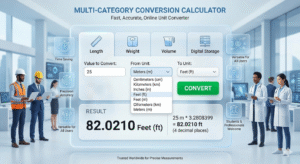
A Conversion Calculator is an online utility that transforms a value from one unit of measurement into another. Instead of memorizing complex formulas or carrying a printed conversion chart, you simply enter a number, select the From unit, choose the To unit, and click Convert. The tool instantly displays the result with proper symbols and up to four decimal places of precision.
This particular Conversion Calculator supports four major categories — Length, Weight, Volume, and Digital Storage — making it a true all-in-one converter for students, professionals, and casual users alike.
A Conversion Calculator is an online tool that helps users convert values from one unit of measurement to another quickly and accurately. It is designed to eliminate the need for manual calculations by automatically applying standard conversion formulas behind the scenes. This makes it easier for users to work with different measurement systems in a simple and efficient way.
The Conversion Calculator works by taking an input value, selecting a source unit, and converting it into a desired target unit using predefined conversion ratios. It can handle a wide range of categories such as length, weight, volume, and digital storage. For example, it can convert meters to kilometers, grams to kilograms, liters to milliliters, or bytes to gigabytes instantly.
One of the main purposes of a Conversion Calculator is to save time and improve accuracy. Manual conversions can often be confusing and prone to errors, especially when dealing with large numbers or multiple unit systems. This tool removes that difficulty by providing instant and precise results.
Another important feature of a Conversion Calculator is its versatility. It supports multiple types of conversions in a single platform, making it useful for students, engineers, scientists, teachers, and everyday users. Whether for academic work, professional tasks, or daily life calculations, it provides a convenient solution.
The tool is also designed with simplicity in mind, allowing users to easily select units, enter values, and get results within seconds. No advanced mathematical knowledge is required, making it accessible to everyone.
Overall, a Conversion Calculator is a fast, reliable, and user-friendly tool that simplifies the process of converting units across different measurement systems. It improves accuracy, saves time, and makes calculations easier for users in various fields.
Why You Need a Conversion Calculator
Manual conversions are slow and error-prone. A single misplaced decimal can ruin a recipe, miscalculate a shipment, or crash a budget. A trusted Conversion Calculator removes that risk by automating the math. Speed, accuracy, and convenience are the three pillars that make this tool indispensable in classrooms, offices, kitchens, warehouses, and data centers around the world.
How the Conversion Calculator Works
The engine behind this tool is elegantly simple. Every supported unit is mapped to a base unit — meters for length, kilograms for weight, liters for volume, and bits for digital storage. When you submit a value, the calculator first converts your input into the base unit, then divides by the target unit’s base factor.
The formula is:
Result = (Value × BaseFactor(From)) ÷ BaseFactor(To)
This two-step normalization ensures perfect consistency across all categories, no matter how many units you add in the future.
Supported Categories of Units
The tool currently supports four powerful categories, grouped neatly inside the dropdown using <optgroup> for clarity:
- Length: Meter, Kilometer, Centimeter, Millimeter, Inch, Foot, Mile
- Weight: Kilogram, Gram, Pound, Ounce
- Volume: Liter, Milliliter, Gallon
- Digital: Bit, Byte, Kilobyte, Megabyte, Gigabyte, Terabyte
This wide coverage means one tool replaces several specialized converters.
Step-by-Step Guide to Using the Tool
Using the Conversion Calculator takes only a few seconds:
- Enter the Value in the numeric input field at the top.
- Select the From unit from the grouped dropdown.
- Select the To unit from the second dropdown.
- Click Convert — the result appears instantly in the right-hand result panel.
- Press Clear to reset and start a new calculation.
The interface is built for minimum clicks and maximum clarity.
Length Conversions Explained
Length is the most commonly converted measurement. Whether you are measuring fabric, road distance, or screen size, this Conversion Calculator handles it. For example, 1 mile equals 1609.34 meters, 1 inch equals 2.54 centimeters, and 1 foot equals 30.48 centimeters. These constants are baked into the calculator’s base-factor table for instant accuracy.
Weight Conversions Explained
Weight conversions matter for cooking, shipping, fitness, and science. 1 pound equals 0.453592 kilograms, and 1 ounce equals 28.3495 grams. With one click, you can switch between metric and imperial without touching a calculator app.
Volume Conversions Explained
Volume is critical in cooking, chemistry, and fuel measurement. 1 gallon equals 3.78541 liters, and 1 liter equals 1000 milliliters. The tool keeps these constants tight so your recipes and lab work stay precise.
Digital Storage Conversions Explained
For developers, IT admins, and content creators, digital conversions are a daily need. This Conversion Calculator uses decimal (SI) base where 1 Byte = 8 bits, 1 KB = 1000 Bytes, 1 MB = 1000 KB, and so on up to Terabytes. Now you can quickly check whether your 4 GB video fits on a flash drive or how many bits a single byte holds.
Real-Life Applications
A Conversion Calculator is more than a classroom tool. Engineers use it to translate blueprint dimensions. Chefs scale recipes from cups to grams. Athletes convert pace from minutes per mile to minutes per kilometer. Travelers decode foreign road signs. Developers estimate bandwidth, file size, and storage limits. The use cases are endless.
Benefits of an Online Conversion Calculator- 100% Free — no signup, no subscription, no hidden cost.
- Instant Results — calculations happen client-side with no waiting.
- Privacy Friendly — no data is sent to a server.
- Mobile Ready — the flex layout adapts beautifully to small screens.
- Visually Clean — amber accent, white panels, and monospace results make output easy to read.
- Accurate — based on internationally accepted conversion constants.
Common Mistakes to Avoid
Even with a reliable tool, users sometimes make avoidable errors:
- Mixing categories — trying to convert kilograms to liters makes no physical sense.
- Ignoring symbols — always double-check whether you meant MB (megabyte) or mb (millibar).
- Rounding too early — the tool already rounds to four decimals, so trust it.
- Confusing binary vs decimal for digital units — this calculator uses decimal multipliers.
Avoiding these traps keeps your results trustworthy.
Tips for Accurate Conversions
To get the most out of the Conversion Calculator, follow these best practices. Always verify the source unit before clicking convert. Re-read the result panel for the symbol, not just the number. Use the Clear button between calculations to avoid mixing inputs. Bookmark the tool so you can reach it in one tap whenever a measurement question pops up.
Design and User Experience
The interface is built around a two-panel flex layout. On the left sits the tool panel with all inputs, dropdowns, and buttons. On the right sits the result panel featuring an amber underline header and a bold monospace result. The page uses a soft slate background, white cards, and a clear amber accent bar on the title — a calm, professional aesthetic that works on desktops and phones alike.
Tiny uppercase labels (9px, weight 800) guide the eye without crowding the form, and rounded inputs feel modern and tactile.
Who Should Use This Tool
Anyone who measures something can benefit from a Conversion Calculator:
- Students working on math, physics, or chemistry homework
- Teachers preparing classroom examples
- Engineers and architects translating units across systems
- Cooks and bakers scaling recipes
- Developers and IT staff estimating bandwidth and storage
- Travelers decoding foreign measurements
- Online shoppers checking product specs in unfamiliar units
FAQs
Q1: Is the Conversion Calculator free to use? Yes — completely free, with no signup required.
Q2: Does it store my data? No. Every calculation runs in your browser and nothing is uploaded.
Q3: Can I convert across categories like meters to liters? No, because the units measure different physical quantities. Stay within one category for valid results.
Q4: Are digital units calculated in decimal or binary? This tool uses decimal (SI) — 1 KB equals 1000 Bytes.
Q5: Will it work on my phone? Yes. The layout is mobile-responsive and works on any modern browser.
Q6: How accurate is it? Results use internationally accepted constants and display up to four decimal places.
Q7: Can I add more units later? Absolutely. Just extend the base-factor object in the script with new entries.
Q8: Does it require internet after loading? No, the math runs offline once the page is open.
Q9: Can teachers use it in the classroom? Yes, it’s a perfect live demonstration tool for unit-conversion lessons.
Q10: Why use this over a search engine? It’s faster, distraction-free, and supports back-to-back conversions without retyping.
Conclusion
The Conversion Calculator is a small but mighty companion for anyone who deals with numbers and units. With a clean amber-accented interface, four powerful categories, and instant in-browser math, it removes the friction of manual conversion and replaces it with speed, precision, and clarity. Whether you’re sizing a digital file, measuring a room, weighing produce, or pouring a perfect recipe, this Conversion Calculator is the one-click answer to your everyday measurement questions. Bookmark it, share it, and let accurate conversions become the easiest part of your day.
The Conversion Calculator is a highly useful and practical tool that simplifies the process of converting values between different units of measurement. In everyday life, people frequently encounter situations where they need to switch between units such as meters to kilometers, grams to kilograms, liters to milliliters, or bytes to gigabytes. Doing these conversions manually can be time-consuming and often leads to mistakes, especially when dealing with large numbers or multiple unit systems.
One of the biggest advantages of the Conversion Calculator is its speed and accuracy. Instead of remembering complex formulas or conversion values, users can simply enter a number, select the required units, and instantly receive accurate results. This automation not only saves time but also ensures consistency and reliability in every calculation. It eliminates human error and provides precise outputs within seconds.
Another major benefit of the Conversion Calculator is its wide usability across different fields. It is not limited to one specific area but can be used in education, science, engineering, cooking, travel, and digital technology. Students use it to solve academic problems, engineers rely on it for technical measurements, and everyday users depend on it for quick conversions in daily tasks. This makes it a universal tool that fits almost every situation where measurement conversion is required.
The tool also enhances learning and understanding of measurement systems. By allowing users to experiment with different units and instantly see the results, it helps build a stronger understanding of how different systems relate to each other. This is especially helpful for students who are learning about metric and imperial systems in mathematics and science.
The Conversion Calculator is also designed to be user-friendly and accessible. Its simple interface ensures that anyone, regardless of technical knowledge, can use it easily. Users do not need to memorize formulas or perform complex calculations. Everything is automated, making the process smooth and stress-free.
In addition, the tool supports multiple categories such as length, weight, volume, and digital storage, making it highly flexible and practical. This multi-category support allows users to handle different types of conversions in one place, without switching between different tools or applications.
Overall, the Conversion Calculator is an essential digital utility that brings convenience, accuracy, and efficiency together in one platform. It saves valuable time, reduces calculation errors, and improves productivity in both academic and professional environments. Whether used by students, teachers, engineers, or general users, it provides a reliable solution for everyday conversion needs.
In conclusion, the Conversion Calculator is more than just a simple tool—it is a smart assistant that simplifies complex measurement tasks and makes everyday calculations faster, easier, and more accurate. By combining ease of use with powerful functionality, it plays an important role in modern digital problem-solving and continues to be an essential resource for users across all fields.