Calculate IP subject marks instantly with our fast and accurate IP Subject Calculator
Table of Contents- Introduction
- What Is a Password Generator?
- Why You Need a Strong Password Today
- How a Password Generator Works
- Key Features of a Good Password Generator
- Benefits of Using a Password Generator
- Common Password Mistakes to Avoid
- How to Use Our Password Generator Step-by-Step
- Password Strength Levels Explained
- Tips to Create Unbreakable Passwords
- Password Generator vs Password Manager
- Who Should Use a Password Generator?
- Security Standards Behind Random Passwords
- FAQs
- Conclusion
Introduction
The internet has changed the way we live, work, shop, learn, and communicate. But with every new account you create — whether it is for Gmail, Facebook, Instagram, Amazon, Netflix, or your online banking — you are also creating a new doorway that hackers can try to break into. According to recent cybersecurity reports, over 80% of data breaches happen because of weak or stolen passwords.
This is where the importance of a Password Generator becomes crystal clear. Instead of inventing passwords yourself (which humans are terrible at, by the way), you let a secure algorithm generate one for you. The result is a password that is random, long, unique, and resistant to attacks.
This article will walk you through every detail you need to understand, choose, and use the best Password Generator available — including the one built right into this page.
In a world where cybercrime happens every 39 seconds, your first and most important line of defense is a strong password. Yet most people still rely on weak, reused, or guessable credentials like “123456”, “qwerty”, or their pet’s name followed by a birth year. This is exactly why a Password Generator has become one of the most essential digital tools for every internet user, business, developer, student, and even casual social media browser.
A Password Generator is a smart, automated tool that creates random, complex, and highly secure passwords in a single click — passwords that are nearly impossible for hackers, bots, or brute-force algorithms to crack. Whether you are protecting your email, banking, social media, gaming, crypto wallet, or business accounts, using a reliable Password Generator can save you from financial loss, identity theft, and emotional stress.
In this complete guide, you will learn everything you need to know about password generators — how they work, why they matter, how to use one effectively, and the best practices for online security.
What Is a Password Generator?
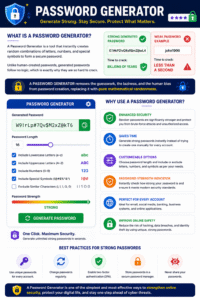
A Password Generator is a software tool — usually available as a website, browser extension, or mobile app — that automatically creates random combinations of letters, numbers, and special symbols to form a secure password.
Unlike human-created passwords, which tend to follow predictable patterns, a generated password follows no logic, which is exactly why it is so hard to crack. A typical strong generated password might look like:
G7#kP2!vQ9xR$mZ@wL4
Compare that to something like “john1990” and you can immediately see the difference. The first one would take billions of years to crack with modern computers, while the second one could be guessed in less than a second.
A Password Generator removes the guesswork, the laziness, and the human bias from password creation, replacing it with pure mathematical randomness.
A Password Generator is a powerful online tool designed to create strong, random, and highly secure passwords instantly. In today’s digital world, where cyber threats and data breaches are becoming increasingly common, using a secure password is essential for protecting personal accounts, business data, and sensitive information. A reliable Password Generator eliminates the need to create passwords manually and helps users generate complex combinations that are much harder for hackers to guess.
This Password Generator allows you to customize your password according to your specific security requirements. You can choose the desired password length, include lowercase letters, uppercase letters, numbers, and special symbols, or exclude confusing characters that may be difficult to read. These advanced options make it easier to create passwords that are both secure and user-friendly.
One of the biggest advantages of using a Password Generator is enhanced security. Randomly generated passwords are significantly stronger than common passwords based on names, birthdays, or simple words. Since they are created using unpredictable character combinations, they provide a much higher level of protection against brute-force attacks and unauthorized access attempts.
This Password Generator also includes a built-in password strength indicator, allowing users to instantly evaluate whether a generated password is easy, medium, or strong. This feature helps ensure that the password meets modern security standards before it is used.
Whether you are creating credentials for email accounts, social media platforms, banking services, business systems, or online applications, a Password Generator can save time while improving security. Instead of struggling to invent a unique password for every account, users can generate highly secure passwords within seconds.
Using a Password Generator is one of the simplest and most effective ways to strengthen online security, reduce the risk of hacking, and protect valuable digital information.
Why You Need a Strong Password Today
Cyberattacks are no longer rare events. They happen every single day, targeting individuals, small businesses, and even multinational corporations. Here’s why you need a strong password right now:
- Hackers use automated bots that test millions of password combinations per second.
- Phishing attacks often succeed because users reuse the same password across multiple sites.
- Data breaches expose billions of credentials on the dark web every year.
- Weak passwords are the #1 cause of personal account hijacking.
- Identity theft and financial fraud often start with one compromised account.
A strong, randomly generated password acts like a digital steel vault around your most sensitive information.
How a Password Generator Works
You might wonder — how does a tool actually create a “random” password? Behind the scenes, a Password Generator uses something called a cryptographically secure pseudo-random number generator (CSPRNG). Here is a simplified breakdown:
- You select your preferences — length, character types, exclusions.
- The tool builds a character pool based on your choices.
- A random algorithm picks characters one by one from that pool.
- The final string is displayed as your new password.
- Strength is calculated based on length and complexity.
The more options you enable — uppercase letters, lowercase letters, numbers, and symbols — the larger the pool becomes, and the stronger your password gets.
Key Features of a Good Password Generator
Not all generators are created equal. A truly powerful Password Generator should offer the following features:
- Adjustable password length (typically 4 to 64 characters)
- Toggle for lowercase letters (a–z)
- Toggle for uppercase letters (A–Z)
- Toggle for numbers (0–9)
- Toggle for symbols (@, #, $, %, &, etc.)
- Option to exclude ambiguous characters like
i, l, 1, L, |, o, O, 0 - Option to exclude brackets like
<>, (), [], {} - No repeated characters option for maximum uniqueness
- Instant strength indicator (Easy / Medium / Strong)
- One-click copy to clipboard
- Works fully offline — your password never leaves your device
The tool on this page includes all of these features, making it one of the most flexible and user-friendly options online.
Benefits of Using a Password Generator
Using a Password Generator is not just convenient — it is one of the smartest digital habits you can adopt. The benefits include:
- Saves time — no more brainstorming weird character combinations.
- Eliminates predictability — no birthdays, pet names, or favorite teams.
- Boosts account security instantly across every platform.
- Reduces the risk of brute-force attacks.
- Protects against dictionary attacks that target common words.
- Encourages unique passwords for every site — a critical security rule.
- Helps you comply with strict workplace and banking security policies.
- Gives peace of mind knowing your data is locked behind real protection.
In short, using a generator transforms your online security from fragile to fortress-level.
Common Password Mistakes to Avoid
Even smart people make terrible password choices. Here are the most common mistakes you should stop making today:
- Using personal information like name, DOB, or phone number.
- Reusing the same password across multiple websites.
- Choosing short passwords under 8 characters.
- Replacing letters with numbers in obvious ways (e.g., “P@ssw0rd”).
- Writing passwords on sticky notes stuck to your monitor.
- Sharing passwords via email or chat without encryption.
- Never updating passwords, even after a known data breach.
- Storing passwords in plain text files on your desktop.
A good generator + a good password manager = bulletproof digital identity.
How to Use Our Password Generator Step-by-Step
Using the tool on this page is incredibly simple. Follow these easy steps:
- Step 1: Choose your desired password length using the slider or input box. We recommend at least 16 characters for serious security.
- Step 2: Enable the character types you want — lowercase, uppercase, numbers, and symbols.
- Step 3: (Optional) Turn on Exclude Ambiguous Characters to avoid confusion between
1andl, or0andO. - Step 4: (Optional) Turn on Exclude Brackets if the site you’re using doesn’t allow them.
- Step 5: (Optional) Enable No Repeated Characters for maximum uniqueness.
- Step 6: Click the big Generate button.
- Step 7: Your new password appears instantly along with a strength rating.
- Step 8: Copy it, save it in your password manager, and use it confidently.
It really is that fast and that simple.
Password Strength Levels Explained
Our tool rates every generated password into one of three categories:
- EASY (Red): Short passwords or those using only one or two character types. These can be cracked in seconds to minutes. Avoid using them for important accounts.
- MEDIUM (Orange): Decent passwords with reasonable length and at least two or three character types. Good for low-risk accounts like newsletters or forums, but not ideal for banking.
- STRONG (Green): Long passwords (16+ characters) with all four character types enabled. These would take trillions of years to crack with current technology. Use these for email, banking, crypto, and work accounts.
Always aim for STRONG whenever possible.
Tips to Create Unbreakable Passwords
Even when using a generator, follow these golden rules:
- Go long. Length beats complexity every time. A 20-character password is exponentially stronger than a 10-character one.
- Mix all four character types whenever the site allows.
- Never reuse a generated password across two different accounts.
- Change critical passwords every 6–12 months.
- Enable two-factor authentication (2FA) wherever possible.
- Use a password manager like Bitwarden, 1Password, or KeePass to store them safely.
- Avoid public Wi-Fi when logging into important accounts.
- Beware of phishing emails that try to steal even the strongest passwords.
Combine these habits with our tool and your security level will skyrocket.
Password Generator vs Password Manager
People often confuse these two tools, but they serve different purposes:
- A Password Generator creates strong, random passwords.
- A password manager stores and auto-fills those passwords for you.
The truth is — you need both. The generator gives you uncrackable passwords, and the manager makes sure you never have to remember any of them. Most modern password managers actually include a built-in generator, but standalone web tools like ours offer more flexibility, transparency, and control.
Who Should Use a Password Generator?
The honest answer is: everyone. But here are some groups who especially benefit:
- Students managing dozens of school and study platforms.
- Freelancers and remote workers juggling multiple client accounts.
- Developers who need API keys, database credentials, and admin logins.
- Business owners protecting customer data and financial systems.
- Gamers safeguarding accounts loaded with valuable in-game items.
- Parents setting up secure logins for kids’ devices and apps.
- Crypto investors whose wallet keys must be uncompromisingly secure.
- Anyone who shops, banks, or socializes online — which is basically all of us.
If you have an internet connection, you need a generator.
Security Standards Behind Random Passwords
The strength of any password depends on something called entropy — a mathematical measure of unpredictability. The higher the entropy, the harder the password is to crack. Here is a quick comparison:
- 8-character lowercase password: ~38 bits of entropy → crackable in minutes.
- 12-character mixed password: ~72 bits of entropy → crackable in centuries.
- 20-character mixed password with symbols: ~130 bits of entropy → crackable in trillions of years.
Modern security standards from NIST, OWASP, and ISO 27001 all recommend passwords with at least 12–16 characters of high entropy, which is exactly what our tool delivers.
The randomness generated by our tool uses your browser’s built-in secure random functions, meaning no two passwords will ever be the same, and nothing is sent over the internet — everything happens locally in your browser for maximum privacy.
FAQs
Q1. Is this Password Generator free to use?
Yes, 100% free forever. There are no hidden fees, no sign-ups, no subscriptions, and no data collection. Generate as many passwords as you want.
Q2. Is it safe to use an online generator?
Absolutely. Our tool runs entirely in your browser. No password is ever sent to a server, stored, logged, or shared. The moment you close the page, the password is gone from our side.
Q3. What is the ideal password length?
For most accounts, 16 characters is excellent. For high-value accounts like banking or crypto, aim for 20 or more characters with all symbol types enabled.
Q4. Should I use the same password for multiple sites?
Never. If one site gets hacked, attackers will try that same password on every other major service — a method called credential stuffing. Always use a unique password per account.
Q5. What if a website doesn’t accept symbols or long passwords?
Use our Exclude Brackets option or reduce the length slightly. Even a strong 12-character alphanumeric password is far better than something weak and memorable.
Q6. How often should I change my passwords?
Change critical passwords every 6 to 12 months, and immediately after any reported data breach involving a service you use.
Q7. Can hackers crack a randomly generated password?
Practically, no. A 16+ character password with mixed types would take modern supercomputers longer than the age of the universe to brute-force.
Q8. Should I write down my generated passwords?
Never on paper or in plain text files. Instead, store them in a trusted password manager with master-password encryption and 2FA enabled.
Q9. Does enabling “No Repeated Characters” make the password stronger?
Slightly, in terms of uniqueness, but the biggest strength booster is still length and character variety. Use it when allowed.
Q10. Can I use this tool on mobile?
Yes! The tool is fully responsive and mobile-friendly, working perfectly on phones, tablets, laptops, and desktops.
Conclusion
In 2026, your digital identity is just as valuable as your physical one — maybe even more so. From your private messages and family photos to your bank balance and crypto holdings, almost everything important about you lives behind a password. Settling for weak, reused, or easy-to-guess credentials is like leaving the front door of your house wide open in a crowded city.
By using a reliable, fast, and privacy-focused tool like the one on this page, you take complete control of your online security. You eliminate the human weakness of predictable patterns and replace it with pure cryptographic randomness. You stop worrying about hackers, leaks, and breaches because you finally have passwords that actually work.
So go ahead — scroll up, adjust your settings, hit Generate, and create a password that is truly worthy of protecting your digital life. Your future self, your bank account, and your peace of mind will thank you.
Stay safe. Stay strong. Stay random.