Commission Calculator
Plan smarter finances using our fast and accurate Present Value Calculator
Table of Contents
- Introduction
- What Is Commission and Why Does It Matter?
- What Is a Commission Calculator?
- Types of Commission Structures
- The Commission Formula Explained
- How to Use a Commission Calculator Step by Step
- Simple Percentage Commission — How It Works
- Tiered Commission Calculator — Advanced Breakdown
- Real Estate Commission Calculator
- Benefits of Using a Commission Calculator
- Commission Calculator for Managers and Teams
- Common Mistakes in Commission Calculation
- Who Should Use a Commission Calculator?
- Designing the Perfect Commission Plan
- Sales Commission Formula
- Real Estate Commission Example
- Frequently Asked Questions
- Conclusion
Introduction
Sales commission is one of the most powerful motivators in any business — it rewards performance, drives revenue, and creates a direct link between effort and income. But calculating it correctly, consistently, and fairly is a challenge that trips up businesses and sales professionals every single day. That is exactly why a Commission Calculator has become an essential tool in the modern workplace.
Whether you are a sales manager setting up a compensation plan, a real estate agent figuring out your take-home pay, or a freelancer negotiating your earnings, a Commission Calculator gives you the power to compute accurate numbers instantly — without spreadsheets, manual formulas, or costly mistakes.
In this comprehensive guide, you will learn everything about commission calculation — from the basic formulas to tiered structures, real estate applications, and advanced compensation models. We will show you step-by-step how to use our tool to calculate any type of commission scenario, avoid common errors, and design a commission plan that motivates your team and grows your business.
By the end, you will understand why a well-built Commission Calculator is not just a convenience — it is a competitive advantage.
What Is Commission and Why Does It Matter?
Commission is a form of variable compensation paid to an individual based on their sales performance. Unlike a fixed salary, commission directly ties income to output — the more you sell, the more you earn. This makes it one of the most effective incentive structures in business.
Commission matters for several key reasons:
- Motivates salespeople to go beyond their targets and consistently improve performance
- Aligns business and employee goals — when the company earns more, so does the team
- Reduces fixed overhead — businesses pay more only when they earn more
- Attracts top talent — high performers prefer commission-based roles for their unlimited earning potential
- Drives accountability — each team member has a measurable, trackable contribution
However, commission also introduces complexity. Different industries use different structures — flat rate, tiered, graduated, split, and residual commissions all require different calculations. Getting these numbers wrong causes trust issues, financial disputes, and high employee turnover. That is precisely where a reliable calculation tool makes all the difference.

What Is a Commission Calculator?
A Commission Calculator is a digital tool designed to instantly and accurately compute commission earnings based on your inputs — sales amount, commission rate, base salary, fixed payouts, and more. Instead of manually working through formulas or building error-prone spreadsheets, you enter your figures and get precise results in seconds.
Our tool is built for a wide range of users and scenarios. It handles:
- Simple flat-rate commissions — a fixed percentage of total sales
- Tiered commission structures — different rates applied at different sales levels
- Base salary plus commission — hybrid compensation models
- Fixed payout modes — set dollar amounts regardless of percentage
A great tool does not just give you a number — it shows you a full breakdown of how that number was reached, making it easy to verify, explain, and communicate commission payouts to your team.
Types of Commission Structures
Before choosing a commission model, it helps to understand the most common structures in use today:
Flat-Rate Commission (Straight Commission)
The simplest model. The salesperson earns a fixed percentage of every sale, with no base salary. For example, a 5% commission on a $100,000 sale = $5,000.
Best for: High-volume sales environments, real estate, insurance
Base Salary Plus Commission
The salesperson receives a guaranteed base salary plus commission on top of their sales. This provides income security while still rewarding performance.
Best for: B2B sales teams, corporate environments, new sales reps
Tiered Commission
Different commission rates apply at different levels of sales volume. For example:
- 3% on the first $100,000
- 5% on sales from $100,001 to $300,000
- 7% on sales above $300,000
Best for: Motivating high performers, scaling compensation with results
Split Commission
Multiple salespeople or departments share the commission from a single deal. Common in team-based or account management roles.
Best for: Enterprise sales, partnerships, multi-department accounts
Residual Commission
The salesperson continues earning commission on ongoing revenue from a client they originally brought in. Common in subscription-based businesses.
Best for: SaaS companies, insurance, financial services
Each of these structures requires a different calculation approach, and our Commission Calculator is equipped to handle them all.
The Commission Formula Explained
Understanding the math behind commission calculations helps you verify your results and explain them confidently to your team.
Basic Commission Formula:
Commission = Sales Amount × Commission Rate
Example:
- Sales Amount: $200,000
- Commission Rate: 3%
- Commission = $200,000 × 0.03 = $6,000
With Base Salary:
Total Earnings = Base Salary + Commission
Example:
- Base Salary: $2,000/month
- Commission: $6,000
- Total Earnings = $8,000
Tiered Commission Formula:
Each tier is calculated separately, then added together.
Example — $450,000 total sales:
- Tier 1: First $100,000 at 3% = $3,000
- Tier 2: $100,001 to $300,000 at 5% = $10,000
- Tier 3: $300,001 to $450,000 at 7% = $10,500
- Total Commission = $23,500
Our tool performs all of these computations automatically — including multi-tier breakdowns — so you never have to do the math by hand.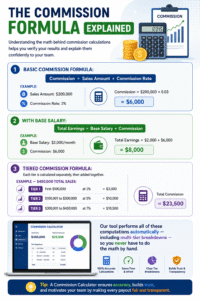
How to Use a Commission Calculator Step by Step
Using our tool is fast and intuitive. Here is a detailed walkthrough:
For Simple Commission:
Step 1: Enter the Sales Price Input the total value of the sale — this is the amount the commission will be calculated on.
Step 2: Enter the Commission Rate Type in your commission percentage. For example, enter “3” for a 3% commission rate.
Step 3: Enter Base Salary / Bonus (Optional) If your compensation includes a fixed base salary or bonus, enter it here. Leave it at zero for straight commission calculations.
Step 4: Enter Fixed Payout (Optional) If you are paid a flat dollar amount per sale instead of a percentage, enter it in the Fixed Payout Mode field. This overrides the rate-based calculation.
Step 5: Click Calculate The tool instantly shows:
- Your commission amount
- Base salary (if entered)
- Total compensation earned
- A full line-by-line breakdown
Step 6: Adjust and Compare Try different rates or sales amounts to model different scenarios — for example, “What would I earn at 4% vs. 3%?” or “How does a higher sales target affect my paycheck?”
Simple Percentage Commission — How It Works
The simple percentage commission is the most widely used commission model across industries. It is straightforward, easy to understand, and simple to communicate to your sales team.
How it works:
You agree on a fixed commission percentage upfront. Every sale earns that percentage of the sale value. There is no minimum threshold and no cap (unless otherwise agreed). Every dollar of revenue you generate translates directly into income.
Industry benchmarks for commission rates:
| Industry | Typical Commission Rate |
|---|---|
| Real Estate | 2.5% – 6% |
| Insurance | 5% – 10% |
| Retail Sales | 1% – 5% |
| Software / SaaS | 8% – 12% |
| Mortgage Brokers | 0.5% – 2.75% |
| Automotive Sales | 20% – 25% of gross profit |
Pro tip: Use our tool to quickly check where your rate stacks up against industry standards and what your earnings would look like at different benchmarks.
Tiered Commission Calculator — Advanced Breakdown
The tiered commission model is the most motivating structure for high-performing salespeople — and also the most complex to calculate manually. Our Commission Calculator handles this automatically with up to 10 customizable tiers.
How Tiered Commission Works:
Each tier defines:
- A sales volume range (e.g., $0 – $100,000)
- A commission rate for that range (e.g., 3%)
As the salesperson’s total sales volume increases, they “unlock” higher-rate tiers — but only the sales within each tier earn that tier’s rate.
Why Tiered Commission Is Powerful:
- Motivates consistent overperformance — every additional sale pushes them into a higher earning bracket
- Rewards top performers disproportionately — the best salespeople earn significantly more
- Scales with business growth — as revenue grows, so does compensation
- Reduces plateau risk — salespeople always have a reason to push harder
Example Using Our Tool:
Enter total sales volume of $450,000 with these tiers:
- Tier 1: $0 – $100,000 at 3%
- Tier 2: $100,001 – $300,000 at 5%
- Tier 3: $300,001+ at 7%
Result: $3,000 + $10,000 + $10,500 = $23,500 total commission
Without a Commission Calculator, computing this manually across 10 tiers for an entire sales team would take hours and introduce significant room for error.
Real Estate Commission Calculator
Real estate is one of the most common industries where commission calculations matter enormously. Every transaction involves large dollar amounts, and even a small error in commission percentage can result in thousands of dollars of overpayment or underpayment.
How Real Estate Commission Works:
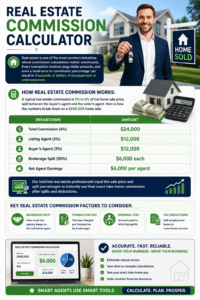
A typical real estate commission is 5% to 6% of the home sale price, split between the buyer’s agent and the seller’s agent. Here is how the numbers break down on a $400,000 home sale:
| Breakdown | Amount |
|---|---|
| Total Commission (6%) | $24,000 |
| Listing Agent (3%) | $12,000 |
| Buyer’s Agent (3%) | $12,000 |
| Brokerage Split (50%) | $6,000 each |
| Net Agent Earnings | $6,000 per agent |
Our tool lets real estate professionals input the sale price and split percentages to instantly see their exact take-home commission after splits and deductions.
Key real estate commission factors to consider:
- Brokerage split — how much the agency keeps vs. the individual agent
- Transaction fees — flat fees charged per transaction by brokerages
- Referral fees — amounts paid to referring agents
- Tax deductions — self-employment taxes on commission income

Benefits of Using a Commission Calculator
Here is why professionals and businesses rely on this tool every day:
1. Instant Accuracy No more manual calculations or spreadsheet errors. Enter your numbers and get the correct result every time.
2. Full Transparency Every calculation includes a detailed line-by-line breakdown, making it easy to explain payouts to employees, clients, or managers.
3. Scenario Modeling Test multiple commission structures side by side — “What if we raised the rate by 1%?” or “What if the deal size doubles?” — before making any decisions.
4. Time Savings Processing commissions for an entire sales team can take hours without a proper tool. Our tool cuts that to minutes.
5. Dispute Resolution When salespeople question their payout, a transparent calculation breakdown eliminates confusion and resolves disputes fairly and quickly.
6. Free and Accessible Our tool is available online for free — no registration, no download, no cost.
Commission Calculator for Managers and Teams
For sales managers and business owners, this tool is not just about individual earnings — it is a strategic planning tool for the entire compensation system.
How managers use it:
- Compensation planning — model different commission structures to find the optimal incentive plan before rolling it out
- Quota setting — calculate what sales volumes are needed to make commission plans financially sustainable for the business
- Forecasting payroll — estimate total commission expenses at different revenue scenarios
- Performance reviews — show each salesperson exactly how their commission was calculated, building trust and transparency
- Benchmarking — compare your commission rates against industry standards to remain competitive in attracting talent
A well-designed commission plan — backed by accurate calculation tools — is one of the most effective levers a manager has for driving sales performance.
Common Mistakes in Commission Calculation
Even experienced professionals make errors when calculating commissions manually. Here are the most critical mistakes to watch out for:
Mistake 1: Using Gross Revenue Instead of Net Revenue Always clarify whether commission is based on the total sale price or the profit margin. Using the wrong base can result in significant overpayment.
Mistake 2: Forgetting to Account for Returns and Refunds If a client returns a product, does the commission get clawed back? Define this policy upfront and factor it into your calculations.
Mistake 3: Ignoring Split Agreements In team-based sales environments, commission splits between multiple reps must be clearly defined and consistently applied.
Mistake 4: Missing Tier Boundaries In tiered models, applying the top-tier rate to the entire sales volume (instead of only the portion within that tier) is a common and costly error.
Mistake 5: Not Accounting for Tax Commission income is taxable. Salespeople should factor in their tax rate to understand their true net income. Always plan for both gross and after-tax earnings.
Mistake 6: Inconsistent Application Across the Team If different managers calculate commissions differently for different team members, it leads to inconsistency, resentment, and legal risk.
Who Should Use a Commission Calculator?
This tool is valuable across a wide range of roles and industries:
- Sales professionals — real estate agents, insurance brokers, car dealers, SaaS reps
- Freelancers and consultants — calculating referral fees or performance bonuses
- Business owners — designing, modeling, and reviewing compensation plans
- Sales managers — processing team payroll and resolving commission disputes
- HR departments — ensuring compliance with agreed compensation structures
- Finance teams — forecasting commission expenses in quarterly budgets
- Recruiters — communicating earning potential to candidates with clear, accurate examples
- Students and career changers — evaluating commission-based job offers
No matter your role, if commission income is part of your financial picture, this tool belongs in your daily toolkit.
Designing the Perfect Commission Plan
A great commission plan does more than pay people — it shapes behavior, drives culture, and determines the ceiling of your business growth. Here are the principles of designing a commission structure that works:
Keep It Simple
Salespeople should be able to calculate their own commission in their head. If the structure is too complex, it loses its motivational power. Use our tool to test whether your plan is intuitive enough for your team to follow.
Set Realistic but Ambitious Targets
Commission thresholds should be achievable by top performers, stretching for mid-performers, and clearly out of reach for underperformers. This creates natural performance stratification.
Align Commission with Business Priorities
Pay higher commission rates on products or services with higher margins — or those you most want to push this quarter. Commission rates are one of the most powerful tools to direct sales effort.
Cap vs. Uncapped Commission
- Uncapped commission motivates top performers to keep going — the sky is the limit
- Capped commission protects business margins but can demotivate high achievers
Most high-growth companies prefer uncapped structures for top performers.
Review and Update Regularly
Commission plans should be revisited at least annually. Use your tool to model what next year’s plan would pay out under different revenue scenarios before finalizing it.
Sales Commission Formula
For a simple commission calculation, multiply the total sales by the commission rate divided by 100.
- Enter the total sales amount.
- Convert the commission rate into a decimal by dividing it by 100.
- Multiply total sales by that decimal rate to find the commission payout.
- Add any eligible base salary, bonus, or fixed payout separately to calculate total gross pay.
Real Estate Commission Example
Total sale: $5,000
Commission rate: 5%
Calculation: $5,000 × (5 ÷ 100) = $5,000 × 0.05
Commission earned: $250
If a base salary or bonus is included, add it to the $250 commission to find the total gross payout.
Frequently Asked Questions
Q: What is a standard commission rate? It varies widely by industry. Retail commissions range from 1–5%, real estate from 2.5–6%, and software sales from 8–12%. Always benchmark against your specific industry.
Q: How is tiered commission different from flat commission? Flat commission applies one rate to the entire sale amount. Tiered commission applies different rates to different portions of the sale — higher rates unlock as you sell more.
Q: Is commission considered regular income? Yes — commission income is taxable as ordinary income in most countries. Salespeople should set aside a portion for taxes, especially if no tax is withheld at source.
Q: Can I use this tool for recurring commissions? Absolutely. Enter your monthly recurring revenue amount and apply your commission rate to calculate monthly recurring earnings.
Q: What is the difference between commission and bonus? Commission is tied directly to individual sales performance. A bonus is typically a discretionary payment based on broader performance goals and is not always tied to a specific transaction.
Q: What is a tiered commission structure?
A tiered commission structure uses different rates for different sales ranges. This calculator applies each rate only to the sales volume that falls inside its tier, then adds all tier payouts together.
Q: Does the highest tier rate apply to all sales?
Usually, no. In a progressive tiered plan, the higher rate applies only to the portion of sales above the previous threshold. Check your employer’s commission agreement because some plans use a different “flat rate at threshold” rule.
Conclusion
A Commission Calculator is more than just a math shortcut — it is the foundation of a fair, transparent, and motivating compensation system. From simple flat-rate calculations to complex 10-tier structures, from solo freelancers to enterprise sales teams, accurate commission calculation matters.
We covered everything you need: the core formulas behind commission, how to use our tool step by step, the differences between commission structures, real estate-specific considerations, how managers can use the tool for strategic planning, and the common mistakes that cost businesses money and trust.
Whether you are checking your own paycheck or designing a compensation plan for a hundred-person sales team, our Commission Calculator gives you the accuracy, speed, and transparency you need. Enter your numbers, get your results instantly, and take the guesswork out of commission for good.
Fair pay builds trust. Transparent calculation builds loyalty. And the right tool builds both.