Check prime factor results quickly and easily with our calculator – Prime Factorization Calculator
Table of Contents
- Introduction
- What Is an Average?
- What Is an Average Calculator?
- The Formula for Calculating an Average
- How the Average Calculator Works — Step by Step
- How to Use the Average Calculator
- Understanding the Average Calculator’s Output
- Types of Averages — Mean, Median, and Mode
- When to Use the Arithmetic Mean (Average)
- Average Calculator in Education and Grading
- Average Calculator in Finance and Business
- Average Calculator in Science and Research
- Average Calculator in Sports and Performance Analysis
- Average Calculator in Everyday Life
- Weighted Averages — When Not All Values Are Equal
- Common Mistakes When Using an Average Calculator
- Frequently Asked Questions (FAQs)
- Conclusion
Introduction
Averages are everywhere. The average score on a test, the average temperature this week, the average monthly expense, the average delivery time — in virtually every domain of life, work, and study, the average is the go-to summary statistic that tells us where the center of a set of numbers lies. Yet as simple as the concept sounds, computing the average by hand across many numbers is time-consuming and error-prone. The Average Calculator eliminates this problem entirely — accept any list of numbers, click once, and receive the average instantly alongside a complete, transparent five-step solution showing exactly how the result was computed.
In this comprehensive guide, we will explore everything about the Average Calculator — the mathematical definition of an average (arithmetic mean), the formula behind it, how the calculator works step by step, and the extraordinary breadth of real-world situations where calculating an average is the essential first step in understanding your data. Whether you are a student averaging your quiz scores, a teacher computing a class grade, a business analyst reporting on monthly performance, a scientist summarizing experimental measurements, or simply someone tracking daily spending, this guide gives you a thorough and practical command of the Average Calculator and the mathematics it applies.
What Is an Average?
An average is a single number that represents the central or typical value in a collection of numbers. It provides a simple summary of an entire dataset — collapsing many individual values into one representative figure that captures the “middle” of the data.
The most common type of average is the arithmetic mean, which is what the Average Calculator computes. It is calculated by adding all the numbers in the dataset and dividing the total by the count of numbers.
Why averages matter:
- They simplify complex datasets into a single, communicable figure
- They enable comparison between different groups, periods, or conditions
- They serve as the foundation for more advanced statistics (variance, standard deviation, regression)
- They appear in virtually every field of human endeavor — from grades to salaries to sports statistics to scientific measurements
Example:
You scored 72, 85, 90, 68, and 95 on five tests. Sum = 72 + 85 + 90 + 68 + 95 = 410 Count = 5 Average = 410 / 5 = 82
The Average Calculator performs this computation instantly for any list of numbers you provide, however long, making it an indispensable tool for anyone who works with numerical data.
What Is an Average Calculator?
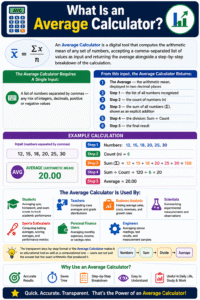
An Average Calculator is a digital tool that computes the arithmetic mean of any set of numbers, accepting a comma-separated list of values as input and returning the average alongside a step-by-step breakdown of the calculation.
The Average Calculator requires a single input:
- A list of numbers separated by commas — any mix of integers, decimals, positive or negative values
From this input, the Average Calculator returns:
- The Average — the arithmetic mean, displayed to two decimal places
- Step 1 — the list of all numbers recognized
- Step 2 — the count of numbers (n)
- Step 3 — the sum of all numbers (Σ), shown as an explicit addition
- Step 4 — the division: Sum ÷ Count
- Step 5 — the final result
The Average Calculator is used by:
- Students — averaging quiz, homework, and exam scores to track academic performance
- Teachers — computing class averages and grade distributions
- Business analysts — finding average sales, costs, revenues, and growth rates
- Scientists — summarizing experimental measurements and observations
- Sports enthusiasts — computing batting averages, scoring averages, and performance metrics
- Personal finance users — averaging monthly expenses, income, or savings rates
- Engineers — averaging sensor readings, test results, and measurement samples
The transparent step-by-step format of the Average Calculator makes it an educational tool as well as a computational one — users see not just the answer but the exact arithmetic that produced it.
The Formula for Calculating an Average
The formula for the arithmetic mean (average) is one of the simplest in mathematics:
Average (x̄) = Sum of all values / Count of values
In mathematical notation:
x̄ = Σxᵢ / n
Where:
- x̄ (x-bar) = the arithmetic mean (average)
- Σxᵢ = the sum of all individual values (x₁ + x₂ + x₃ + … + xₙ)
- n = the total count of values in the dataset
This formula has three components:
- Summation (Σxᵢ) — add up every number in the dataset
- Count (n) — determine how many numbers are in the dataset
- Division (Σxᵢ / n) — divide the sum by the count to find the middle value
Properties of the arithmetic mean:
- Sensitivity to all values — every number in the dataset influences the average; adding or removing a value always changes it
- Balance point — the average is the point at which the dataset “balances” — the sum of positive deviations from the mean equals the sum of negative deviations
- Uniqueness — every dataset has exactly one arithmetic mean
- Effect of outliers — very high or very low values (outliers) pull the average toward them, which is why the average may not always be the best central measure for skewed data
The Average Calculator applies this formula automatically — no manual addition, no division errors, no rounding mistakes.
How the Average Calculator Works — Step by Step
The Average Calculator implements the arithmetic mean formula through a systematic five-step process, which it displays transparently for every calculation.
Step 1 — Parse the Input The Average Calculator reads the comma-separated input string and splits it into individual values, converting each to a number and filtering out any non-numeric entries.
Step 2 — Build the Number List Valid numbers are collected into an ordered list. For example, input “10, 20, 30, 40” becomes the list [10, 20, 30, 40].
Step 3 — Count the Numbers The Average Calculator determines n — the count of valid numbers in the list. For [10, 20, 30, 40], n = 4.
Step 4 — Compute the Sum All values in the list are added together: 10 + 20 + 30 + 40 = 60. The Average Calculator displays this addition explicitly so users can verify every term.
Step 5 — Divide Sum by Count The Average Calculator divides the sum by n: 60 / 4 = 15. The result (15.00) is displayed as the average.
The complete output for input “10, 20, 30, 40”:
- List of numbers: [10, 20, 30, 40]
- Count (n): 4
- Summation: 10 + 20 + 30 + 40 = 60
- Division: 60 / 4
- Result: 15.00
This transparency distinguishes the Average Calculator from a black-box computation — users can follow every step, confirm the arithmetic, and understand exactly how the average was derived.
How to Use the Average Calculator
The Average Calculator is designed for maximum simplicity. Here is the complete usage guide:
Step 1 — Prepare Your Numbers Identify the values whose average you want to compute. These can be any numbers — test scores, prices, temperatures, times, measurements, or any other numeric data.
Step 2 — Enter the Numbers Type your numbers into the input field, separated by commas. The Average Calculator accepts integers (10, 25, 300), decimals (3.14, 7.5, 12.333), and negative numbers (−5, −12.4). Spaces around commas are automatically handled.
Example input: 10, 20, 30, 40
Step 3 — Click “Calculate” Press the Calculate button. The Average Calculator immediately processes the input and generates the complete result.
Step 4 — Review the Average and Steps The results panel displays the average in bold at the top, followed by the five-step breakdown. Verify that the count matches the number of values you entered, that the sum looks correct, and that the average makes intuitive sense.
Step 5 — Clear and Repeat Use the Clear button to reset the input field and enter a new set of numbers for a fresh calculation.
Tips for accurate use:
- Separate every number with a comma — do not use spaces alone
- Decimal numbers should use a period as the decimal separator (e.g., 3.14, not 3,14)
- The Average Calculator accepts any count of numbers — from 2 to hundreds
Understanding the Average Calculator’s Output
The Average Calculator’s five-step output provides complete transparency about every stage of the calculation. Here is how to read each part:
Average = [result]: The primary output — the arithmetic mean of all entered numbers, rounded to two decimal places. This is the number that represents the central value of your dataset.
List of numbers: Confirms exactly which values the Average Calculator recognized and included in the calculation. If a value you entered is missing from this list, it was not recognized as a valid number (check for typos).
Count (n): The total number of valid values processed. Always verify this matches the number of values you intended to include.
Summation (Σ): The complete addition shown explicitly — for example, “10 + 20 + 30 + 40 = 60.” This allows you to verify the sum by hand or spot if an incorrect value was entered.
Division: The sum divided by the count — for example, “60 / 4.” This is the core operation of the Average Calculator, and displaying it explicitly makes the formula visible.
Result: The final average, highlighted in color, confirming the output. This matches the bold Average line at the top — both display the same value for easy reference.
Types of Averages — Mean, Median, and Mode
While the Average Calculator specifically computes the arithmetic mean, it is important to understand where the mean fits among the three common measures of central tendency — mean, median, and mode.
Arithmetic Mean (what the Average Calculator computes) The sum of all values divided by the count. The most widely used average.
- Best for: symmetric, normally distributed data without extreme outliers
- Sensitive to: outliers — a single very large or very small value significantly affects the mean
- Example: Mean of [2, 3, 5, 7, 8] = (2+3+5+7+8)/5 = 5.0
Median The middle value when all data points are arranged in order. If there is an even number of values, the median is the average of the two middle values.
- Best for: skewed data with outliers (e.g., income distributions, house prices)
- Not sensitive to: extreme values
- Example: Median of [2, 3, 5, 7, 8] = 5 (middle value)
Mode The value that appears most frequently in the dataset.
- Best for: categorical data, finding the most common response
- Example: Mode of [2, 3, 5, 5, 7, 8] = 5 (appears twice)
When to use the Average Calculator’s mean vs. other measures:
- Use the Average Calculator when your data is reasonably symmetric and outliers are not a concern
- Consider the median instead when your data includes very high or very low outlier values (common in income, property price, and survey data)
- Consider the mode when you need the most popular or most frequent value
When to Use the Arithmetic Mean (Average)
The arithmetic mean computed by the Average Calculator is the most appropriate central tendency measure when:
- Data is numeric and continuous — scores, temperatures, times, prices, weights
- Data is symmetrically distributed — roughly bell-shaped, without heavy skew
- Outliers are absent or minimal — no extreme values that would distort the mean
- You need a value that accounts for every data point — unlike median, the mean uses all values in the dataset
- You will use the result in further calculations — mean is required for variance, standard deviation, correlation, regression, and many other statistical operations
Practical examples where the Average Calculator’s mean is ideal:
- Average score across five exams (no extreme outliers expected)
- Average daily temperature over a month (continuous, symmetric)
- Average product rating from customer reviews (1–5 scale, many data points)
- Average monthly sales over a year (business performance tracking)
- Average lap time in a race (sports timing data)
Average Calculator in Education and Grading
Computing averages is one of the most fundamental operations in education, and the Average Calculator supports students and educators at every level.
Student Grade Tracking Students use the Average Calculator to monitor their academic performance — entering homework scores, quiz results, and exam grades to find their current course average and understand how many points they need to achieve their target grade. The Average Calculator makes this calculation instant and error-free, eliminating the risk of miscounting or mis-adding scores.
Teacher Grade Computation Teachers use the Average Calculator to compute class averages after tests, identify how the class performed overall, and determine whether grade adjustments (curves) are needed. Entering all 30 student scores takes seconds, and the Average Calculator returns the class mean with the full summation shown.
Grade Point Average (GPA) While GPA calculations often involve weighted averages (where each course credit count may differ), the Average Calculator handles the unweighted case — entering all course grades and finding the unweighted GPA immediately.
Standardized Test Preparation Students tracking practice test scores over time use the Average Calculator to find their average performance and identify trends — are scores improving, plateauing, or declining? The Average Calculator provides the reference point for this trajectory analysis.
Average Calculator in Finance and Business
Averages are foundational to financial analysis and business reporting, and the Average Calculator is a practical daily tool for professionals in these fields.
Monthly Expense Tracking Individuals and households use the Average Calculator to find their average monthly spending across different categories — utilities, groceries, entertainment, transportation. Knowing the average monthly expense in each category enables budget planning and identification of areas for cost reduction.
Sales Performance Analysis Sales teams and managers use the Average Calculator to compute average daily, weekly, or monthly sales figures. Comparing the average of one period to another reveals growth trends, seasonal patterns, and the impact of sales initiatives.
Average Return on Investment Investors calculate the average annual return on an investment portfolio by entering yearly return percentages into the Average Calculator. While compound returns require more advanced formulas, the simple arithmetic average return provides a useful first-pass estimate of investment performance.
Average Transaction Value E-commerce businesses use the Average Calculator to find the average transaction value — total revenue divided by number of transactions. This metric, directly computable with the Average Calculator, drives pricing strategy and customer acquisition cost analysis.
Inventory and Supply Chain Purchasing managers compute average lead times, average order quantities, and average supplier prices using the Average Calculator to inform procurement decisions and inventory level settings.
Average Calculator in Science and Research
In scientific research, computing the average of repeated measurements is one of the most fundamental operations in data analysis, and the Average Calculator supports this work across all scientific disciplines.
Experimental Replication Scientists repeat experiments multiple times to reduce the impact of random error. The Average Calculator computes the mean of repeated measurements, which is more reliable and accurate than any single measurement alone.
Laboratory Measurements When a lab instrument measures the same sample five times and returns slightly different readings due to measurement noise, the Average Calculator gives the best single estimate of the true value — the arithmetic mean of the five readings.
Survey and Clinical Data Researchers analyzing survey responses (e.g., average age of participants, average rating given to a treatment) or clinical measurements (average blood pressure in a treatment group) use the Average Calculator as the first step in descriptive statistics.
Environmental Monitoring Environmental scientists computing average air quality index values, average rainfall, average sea temperature, or average pollutant concentrations use the Average Calculator to summarize monitoring data across many measurement stations and time periods.
Average Calculator in Sports and Performance Analysis
Sports are rich with averages, and the Average Calculator supports athletes, coaches, and fans in tracking and comparing performance.
Batting Averages In baseball and cricket, batting average is literally an average (hits divided by at-bats, or runs scored divided by innings). The Average Calculator computes performance averages for individual players and entire teams across any number of games.
Points Per Game Basketball, soccer, football, and hockey all use points-per-game averages to compare player and team performance. Enter game scores into the Average Calculator and receive the average points per game instantly.
Lap Times and Race Analysis Motorsports and athletics use average lap time or average split time to measure consistent pace. The Average Calculator computes the mean across any number of laps, helping athletes and coaches identify where pacing is strong or needs improvement.
Fitness Tracking Personal fitness goals — average daily steps, average weekly workout duration, average resting heart rate over a month — are all computable with the Average Calculator by entering the values for each day or session.
Average Calculator in Everyday Life
Beyond professional and academic contexts, the Average Calculator is useful in dozens of everyday situations.
Grocery and Shopping Price Comparison When comparing the prices of the same product across different stores or package sizes, the Average Calculator gives the average price per unit, making comparison straightforward and fair.
Travel and Commute Times Tracking how long your commute takes each day for a week and using the Average Calculator to find the average commute time helps with scheduling and decision-making about departure times.
Restaurant Bills and Splitting Costs When a group of friends pools expenses over a trip, the Average Calculator instantly finds the average spending per person — useful for cost-sharing and reimbursement calculations.
Energy and Utility Bills Entering monthly electricity, gas, or water bills into the Average Calculator gives the average monthly utility cost — useful for budgeting and identifying unusually high months.
Recipe Scaling When averaging ingredient quantities across multiple recipe variations to find the “typical” amount, the Average Calculator handles the computation quickly.
Weighted Averages — When Not All Values Are Equal
The standard Average Calculator computes a simple (unweighted) arithmetic mean, where every value contributes equally. However, in some situations, different values should carry different weights.
Examples where weighted averages are needed:
- GPA with credit hours — a 4-credit course should count more than a 1-credit course
- Investment portfolio returns — assets with larger allocations should be weighted more heavily
- Weighted course grades — exams worth 40% of the grade vs. homework worth 10% need different weights
Formula for weighted average:
Weighted Average = Σ(value × weight) / Σ(weight)
The Average Calculator handles unweighted averages — when all values should contribute equally. For weighted averages, multiply each value by its weight before entering into the Average Calculator, then divide by the sum of weights manually to obtain the weighted result.
Most everyday averages are unweighted — student quiz scores (equal weight each), daily temperatures, product prices, race lap times — making the Average Calculator directly applicable to the vast majority of common situations.
Common Mistakes When Using an Average Calculator
The Average Calculator is simple, but certain errors can affect the quality of results:
- Including non-numeric characters — Symbols like currency signs ($, £, €), percentage signs (%), or units (kg, mph) must be removed before entering values. The Average Calculator parses only numeric characters and decimal points
- Using the wrong separator — Values must be separated by commas. Spaces alone, semicolons, or line breaks will not be correctly parsed. Always use commas as separators in the Average Calculator
- Entering duplicate values unintentionally — If a number appears twice in the list, the Average Calculator includes it twice in the calculation, which is correct only if it genuinely appears twice in your dataset
- Confusing average with sum — The average is Sum ÷ Count, not just the sum. Verify that the count (n) shown in the Average Calculator output matches your expectation
- Using average for highly skewed data — If your dataset contains extreme outliers (e.g., one person earning $10 million in a group where everyone else earns $50,000), the mean from the Calculator will be distorted. In such cases, the median is a more representative central measure
- Rounding input values before averaging — For best precision, enter full values and let the Calculator handle rounding in the output, rather than rounding individual inputs before entry
Frequently Asked Questions (FAQs)
What is an Average Calculator? An Calculator is a digital tool that computes the arithmetic mean of any set of numbers entered as a comma-separated list, displaying the average alongside a five-step breakdown of the computation.
What is the formula for the average? The formula is: Average = Sum of all values / Count of values. In notation: x̄ = Σxᵢ / n. The Calculator applies this formula automatically to any list of numbers you provide.
How many numbers can the Calculator handle? The Average Calculator accepts any number of comma-separated values — from 2 to hundreds. There is no practical upper limit for typical use cases.
Can the Calculator handle decimal numbers? Yes. The Average Calculator accepts integers and decimals alike. Use a period (.) as the decimal separator. For example, 3.14, 7.5, and 12.333 are all valid inputs.
Can the Calculator handle negative numbers? Yes. Negative numbers are fully supported. For example, entering −5, −3, 0, 3, 5 gives an average of 0.
What is the difference between average, mean, median, and mode? “Average” most commonly refers to the arithmetic mean — what the Calculator computes (sum divided by count). The median is the middle value when data is sorted. The mode is the most frequent value. All three are measures of central tendency, appropriate for different data types and distributions.
What happens if I enter only one number? The Calculator will still compute a result — the average of a single number is the number itself (since n = 1 and sum / 1 = sum). However, averages are typically most meaningful with two or more values.
How is the Average Calculator different from a sum calculator? A sum calculator adds numbers together. The Average Calculator also divides the sum by the count — applying the full arithmetic mean formula to give you the central value, not just the total.
Is the average always one of the numbers in the dataset? No. The average can be any value — it is often a decimal number that does not appear in the original dataset. For example, the average of 1, 2, and 4 is 7/3 ≈ 2.33, which is not in the list.
When should I use a weighted average instead of the Calculator? Use a weighted average when different values should contribute unequally — for example, when computing GPA from courses with different credit hours, or when calculating a portfolio return where different assets have different allocation sizes. Use the Calculator when all values contribute equally.
Conclusion
The average is one of the most powerful and universally used mathematical concepts in existence — a single number that captures the center of any dataset, enables meaningful comparisons between groups and periods, and serves as the foundation for virtually all of statistical analysis. From the student checking their grade average to the scientist summarizing experimental results, from the business analyst reporting monthly performance to the coach tracking an athlete’s statistics, the arithmetic mean is the first and most important summary statistic applied to numerical data.
The Calculator makes this essential computation instant, accurate, and completely transparent. By accepting any list of numbers, computing the sum and count automatically, and displaying a clear five-step solution — showing list, count, summation, division, and result — the Average Calculator serves both as a practical computational tool and as an educational resource that builds genuine understanding of how averages work.
Whether you are averaging five exam scores, thirty daily temperatures, twelve monthly sales figures, or any other collection of numbers that matters to you, the Average Calculator delivers the result you need in one click — with the full arithmetic shown so you can always verify the answer and understand exactly where it came from.
Bookmark this guide, practice with the Average Calculator using numbers from your own life and work, and develop the confidence that comes from knowing how to summarize any dataset with the most fundamental and universally understood number in statistics — the average.