Calculate Real Feel Heat Easily – Heat Index Calculator
Table of Contents
- Introduction
- What Is a Bandwidth Calculator?
- The Formula Behind a Bandwidth Calculator
- How to Use a Bandwidth Calculator Step by Step
- Understanding Key Bandwidth Inputs
- Bandwidth Calculator: Reading and Interpreting Results
- Bandwidth vs. Speed – Clearing Up the Confusion
- Real-World Examples Using a Bandwidth Calculator
- Why Bandwidth Planning Matters for Businesses and Networks
- Applications of a Bandwidth Calculator Across Industries
- Tips for Optimizing Bandwidth Usage
- Common Mistakes When Using a Bandwidth Calculator
- FAQs
- Conclusion
Introduction
Every modern digital operation — from streaming a video to running a cloud-based enterprise application — depends on one fundamental resource: bandwidth. Whether you are a network administrator managing hundreds of concurrent users, a business owner planning an office internet upgrade, or a developer estimating the capacity requirements for a new application, understanding exactly how much bandwidth you need is not optional. It is essential. And the fastest, most reliable way to arrive at that figure is through a Bandwidth Calculator.
A Bandwidth Calculator takes the guesswork out of network capacity planning entirely. By combining inputs like file size, concurrent users, request volume, safety margins, and network efficiency, it produces a precise recommended bandwidth figure — the actual speed your network needs to handle the stated load without congestion. Without this calculation, network engineers often work from rough estimates that lead to two equally costly outcomes: over-provisioned networks that waste budget, or under-provisioned networks that choke during peak usage. A Bandwidth Calculator solves both problems simultaneously.
This comprehensive guide explains exactly how a Bandwidth Calculator works, covers every input and output in detail, walks through real-world examples across different use cases, and gives you the knowledge to apply bandwidth calculations accurately for home networks, office environments, data centers, and large-scale application deployments. By the end, you will know precisely how to use a Bandwidth Calculator to make confident, well-informed network capacity decisions.
What Is a Bandwidth Calculator?
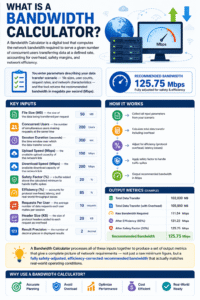
A Bandwidth Calculator is a digital tool that computes the network bandwidth required to serve a given number of concurrent users transferring data at a defined rate, accounting for overhead, safety margins, and network efficiency. You enter parameters describing your data transfer scenario — file sizes, user counts, request rates, and network characteristics — and the tool returns the recommended bandwidth in megabits per second (Mbps).
The key inputs for a Bandwidth Calculator are:
- File Size (MB) — the size of the data being transferred per request
- Concurrent Users — the number of simultaneous users making requests at the same time
- Session Duration (seconds) — the time window over which the data transfer occurs
- Upload Speed (Mbps) — the available upload capacity of the network link
- Download Speed (Mbps) — the available download capacity of the network link
- Safety Factor (%) — a buffer added above the calculated minimum to handle traffic spikes
- Efficiency (%) — accounts for protocol overhead, latency, and real-world throughput losses
- Requests Per User — the average number of data requests each user makes per session
- Header Size (KB) — the size of protocol headers added to each request as overhead
- Result Precision — the number of decimal places in displayed results
A Bandwidth Calculator processes all of these inputs together to produce a set of output metrics that give a complete picture of network requirements — not just a raw minimum figure, but a fully safety-adjusted, efficiency-corrected recommended bandwidth that actually matches real-world operating conditions.
The Formula Behind a Bandwidth Calculator
Understanding the calculation logic behind a Bandwidth Calculator helps you verify results, adjust inputs with confidence, and understand exactly what each output metric represents.
Step 1 — Calculate Total Data Volume The first step is computing the total data volume that needs to be transferred across all users and requests:
Total Data (MB) = File Size (MB) × Concurrent Users × Requests Per User
For example: 50 MB × 100 users × 5 requests = 25,000 MB total data
Step 2 — Add Protocol Overhead Every network request carries additional header data — TCP/IP headers, HTTP headers, and protocol metadata. These add up, especially at scale:
Overhead (MB) = (Header Size (KB) × Concurrent Users × Requests Per User) ÷ 1024
For example: (2 KB × 100 × 5) ÷ 1024 = 0.977 MB overhead
Step 3 — Calculate Raw Required Speed Divide the total data volume (plus overhead) by the session duration, and convert from megabytes to megabits (×8):
Raw Speed (Mbps) = (Total Data + Overhead) × 8 ÷ Duration (seconds)
This gives the theoretical minimum bandwidth needed to transfer all data within the specified time window.
Step 4 — Apply Safety Factor and Efficiency Correction Real networks never operate at theoretical maximum capacity. A safety buffer handles traffic spikes, and an efficiency correction accounts for protocol overhead and real-world throughput losses:
Recommended Speed (Mbps) = Raw Speed × (1 + Safety Factor ÷ 100) × (100 ÷ Efficiency)
This final figure — the recommended bandwidth — is the core output of every Bandwidth Calculator and represents the network capacity you should provision to handle the described load comfortably and reliably.
How to Use a Bandwidth Calculator Step by Step
Using a Bandwidth Calculator correctly takes a few minutes of preparation but delivers results you can act on immediately. Here is the complete process:
Step One — Enter File Size Enter the size of the data being transferred per request in megabytes. For web page loads, this might be 1–5 MB. For video streams, it could be 50–500 MB per session. For mixed workloads, use the average file size across all request types.
Step Two — Enter Concurrent Users Enter the number of users that will be simultaneously active on the network during the peak usage period. This is the most critical input in the Bandwidth Calculator — always use the peak concurrent user count, not the total registered or daily active user count. Peak simultaneous load is what determines bandwidth requirements.
Step Three — Enter Session Duration Enter how long the data transfer session lasts in seconds. For a one-hour office work session, this would be 3,600 seconds. For a video streaming service calculating per-session requirements, it might be 1,800 seconds (30 minutes).
Step Four — Enter Upload and Download Speeds Enter the available link speeds for comparison. The Bandwidth Calculator uses these values to compute load factor and produce the Optimized or Congested verdict — showing whether the recommended bandwidth fits within your existing connection or requires an upgrade.
Step Five — Set Safety Factor and Efficiency The safety factor (typically 20–30%) ensures the network handles unexpected traffic spikes without degrading. Efficiency (typically 70–85%) accounts for real-world protocol overhead and throughput losses. Leaving these at realistic values rather than optimistic ones is what separates an accurate Bandwidth Calculator result from a theoretical minimum that fails in practice.
Step Six — Enter Requests Per User and Header Size Enter how many individual requests each user makes per session, and the average size of protocol headers per request. These inputs capture overhead that is easy to underestimate but significant at scale.
Step Seven — Click Calculate and Read Results Press Calculate. The Bandwidth Calculator instantly returns ten output metrics covering total data volume, overhead, raw speed, recommended bandwidth, per-user demand, capacity utilization, network load factor, transfer time, efficiency rate, and a final Optimized or Congested verdict.
Understanding Key Bandwidth Inputs
Getting accurate values for each input is the key to getting a this tool result you can actually rely on.
File Size: The Foundation of the Calculation File size per request directly determines the total data volume, and therefore the entire bandwidth requirement. For websites, measure average page weight including images, scripts, and stylesheets. For applications, measure the average API response payload size. For video streaming, use the bitrate multiplied by average session length.
Concurrent Users: Always Plan for Peak The concurrent user count must reflect your actual peak load, not your average load. Most networks experience a peak-to-average ratio of 3:1 or higher — meaning the peak simultaneous user count can be three times the average. Sizing bandwidth based on average usage guarantees congestion during peak periods.
Safety Factor: Your Buffer Against the Unexpected A 20% safety factor means provisioning 120% of the calculated minimum bandwidth. This buffer absorbs sudden spikes in traffic, burst downloads, or unexpected new users without causing network degradation. For mission-critical applications, consider a 30% safety factor. For standard office networks, 20% is typically sufficient.
Efficiency: The Reality Gap No network operates at 100% of its theoretical throughput. TCP/IP protocol overhead, latency, retransmissions, and real-world signal quality all reduce effective throughput. An efficiency setting of 80% reflects that your network delivers approximately 80% of its rated capacity under real operating conditions — a realistic and commonly applicable assumption.
Bandwidth Calculator: Reading and Interpreting Results
A this tool returns a set of ten output metrics, each providing a different dimension of your network capacity picture.
Total Data (MB) The total volume of payload data transferred across all users and requests during the session. This is the gross data transfer figure before overhead, safety margins, or efficiency corrections are applied.
Overhead (MB) The additional data volume added by protocol headers. While small per request, overhead scales linearly with user count and request rate. At 100 concurrent users making 5 requests each with 2 KB headers, overhead adds nearly 1 MB — significant at enterprise scale.
Raw Speed (Mbps) The theoretical minimum bandwidth to transfer all data within the session window, without any safety factor or efficiency correction. This figure is a lower bound — never use it as your provisioned bandwidth without applying corrections.
Recommended Speed (Mbps) The bandwidth you should actually provision — the raw speed multiplied by the safety factor and efficiency corrections. This is the primary output figure of the this tool and the number to take to your ISP, network engineer, or procurement team.
Per User Demand (Mbps) The recommended bandwidth divided by the concurrent user count. This per-user figure is useful for scaling calculations — if you expect user count to grow, multiply this figure by the projected future concurrent user count to estimate future bandwidth requirements.
Network Load Factor The ratio of required raw speed to available download speed. A value below 1.0 means your current connection can handle the load. A network load factor above 1.0 means your connection is insufficient for the described workload and an upgrade is required.
Verdict: Optimized or Congested The final summary verdict compares recommended bandwidth against available download speed. “Optimized” means the required bandwidth fits within your current connection. “Congested” means the workload exceeds available capacity and network performance will degrade under the modeled conditions.
Bandwidth vs. Speed – Clearing Up the Confusion
Bandwidth and internet speed are terms that are often used interchangeably, but they describe subtly different things — and understanding the distinction helps you use a this tool more effectively.
Bandwidth: The Pipe Width Bandwidth refers to the maximum data transfer capacity of a network connection — the width of the pipe, measured in megabits per second (Mbps) or gigabits per second (Gbps). A 100 Mbps connection can theoretically transfer 100 megabits of data every second.
Speed: How Fast Data Moves Speed refers to how quickly actual data is transferred in practice, which depends not only on bandwidth but also on latency, packet loss, server performance, and network congestion. A 100 Mbps connection might only deliver 75 Mbps of effective throughput in real-world conditions — which is exactly what the efficiency parameter in a this tool captures.
Why the Distinction Matters When you ask “how much bandwidth do I need?”, the answer from a this tool is a capacity figure — the pipe width you need. When you ask “how fast is my internet?”, the answer is a real-world throughput measurement. Planning network capacity with a this tool always addresses the pipe width question, ensuring you have enough headroom for real-world throughput to comfortably serve your users.
Real-World Examples Using a Bandwidth Calculator
Working through concrete examples shows exactly how a this tool translates raw inputs into actionable network planning decisions.
Example 1: Small Office with 20 Users
- File Size: 5 MB, Concurrent Users: 20, Duration: 3600s, Requests Per User: 10, Safety Factor: 20%, Efficiency: 80%
- Total Data: 1,000 MB; Raw Speed: 22.2 Mbps; Recommended: 33.4 Mbps
- A 50 Mbps business internet connection would comfortably handle this workload.
Example 2: Video Streaming Platform (1,000 Concurrent Users)
- File Size: 200 MB (per 20-min session), Concurrent Users: 1,000, Duration: 1200s, Requests Per User: 1, Safety Factor: 25%, Efficiency: 75%
- Total Data: 200,000 MB; Raw Speed: 1,333 Mbps; Recommended: 2,222 Mbps
- This workload requires a 10 Gbps data center connection or CDN distribution.
Example 3: SaaS Application (100 API Users)
- File Size: 0.5 MB, Concurrent Users: 100, Duration: 3600s, Requests Per User: 50, Safety Factor: 20%, Efficiency: 85%
- Total Data: 2,500 MB; Raw Speed: 5.56 Mbps; Recommended: 7.8 Mbps
- A standard 100 Mbps server connection handles this workload with significant headroom.
These examples show how the same this tool formula scales seamlessly from small office environments to large-scale application deployments, giving accurate results across several orders of magnitude of network demand.
Why Bandwidth Planning Matters for Businesses and Networks
Bandwidth planning is one of the most directly impactful decisions in network and IT management, with consequences that affect every user on the network every day.
The Cost of Under-Provisioning When a network lacks sufficient bandwidth for its actual load, users experience slowdowns, timeouts, and failed requests — impacts that directly reduce productivity, frustrate customers, and damage brand reputation. For e-commerce platforms, inadequate bandwidth during peak traffic periods translates directly into lost revenue.
The Waste of Over-Provisioning Bandwidth costs money, and over-provisioned connections represent recurring wasted expenditure. A company paying for a 1 Gbps leased line when it only needs 200 Mbps is spending five times more than necessary on connectivity. Regular use of a this tool prevents this scenario by grounding capacity decisions in actual measured requirements.
Scalability Planning Understanding current bandwidth requirements precisely also enables accurate scalability planning. If you know your current 100-user peak load requires 35 Mbps, and you expect user count to double, you know you will need approximately 70 Mbps. This straightforward scaling logic, grounded in solid this tool outputs, transforms capacity planning from guesswork into a precise, data-driven process.
Applications of a this tool Across Industries
Bandwidth planning with a this tool is relevant across virtually every industry that uses digital infrastructure.
Enterprise IT and Network Operations Corporate IT departments use bandwidth data to size WAN links, LAN uplinks, and internet connections for office buildings, branch offices, and remote work infrastructure. With the growth of cloud applications and video conferencing, enterprise bandwidth requirements have grown dramatically, making regular recalculation essential.
Web Hosting and Cloud Services Hosting providers and cloud platforms use bandwidth calculations to tier their service plans and determine data transfer allowances. Developers launching new web applications benefit from running a this tool estimate during architecture planning to ensure their chosen hosting tier can support expected traffic without throttling or excess charges.
Media and Entertainment Streaming platforms, live event broadcasters, and online gaming providers must provision massive amounts of bandwidth to serve concurrent audiences. Accurate bandwidth planning ensures content is delivered smoothly without buffering or quality degradation, which is directly tied to audience retention and subscription revenue.
Education and Healthcare Schools deploying learning management systems and hospitals running telemedicine platforms have strict performance requirements. Downtime or degradation in these environments has direct educational and patient care consequences, making accurate bandwidth provisioning through careful calculation a professional obligation, not just a technical preference.
Tips for Optimizing Bandwidth Usage
Running a this tool shows how much bandwidth you need — these strategies help reduce that requirement through smarter network and application design.
Implement Content Delivery Networks (CDNs) CDNs distribute content to servers closer to users, reducing the volume of data that must travel over your primary connection and dramatically decreasing the bandwidth load on your origin infrastructure. For media-heavy applications, CDN deployment can reduce origin bandwidth requirements by 70–90%.
Enable Data Compression Compressing data before transmission reduces file sizes and therefore reduces bandwidth consumption. HTTP compression (gzip and Brotli) is standard for web content, and application-level compression can significantly reduce API payload sizes.
Implement Caching Client-side and server-side caching reduce repeat data transfers for the same content, lowering effective bandwidth consumption by serving cached responses rather than generating and transmitting fresh data for every request.
Optimize File Sizes Compressing images, minifying JavaScript and CSS, and using efficient media codecs directly reduces the file sizes that feed into your this tool inputs. Smaller file sizes mean lower bandwidth requirements for the same user experience.
Monitor and Rate-Limit Heavy Users Identify and manage bandwidth-heavy users or applications through traffic monitoring and quality-of-service (QoS) policies that prevent any single user or process from monopolizing shared bandwidth at the expense of others.
Common Mistakes When Using a Bandwidth Calculator
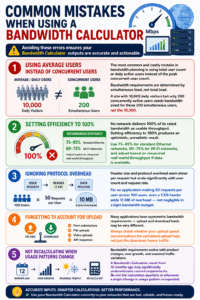
Avoiding these errors ensures your this tool outputs are accurate and actionable.
Using Average Users Instead of Concurrent Users The most common and costly mistake in bandwidth planning is using total user count or daily active users instead of the peak concurrent user count. Bandwidth requirements are determined by simultaneous load, not total load. A site with 10,000 daily visitors but only 200 concurrently active users needs bandwidth sized for those 200 simultaneous users, not the 10,000.
Setting Efficiency to 100% No network delivers 100% of its rated bandwidth as usable throughput. Setting efficiency to 100% produces an optimistic, unrealistic result. Use 75–85% for standard Ethernet networks, 60–75% for Wi-Fi networks, and adjust based on measured real-world throughput if data is available.
Ignoring Protocol Overhead Header size and protocol overhead seem minor per request but scale significantly with user count and request rate. For an application making 50 requests per user across 100 users, even a 2 KB header adds 10 MB of overhead — not negligible in a tight bandwidth budget.
Forgetting to Account for Upload Many applications have asymmetric bandwidth requirements — upload and download loads may be very different. Form submissions, file uploads, video uploads, and API responses all generate upload traffic. Always check whether your upload speed accommodates the calculated upload load, not just the download-heavy traffic.
Not Recalculating When Usage Patterns Change Bandwidth requirements evolve with product changes, user growth, and seasonal traffic variations. A this tool result from 12 months ago may significantly underestimate current requirements. Re-run the calculation quarterly or whenever a major change in usage pattern is expected.
FAQs
What does a Bandwidth Calculator do? A Bandwidth Calculator computes the network bandwidth required to handle a defined workload — combining file sizes, concurrent user counts, session duration, safety margins, and efficiency factors into a recommended bandwidth figure in Mbps. It removes the guesswork from network capacity planning and gives a precise, actionable output.
What is the difference between bandwidth and internet speed? Bandwidth is the maximum theoretical data transfer capacity of a connection; internet speed is the real-world throughput achieved under operating conditions. Bandwidth is what your ISP sells you; actual speed is what you measure in practice. A this tool addresses bandwidth requirements, while the efficiency input accounts for the gap between rated bandwidth and real-world speed.
How many Mbps do I need for 100 concurrent users? The answer depends on what each user is doing. For typical office web browsing and light file transfers, 100 concurrent users typically require 20–50 Mbps of bandwidth with appropriate safety margins. For video conferencing or large file transfers, the same 100 users may require 200 Mbps or more. Run the numbers through a Bandwidth Calculator with your specific file sizes and request rates for a precise figure.
What is a good safety factor to use? A 20% safety factor is appropriate for standard office networks and general business applications. Increase to 25–30% for mission-critical applications, customer-facing services, or environments where traffic is highly variable or unpredictable. The safety factor ensures your network handles unexpected spikes without becoming congested.
Can a Bandwidth Calculator be used for Wi-Fi networks? Yes — set the efficiency parameter to 60–75% when calculating for Wi-Fi networks, which experience more overhead, interference, and throughput variability than wired Ethernet connections. This efficiency reduction accounts for the real-world performance difference between rated Wi-Fi speeds and actual throughput.
How do I know if my current bandwidth is sufficient? Check the Network Load Factor in the Bandwidth Calculator results. A load factor below 1.0 means your current connection is sufficient. A load factor above 1.0 means the calculated requirement exceeds your available bandwidth and a connection upgrade is needed. The Congested verdict serves the same purpose at a glance.
How often should I recalculate bandwidth requirements? Recalculate bandwidth requirements whenever there is a significant change in user count, application behavior, or traffic patterns — and as a minimum, at least once per year. Network requirements evolve continuously with product changes, user growth, and new applications, making periodic recalculation with a this tool an essential part of responsible network management.
Conclusion
Bandwidth planning is one of the most consequential technical decisions in network and IT management, directly affecting every user’s daily experience with every application, service, and resource on the network. Decisions made without calculation — based on assumptions, guesses, or outdated estimates — inevitably result in either costly over-provisioning or frustrating under-provisioning. A this tool closes that gap by grounding every capacity decision in precise, formula-driven outputs that reflect real-world conditions.
The formula at the heart of every this tool captures the full complexity of network load — accounting not just for raw data volume, but for concurrent users, request rates, protocol overhead, safety margins, and real-world efficiency losses that simple back-of-envelope estimates always miss. That completeness is what makes the difference between a theoretical minimum that fails in production and a recommended bandwidth figure that actually works.
Throughout this guide, we have covered every input, formula, and output metric that a this tool uses, alongside real-world examples across office, streaming, SaaS, enterprise, and cloud environments. We have explored why bandwidth planning matters for businesses of every size, how to optimize bandwidth usage to reduce requirements, and how to avoid the most common calculation mistakes that lead to poor provisioning decisions.
Use a Bandwidth Calculator for every network capacity decision — whether you are sizing a new office internet connection, planning the infrastructure for a growing web application, or reviewing whether your current network can support a new software deployment. Measure accurately, apply realistic safety factors and efficiency values, and revisit the calculation whenever usage patterns change. That discipline — rigorous, regular bandwidth planning with a reliable this tool — is the foundation of a network that performs reliably for every user, at every peak, without wasted capacity or unwanted congestion.