Matrix Calculator
Matrix A
Matrix B
Calculate surface area instantly with our fast and easy Surface Area Calculator
Table of Contents
- Introduction
- What Is a Matrix Calculator?
- What Is This Tool and How Does It Work?
- Why You Should Use This Tool
- Step-by-Step Usage Guide
- Matrix Operations Explained
- Methods for Solving Systems of Equations
- Types of Solutions: Unique, No Solution, and Infinite Solutions
- Real-World Applications
- Tips for Accurate Results
- Common Mistakes to Avoid
- Frequently Asked Questions (FAQs)
- Conclusion
Introduction
Mathematics has never been more accessible, and tools that handle complex algebraic computations have transformed the way students, engineers, scientists, and professionals work with numbers. At the heart of linear algebra lies one of the most important problems in mathematics: solving multiple equations with multiple unknowns simultaneously. A Solving a System of Equations Calculator makes this process fast, accurate, and completely effortless.
Whether you are a student working through a linear algebra assignment, an engineer modeling a real-world system, or a data scientist building a predictive model — the ability to solve systems of equations quickly is a non-negotiable skill. But doing it manually, especially for 3×3 or larger systems, is time-consuming and error-prone. A Solving a System of Equations Calculator removes those barriers entirely.
In this complete guide, you will learn what systems of equations are, how matrix operations relate to solving them, how to use the Matrix Calculator tool effectively, and where these calculations matter in the real world. By the time you finish reading, you will have a thorough understanding of how a Solving a System of Equations Calculator works — and why it belongs in every mathematician’s toolkit.
What Is a Matrix Calculator?
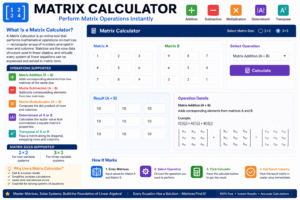
A Matrix Calculator is an online tool that performs mathematical operations on matrices — rectangular arrays of numbers arranged in rows and columns. Matrices are the core data structure used in linear algebra, and virtually every system of linear equations can be expressed and solved in matrix form.
Here is what a well-built Matrix Calculator typically supports:
- Matrix Addition (A + B) — adds corresponding elements from two matrices of the same size
- Matrix Subtraction (A − B) — subtracts corresponding elements from two matrices
- Matrix Multiplication (A × B) — computes the dot product of rows and columns
- Determinant of A or B — calculates the scalar value that summarizes a square matrix’s properties
- Transpose of A or B — flips a matrix along its diagonal, swapping rows and columns
A Matrix Calculator supports both 2×2 and 3×3 matrix sizes, making it suitable for two-variable and three-variable systems. The tool accepts numeric inputs for each cell, performs the selected operation with a single click, and returns the result instantly — either as a full matrix or as a single scalar value, depending on the operation.
Understanding the Matrix Calculator is the first step toward mastering systems of equations. Every major operation the tool performs — particularly determinants and matrix multiplication — plays a direct role in how a Solving a System of Equations Calculator arrives at its answer.
What Is a Solving a System of Equations Calculator?
A Solving a System of Equations Calculator is a digital tool that finds the values of unknown variables that satisfy two or more equations simultaneously. In practical terms, it finds the point (or points) where multiple equations intersect — the exact values of x, y, and sometimes z that make all equations true at the same time.
A system of equations looks like this:
For a 2-variable system:
- 2x + 3y = 12
- 4x − y = 5
For a 3-variable system:
- x + 2y − z = 4
- 3x − y + 2z = 7
- 2x + y + z = 9
A Solving a System of Equations Calculator takes the coefficients from these equations, arranges them in matrix form, and applies linear algebra methods to find the unique solution — or to determine that no unique solution exists.
The Matrix Calculator is closely connected to this tool because the determinant operation it computes is the key to understanding whether a system has a solution, and matrix operations like transpose and multiplication are used in the underlying solution methods such as Cramer’s Rule and Gaussian Elimination.
Why You Should Use a Solving a System of Equations Calculator
Many students and professionals wonder whether it is worth using a Solving a System of Equations Calculator when solutions can be found manually. The answer is almost always yes — and here is why.
Speed and Efficiency Manually solving a 3×3 system of equations requires multiple rounds of substitution or elimination, careful tracking of coefficients, and precise arithmetic at every step. A Solving a System of Equations Calculator delivers the exact same result in under a second.
Accuracy and Reliability Even one arithmetic mistake in a multi-step system solution can invalidate the entire result. A missed negative sign, an incorrectly copied coefficient, or a division error — any of these produces a completely wrong answer. A Solving a System of Equations Calculator eliminates all of these risks.
Educational Reinforcement Students can solve a system by hand, then verify their answer instantly using a Solving a System of Equations Calculator. This workflow builds problem-solving skills while providing immediate feedback — one of the most powerful ways to learn.
Professional Productivity Engineers, economists, and scientists routinely work with large systems of equations. A reliable Solving a System of Equations Calculator accelerates their workflows, letting them focus on interpreting results rather than grinding through arithmetic.
Accessibility You do not need to be a math expert to get accurate results. The interface is straightforward — enter your coefficients, select the operation, and click Calculate.
How to Use a Solving a System of Equations Calculator Step by Step
Using this tool to solve a system of equations is simple. Follow these steps to get accurate results every time.
Step 1 — Select the Matrix Size Choose either 2×2 or 3×3 from the Matrix Size dropdown. A 2×2 system solves two equations with two unknowns (x and y). A 3×3 system solves three equations with three unknowns (x, y, and z).
Step 2 — Enter the Coefficients into Matrix A Fill in the coefficient matrix — each row corresponds to one equation, and each column corresponds to one variable. For the system 2x + 3y = 12 and 4x − y = 5, Matrix A would contain: Row 1 = [2, 3] and Row 2 = [4, −1].
Step 3 — Enter Constants or Second Matrix into Matrix B Depending on the operation you want to perform, enter the constants vector or a second matrix. The Matrix Calculator supports both single-matrix operations (like determinant and transpose) and two-matrix operations (addition, subtraction, multiplication).
Step 4 — Select the Operation Use the Operation dropdown to choose what you want the Solving a System of Equations Calculator to compute — A + B, A − B, A × B, det(A), det(B), transpose of A, or transpose of B.
Step 5 — Click Calculate Press the Calculate button. The tool instantly displays the result — either as a full result matrix or as a single scalar value. The output is rounded to four decimal places for precision.
Step 6 — Use Reset to Start Fresh Click Reset at any time to clear all fields and begin a new calculation.
Matrix Operations Explained
To fully appreciate what this tool does, it helps to understand the matrix operations it uses. Each operation has a specific mathematical role.
Matrix Addition (A + B) Adding two matrices means adding their corresponding elements. If Matrix A has value 3 in row 1, column 1, and Matrix B has value 5 in the same position, the result has value 8. Both matrices must be the same size for addition to work.
Matrix Subtraction (A − B) Subtraction works the same way as addition — corresponding elements are subtracted. It is used to find the difference between two linear transformations or datasets represented as matrices.
Matrix Multiplication (A × B) This is the most complex of the basic operations. Each element of the result matrix is computed as the dot product of a row from Matrix A and a column from Matrix B. Matrix multiplication is not commutative — A × B does not generally equal B × A.
Determinant The determinant is a single number that summarizes key properties of a square matrix. For a 2×2 matrix with elements [[a, b], [c, d]], the determinant is ad − bc. A determinant of zero means the system of equations has either no solution or infinitely many solutions — making it a crucial check in any Solving a System of Equations Calculator.
Transpose The transpose of a matrix flips it along its main diagonal — rows become columns and columns become rows. If Matrix A is 3×2, its transpose is 2×3. Transposing is used in many optimization and machine learning algorithms built on linear systems.
Methods for Solving Systems of Equations
This tool can use several mathematical methods internally. Understanding these methods helps you appreciate how it works and when each is most appropriate.
Substitution Method The substitution method involves solving one equation for one variable and substituting that expression into the other equations. It works well for small systems but becomes very tedious for 3-variable or larger systems. This method is best understood as a learning tool for building intuition before using a calculator.
Elimination Method (Gaussian Elimination) Gaussian Elimination is the most widely used algebraic method for solving linear systems. It involves systematically adding or subtracting multiples of equations to eliminate variables one by one until a solution is reached. The Matrix Calculator’s underlying logic mirrors this process in matrix form.
Cramer’s Rule Cramer’s Rule uses determinants to find the value of each variable directly. For a 2×2 system, the solution for x is the determinant of the x-substituted matrix divided by the determinant of the coefficient matrix. A Solving a System of Equations Calculator that uses Cramer’s Rule requires the determinant to be non-zero — confirming that a unique solution exists.
Matrix Inverse Method The inverse method expresses the solution as X = A⁻¹ × B, where A is the coefficient matrix, B is the constants column, and A⁻¹ is the inverse of A. This method is powerful and efficient, particularly for larger systems processed computationally.
Types of Solutions: Unique, No Solution, and Infinite Solutions
Not every system of equations has exactly one answer. Understanding the three possible outcome types is essential when working with this tool.
Unique Solution A system has a unique solution when the lines (or planes) representing the equations intersect at exactly one point. This happens when the determinant of the coefficient matrix is non-zero. Example: 2x + y = 5 and x − y = 1 intersect at exactly one point, giving unique values for x and y.
No Solution (Inconsistent System) An inconsistent system occurs when the equations represent parallel lines that never intersect. The determinant of the coefficient matrix equals zero, and the system produces a contradiction — for example, 0 = 5 — indicating no valid solution exists. A Solving a System of Equations Calculator will flag this case with an appropriate message.
Infinitely Many Solutions (Dependent System) A dependent system occurs when two or more equations describe the exact same line or plane — one equation is a multiple of another. Again, the determinant is zero. There are infinitely many points that satisfy all equations simultaneously, and the solution is typically expressed as a parametric set.
Understanding these three outcomes helps you correctly interpret the results from a Solving a System of Equations Calculator and know whether the system you entered is well-posed for a unique answer.
Real-World Applications
This tool is not limited to the mathematics classroom. Systems of equations appear across virtually every scientific and technical discipline.
Electrical Engineering Kirchhoff’s Laws for electrical circuits produce systems of linear equations. Engineers use a Solving a System of Equations Calculator to determine the current flowing through each branch of a circuit — a critical step in designing safe, efficient electronics.
Economics and Business Supply-and-demand modeling, cost-revenue analysis, and input-output economic models all reduce to systems of linear equations. Economists and business analysts solve these systems to forecast prices, optimize production, and balance budgets.
Computer Graphics and Game Development 3D transformations, perspective projections, and collision detection in games and simulations are computed using matrix operations. A matrix-based calculator is at the core of every 3D rendering engine.
Chemistry and Balancing Equations Balancing chemical equations requires solving a system of linear equations to ensure the same number of atoms of each element appears on both sides of the reaction. This tool automates this process for complex reactions.
Civil and Structural Engineering Structural analysis of bridges, buildings, and frameworks involves solving large systems of equilibrium equations. Engineers use matrix-based tools to determine forces, stresses, and deflections under different load conditions.
Data Science and Machine Learning Linear regression, neural network training, and principal component analysis all rely on solving systems of equations expressed in matrix form. Matrix-based tools are the computational foundation underlying these powerful techniques.
Tips for Accurate Results
To get the most reliable output from this tool, keep these practical tips in mind every time you work with it.
Double-Check Coefficient Entry Transcription errors are the leading cause of wrong results. Before clicking Calculate, review every cell in Matrix A and Matrix B to confirm the coefficients match your original equations exactly. A single wrong sign can completely change the solution.
Verify the Determinant Before Expecting a Unique Solution Always compute det(A) first when solving a system. If the determinant is zero, your system is either inconsistent or dependent — a unique solution does not exist. A Solving a System of Equations Calculator will handle this gracefully, but knowing in advance sets the right expectations.
Use Consistent Equation Formatting Rearrange all your equations into standard form (ax + by + cz = d) before entering values into the tool. Mixed formatting — some equations in standard form, others not — leads to incorrect coefficient matrices.
Understand the Result in Context The numbers produced by the tool represent the values of your unknowns. Always substitute the solution back into each original equation to verify the result is correct. This step takes 30 seconds and confirms your answer with certainty.
Select the Right Operation The Matrix Calculator supports seven distinct operations. Make sure you have selected the correct one from the dropdown. Using “Determinant of A” when you need “A × B” will produce a completely different — and irrelevant — output.
Common Mistakes to Avoid
Even experienced users sometimes make avoidable errors when working with matrix-based tools. Here are the most important ones to know.
Mistake 1 — Mixing Up Rows and Columns Each row of the coefficient matrix represents one equation; each column represents one variable. Confusing this arrangement completely scrambles the system. Always build the matrix systematically — equation by equation, left to right.
Mistake 2 — Forgetting Negative Signs Negative coefficients must be entered as negative numbers. For the equation 3x − 2y = 7, the coefficient of y is −2 — not 2. Missing a negative sign in a Solving a System of Equations Calculator input produces an entirely incorrect result.
Mistake 3 — Entering a Non-Square Matrix for Determinant The determinant operation is only defined for square matrices — 2×2 or 3×3. The Matrix Calculator supports exactly these sizes. If your system is not square, a unique solution using Cramer’s Rule cannot be obtained.
Mistake 4 — Confusing Matrix Multiplication with Scalar Multiplication Matrix multiplication (A × B) follows row-by-column dot product rules and produces a result matrix — not a simple element-by-element product. Expecting element-wise multiplication when using the multiplication operation will lead to misinterpreted results.
Mistake 5 — Ignoring the Reset Button Values from a previous calculation remain in the grid until explicitly cleared. Always click Reset before entering a new system to avoid accidentally mixing old and new values in the same calculation. Solving a System of Equations Calculator
Frequently Asked Questions (FAQs)
What is a Solving a System of Equations Calculator used for? A Solving a System of Equations Calculator is used to find the values of unknown variables that satisfy two or more equations simultaneously. It is widely used by students, engineers, scientists, economists, and data analysts to handle linear algebra problems quickly and accurately.
How is the Matrix Calculator related to solving systems of equations? The Matrix Calculator directly supports solving systems of equations through its determinant and matrix multiplication operations. The workflow using matrices relies on these exact computations — particularly determinants (for Cramer’s Rule) and matrix inversion.
What does it mean when the determinant equals zero? When the determinant of the coefficient matrix is zero, the system either has no solution (inconsistent) or infinitely many solutions (dependent). A Solving a System of Equations Calculator cannot return a unique answer in this case — the system must be examined further to determine which case applies.
Can this tool solve three-variable systems? Yes. The Matrix Calculator supports 3×3 matrix operations, which correspond to three-variable systems. Switch the Matrix Size dropdown to 3×3, enter the coefficients for each of the three equations, and the tool handles the rest.
Is a Solving a System of Equations Calculator free to use? Yes. This tool is completely free with no sign-up or registration required. A Solving a System of Equations Calculator available online runs entirely in your browser, and all computations are performed locally — no data is sent to any server.
What methods does the calculator use internally? The underlying logic of this tool mirrors standard linear algebra methods — including determinant expansion and matrix multiplication — consistent with techniques like Cramer’s Rule and Gaussian Elimination taught in algebra and linear algebra courses.
Can I use the result to verify a manually solved system? Absolutely. One of the best uses of this tool is to check hand-calculated answers. Solve the system manually first, then enter the same coefficients into the tool and compare results. Any discrepancy reveals exactly where the manual calculation went wrong Solving a System of Equations Calculator
Conclusion
Systems of equations are everywhere — from circuit diagrams and economic models to 3D game engines and machine learning algorithms. Mastering how to solve them is a fundamental skill in mathematics, science, and technology. And a Solving a System of Equations Calculator is the most effective tool available for doing it quickly, accurately, and confidently.
The Matrix Calculator presented here gives you everything you need: matrix addition, subtraction, and multiplication for combining linear transformations; determinant calculations for checking whether a unique solution exists; and transpose operations for reshaping data. Together, these operations form the complete toolkit of a Solving a System of Equations Calculator.
In this guide, we covered:
- What a Matrix Calculator is and all the operations it supports
- What this tool is and how it works
- Step-by-step instructions for using the tool correctly
- Core matrix operations and their roles in solving linear systems
- The four main solution methods: substitution, elimination, Cramer’s Rule, and the inverse method
- The three types of system outcomes — unique, no solution, and infinite solutions
- Real-world applications across engineering, economics, chemistry, and data science
- Practical tips for accuracy and common mistakes to avoid
- Answers to the most frequently asked questions
Whether you are solving a simple two-variable problem or a complex three-variable system, this calculator is your most reliable partner. Use it to verify your work, speed up your calculations, and build deeper confidence in your mathematical reasoning.
Start using the Matrix Calculator today — enter your coefficients, select your operation, and let linear algebra do the heavy lifting for you Solving a System of Equations Calculator.