Surface Area Calculator
Formula: 6a²
Enter positive values in any consistent unit. Result is in square units.
Solve statistics problems instantly with our fast and easy Statistics Calculator
Table of Contents
- Introduction
- What Is Surface Area?
- What Is This Tool and How Does It Work?
- Why You Should Use This Tool
- Step-by-Step Usage Guide
- Surface Area Formulas for All Common Shapes
- Solved Examples With Step-by-Step Working
- Real-World Applications of Surface Area
- Tips for Getting Accurate Results
- Common Mistakes to Avoid
- Frequently Asked Questions (FAQs)
- Conclusion
Introduction
Geometry is one of the most practical branches of mathematics, and surface area sits right at the heart of it. Whether you are a student trying to pass an exam, a teacher explaining a concept, a builder estimating how much paint to buy, or an engineer designing a product — understanding surface area is absolutely essential. But manually computing the surface area of complex shapes can be slow, error-prone, and frustrating.
That is exactly why a Surface Area Calculator was built. This tool takes the complexity out of geometry by computing precise results in seconds. All you need to do is select the shape, enter the measurements, and it instantly delivers an accurate answer. No formulas to memorize, no risk of arithmetic errors, and no wasted time.
In this complete guide, we cover everything you need to know — from the basic definition of surface area to mastering every formula, from real-world applications to common mistakes. By the time you finish reading, you will be fully equipped to use a Surface Area Calculator with confidence and accuracy.
What Is Surface Area?
Surface area is the total area of all the outer faces and curved surfaces of a three-dimensional object. It answers the question: How much material would be needed to completely wrap the outside of this shape?
For example, imagine wrapping a birthday gift box — the amount of wrapping paper required to cover every face of the box equals its surface area. Similarly, if you were to paint a ball, the amount of paint needed to coat the entire outside of the ball equals its surface area.
Surface area is always measured in square units — such as:
- Square centimeters (cm²)
- Square meters (m²)
- Square inches (in²)
- Square feet (ft²)
A two-dimensional shape like a rectangle or triangle has only one flat face. But a three-dimensional shape like a cube, cylinder, or cone has multiple faces, edges, and curved surfaces — all of which must be added together to get the total surface area.
Understanding surface area is fundamental in fields like mathematics, physics, chemistry, biology, engineering, and architecture. It governs how objects interact with heat, light, fluids, and other materials. From packaging design to pharmaceutical science, surface area plays a central role in how the physical world works.
What Is a Surface Area Calculator?
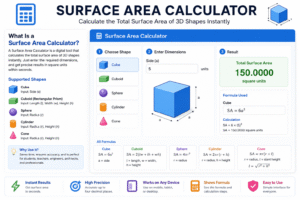
A Surface Area Calculator is a digital tool — available online or as an app — that automatically computes the total surface area of common three-dimensional geometric shapes. Instead of working through complex formulas by hand, a Surface Area Calculator does all the computation for you, returning a precise result in square units within seconds.
A well-designed tool typically supports the following shapes:
- Cube — requires one input: side length (a)
- Cuboid (Rectangular Prism) — requires three inputs: length (l), width (w), height (h)
- Sphere — requires one input: radius (r)
- Cylinder — requires two inputs: radius (r) and height (h)
- Cone — requires two inputs: radius (r) and height (h)
For each shape, the tool displays the corresponding formula so you always know exactly what calculation is being performed behind the scenes.
The key advantages of using this tool include instant results, high precision up to four decimal places, and ease of use for all levels — from school students to professional engineers. Whether you are on a mobile phone or a desktop computer, this tool is ready at any time with zero setup required.
Why You Should Use a Surface Area Calculator
Many people wonder whether it is worth using a Surface Area Calculator when formulas can be applied manually. The answer is almost always yes — and here is why.
1. Speed Manually computing the surface area of a cone involves a slant height calculation, a square root, and a multiplication — all of which take time. This tool delivers the exact same result in under a second.
2. Accuracy Human errors are common in multi-step calculations. Misplacing a decimal, forgetting to square a number, or using an incorrect value of pi — these mistakes happen regularly. A Surface Area Calculator eliminates every one of them.
3. Accessibility You do not need advanced math skills to get a correct result. A Surface Area Calculator is designed to be simple and intuitive, making it accessible to students at any level, as well as non-math professionals who need a quick answer.
4. Learning Aid Students can use the tool to check their manual work. After solving a problem by hand, running it through a Surface Area Calculator confirms whether the answer is correct — reinforcing learning without relying entirely on a teacher or textbook.
5. Professional Productivity Engineers, architects, and manufacturers use surface area calculations daily. A reliable Surface Area Calculator speeds up workflows and ensures the numbers that go into material estimates or design blueprints are always correct.
How to Use a Surface Area Calculator Step by Step
Using a Surface Area Calculator is simple. Follow these five steps to get accurate results every time.
Step 1 — Select the Shape Use the dropdown menu to choose the 3D shape you want to calculate: Cube, Cuboid, Sphere, Cylinder, or Cone.
Step 2 — Read the Formula Once you select a shape, the Surface Area Calculator automatically displays the formula being used — for example, 6a² for a cube or 2πr(r + h) for a cylinder. Reading this formula helps you understand exactly what is being computed.
Step 3 — Enter Your Measurements Fill in all the required input fields with positive numeric values. For a cuboid, you will enter length, width, and height. For a sphere, you only need the radius. Make sure all values are in the same unit of measurement.
Step 4 — Read the Result The Surface Area Calculator instantly updates the result as you type. The output is shown in square units — for example, 96.0000 unit².
Step 5 — Reset When Needed Click the Reset button to clear all fields and start a fresh calculation. This is useful when switching between different shapes or different sets of measurements.
Pro Tip: Always use the same unit for all inputs. Mixing centimeters and meters in the same calculation will produce meaningless results.
Surface Area Formulas for All Common Shapes
The best way to understand what this tool is doing is to learn the formulas it applies. Here is a complete breakdown of every formula for the five most common 3D shapes.
Cube
A cube has six equal square faces. All sides are the same length, so only one measurement is needed.
Formula: SA = 6a²
Where a is the length of one side.
Example: If a = 5 cm SA = 6 × 5² = 6 × 25 = 150 cm²
Cuboid (Rectangular Prism)
A cuboid has six rectangular faces arranged in three pairs of equal rectangles. It requires three measurements.
Formula: SA = 2(lw + wh + hl)
Where l is length, w is width, and h is height.
Example: If l = 8 cm, w = 4 cm, h = 3 cm SA = 2(32 + 12 + 24) = 2 × 68 = 136 cm²
Sphere
A sphere has a single, seamless curved surface with no edges or corners. Only the radius is needed.
Formula: SA = 4πr²
Where r is the radius.
Example: If r = 6 cm SA = 4 × π × 36 ≈ 452.39 cm²
Cylinder
A cylinder has two circular bases and one lateral curved surface. Both the radius and height are required.
Formula: SA = 2πr(r + h)
Where r is the radius and h is the height.
Example: If r = 4 cm, h = 10 cm SA = 2 × π × 4 × 14 ≈ 351.86 cm²
Cone
A cone has one circular base and one curved lateral surface. The slant height is calculated internally as √(r² + h²).
Formula: SA = πr(r + √(r² + h²))
Example: If r = 3 cm, h = 4 cm Slant height = √(9 + 16) = 5 SA = π × 3 × (3 + 5) = π × 24 ≈ 75.40 cm²
Solved Examples With Step-by-Step Working
Seeing this tool in action with full working makes the process much clearer and easier to follow.
Example 1 — Cube A storage crate is cube-shaped with a side length of 2 meters. How much material is needed to build it?
SA = 6 × 2² = 6 × 4 = 24 m²
You would need 24 square meters of material.
Example 2 — Sphere A decorative globe has a radius of 10 cm. What is its total surface area?
SA = 4 × π × 100 ≈ 1,256.64 cm²
This is approximately how much surface material the globe requires.
Example 3 — Cylinder A steel drum has a radius of 30 cm and a height of 90 cm. How much steel is needed to manufacture it?
SA = 2 × π × 30 × (30 + 90) = 2 × π × 3,600 ≈ 22,619.47 cm²
This tells the manufacturer exactly how much sheet steel is required.
Example 4 — Cone An ice cream cone has a radius of 3.5 cm and a height of 12 cm. Slant height = √(12.25 + 144) = √156.25 = 12.5 cm SA = π × 3.5 × (3.5 + 12.5) = π × 56 ≈ 175.93 cm²
Real-World Applications of Surface Area
A Surface Area Calculator is far more than a classroom tool. Surface area calculations have critical real-world applications across dozens of industries. Here are the most important ones.
Construction and Renovation Builders and painters calculate surface area to determine how much paint, plaster, tile, or cladding is required for walls, ceilings, and floors. Overestimating wastes money; underestimating causes costly project delays.
Manufacturing and Packaging Product designers and packaging engineers rely on this tool to determine how much material — cardboard, plastic, aluminum foil — is needed to manufacture a container, wrap a product, or fabricate a box. A Surface Area Calculator saves hours of manual drafting work.
Biology and Medicine In biology, the surface area-to-volume ratio is critically important for cellular function. Lungs, intestines, and kidneys all have highly folded internal structures specifically to maximize their surface area. The same principles apply in pharmaceutical drug delivery — fine powders dissolve faster because smaller particles have a greater surface area.
Thermodynamics and Engineering Heat transfer is directly proportional to surface area. Engineers use these calculations when designing radiators, heat exchangers, cooling fins, and insulation systems. A larger surface area means faster and more efficient heat exchange.
Agriculture and Environmental Science Farmers and soil scientists use surface area concepts to understand how fertilizers and pesticides distribute across soil particles. Activated carbon filters in water treatment work because microscopic particles have enormous surface areas relative to their size.
Art, Sculpture, and Design Artists and sculptors calculate surface areas when coating, gilding, anodizing, or finishing 3D objects. Knowing the exact area ensures the right quantity of material is prepared — saving cost and reducing waste.
Tips for Getting Accurate Results
To get the most reliable output from this tool, follow these practical guidelines.
Always Use Consistent Units This is the single most important rule. If you enter the radius in centimeters, the height must also be in centimeters. Mixing units is the most common cause of wildly incorrect results.
Use the Radius, Not the Diameter For spheres, cylinders, and cones, the formula always requires the radius — not the diameter. The radius is exactly half the diameter. If your tape measure shows the full width, divide by 2 before entering the value into a Surface Area Calculator.
Enter Only Positive Values All geometric dimensions — side lengths, radii, heights — must be positive numbers greater than zero. A value of zero or a negative number will not produce a meaningful or valid result.
Double-Check Your Inputs Before Reading the Result A single digit error in a large measurement can lead to a dramatically different answer. Always verify what you have typed before relying on the output for professional or academic purposes.
Understand the Formula Being Used When this tool shows you the formula, take a moment to read it. This helps you verify that the result is in a reasonable range and builds your geometric intuition over time.
Common Mistakes to Avoid
Even with a Surface Area Calculator, users sometimes make preventable errors. Here are the most common ones — and how to avoid them.
Mistake 1 — Entering Diameter Instead of Radius This is the single most frequent mistake when working with spheres and cylinders. If a ball has a diameter of 14 cm, its radius is 7 cm — not 14. Always halve the diameter before entering it.
Mistake 2 — Mixing Different Units Using centimeters for one field and meters for another will produce a result that is completely meaningless. Standardize all measurements to one unit before you begin.
Mistake 3 — Selecting the Wrong Shape Choosing “Sphere” when you need “Cylinder” applies the wrong formula entirely. Always confirm the shape selected in a Surface Area Calculator matches the actual physical object you are measuring.
Mistake 4 — Confusing Surface Area with Volume Surface area and volume are two entirely different measurements. Surface area measures the outer covering; volume measures the space inside. A Surface Area Calculator only computes the outer area — for interior capacity, you need a separate volume calculator.
Mistake 5 — Ignoring Both Bases of a Cylinder The surface area formula for a cylinder includes both circular end caps plus the curved lateral surface. The formula 2πr(r + h) already accounts for both bases — do not manually subtract them from the result.
Frequently Asked Questions (FAQs)
What is a Surface Area Calculator used for? A Surface Area Calculator is used to find the total outer area of three-dimensional shapes including cubes, cuboids, spheres, cylinders, and cones. It is widely used by students, teachers, engineers, architects, and manufacturers for fast and accurate geometry calculations.
Which shapes does this tool support? Most versions of a Surface Area Calculator support five standard 3D shapes: cube, cuboid, sphere, cylinder, and cone. Advanced versions may also support pyramids, tori, and other geometric solids.
Is this tool free to use? Yes. A Surface Area Calculator available online is completely free with no registration or sign-up required. Simply open the tool, select your shape, enter your values, and read the result instantly.
What unit of measurement should I use? You can use any unit — centimeters, meters, inches, or feet — as long as all inputs use the same unit consistently. The result will automatically be expressed in the corresponding square unit.
Can this be used for irregular shapes? A standard Surface Area Calculator is designed for regular geometric shapes. For irregular or composite objects, the best approach is to break the shape into simpler recognizable parts, calculate each part separately, and sum the results together.
How accurate are the results? Results are typically precise to four decimal places, making the tool highly reliable for both academic study and professional engineering work.
Why is surface area important in daily life? Surface area determines how much material is needed to cover an object, how quickly heat transfers from one body to another, how effectively a drug is absorbed, and how efficiently a structure is built. It is one of the most practically useful measurements in all of geometry.
Conclusion
Surface area is everywhere — in the boxes we ship, the pipes that carry water, the capsules we swallow, and the buildings we live in. Mastering surface area calculations is not just an academic exercise; it is a genuinely practical skill with applications across dozens of industries and everyday tasks.
A Surface Area Calculator is one of the most useful tools you can add to your mathematical toolkit. It removes the complexity from geometry, eliminates calculation errors, and delivers precise results in seconds — no matter your skill level or background.
In this guide, we covered:
- The definition and importance of surface area
- How a Surface Area Calculator works and why you should use one
- Step-by-step instructions for using the tool correctly
- Formulas for all five common 3D shapes — cube, cuboid, sphere, cylinder, and cone
- Real-world solved examples with full working
- Practical applications across construction, manufacturing, medicine, and more
- Tips for accurate results and common mistakes to avoid
- Answers to the most frequently asked questions
Whether you are a student preparing for an exam, a professional working on a design project, or simply someone curious about geometry, this tool is built for you. Use it regularly, understand the formulas it applies, and surface area calculations will become completely second nature.
Start using the Surface Area Calculator today — enter your measurements, read your result, and let geometry work for you.