Perform simple calculations instantly with our fast and easy Basic Calculator
Table of Contents
- Introduction
- What Is a Scientific Calculator?
- Key Functions of a Scientific Calculator
- Trigonometric Functions — sin, cos, tan and Their Inverses
- Logarithmic Functions — log and ln
- Exponential Functions and the Number e
- Roots — Square Root, Cube Root, and nth Powers
- Factorial Function and Combinatorics
- Memory Functions — MC, MR, M+, M−
- Modulo, Absolute Value, and Constants (π, e)
- RAD vs. DEG Mode — Understanding Angle Units
- INV Mode — Accessing Inverse Trigonometric Functions
- History Feature — Recalling Previous Calculations
- How to Use the Scientific Calculator Step by Step
- Scientific Calculator in Education and Mathematics
- Scientific Calculator in Physics and Engineering
- Scientific Calculator in Finance and Statistics
- Scientific Calculator in Computer Science and Programming
- Common Mistakes When Using a Scientific Calculator
- Frequently Asked Questions (FAQs)
- Conclusion
Introduction
Mathematics at its most powerful requires more than simple addition, subtraction, multiplication, and division. The moment you step beyond basic arithmetic — into trigonometry, logarithms, exponential functions, factorials, roots, and complex expressions — you need a tool that can handle the full spectrum of mathematical operations. That tool is the Scientific Calculator. Whether you are a high school student solving trigonometric equations, a university student working through calculus problems, a physicist computing exponential decay, an engineer analyzing periodic signals, or a data scientist applying statistical transformations, the Scientific Calculator is the indispensable instrument that makes advanced computation fast, accurate, and accessible.
In this comprehensive guide, we will explore everything about the Scientific Calculator — the full range of functions it provides, the mathematical principles behind each one, how to use the calculator’s features effectively, and the remarkable breadth of real-world applications where scientific calculation is essential. This guide is designed for students, educators, scientists, engineers, and any professional or enthusiast who needs to perform computations beyond the reach of a basic calculator. By the end, you will have a thorough understanding of the Scientific Calculator, every function it provides, and how to apply it confidently across mathematics, science, and engineering.
What Is a Scientific Calculator?
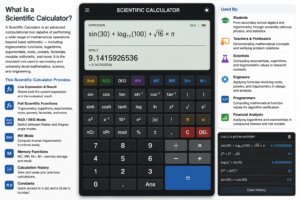
A Scientific Calculator is an advanced computational tool capable of performing a wide range of mathematical operations beyond basic arithmetic — including trigonometric functions, logarithms, exponentials, roots, powers, factorials, modular arithmetic, and more. It is the standard tool used in secondary and university-level mathematics, science, and engineering.
The Scientific Calculator featured here is a fully-featured browser-based tool with a clean, modern interface that provides:
- A live display showing both the current expression and the evaluated result
- A full set of scientific function keys organized for efficient use
- RAD/DEG angle mode switching
- INV mode for inverse trigonometric functions
- Memory storage functions (MC, MR, M+, M−)
- A calculation history log for recalling previous results
- Support for constants π and e
- Keyboard-style numeric pad and operator keys
The Scientific Calculator is used by:
- Students — from secondary school algebra and trigonometry through university calculus, physics, and statistics
- Teachers and professors — demonstrating mathematical concepts and verifying problem solutions
- Scientists — computing exponentials, logarithms, and trigonometric values in research contexts
- Engineers — applying formulas involving roots, powers, and trigonometry in design and analysis
- Programmers — computing mathematical function values for algorithm verification
- Financial analysts — applying logarithms and exponentials in compound interest and risk models
The browser-based Scientific Calculator provides the same functionality as a physical scientific calculator — without needing to purchase, carry, or power a separate device.
Key Functions of a Scientific Calculator
The Scientific Calculator provides every function needed for advanced mathematical computation. Here is an overview of the complete function set organized by category:
Arithmetic Operations: +, −, ×, ÷, % (percentage/modulo), parentheses ( )
Trigonometric Functions: sin, cos, tan (and their inverses via INV mode: asin, acos, atan)
Logarithmic Functions: log (base-10 logarithm), ln (natural logarithm)
Exponential Functions: e (Euler’s number), EXP (scientific notation exponent), xʸ (power)
Root Functions: √ (square root), ∛ (cube root)
Special Functions: x! (factorial), 1/x (reciprocal), |x| (absolute value), mod (modulo)
Constants: π (pi ≈ 3.14159…), e (Euler’s number ≈ 2.71828…)
Memory: MC (memory clear), MR (memory recall), M+ (add to memory), M− (subtract from memory)
Control: AC (all clear), ⌫ (backspace), Ans (insert last answer), RAD/DEG toggle, INV toggle
Together, these functions make the Scientific Calculator capable of handling virtually every mathematical operation encountered in secondary school, university, and professional scientific and engineering contexts.
Trigonometric Functions — sin, cos, tan and Their Inverses
Trigonometric functions are among the most important and frequently used functions in all of mathematics, and the Scientific Calculator provides all six trigonometric operations (three direct and three inverse) in a single, easily accessible interface.
Sine (sin)
sin(θ) = opposite / hypotenuse
The sine function returns the ratio of the opposite side to the hypotenuse in a right triangle for angle θ. It is periodic with period 360° (or 2π radians), making it essential for modeling waves, oscillations, and periodic phenomena.
Scientific Calculator example: sin(30°) = 0.5 | sin(π/6) = 0.5
Cosine (cos)
cos(θ) = adjacent / hypotenuse
The cosine function returns the ratio of the adjacent side to the hypotenuse. It is the “phase-shifted” version of sine — cos(θ) = sin(θ + 90°).
Scientific Calculator example: cos(60°) = 0.5 | cos(0) = 1
Tangent (tan)
tan(θ) = sin(θ) / cos(θ) = opposite / adjacent
The tangent function relates the angle to the ratio of opposite to adjacent sides.
Scientific Calculator example: tan(45°) = 1 | tan(π/4) = 1
Inverse Trigonometric Functions (via INV mode) When INV is activated on the Scientific Calculator, the trig buttons switch to their inverse functions:
- asin (arcsin) — returns the angle whose sine is x: asin(0.5) = 30°
- acos (arccos) — returns the angle whose cosine is x: acos(0.5) = 60°
- atan (arctan) — returns the angle whose tangent is x: atan(1) = 45°
Applications of trigonometric functions in the Scientific Calculator:
- Structural engineering (force components, roof angles, beam loads)
- Navigation (bearing calculations, GPS position)
- Physics (wave equations, pendulum motion, circular motion)
- Signal processing (Fourier transforms, filter design)
Logarithmic Functions — log and ln
Logarithms are the inverse of exponential functions and are among the most powerful tools in mathematics, used to compress enormous ranges of values and solve exponential equations.
Common Logarithm — log (base 10)
log(x) = log₁₀(x) — the power to which 10 must be raised to give x
The base-10 logarithm is the standard logarithm in science and engineering.
- Scientific Calculator: log(100) = 2 (since 10² = 100)
- Scientific Calculator: log(1000) = 3 | log(1) = 0 | log(0.01) = −2
Natural Logarithm — ln (base e)
ln(x) = logₑ(x) — the power to which e must be raised to give x
The natural logarithm is the fundamental logarithm in calculus, statistics, and physics.
- Scientific Calculator: ln(e) = 1 | ln(1) = 0 | ln(7.389) ≈ 2
Key logarithm properties (all verifiable with the Scientific Calculator):
- log(a × b) = log(a) + log(b)
- log(a/b) = log(a) − log(b)
- log(aⁿ) = n × log(a)
- ln(eˣ) = x
Applications of logarithms in the Scientific Calculator:
- pH calculation in chemistry: pH = −log[H⁺]
- Decibel scale in acoustics: dB = 10 × log(P₂/P₁)
- Richter magnitude: M = log(A/A₀)
- Compound interest: n = log(FV/PV) / log(1+r)
- Information entropy and data compression
Exponential Functions and the Number e
The exponential function eˣ is one of the most fundamental functions in mathematics, appearing in compound growth, radioactive decay, probability distributions, circuit analysis, and throughout calculus.
Euler’s Number (e)
e ≈ 2.71828182845…
e is the base of the natural exponential function and the natural logarithm. It is an irrational number, like π, and appears naturally in any process involving continuous growth or decay.
Exponential function eˣ: The Scientific Calculator provides exp(x) = eˣ — computing any power of e instantly.
- exp(1) = e ≈ 2.71828
- exp(2) ≈ 7.389
- exp(0) = 1
- exp(−1) ≈ 0.368
Power function xʸ: The Scientific Calculator’s xʸ key computes any base raised to any power — not just powers of e.
- 2^10 = 1024
- 3^5 = 243
- 5^0.5 = √5 ≈ 2.236
Applications of exponential functions in the Scientific Calculator:
- Radioactive decay: N(t) = N₀ × e^(−λt)
- Compound interest: A = P × e^(rt) (continuous compounding)
- Population growth models
- RC circuit charging and discharging
- Normal distribution (bell curve): f(x) = (1/σ√2π) × e^(−(x−μ)²/2σ²)
Roots — Square Root, Cube Root, and nth Powers
Root functions are the inverse of power functions, and the Scientific Calculator provides both the square root (√) and cube root (∛) for direct use, with the xʸ key enabling any nth root via fractional exponents.
Square Root (√)
√x = x^(1/2) — the number which, when squared, gives x
- Scientific Calculator: √25 = 5 | √2 ≈ 1.4142 | √144 = 12
Cube Root (∛)
∛x = x^(1/3) — the number which, when cubed, gives x
- Scientific Calculator: ∛27 = 3 | ∛8 = 2 | ∛100 ≈ 4.6416
General nth Root using xʸ Any nth root can be computed as x^(1/n) using the power key:
- 4th root of 16: 16^0.25 = 2
- 5th root of 243: 243^0.2 = 3
Applications of root functions in the Scientific Calculator:
- Pythagorean theorem: c = √(a² + b²)
- Quadratic formula: x = (−b ± √(b²−4ac)) / 2a
- Standard deviation computation from variance: σ = √(variance)
- Geometric mean: G = ⁿ√(x₁ × x₂ × … × xₙ)
- Physical sciences: velocity from kinetic energy v = √(2KE/m)
Factorial Function and Combinatorics
The factorial function computes the product of all positive integers up to n, denoted n!, and is fundamental to combinatorics, probability, and series mathematics.
Definition:
n! = n × (n−1) × (n−2) × … × 2 × 1
Scientific Calculator examples:
- 5! = 5 × 4 × 3 × 2 × 1 = 120
- 10! = 3,628,800
- 0! = 1 (by convention)
The Scientific Calculator’s x! key computes factorials directly for any non-negative integer.
Applications of the factorial in the Scientific Calculator:
- Permutations: P(n,r) = n! / (n−r)! — counting ordered arrangements
- Combinations: C(n,r) = n! / (r!(n−r)!) — counting unordered selections
- Probability: computing outcomes of card games, lottery draws, and chance events
- Taylor series: many mathematical functions are expressed as series involving factorials (eˣ = Σ xⁿ/n!)
- Stirling’s approximation for large factorials in statistical mechanics
Memory Functions — MC, MR, M+, M−
The memory functions of the Scientific Calculator provide a built-in storage register for values that need to be saved between calculations — eliminating the need to write down intermediate results.
MC — Memory Clear Resets the memory register to zero. Use MC when starting a new calculation that should not use any previously stored value.
MR — Memory Recall Inserts the current value stored in memory into the active expression. This allows a stored value to be reused in any subsequent calculation.
M+ — Memory Add Adds the current result to whatever is stored in memory. Useful for running totals — for example, summing multiple sub-results in a multi-step problem.
M− — Memory Subtract Subtracts the current result from the memory register. Useful for accumulating differences.
Practical example using memory functions in the Scientific Calculator:
- Calculate sin(30°) = 0.5 → press M+ → memory = 0.5
- Calculate cos(60°) = 0.5 → press M+ → memory = 1.0
- Calculate tan(45°) = 1 → press M+ → memory = 2.0
- Press MR → inserts 2.0 into the current expression for further calculation
Memory functions are particularly valuable when working through multi-step problems where intermediate values from the Scientific Calculator are needed in later steps of the same computation.
Modulo, Absolute Value, and Constants (π, e)
The Scientific Calculator provides several additional mathematical tools that expand its utility beyond the primary arithmetic and trigonometric functions.
Modulo (mod) The modulo operation returns the remainder when one number is divided by another.
17 mod 5 = 2 (since 17 = 3 × 5 + 2)
Applications: computer programming (loop wraparound, hash functions), number theory, clock arithmetic, finding whether a number is even or odd.
Absolute Value (|x|) The absolute value returns the non-negative magnitude of a number, regardless of sign.
|−7| = 7 | |3.14| = 3.14
The Scientific Calculator’s |x| key wraps the expression in an absolute value function, enabling signed intermediate results to be converted to their magnitudes for use in distance formulas, error calculations, and norm computations.
Pi (π)
π ≈ 3.14159265358979…
The ratio of a circle’s circumference to its diameter — one of the most important constants in mathematics. The Scientific Calculator’s π key inserts the full floating-point value of pi into any expression, enabling precise circle, wave, and angle calculations.
Euler’s Number (e) as a Constant
e ≈ 2.71828182845905…
Inserted directly into expressions for use in exponential formulas, compound growth calculations, and natural logarithm problems.
RAD vs. DEG Mode — Understanding Angle Units
One of the most important settings on the Scientific Calculator is the angle mode — RAD (radians) or DEG (degrees). Trigonometric functions give different numerical results depending on which mode is active, and using the wrong mode is one of the most common calculation errors.
Degrees (DEG mode) Angles are measured in degrees: a full circle = 360°, a right angle = 90°, a straight angle = 180°.
- Scientific Calculator in DEG mode: sin(90°) = 1 | cos(180°) = −1 | tan(45°) = 1
Radians (RAD mode) Angles are measured in radians: a full circle = 2π ≈ 6.283 rad, a right angle = π/2 ≈ 1.571 rad.
- Scientific Calculator in RAD mode: sin(π/2) = 1 | cos(π) = −1 | tan(π/4) = 1
Conversion formula:
Radians = Degrees × π/180 Degrees = Radians × 180/π
When to use each mode:
- DEG mode — everyday geometry, surveying, navigation, engineering drawings
- RAD mode — calculus, physics, signal processing, polar coordinates, Fourier analysis
The Scientific Calculator shows the current mode in the top bar and toggles instantly between RAD and DEG with a single button press. Always verify the mode is correct before computing any trigonometric function.
INV Mode — Accessing Inverse Trigonometric Functions
The INV (inverse) toggle on the Scientific Calculator transforms the trigonometric function keys into their inverse counterparts, giving access to arcsin, arccos, and arctan without requiring additional keys.
When INV is active:
- sin → asin (arcsin) — given a sine value, returns the angle
- cos → acos (arccos) — given a cosine value, returns the angle
- tan → atan (arctan) — given a tangent value, returns the angle
Scientific Calculator examples with INV active:
- asin(0.5) = 30° (in DEG mode) or π/6 ≈ 0.5236 (in RAD mode)
- acos(0) = 90° or π/2
- atan(1) = 45° or π/4
Applications of inverse trigonometric functions via the Scientific Calculator:
- Finding angles in right triangles when two sides are known
- Converting Cartesian to polar coordinates
- Computing phase angles in AC circuit analysis
- Solving navigation problems: if you know how far north and east you traveled, use atan(east/north) to find the bearing
History Feature — Recalling Previous Calculations
The Scientific Calculator includes a calculation history panel that stores up to 8 previous calculations, displaying both the expression entered and the result produced for each.
How history works:
- Every time you press = and receive a valid result, the expression and result are saved to the history
- The history appears as a scrollable list of clickable entries in the right panel
- Clicking any history entry restores that expression and result to the active display — allowing you to re-evaluate, extend, or use previous calculations as starting points
Practical benefits of the history feature:
- Error recovery — if you accidentally clear a result, retrieve it from history
- Iterative calculations — use a previous result as the starting point for a new expression
- Comparison — see multiple related results side by side without re-entering each expression
- Teaching and review — trace the sequence of steps used to arrive at a final answer
The Ans button on the Scientific Calculator provides a complementary function — inserting the most recent result directly into the current expression, enabling chained calculations without retyping values.
How to Use the Scientific Calculator Step by Step
The Scientific Calculator is designed for both simple and complex calculations. Here is a guide to getting the most from its features:
For basic arithmetic: Type the expression using number keys and operators (+, −, ×, ÷), then press = to evaluate.
For trigonometric functions:
- Set the angle mode (RAD or DEG) by pressing the mode toggle key
- Press sin, cos, or tan — the Scientific Calculator opens the function with a parenthesis
- Enter the angle value and close the parenthesis
- Press = to evaluate
For logarithms: Press log (for base-10) or ln (for natural log), enter the argument, close the parenthesis, and press =.
For powers and roots:
- For square root: press √, enter the number, close the parenthesis, press =
- For cube root: press ∛, enter the number, close the parenthesis, press =
- For xʸ: enter the base, press xʸ, enter the exponent, press =
For factorials: Enter the integer, press x!, then press = — the Scientific Calculator evaluates n!.
For inverse trig: Press INV to activate inverse mode, then press the trig key (now showing the inverse function), enter the value, close the parenthesis, and press =.
For memory: Store a result with M+, recall it with MR, clear with MC, and subtract from memory with M−.
Scientific Calculator in Education and Mathematics
The Scientific Calculator is the standard tool in secondary and university mathematics education, required for courses in algebra, trigonometry, pre-calculus, calculus, statistics, and physics.
Secondary School Students use the Scientific Calculator for:
- Evaluating trigonometric functions in geometry and trigonometry
- Computing logarithms and exponentials in algebra
- Verifying manual calculations and exploring mathematical patterns
University Mathematics At university level, the Scientific Calculator supports:
- Calculus (evaluating limits, checking derivatives, numerical integration)
- Linear algebra (matrix element computations)
- Statistics (normal distribution values, chi-square functions)
- Differential equations (exponential solution verification)
Standardized Exams The SAT, ACT, IB, A-Level, and many university entrance exams permit or require a Scientific Calculator. Students fluent with all its functions — including trig, logs, and memory — perform significantly faster and more accurately on calculation-heavy sections.
Scientific Calculator in Physics and Engineering
Physics and engineering computations almost invariably require a Scientific Calculator, from introductory mechanics through advanced electromagnetics and thermodynamics.
Classical Mechanics
- Velocity, force, and energy calculations using powers and roots
- Projectile motion: range = v² × sin(2θ) / g — requires trig and squares
- Simple harmonic motion: x(t) = A × cos(ωt + φ) — requires trig with the Scientific Calculator
Electromagnetism
- Impedance in AC circuits: Z = √(R² + X²) — square root from the Scientific Calculator
- Phase angle: φ = atan(X/R) — inverse trig via INV mode
- Exponential charge/discharge: V(t) = V₀ × e^(−t/RC) — exponential function
Thermodynamics
- Boltzmann factor: e^(−E/kT) — requires the Scientific Calculator’s exponential function
- Logarithmic entropy relations: S = k × ln(W) — natural logarithm
Scientific Calculator in Finance and Statistics
Financial mathematics and statistics rely heavily on the logarithmic and exponential functions provided by the Scientific Calculator.
Compound Interest
A = P × (1 + r/n)^(nt) — requires the power function xʸ
Continuous Compounding
A = P × e^(rt) — requires the exponential function from the Scientific Calculator
Loan Payments (Annuity Formula)
PMT = PV × r / (1 − (1+r)^(−n)) — requires powers of (1+r)
Normal Distribution Z-Scores
z = (x − μ) / σ — basic arithmetic, then use z with statistical tables
Compound Annual Growth Rate
CAGR = (FV/PV)^(1/n) − 1 — requires fractional powers via xʸ in the Scientific Calculator
Scientific Calculator in Computer Science and Programming
Programmers and computer scientists use the Scientific Calculator to verify algorithm outputs, compute mathematical constants, and test function values.
Bit Operations and Modulo The modulo operation (mod on the Scientific Calculator) is fundamental in hashing, cryptography, and loop control in programming.
Algorithm Complexity Logarithms are central to algorithm analysis: binary search is O(log n), heapsort is O(n log n). The Scientific Calculator computes log values instantly for any n.
Floating-Point Verification Programmers use the Scientific Calculator to check whether their code is producing the correct numerical output — computing sin, cos, log, exp, and factorial by hand via the calculator to compare against program output.
Common Mistakes When Using a Scientific Calculator
Even experienced users make these errors with the Scientific Calculator:
- Wrong angle mode — Computing sin(90) in RAD mode returns 0.8940 (sin of 90 radians), not 1. Always verify RAD/DEG mode before any trig calculation on the Scientific Calculator
- Missing parentheses — Entering sin 30 without closing the parenthesis or entering the argument incorrectly produces errors. Always match opening and closing parentheses
- Confusing log and ln — log is base-10; ln is base-e. Using log where ln is required (or vice versa) produces incorrect results. The Scientific Calculator labels them distinctly — use the appropriate one
- Forgetting INV mode is active — If INV was pressed for an inverse trig computation, remember to press it again to deactivate it. Accidentally using asin where sin was intended is a common Scientific Calculator error
- Entering degrees when radians are expected — In RAD mode, enter angles in radians (e.g., π/6 for 30°), not degrees. The Scientific Calculator will not auto-convert
- Squaring π incorrectly — π × r² is π × (r²), not (π × r)². Always square r first, then multiply by π in the Scientific Calculator
Frequently Asked Questions (FAQs)
What is a Scientific Calculator? A Scientific Calculator is an advanced computational tool that performs mathematical operations beyond basic arithmetic — including trigonometric functions, logarithms, exponentials, roots, powers, factorials, and more, with support for constants like π and e.
What is the difference between log and ln on the Scientific Calculator? log computes the base-10 logarithm (log₁₀), used commonly in science and engineering. ln computes the natural logarithm (base e), fundamental in calculus and physics. The Scientific Calculator provides both as separate keys.
Should I use RAD or DEG mode? Use DEG mode for everyday geometry, surveying, and engineering where angles are in degrees. Use RAD mode for calculus, physics, and signal processing where angles are in radians. The Scientific Calculator toggles between modes with a single key press.
How do I compute an inverse trigonometric function on the Scientific Calculator? Press the INV key to activate inverse mode, then press sin, cos, or tan — the Calculator will compute asin, acos, or atan respectively.
What is the Ans key on the Calculator? The Ans key inserts the most recent calculation result into the current expression — allowing chained calculations without retyping values.
How do I compute xʸ on the Calculator? Enter the base number, press the xʸ key, enter the exponent, then press =. For example, for 2^10, enter 2, press xʸ, enter 10, press = to get 1024.
Can the Calculator handle negative numbers? Yes. Use the minus (−) key to enter negative values. All functions including trig, log, and absolute value handle negative inputs where mathematically defined (note: log and ln are not defined for negative values).
What does the modulo (mod) function do on the Calculator? The mod function returns the remainder of a division. For example, 17 mod 5 = 2 (because 17 ÷ 5 = 3 remainder 2). It is widely used in programming, number theory, and cryptography.
How many calculations does the Calculator history store? The Calculator stores up to 8 previous calculations in its history panel. Clicking any history entry restores that expression and result to the display for reuse.
What is EXP on the Calculator? EXP enters a power of 10 or e in scientific notation — useful for entering very large or very small numbers in compact form, such as 6.02 × 10²³ (Avogadro’s number).
Conclusion
The Calculator is one of the most powerful and broadly applicable tools in mathematics, science, and engineering — a single instrument that makes the full range of mathematical operations accessible at the press of a button. From the student computing sin(30°) in a trigonometry class, to the physicist evaluating e^(−λt) for a radioactive decay problem, to the financial analyst computing CAGR with a fractional power, to the programmer verifying a logarithm value against their code — the Calculator is the universal computational companion for anyone who works with mathematics beyond basic arithmetic.
The Scientific Calculator featured in this guide combines the complete function set of a professional scientific calculator with the convenience of a browser-based tool — no hardware required, no batteries needed, always available. With RAD/DEG angle mode switching, INV mode for inverse functions, memory storage for multi-step problems, and a calculation history for reviewing previous results, every feature needed for serious mathematical computation is included and instantly accessible.
Whether you are approaching mathematics for the first time or working through advanced research-level problems, mastering the Calculator — understanding each function, knowing when to apply it, and avoiding the common mistakes that produce incorrect results — is one of the most valuable skills you can develop. Bookmark this guide, practice with the Scientific Calculator using problems from your own coursework or work, and build the computational fluency that transforms complex mathematics from intimidating to manageable — one precise, confident calculation at a time.