Solve advanced math instantly with our fast and accurate Scientific Calculator
Table of Contents
1.Introduction
2. What Is a Basic Calculator?
3. History and Evolution of the Basic Calculator
4. Key Features of a Modern Basic Calculator
5. All the Operations a Basic Calculator Performs
6. How to Use a Basic Calculator Step by Step
7. Memory Functions in a Basic Calculator Explained
8. The Percentage Function – Often Overlooked, Always Useful
9. Order of Operations and How a Basic Calculator Handles It
10. Basic Calculator vs Scientific Calculator – Key Differences
11. Real-Life Uses of a Basic Calculator
12. Why an Online Basic Calculator Is Better Than a Physical One
13. Tips for Using a Basic Calculator Efficiently
14. Common Mistakes to Avoid
15. Frequently Asked Questions (FAQs)
16. Conclusion
Introduction
Arithmetic is the foundation of all mathematics, and the ability to perform arithmetic calculations quickly, accurately, and effortlessly is a skill that every person — regardless of age, profession, or educational background — needs every single day. From calculating a grocery bill to splitting a restaurant check, from computing a percentage discount to doubling a recipe, arithmetic operations are woven into the fabric of daily life. And the most accessible, reliable, and universally trusted tool for performing these operations is the Basic Calculator.
A Basic Calculator is the starting point of all computational tools — a clean, straightforward interface that handles addition, subtraction, multiplication, division, percentages, and memory functions with speed and precision. Whether you are a student doing homework, a shopkeeper calculating totals, a homeowner managing a budget, or a professional doing quick estimates, a Basic Calculator is always the right tool for the job when clarity and simplicity matter most.
In this comprehensive guide, we will cover everything you need to know about the Basic Calculator — its history, its functions, how to use it correctly, its real-world applications, and how modern online versions compare to physical calculators. We will also highlight the common mistakes people make when using a Basic Calculator and how to avoid them. By the end of this article, you will have a complete, thorough understanding of this essential everyday tool and how to get the maximum value from it in every situation.
What Is a Basic Calculator?
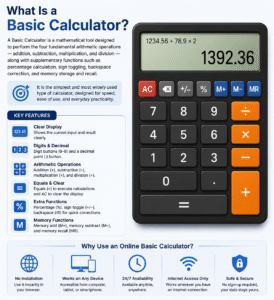
A Basic Calculator is a mathematical tool designed to perform the four fundamental arithmetic operations — addition, subtraction, multiplication, and division — along with supplementary functions such as percentage calculation, sign toggling, backspace correction, and memory storage and recall. It is the simplest and most widely used type of calculator, designed for speed, ease of use, and everyday practicality.
Unlike a scientific calculator, which includes trigonometric functions, logarithms, roots, matrices, and advanced statistical operations, a Basic Calculator focuses entirely on the core arithmetic operations that the vast majority of people need in their daily lives. This focused design makes it faster to learn, easier to use, and less overwhelming for users who simply need to add up numbers or compute a quick percentage without navigating a complex array of specialized buttons.
The key characteristics of a Basic Calculator are:
- A clear numerical display showing the current input and result
- Digit buttons (0 through 9) and a decimal point button
- Four arithmetic operator buttons: addition (+), subtraction (−), multiplication (×), and division (÷)
- An equals button (=) to execute the calculation
- A clear button (AC) to reset the display
- A percentage button (%) for quick percentage computations
- A sign toggle (+/−) for switching between positive and negative numbers
- Memory functions (M+, M−, MR) for storing and recalling values
- A backspace button for correcting input errors digit by digit
A Basic Calculator available online adds even more convenience — zero installation, instant access from any device, and availability around the clock wherever there is an internet connection.
History and Evolution of the Basic Calculator
Understanding the history of the Basic Calculator gives you a deeper appreciation for how profoundly this tool has simplified human life over the past century.
The Mechanical Era
The earliest mechanical calculating devices — such as Blaise Pascal’s Pascaline (1642) and Gottfried Wilhelm Leibniz’s Step Reckoner (1673) — could perform addition, subtraction, multiplication, and division using gears and wheels. These massive, expensive machines were the ancestors of every Basic Calculator in use today.
The Electromechanical Era
In the early 20th century, electromechanical calculators using electric motors and relay switches began replacing purely manual devices. These were still large, expensive office machines, but they dramatically increased computational speed for business and scientific use.
The Electronic Era
The first fully electronic desktop calculators appeared in the early 1960s — large machines using vacuum tubes or transistors that cost thousands of dollars. By the late 1960s, integrated circuit technology began to shrink calculators dramatically in both size and cost. The first truly pocket-sized electronic Basic Calculator, the Busicom LE-120A “HANDY,” appeared in 1971 and weighed just 410 grams.
The Ubiquitous Pocket Calculator
By the mid-1970s, mass production had driven the cost of a pocket Basic Calculator below $10, making it accessible to virtually everyone. Texas Instruments, Casio, and Sharp led this revolution. By 1980, having a Basic Calculator in your pocket or on your desk was completely standard.
The Digital and Online Era
Today, a Basic Calculator is available on every smartphone, tablet, laptop, and desktop computer as a built-in application. Web-based versions offer the same functionality with the added benefits of accessibility across all devices without installation. The Basic Calculator has completed its journey from a room-filling machine costing thousands of dollars to a free, instant tool available to anyone in the world with internet access.
Key Features of a Modern Basic Calculator
A well-designed modern Basic Calculator includes a carefully chosen set of features that cover every common arithmetic need without introducing unnecessary complexity:
Large, Clear Numerical Display
The display is the most important part of the Basic Calculator interface. A good display shows the current number being entered, the result of a calculation, and handles long numbers gracefully — either by truncating with scientific notation or by scrolling horizontally. Clear, high-contrast fonts make the display readable at a glance.
Responsive Digit Buttons (0–9 and Decimal Point)
The digit buttons are the primary input mechanism. A well-designed Basic Calculator ensures these buttons are large, clearly labeled, and respond instantly to touch or click without delay or misregistration.
Four Arithmetic Operators
Addition (+), subtraction (−), multiplication (×), and division (÷) are the core operations of every Basic Calculator. These buttons should be visually distinct from digit buttons — typically in a different color or shade — so they are easily identifiable during rapid use.
Equals Button
The equals (=) button executes the pending operation and displays the result. In many modern digital Basic Calculator interfaces, the equals button is given a more prominent visual treatment — larger, darker, or in a contrasting color — to reflect its central role.
All Clear (AC) Button
The AC button resets the Basic Calculator completely — clearing the display, any pending operation, and any previously entered values. This is the fastest way to start a new calculation from scratch.
Backspace Button
The backspace button removes the last digit entered from the current number. This is an essential feature that prevents users from having to clear the entire display when they make a single-digit entry mistake — they simply delete the incorrect digit and continue.
Sign Toggle (+/−)
The sign toggle button flips the current displayed number between positive and negative. This allows quick entry of negative values without having to subtract from zero, making the Basic Calculator efficient for financial calculations involving debits, losses, or temperature changes.
Percentage Button (%)
The percentage button divides the current number by 100, instantly converting a whole number percentage (such as 15) into its decimal form (0.15) for use in multiplication. This feature is one of the most-used functions of a Basic Calculator in everyday shopping, tipping, and tax calculation scenarios.
Memory Functions (M+, M−, MR)
Memory functions allow users to store a value and recall it later. M+ adds the current display value to the memory register. M− subtracts it. MR (Memory Recall) brings the stored value back to the display. These functions are invaluable for multi-step calculations where an intermediate result needs to be held while further calculations are performed.
All the Operations a Basic Calculator Performs
A Basic Calculator handles the following operations with full accuracy:
Addition (+)
Combines two or more numbers to produce their total sum. Example: 347 + 128 = 475
Subtraction (−)
Finds the difference between two numbers by removing one quantity from another. Example: 500 − 73 = 427
Multiplication (×)
Computes the product of two numbers — equivalent to repeated addition. Example: 24 × 15 = 360
Division (÷)
Divides one number by another to find the quotient. Example: 144 ÷ 12 = 12. A Basic Calculator automatically handles division by zero by displaying an error message, preventing the undefined result from being silently passed to further calculations.
Percentage (%)
Converts a whole number to its equivalent decimal fraction by dividing by 100. Combined with multiplication, this allows instant calculation of any percentage of any number. Example: 15% of 200 → 200 × 15% = 30
Sign Toggle (+/−)
Converts a positive number to negative or a negative number to positive. Example: 45 → −45
Exponent via EXP
Some modern online Basic Calculator versions include an EXP function that allows entry of numbers in scientific notation — for example, entering 5 EXP 3 means 5 × 10³ = 5,000.
Memory Storage and Recall
Store intermediate results for later use without writing them down. The memory function makes a Basic Calculator capable of multi-stage calculations that would otherwise require pen and paper for note-taking.
How to Use a Basic Calculator Step by Step
Using a Basic Calculator is intuitive, but knowing the correct sequence of steps ensures accurate results every time:
Step One – Clear the Display
Always begin a new calculation by pressing AC (All Clear) to ensure no leftover values from a previous calculation are still in memory. Starting clean prevents carry-over errors that are easy to miss.
Step Two – Enter the First Number
Press the digit buttons to enter the first number in your calculation. Use the decimal point button for decimal values. If the number is negative, enter the digits first and then press +/− to toggle the sign.
Step Three – Press the Operator
Press the appropriate operator button — +, −, ×, or ÷ — to indicate which arithmetic operation you want to perform. The Basic Calculator stores this operator and waits for the second number.
Step Four – Enter the Second Number
Type the second number using the digit buttons. If you make a mistake, use the Backspace button to delete the last digit without clearing the entire entry.
Step Five – Press Equals
Press the = button to execute the calculation. The Basic Calculator applies the selected operator to both numbers and displays the result instantly.
Step Six – Continue or Start Over
If you want to continue building on the result, press another operator and enter the next number. If you want to start a completely new calculation, press AC to reset the Basic Calculator to its starting state.
Step Seven – Use Memory for Multi-Step Problems
For calculations involving multiple intermediate results, use M+ to add a result to memory, continue with the next calculation, and then press MR to recall the stored value when you need to combine it with the new result.
Memory Functions in a Basic Calculator Explained
Memory functions are one of the most powerful — and most underused — features of a Basic Calculator. Understanding how to use them correctly can dramatically simplify complex multi-step arithmetic.
M+ (Memory Plus)
Pressing M+ adds the currently displayed number to the memory register. If memory currently holds 50 and you press M+ with 30 on the display, memory now holds 80. This is useful for accumulating running totals across separate calculations.
M− (Memory Minus)
Pressing M− subtracts the currently displayed number from the memory register. If memory holds 100 and you press M− with 25 on the display, memory now holds 75. This is useful for tracking running balances where some amounts are added and others are subtracted.
MR (Memory Recall)
Pressing MR replaces the current display with whatever value is stored in memory. The stored value is not deleted — it remains in memory until overwritten. MR effectively “pastes” the stored value into the current calculation, allowing you to use it as an operand in the next step.
Practical Example:
You are shopping and want to compute: (4 × 7.99) + (3 × 5.49) + (2 × 12.99)
- Calculate 4 × 7.99 = 31.96 → press M+
- Calculate 3 × 5.49 = 16.47 → press M+
- Calculate 2 × 12.99 = 25.98 → press M+
- Press MR → display shows 74.41 (total of all three)
This kind of running total across separate multiplication operations is exactly the scenario where memory functions transform a Basic Calculator from a simple arithmetic tool into a genuinely powerful everyday calculator.
The Percentage Function – Often Overlooked, Always Useful
The percentage button (%) is one of the most valuable functions on a Basic Calculator, yet many users either do not know how to use it correctly or resort to manual conversion instead.
How the percentage function works:
Pressing % divides the current display value by 100. This converts a percentage figure into its decimal equivalent that can be directly used in multiplication.
Common use cases:
Calculating a percentage of a number:
To find 20% of 350: Enter 350 × 20 % = → 70
Calculating a price after discount:
Item costs $80, discount is 15%. Enter 80 − 15 % = → 68 (the discounted price)
Adding tax to a price:
Item costs $120, tax is 8%. Enter 120 + 8 % = → 129.60 (price including tax)
Finding what percentage one number is of another:
What percentage is 45 of 180? Enter 45 ÷ 180 × 100 = → 25%
Mastering the percentage function makes a Basic Calculator indispensable for everyday shopping, restaurant tipping, salary calculations, and any financial task involving percentages.
Order of Operations and How a Basic Calculator Handles It
One of the most important things to understand about a Basic Calculator is that it processes operations sequentially from left to right — not according to the standard mathematical order of operations (BODMAS/PEMDAS).
Standard math order (BODMAS/PEMDAS):
2 + 3 × 4 = 2 + 12 = 14 (multiplication first)
Basic Calculator processing (left to right):
2 + 3 × 4 = 5 × 4 = 20 (addition first, then multiplication)
This means a Basic Calculator does NOT automatically apply mathematical order of operations. It simply executes each operation as you enter it. For calculations where order of operations matters, you must enter the operations in the correct sequence yourself — completing multiplications and divisions before additions and subtractions, or using memory functions to hold intermediate results.
This is a fundamental design choice that keeps the Basic Calculator simple and predictable for everyday use. For complex algebraic expressions that require strict order-of-operations compliance, a scientific calculator or expression parser should be used instead.
Basic Calculator vs Scientific Calculator – Key Differences
Understanding when to use a Basic Calculator versus a scientific calculator helps you choose the right tool for every situation:
| Feature | Basic Calculator | Scientific Calculator |
|---|---|---|
| Operations | +, −, ×, ÷, %, Memory | All basic + trig, log, roots, stats |
| Interface | Simple, minimal buttons | Complex, many function buttons |
| Learning curve | Immediate — no learning needed | Requires study to use advanced functions |
| Best for | Everyday arithmetic, shopping, budgeting | Engineering, science, advanced math |
| Display | Single-line or simple | Often multi-line with equation display |
| Order of operations | Left-to-right sequential | Full BODMAS/PEMDAS compliance |
| User | Everyone | Students, scientists, engineers |
For the vast majority of daily arithmetic tasks, a Basic Calculator is not just sufficient — it is the ideal tool. Its simplicity is a feature, not a limitation. The focused design prevents accidental use of complex functions and keeps every calculation fast and transparent.
Real-Life Uses of a Basic Calculator
The Basic Calculator is the most universally used computational tool in the world because it directly addresses the arithmetic needs that arise in everyday life across every age group and profession:
Shopping and Personal Finance
Calculating the total cost of a shopping basket, applying a coupon discount, computing the unit price of a product per kilogram or per liter, splitting a bill between friends, or determining how much change to expect — all of these common shopping tasks are perfect use cases for a Basic Calculator.
Home Budgeting
Tracking monthly income versus expenses, computing the total of utility bills, calculating how much money remains after fixed costs, or projecting savings over a period of months all require straightforward arithmetic that a Basic Calculator handles perfectly.
Cooking and Recipe Scaling
Doubling or halving a recipe requires multiplication and division of ingredient quantities. A Basic Calculator makes this quick and error-free, preventing the frustration of incorrectly scaled recipes.
Home Improvement and DIY Projects
Calculating the area of a room to determine how much flooring or paint is needed, computing the number of tiles required for a bathroom, or estimating material quantities for a construction project all rely on basic multiplication and division — exactly what a Basic Calculator is built for.
Business and Retail
Computing sales totals, applying percentage discounts or markups, calculating tax amounts, splitting costs between departments, or verifying invoice totals are daily retail and business tasks that a Basic Calculator handles with speed and reliability.
Education
Students at every level use a Basic Calculator to check arithmetic homework, verify the results of mental math, and build confidence in their numerical reasoning by comparing manual calculations against calculator outputs.
Travel and Currency
Converting between currencies using an exchange rate, computing the local price of a foreign item, or calculating the total cost of a trip in multiple currencies are all operations that a Basic Calculator handles quickly and accurately.
Why an Online Basic Calculator Is Better Than a Physical One
An online Basic Calculator offers several important advantages over a traditional physical pocket calculator:
- Always available — accessible on any smartphone, tablet, laptop, or desktop computer without needing to carry or charge a separate device
- Free — no purchase required; web-based Basic Calculator tools are universally free to use
- No batteries needed — physical calculators die at inconvenient moments; an online Basic Calculator is powered by your device
- Larger display — digital interfaces can render larger, clearer numbers than the small LCD displays of pocket calculators
- Keyboard shortcuts — many online Basic Calculator tools support keyboard number entry, making input faster than tapping physical buttons
- Always up to date — web-based tools are updated automatically; no firmware or software management required
- Impossible to lose — you cannot lose an online Basic Calculator the way you can lose a physical device
Tips for Using a Basic Calculator Efficiently
To get maximum speed and accuracy from a Basic Calculator, apply these professional tips:
- Always press AC before starting a new calculation. This prevents carry-over values from a previous session from contaminating your new calculation.
- Use memory functions for multi-step problems instead of writing intermediate results on paper. M+, M−, and MR are specifically designed for this purpose.
- Double-check your operator choice before pressing equals. Pressing × when you meant ÷ is a common and costly error that completely changes the result.
- Use backspace instead of AC when you make a single-digit entry error. AC clears everything; backspace corrects just the last digit.
- Use the percentage button for discount and tax calculations rather than converting percentages to decimals manually. It is faster and reduces the chance of conversion errors.
- For long calculations, verify intermediate results before continuing. Building on an incorrect intermediate value compounding through several more operations multiplies the error.
- Enter negative numbers correctly — type the digits first, then press +/− to toggle the sign. Do not try to “subtract from zero” as a workaround.
Common Mistakes to Avoid
Even with a tool as simple as a Basic Calculator, users regularly make avoidable errors. Here are the most important mistakes to recognize and prevent:
Not Pressing AC Between Calculations
The single most common error is starting a new calculation without clearing the previous one. If a result is still showing on the display when you begin entering a new number, that leftover value may be incorporated into the new calculation if you accidentally press an operator first. Always press AC to start fresh.
Confusing the Order of Entry
The sequence in which you enter numbers and operators matters. Division and subtraction are not commutative — 10 ÷ 2 ≠ 2 ÷ 10. Always think through which number is the dividend and which is the divisor, or which is being subtracted from which, before entering your values.
Using a Basic Calculator for Complex Expressions
A Basic Calculator does not honor mathematical order of operations. Entering 5 + 3 × 2 on a Basic Calculator gives 16, not 11. For expressions that require proper BODMAS compliance, either restructure the calculation to match the sequential processing model or use a scientific or expression-capable calculator.
Entering Too Many Digits
Most Basic Calculator displays have a maximum digit capacity (typically 10–12 digits). Attempting to enter a number with more digits will either be ignored or truncated. For very large numbers, use scientific notation or a more advanced tool.
Misusing the Percentage Button
Many users misunderstand how the percentage button interacts with addition and subtraction. For example, 100 + 10% on a Basic Calculator typically produces 110 (adding 10% of 100), not 100.10 (adding the decimal 0.10). Understanding this behavior prevents incorrect percentage calculations in shopping and financial tasks.
Not Verifying the Display Before Pressing Equals
A quick visual check of the displayed numbers and operator before pressing = takes less than one second and catches most input errors before they produce an incorrect result that might go unnoticed.
Frequently Asked Questions (FAQs)
What is a Basic Calculator and what operations does it perform?
A Basic Calculator is a mathematical tool designed for everyday arithmetic operations. It performs addition, subtraction, multiplication, and division, along with supplementary functions including percentage calculation, sign toggling, memory storage and recall, and digit-by-digit backspace correction. A Basic Calculator is designed for simplicity, speed, and universal accessibility.
Is a Basic Calculator suitable for all math problems?
A Basic Calculator is ideal for everyday arithmetic — shopping totals, budget calculations, percentage computations, recipe scaling, and similar tasks. For advanced mathematics involving trigonometry, logarithms, roots, statistical functions, or algebraic expressions, a scientific or graphing calculator is more appropriate. A Basic Calculator excels at the arithmetic that most people need most of the time.
Does a Basic Calculator follow the mathematical order of operations?
No. A Basic Calculator processes operations sequentially from left to right, not according to BODMAS/PEMDAS. This means multiplication and division are not automatically prioritized over addition and subtraction. For expressions where order of operations matters, users must sequence their input accordingly or use parentheses-capable calculators.
How do memory functions work on a Basic Calculator?
Memory functions allow you to store and retrieve numerical values during a calculation session. M+ adds the displayed value to the memory register. M− subtracts it. MR (Memory Recall) displays the stored value. These functions are especially useful for running totals and multi-step calculations where intermediate results need to be held while other operations are performed.
What does the +/− button do on a Basic Calculator?
The +/− button (sign toggle) flips the currently displayed number between positive and negative. Pressing +/− when 45 is displayed changes it to −45. Pressing it again returns it to 45. This function allows quick entry of negative values for financial calculations, temperature differences, and any other context where negative numbers are needed.
Can I use a Basic Calculator on my phone?
Yes. Every smartphone — whether iOS or Android — includes a built-in Basic Calculator app. Additionally, numerous free web-based Basic Calculator tools are accessible directly in any mobile browser without needing to download or install anything.
What is the difference between the AC and Backspace buttons?
AC (All Clear) resets the entire Basic Calculator — it clears the display, any pending operation, and all entered values. Backspace removes only the last digit entered from the current number, leaving the rest of the calculation intact. Use Backspace for single-digit entry corrections and AC to start a completely new calculation.
Why does my Basic Calculator show “Error” for some calculations?
A Basic Calculator displays an error when asked to perform a mathematically undefined or impossible operation — most commonly division by zero (any number ÷ 0 is undefined). An error may also appear if a result exceeds the display’s maximum digit capacity. Pressing AC clears the error and resets the Basic Calculator for a new calculation.
Conclusion
The Basic Calculator is one of the most democratically accessible and universally valued tools in human history. It has evolved from a room-filling mechanical device costing thousands of dollars into a free, instant, always-available digital tool accessible to anyone on any device anywhere in the world. That evolution reflects a fundamental truth: simple, reliable arithmetic computation is a need shared by every person on the planet, and the Basic Calculator meets that need with unmatched efficiency.
Whether you are adding up a grocery list, computing a tip at a restaurant, calculating a percentage discount on a sale item, scaling a recipe for a dinner party, or managing a household budget, the Calculator is always the right tool. Its focused design — four core operations, a clear display, a percentage function, and memory storage — covers the full range of everyday arithmetic without a single unnecessary complication.
The best Basic Calculator is the one you have available when you need it — and in today’s connected world, that means a web-based tool that works instantly on your phone, tablet, or computer, requires no installation, costs nothing, and delivers accurate results every time. Use it confidently, use it consistently, and let the Calculator do what it does best: give you fast, reliable answers to the arithmetic questions that arise in your daily life, every single day.