Sample Size Calculator
Calculate logarithms instantly with our fast and accurate Logarithm Calculator
Table of Contents
- Introduction
- What Is a Sample Size Calculator?
- Key Statistical Concepts — Population, Sample, Confidence, and Margin of Error
- The Sample Size Formula — How It Works
- The Margin of Error Formula — How It Works
- Confidence Levels Explained — 90%, 95%, and 99%
- Standard Deviation in the Sample Size Calculator
- Finite Population Correction — Why Population Size Matters
- How to Use the Sample Size Calculator — Find Sample Size Mode
- How to Use the Sample Size Calculator — Find Margin of Error Mode
- Interpreting the Sample Size Calculator’s Results
- Sample Size Calculator in Market Research and Business
- Sample Size Calculator in Healthcare and Clinical Trials
- Sample Size Calculator in Political Polling and Surveys
- Sample Size Calculator in Academic and Scientific Research
- Sample Size Calculator in Quality Control and Manufacturing
- Factors That Affect Sample Size
- Common Mistakes When Using a Sample Size Calculator
- Frequently Asked Questions (FAQs)
- Conclusion
Introduction
Every survey, research study, clinical trial, market research campaign, and scientific experiment faces the same fundamental question: how many data points do I actually need? Collect too few, and your results may be unreliable — distorted by chance and failing to represent the true population. Collect too many, and you waste time, money, and resources gathering data that adds no meaningful statistical value. The answer to this critical question is provided by the Sample Size Calculator — a statistical tool that determines the precise number of observations, responses, or measurements needed to produce results at a specified confidence level and margin of error.
The Sample Size Calculator is one of the most practically important tools in applied statistics. Whether you are designing a political poll, a customer satisfaction survey, a medical clinical trial, a product quality test, or an academic research study, the correct sample size is the foundation of every statistically valid conclusion. Too small a sample produces results that cannot be trusted; the right sample size ensures that your findings reflect reality within a known, acceptable margin of error at a defined level of statistical confidence.
In this comprehensive guide, we will explore everything about the Sample Size Calculator — the statistical concepts it embodies, both of its computation modes (finding sample size and finding margin of error), the mathematical formulas it uses, how to use it step by step, and the wide range of real-world contexts in which correct sampling is essential. Whether you are a student learning statistics, a researcher designing a study, a business analyst running customer surveys, or a data scientist validating results, this guide provides a thorough and practical mastery of the Sample Size Calculator and the statistical principles it is built on.
What Is a Sample Size Calculator?
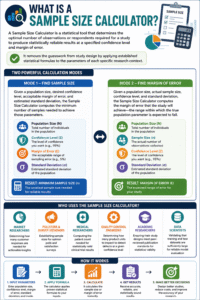
A Sample Size Calculator is a statistical tool that determines the optimal number of observations or respondents required for a study to produce statistically reliable results at a specified confidence level and margin of error. It removes the guesswork from study design by applying established statistical formulas to the parameters of each specific research context.
The Sample Size Calculator featured here provides two distinct calculation modes:
Mode 1 — Find Sample Size Given a population size, desired confidence level, acceptable margin of error, and estimated standard deviation, the Sample Size Calculator computes the minimum number of samples needed to achieve those parameters.
Mode 2 — Find Margin of Error Given a population size, actual sample size, confidence level, and standard deviation, the Sample Size Calculator computes the margin of error that the study will achieve — the range within which the true population parameter is expected to fall.
The Sample Size Calculator is used by:
- Market researchers — determining how many customer responses are needed for actionable insights
- Pollsters and survey designers — establishing sample sizes for opinion polls and satisfaction surveys
- Medical researchers — computing the patient count needed for statistically valid clinical trial results
- Quality control engineers — determining how many product units to inspect to detect defects at a given confidence level
- Academic researchers — ensuring their study designs meet peer-reviewed publication standards for statistical validity
- Data scientists — validating that training and test datasets are sufficiently large for reliable model evaluation

Key Statistical Concepts — Population, Sample, Confidence, and Margin of Error
Understanding the four key parameters of the Sample Size Calculator is essential for using it correctly and interpreting its results meaningfully.
Population (N) The total number of individuals, items, or events in the group you wish to study. This is the complete set from which your sample is drawn.
- Examples: all registered voters in a country (N = millions), all customers of a company (N = 50,000), all products in a manufacturing run (N = 10,000)
- For the Sample Size Calculator, population size matters most when the sample is a significant fraction of the population (the finite population correction applies)
Sample Size (n) The number of individuals, items, or events actually measured, surveyed, or observed. The sample is a subset of the population chosen to represent the whole. The Sample Size Calculator tells you how large this subset must be.
Confidence Level The probability (expressed as a percentage) that the true population parameter falls within the margin of error around your sample result.
- A 95% confidence level means: if you repeated the study 100 times with different samples, approximately 95 of those studies would produce results within the stated margin of error of the true population value
- Common confidence levels: 90%, 95%, 99% — the Sample Size Calculator uses 95% (Z = 1.96) as the standard
Margin of Error (e) The maximum expected difference between the sample result and the true population value — the “plus or minus” figure reported in surveys and polls.
- A margin of error of ±5% means the true value is expected to be within 5 percentage points of your measured result
- The Sample Size Calculator lets you specify your acceptable margin of error — smaller margins require larger samples
The Sample Size Formula — How It Works
The Sample Size Calculator uses a well-established statistical formula to compute the required sample size from the four input parameters.
Step 1 — Compute the Uncorrected Sample Size
ss = (Z² × σ²) / e²
Where:
- Z = the Z-score corresponding to the confidence level (Z = 1.96 for 95% confidence)
- σ = standard deviation of the population (or estimated proportion — default 0.5 for maximum variability)
- e = margin of error as a decimal (e.g., 5% → e = 0.05)
Step 2 — Apply the Finite Population Correction
n = ss / (1 + ss/N)
Where N is the total population size. This correction adjusts the sample size downward when the uncorrected sample size is a significant proportion of the population — for very large populations, the correction has minimal effect, but for small populations it substantially reduces the required sample size.
Example calculation using the Sample Size Calculator:
- Population: N = 10,000
- Confidence: 95% → Z = 1.96
- Margin of error: 5% → e = 0.05
- Standard deviation: σ = 0.5
ss = (1.96² × 0.5²) / 0.05² = (3.8416 × 0.25) / 0.0025 = 0.9604 / 0.0025 = 384.16 n = 384.16 / (1 + 384.16/10,000) = 384.16 / 1.03842 ≈ 370
The Sample Size Calculator rounds up to ensure the required statistical power is met — always round up, never down.
The Margin of Error Formula — How It Works
The second mode of the Sample Size Calculator computes the margin of error that results from a given sample size — the inverse of the sample size calculation.
Margin of Error Formula (with finite population correction):
e = Z × √[(σ²/n) × ((N−n)/(N−1))]
Where:
- Z = Z-score for the confidence level (1.96 for 95%)
- σ = standard deviation
- n = actual sample size
- N = population size
- (N−n)/(N−1) = the finite population correction factor
Example using the Sample Size Calculator in Margin of Error mode:
- Population: N = 10,000
- Sample size: n = 385
- Confidence: 95% → Z = 1.96
- Standard deviation: σ = 0.5
e = 1.96 × √[(0.25/385) × (9615/9999)] e = 1.96 × √[0.000649 × 0.9616] e = 1.96 × √0.000624 e = 1.96 × 0.02498 ≈ 4.90%
This result means that with a sample of 385 from a population of 10,000 at 95% confidence, the true population value is expected to fall within ±4.90% of the sample result.
Confidence Levels Explained — 90%, 95%, and 99%
The confidence level is one of the most important inputs to the Sample Size Calculator, and choosing the right level requires understanding what each one means in practice.
90% Confidence Level (Z = 1.645)
- Interpretation: 90 out of 100 repeated studies would produce results within the stated margin of error
- Use case: exploratory research, preliminary studies, low-stakes business decisions
- Effect on sample size: requires the smallest sample — the lower confidence threshold means fewer observations are needed
95% Confidence Level (Z = 1.96)
- Interpretation: 95 out of 100 repeated studies would produce results within the stated margin of error
- Use case: standard for most academic research, business surveys, public opinion polls — the default in the Sample Size Calculator
- Effect on sample size: moderately larger than 90% — the most widely used standard
99% Confidence Level (Z = 2.576)
- Interpretation: 99 out of 100 repeated studies would produce results within the stated margin of error
- Use case: medical research, safety-critical engineering, pharmaceutical trials, financial risk models
- Effect on sample size: requires the largest sample — higher confidence demands more data
Key trade-off: Higher confidence levels reduce the risk of a wrong conclusion but require substantially larger samples. The Sample Size Calculator makes this trade-off explicit — you can immediately see how much the required sample size changes when you adjust the confidence level.
Standard Deviation in the Sample Size Calculator
Standard deviation (σ) measures the variability or spread of the population — how much individual values differ from the average. It is a critical input to the Sample Size Calculator because higher variability requires larger samples to achieve the same precision.
When you know the population standard deviation: Enter the actual known or estimated standard deviation from previous studies, pilot data, or domain knowledge.
When standard deviation is unknown: Use σ = 0.5 — this is the maximum standard deviation for a proportion between 0 and 1, and it guarantees the most conservative (largest) sample size estimate. The Sample Size Calculator defaults to 0.5, which is the safest choice when the population variability is unknown.
Effect of standard deviation on the Sample Size Calculator results:
- Higher σ → more variability → larger required sample size
- Lower σ → less variability → smaller required sample size
Example: For a population where items are nearly identical (low variability, σ = 0.1), a much smaller sample suffices compared to a highly varied population (σ = 0.5). The Sample Size Calculator reflects this — always input the most accurate σ available to avoid unnecessarily large or small sample sizes.
Finite Population Correction — Why Population Size Matters
One of the most important features of the Sample Size Calculator is its application of the finite population correction (FPC). This adjustment recognizes that when the sample represents a meaningful fraction of the total population, the required sample size is smaller than the formula for an infinite population would suggest.
The FPC formula:
Adjusted n = ss / (1 + ss/N)
Intuition: If the population is only 100 people and you need to survey 96 of them, you are essentially surveying almost everyone — you do not need a sample, you need a census. The FPC captures this logic by reducing the required sample size when N is small relative to ss.
Practical effects in the Sample Size Calculator:
| Population (N) | Uncorrected ss | FPC-Adjusted n |
|---|---|---|
| 500 | 384 | 218 |
| 1,000 | 384 | 278 |
| 5,000 | 384 | 357 |
| 10,000 | 384 | 370 |
| 100,000 | 384 | 383 |
| 1,000,000+ | 384 | ~384 |
As population size grows, the FPC correction becomes negligible. For very large populations (over 100,000), the required sample size is essentially independent of total population size — a finding that surprises many first-time users of the Sample Size Calculator.
How to Use the Sample Size Calculator — Find Sample Size Mode
Using the Sample Size Calculator to determine the required sample size is straightforward. Follow these steps:
Step 1 — Enter Population Size Input the total number of individuals in your population (N). If your population is very large (millions of people), enter any large number — the FPC will have minimal effect.
Step 2 — Enter Confidence Level Input your desired confidence level as a percentage. The Sample Size Calculator defaults to 95%, which is appropriate for most research contexts.
Step 3 — Enter Margin of Error Input your acceptable margin of error as a percentage (e.g., enter 5 for ±5%). Smaller margins of error require larger samples — the Sample Size Calculator reflects this immediately in the result.
Step 4 — Enter Standard Deviation Input the estimated population standard deviation. Use 0.5 if unknown — this gives the most conservative (largest) sample size, ensuring you do not underestimate your data needs.
Step 5 — Click Calculate The Sample Size Calculator applies the formula and displays:
- The required sample size (n)
- An explanation of what the result means in terms of confidence and margin of error
Step 6 — Interpret the Result The result states: “n measurements/surveys are needed to have a confidence level of [X]% that the real value is within ±[e]% of the measured value.”
How to Use the Sample Size Calculator — Find Margin of Error Mode
The Margin of Error mode of the Sample Size Calculator works in reverse — given a fixed sample size, it tells you the precision your study will achieve.
Step 1 — Enter Population Size Input the total population N — same as in Find Sample Size mode.
Step 2 — Enter Your Actual Sample Size Input the number of observations, respondents, or measurements you actually have or plan to collect.
Step 3 — Enter Confidence Level Input the confidence level (default 95%).
Step 4 — Enter Standard Deviation Input σ (default 0.5 for unknown populations).
Step 5 — Click Calculate The Sample Size Calculator applies the margin of error formula with the finite population correction and displays:
- The margin of error as a percentage (±X%)
- An explanation of what the result means
This mode is particularly useful for:
- Evaluating the precision of an existing dataset before you have enough responses
- Determining whether a partially collected sample is already sufficiently large
- Communicating to stakeholders what level of precision your study’s sample size will achieve
Interpreting the Sample Size Calculator’s Results
Understanding what the Sample Size Calculator’s output actually means is as important as knowing how to compute it.
“Sample size: 370” means that you need at least 370 responses, measurements, or observations from your population to achieve the specified confidence and precision. Collecting fewer reduces your confidence or increases your margin of error; collecting more improves precision beyond what you specified.
“Margin of error: 4.90%” means that the true population value is expected to fall within ±4.90 percentage points of your sample result, at the specified confidence level. If your survey shows 60% support, the true value is expected to be between 55.1% and 64.9%.
The “confidence level” is not the probability that your specific result is correct. It is the long-run proportion of studies using this method that will produce results within the stated margin of error. A single study either contains the true value within its interval or it does not — but 95% of all such studies do.
The Sample Size Calculator produces a minimum sample size. In practice, researchers often increase the target sample by 10–20% to account for non-response rates, data quality filtering, and attrition in longitudinal studies.
Sample Size Calculator in Market Research and Business
Market research is one of the most common applications of the Sample Size Calculator, and correct sample sizing is the difference between actionable business intelligence and misleading data.
Customer Satisfaction Surveys A company with 50,000 customers wants to measure satisfaction with 95% confidence and ±3% margin of error. The Sample Size Calculator determines how many completed surveys are needed — ensuring that the results genuinely represent the customer base rather than being distorted by a sample that is too small.
Product Testing and Focus Groups When testing a new product concept, companies use the Sample Size Calculator to determine how many test participants are needed to detect a preference (e.g., 60% prefer version A over version B) with statistical confidence.
A/B Testing Digital marketers and product teams use the Sample Size Calculator to determine how many visitors or users must be exposed to each variant in an A/B test before results are statistically meaningful — preventing premature conclusions from underpowered tests.
Employee Surveys In organizations with thousands of employees, the Sample Size Calculator determines the minimum response count needed for survey results to be representative of the entire workforce at a specified confidence level.
Sample Size Calculator in Healthcare and Clinical Trials
In healthcare, the Sample Size Calculator is not merely a convenience — it is an ethical and scientific requirement. Under-powered clinical trials may fail to detect real treatment effects; over-powered trials expose unnecessary numbers of patients to experimental treatments.
Phase II and III Clinical Trials Pharmaceutical researchers use the Sample Size Calculator to determine how many patients must be enrolled in each arm of a clinical trial to detect a specified treatment effect with sufficient statistical power. An incorrectly sized trial is a trial that cannot be trusted, regardless of its outcome.
Epidemiological Studies In public health, the Sample Size Calculator determines how many individuals must be sampled from a population to estimate disease prevalence, vaccination rates, or risk factor distributions with a specified margin of error.
Diagnostic Test Evaluation When validating a new diagnostic test, researchers use the Sample Size Calculator to determine how many confirmed positive and negative cases must be tested to estimate sensitivity and specificity with adequate precision.
Quality of Life Studies Patient-reported outcome studies use the Sample Size Calculator to ensure that survey samples are large enough to detect clinically meaningful differences between treatment groups.
Sample Size Calculator in Political Polling and Surveys
Political polling is the most publicly visible application of the Sample Size Calculator, and the margin of error reported in polls is computed directly from sample size and population parameters.
National Opinion Polls When pollsters report “Support is at 52%, with a margin of error of ±3 percentage points at 95% confidence,” that ±3% margin was computed using the Sample Size Calculator (or its equivalent) from the number of respondents surveyed and the size of the voting population.
Exit Polls Election exit polls use the Sample Size Calculator to determine how many voters must be interviewed at polling stations to project results with sufficient precision before all votes are counted.
Policy Preference Surveys Government agencies and think tanks use the Sample Size Calculator to determine sample sizes for surveys measuring public support for proposed policies, regulations, and public services.
The notorious 2016 US election polling errors were partly attributable to sampling issues — incorrect sample compositions meant that samples that appeared the right size according to the Sample Size Calculator were not actually representative of the true voting population. This illustrates that sample size is necessary but not sufficient — sample representativeness is equally important.
Sample Size Calculator in Academic and Scientific Research
Academic research in psychology, economics, sociology, education, biology, and every other empirical discipline depends on the Sample Size Calculator for study design.
Power Analysis Academic researchers combine the Sample Size Calculator with power analysis to determine sample sizes that provide both the correct confidence level and sufficient statistical power (typically 80% or 90%) to detect effects of a specified magnitude. Journals increasingly require documented power calculations before peer review is accepted.
Replication Studies The replication crisis in psychology and social science has highlighted the importance of adequate sample sizes. Many classic findings that failed to replicate were based on under-powered studies that the Sample Size Calculator would have identified as too small.
Grant Applications Funding agencies require statistical justification for sample sizes in all proposed research. The Sample Size Calculator provides the quantitative basis for these justifications — showing that the proposed study has enough participants to detect the expected effect at the stated confidence level.
Sample Size Calculator in Quality Control and Manufacturing
Manufacturing and quality control use the Sample Size Calculator to determine how many units from a production run must be inspected to provide statistical assurance of quality standards.
Acceptance Sampling A manufacturer producing 10,000 units per day cannot inspect every unit. The Sample Size Calculator determines how many units must be sampled to ensure that if the defect rate is above the acceptable threshold, it will be detected with high probability.
Process Capability Studies When qualifying a new production process, quality engineers use the Sample Size Calculator to determine how many samples must be taken to estimate the process mean and standard deviation with sufficient precision.
Incoming Materials Inspection When receiving materials from suppliers, the Sample Size Calculator determines the inspection lot size needed to verify that material quality meets specifications at a defined confidence level.
Factors That Affect Sample Size
Several factors influence the output of the Sample Size Calculator, and understanding these helps you make informed decisions about study design.
Higher confidence level → larger sample size Every increase in required confidence (from 90% to 95% to 99%) increases the required sample from the Sample Size Calculator substantially.
Smaller margin of error → larger sample size Halving the margin of error (from ±5% to ±2.5%) approximately quadruples the required sample — because error appears squared in the formula.
Higher standard deviation → larger sample size More variable populations require more data to characterize accurately. Reducing variability through careful study design or stratified sampling can reduce the required sample size.
Larger population → slightly larger sample (up to a limit) For large populations, population size has little effect on the Sample Size Calculator output — the required sample converges to approximately 384 at 95% confidence and ±5% margin for any population over ~100,000.
Common Mistakes When Using a Sample Size Calculator
These errors frequently undermine sample size calculations:
- Confusing confidence level with probability of being correct — A 95% confidence level does not mean there is a 95% probability your specific sample result is correct. It means 95% of similarly designed studies will contain the true value within their margin of error
- Using too small a margin of error — Specifying ±1% when ±5% would serve the business purpose results in a vastly larger (and more expensive) required sample from the Sample Size Calculator
- Forgetting non-response rates — The Sample Size Calculator gives the number of valid responses needed. If your expected response rate is 40%, you must contact 2.5× the sample size to receive the required number of responses
- Using the sample size for a different population — A sample size computed for a population of 10,000 does not apply to a population of 500. Always run the Sample Size Calculator for the specific population of your study
- Treating sample size as the only quality requirement — A correctly sized but biased sample (e.g., surveying only online users when the population includes many non-internet users) produces misleading results even when the Sample Size Calculator has been applied correctly
Frequently Asked Questions (FAQs)
What is a Sample Size Calculator? A Sample Size Calculator is a statistical tool that computes the minimum number of observations, respondents, or measurements needed to produce study results at a specified confidence level and margin of error.
What is margin of error? Margin of error is the maximum expected difference between the sample result and the true population value — the “±” figure reported alongside survey and poll results. The Sample Size Calculator computes it from sample size, population size, confidence level, and standard deviation.
What confidence level should I use? The 95% confidence level is the standard for most research and surveys, and is the default in the Sample Size Calculator. Use 99% for medical, safety-critical, or high-stakes financial decisions.
Why does the Sample Size Calculator use Z = 1.96 for 95% confidence? The Z-score of 1.96 corresponds to the critical value of the standard normal distribution at which 95% of outcomes fall within ±1.96 standard deviations of the mean. This is the mathematical basis for the 95% confidence interval.
What should I enter for standard deviation if I don’t know it? Use 0.5. This is the maximum standard deviation for a proportion (0 to 1 scale) and produces the most conservative — largest — sample size estimate, ensuring you do not under-sample.
Why does sample size not depend much on population size for large populations? The finite population correction in the Sample Size Calculator shows that for large populations, nearly the same sample size provides the same precision regardless of whether the population is 100,000 or 100 million. This is a mathematically proven result.
What is the difference between sample size and population? Population (N) is the total group you are studying. Sample size (n) is the subset actually measured. The Sample Size Calculator determines how large n must be to characterize N within specified statistical parameters.
How do I calculate sample size for a very small population? Enter the exact population size into the Sample Size Calculator — the finite population correction will reduce the required sample size significantly compared to large-population calculations. For a population of 100, a surprisingly small sample often suffices.
What happens if I collect more than the required sample size? Collecting more data than the Sample Size Calculator specifies reduces your margin of error below the specified level — increasing precision. This is generally beneficial, provided the additional cost and effort are justified.
Can the Sample Size Calculator be used for A/B testing? Yes — the Sample Size Calculator can determine the number of users required in each variant group to detect a difference of a specified size with a given confidence level, making it useful for digital experiment design.
Conclusion
The Sample Size Calculator is one of the most practically important tools in applied statistics — the instrument that bridges the gap between theoretical statistical concepts and the real-world design of surveys, experiments, clinical trials, quality inspections, and research studies. Getting the sample size right is not merely a technical detail; it is the foundation upon which the reliability, validity, and credibility of an entire study rests. Too small a sample produces results that cannot be trusted; too large a sample wastes resources without proportional gain in precision.
By providing both the Find Sample Size mode and the Find Margin of Error mode, the Sample Size Calculator covers the two most common practical needs in research design: planning how much data to collect, and evaluating the precision of data already collected or planned. With inputs for population size, confidence level, margin of error, and standard deviation — and with automatic finite population correction applied to every calculation — the Sample Size Calculator handles the full range of real-world sampling scenarios with mathematical rigor and practical clarity.
Whether you are a student calculating a required survey size for a class project, a market researcher determining the response count needed for meaningful customer insights, a pharmaceutical researcher sizing a clinical trial, or a quality engineer planning an acceptance sampling scheme, the Sample Size Calculator gives you the statistically sound answer you need — quickly, accurately, and with a clear explanation of what the result means in the context of your study.
Bookmark this guide, use the Sample Size Calculator for every study you design, and make statistically grounded sampling decisions that give your findings the credibility, precision, and scientific validity they deserve.