Pace Calculator
Find Your Conception Date Instantly with the Pregnancy Conception Calculator
Table of Contents
- Introduction
- What Is a Pace Calculator?
- Why Every Runner Needs a Pace Calculator
- Understanding the 20 Inputs in Our Pace Calculator
- Average Pace – The Core Metric Explained
- Estimated Power Output and What It Means for Your Training
- Intensity Index – Balancing Heart Rate, Age, and Workout Load
- Recovery Score and Why Rest Is a Performance Variable
- Calorie Efficiency – Getting More from Every Kilometre
- Elevation Impact, Stride Efficiency, and Oxygen Level
- Hydration Need – The Often Ignored Performance Factor
- Performance Gap, Training Zone, and Wind Factor
- Marathon Time Projection – From Daily Pace to Race Day
- How to Use Our Pace Calculator Step-by-Step
- Pace Zones and What They Mean for Your Training Plan
- How to Improve Your Pace Over Time
- Common Pace Calculator Mistakes Runners Make
- Frequently Asked Questions (FAQs)
- Conclusion
Introduction
Every runner — from the complete beginner finishing their first 5K to the elite marathoner chasing a personal best — is defined by one number above all others: their pace. Pace is the heartbeat of running. It determines how hard your body is working, how long a given distance will take, whether you are training in the right zone, and whether your race-day strategy is realistic or dangerously optimistic.
A Pace Calculator turns that single number into a complete performance portrait. By processing twenty key variables — including distance, time, age, weight, heart rate, elevation gain, step count, cadence, stride length, oxygen level, workout load, hydration, sleep quality, and wind speed — our Pace Calculator produces twenty distinct result metrics that tell you not just how fast you ran, but how efficiently, how sustainably, and how much room you have to improve.
In this comprehensive guide, you will learn what a Pace Calculator is, why its twenty inputs matter, how to interpret every one of its outputs, how to use its marathon time projection to plan your race, and which training strategies most effectively translate Pace Calculator data into genuine performance gains. Whether you are training for your first 10K or your fifteenth marathon, this guide and our free Pace Calculator give you the analytical tools to run smarter and achieve more.
What Is a Pace Calculator?
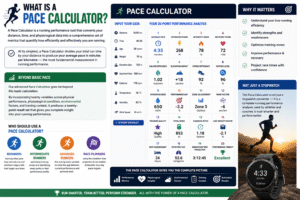
A Pace Calculator is a running performance tool that converts your distance, time, and physiological data into a comprehensive set of metrics that quantify how efficiently and effectively you are running. At its simplest, a Pace Calculator divides your total run time by your distance to produce your average pace in minutes per kilometre — the most fundamental measurement in running performance.
Our advanced Pace Calculator goes far beyond this basic calculation. By incorporating twenty variables across physical performance, physiological condition, environmental factors, and training context, it produces a twenty-point result set that covers average pace, estimated power, intensity index, recovery score, calorie efficiency, elevation impact, stride efficiency, oxygen level, hydration need, performance gap, zone adjustment, wind factor, training quality, total work in kilojoules, cadence ratio, age-weight factor, rest requirement, effective VO2, marathon time projection, and a final performance verdict.
No other single tool gives runners this breadth of insight in one calculation. The Pace Calculator is not just a stopwatch converter — it is a complete running performance analyser that helps you understand your training with the same depth of data used by professional coaching teams.
Who should use a Pace Calculator?
- Beginners learning what pace they naturally run and whether it aligns with their target race times
- Intermediate runners optimising training zones and identifying weak points in their performance profile
- Advanced runners fine-tuning every variable to close the gap between current performance and personal best
- Race planners using the marathon time projection to set realistic, achievable race-day pace targets

Why Every Runner Needs a Pace Calculator
Running without knowing your pace is like driving without a speedometer. You might eventually arrive at your destination, but you have no way of knowing whether you are going too fast, too slow, burning too much fuel, or heading for a breakdown.
Here is why using a Pace Calculator transforms training quality:
Prevents Overtraining: Running too fast too often is the most common cause of running injuries. A Pace Calculator reveals when your average pace suggests you are training above your sustainable threshold — enabling you to dial back before overuse injuries derail your programme.
Prevents Undertraining: Equally, consistently running too slowly produces fitness plateaus. The intensity index and training zone outputs of the Pace Calculator reveal when sessions are insufficiently challenging to drive meaningful adaptation.
Sets Realistic Race Goals: Race-day pacing disasters — starting too fast, hitting the wall, or dramatically missing a time target — are almost always caused by poor pace planning. The Pace Calculator’s marathon time projection gives you an evidence-based race-day pace target built on your actual training data rather than wishful thinking.
Tracks Progress Over Time: By saving and comparing Pace Calculator results from equivalent training runs over weeks and months, you create an objective performance record that shows clearly whether your training is producing the expected improvements.
Optimises Recovery: The recovery score and rest requirement outputs of the Pace Calculator quantify the recovery demand of each session — helping you plan rest days intelligently rather than guessing whether your body is ready for the next training load.
Understanding the 20 Inputs in Our Pace Calculator
The power of our Pace Calculator lies in the breadth and relevance of its twenty input fields. Together, they capture every variable that meaningfully affects running performance:
Distance (km): The total distance of your run. This, combined with time, produces your average pace — the most foundational output of any Pace Calculator.
Total Hours and Total Minutes: The complete duration of your run. Together, these fields express your total run time in minutes, which the Pace Calculator divides by distance to produce average pace in minutes per kilometre.
Age: Used in the intensity index calculation. Younger runners have higher maximum heart rates; age adjusts the interpretation of heart rate data in the performance analysis.
Weight (kg): Body weight is a key variable in power output estimation, hydration need calculation, and the age-weight factor. Heavier runners expend more energy per kilometre, a fact the Pace Calculator incorporates across multiple outputs.
Heart Rate: Average heart rate during the run. Combined with age and workout load, heart rate determines the intensity index — the key measure of how hard your cardiovascular system was working.
Elevation Gain (m): Total ascent during the run. Elevation significantly increases effort and slows pace on uphill sections. The Pace Calculator quantifies this as elevation impact per kilometre, contextualising your pace data against the terrain.
Step Count: Total steps taken during the run. Combined with cadence, step count contributes to the cadence ratio output.
Cadence (steps per minute): The number of foot strikes per minute. Elite runners typically cadence at 170 to 190 steps per minute. The Pace Calculator uses cadence alongside stride length to calculate stride efficiency — a key determinant of running economy.
Stride Length (m): The distance covered with each stride. Combined with cadence, this determines your theoretical pace and your stride efficiency score.
Oxygen Level (%): Blood oxygen saturation during or immediately after the run. The Pace Calculator uses this to produce an effective VO2 estimate and assess how altitude, fatigue, or cardiovascular strain affected oxygen delivery.
Workout Load: A subjective or computed measure of overall training stress. Combined with heart rate and age, it drives the intensity index; combined with sleep quality, it produces the training quality score.
Rest Time (hours): Hours of rest between this session and the previous training session. Insufficient rest time increases injury risk and reduces the quality of adaptation — the Pace Calculator uses this to compute rest requirement.
Sleep Quality (1–10): A subjective rating of sleep quality. Sleep is the primary recovery mechanism for runners. Poor sleep dramatically impairs performance and recovery — a variable most training logs ignore but our Pace Calculator explicitly incorporates.
Hydration (litres): Fluid consumed during the run. The Pace Calculator uses this alongside weight to calculate whether your hydration was adequate for your individual sweat rate and run duration.
Calories Burned: Estimated total caloric expenditure for the run. Used to calculate calorie efficiency per kilometre and total work in kilojoules.
Target Pace (min/km): Your goal pace for this run or race. The Pace Calculator compares your actual average pace against this target to produce the performance gap — the most direct measure of whether you hit your objective.
Previous Best (min/km): Your personal best pace for this distance or a comparable effort. Combined with current average pace, this provides a longitudinal performance comparison.
Training Zone (1–5): The intended training zone for the session — from Zone 1 (easy recovery) to Zone 5 (maximum effort). The Pace Calculator uses this to produce a zone adjustment factor that contextualises your intensity index against your session intention.
Wind Speed (km/h): Headwind or environmental wind speed during the run. Wind significantly affects running effort — a 20 km/h headwind can add 1 to 2 minutes per kilometre for average runners. The Pace Calculator quantifies the wind factor’s contribution to your performance data.
Average Pace – The Core Metric Explained
Average pace is the foundational output of any Pace Calculator, and understanding it thoroughly is essential before engaging with the more advanced metrics.
Formula: Average Pace (min/km) = Total Minutes ÷ Distance (km)
For example: 1 hour 30 minutes = 90 minutes. 90 ÷ 10km = 9.0 min/km average pace.
What your average pace tells you:
- How you performed versus your target: The performance gap output compares average pace to your target — a negative gap means you ran faster than planned; positive means slower.
- Your projected marathon time: The Pace Calculator multiplies average pace by 42.2 to project your marathon finish time — a powerful planning tool for race preparation.
- Your training zone alignment: Average pace, combined with heart rate and training zone, reveals whether you ran the intended effort level or drifted too fast or too slow.
Average pace benchmarks by runner category:
- Beginner (first year): 8:00 to 12:00 min/km
- Recreational runner: 5:30 to 7:30 min/km
- Competitive club runner: 4:00 to 5:30 min/km
- Elite amateur: 3:30 to 4:00 min/km
- Professional marathon runner: Under 3:00 min/km
Estimated Power Output and What It Means for Your Training
Running power — expressed in watts — is one of the most important emerging metrics in endurance performance, and our Pace Calculator estimates it from your weight, cadence, and stride length.
Formula: Estimated Power (W) = (Weight × Cadence × Stride Length) ÷ 100
Why power matters: Unlike pace, which is affected by external factors like wind, gradient, and fatigue, power output is a direct measure of the mechanical work your muscles are producing. Two runners of identical pace can have very different power outputs — the more efficient runner produces less power to achieve the same speed.
Using power data from the Pace Calculator:
- Compare power across runs: If your pace improves but power stays the same, running economy has improved.
- Identify efficiency gains: Increasing cadence while maintaining stride length increases power output and pace simultaneously — a key target for mid-level runners seeking improvement.
- Monitor fatigue: A run where power drops significantly late despite maintained effort indicates aerobic fatigue — a sign that the Pace Calculator’s rest requirement output should be taken seriously.
Intensity Index – Balancing Heart Rate, Age, and Workout Load
The intensity index is one of the most analytically powerful outputs of our Pace Calculator, combining three variables — heart rate, age, and workout load — to produce a single number that quantifies how hard your cardiovascular and musculoskeletal systems worked relative to your capacity.
Formula: Intensity Index = (Heart Rate ÷ Age) × (Workout Load ÷ 10)
Interpreting your intensity index:
- Low index (under 5): The session was within comfortable aerobic capacity — appropriate for recovery or base-building runs.
- Moderate index (5 to 10): The session represented a genuine aerobic stimulus — appropriate for tempo and steady-state training.
- High index (above 10): The session was highly demanding — appropriate for race-pace intervals or threshold work, but requires proportionally longer recovery.
The intensity index from the Pace Calculator is most useful when tracked across multiple sessions. A consistently rising index over several weeks without corresponding increases in rest and sleep may indicate accumulated fatigue and increased injury risk — a warning the Pace Calculator makes visible before it becomes a problem.
Recovery Score and Why Rest Is a Performance Variable
One of the most distinctive features of our Pace Calculator is its explicit recovery analysis — incorporating sleep quality and workout load to produce a recovery score that tells you how much your body has recovered from training demands.
Formula: Recovery = (Sleep Quality × 10) − (Workout Load ÷ 2)
Why recovery matters: Fitness gains do not happen during training — they happen during recovery. The training stimulus breaks down muscle fibres and depletes energy stores; the subsequent rest period is when repair, adaptation, and strengthening occur. Without adequate recovery, training load accumulates without producing corresponding fitness gains, and the risk of overuse injury and overtraining syndrome increases substantially.
Using the recovery score from the Pace Calculator:
- High recovery score: You are absorbing your training effectively — safe to maintain or increase load.
- Low recovery score: Your body is not fully recovering between sessions — reduce intensity, prioritise sleep, and consult the rest requirement output for guidance.
Sleep quality is particularly important. Even one or two nights of poor sleep can reduce running performance by 5% to 15% — a magnitude clearly visible in Pace Calculator results when sleep quality drops from 8 to 4.
Calorie Efficiency – Getting More from Every Kilometre
Calorie efficiency — calories burned per kilometre — is a measure of running economy, and our Pace Calculator produces it directly from your calorie expenditure and distance data.
Formula: Calorie Efficiency (kcal/km) = Calories Burned ÷ Distance
Why it matters: A lower calorie-per-kilometre figure indicates better running economy — your body is covering each kilometre with less metabolic cost, which means you can sustain a given pace for longer before fatiguing. Elite marathoners typically burn 60 to 75 kcal/km; recreational runners commonly burn 80 to 100 kcal/km.
Improving calorie efficiency (reducing kcal/km) is one of the primary goals of endurance training and is achieved through improved running form, increased strength-to-weight ratio, greater cardiovascular efficiency, and higher weekly mileage that builds aerobic base. Track this metric over months in the Pace Calculator to confirm your training is producing the expected economy improvements.
Elevation Impact, Stride Efficiency, and Oxygen Level
Three outputs of the Pace Calculator — elevation impact, stride efficiency, and oxygen level — form a physiological picture of how terrain, movement mechanics, and cardiovascular function combined during your run:
Elevation Impact (m/km): Total elevation gain divided by distance — the average metres of climbing per kilometre. High elevation impact contextualises a slower-than-usual pace: a 7:00 min/km pace on a route with 50m/km elevation impact is a very different physiological effort from a 7:00 min/km pace on flat terrain.
Stride Efficiency: Cadence multiplied by stride length, divided by 100 — a unitless measure of how effectively each stride converts effort into forward movement. Higher stride efficiency indicates better running mechanics. The key levers are increasing cadence toward the optimal 170 to 190 range and optimising stride length — not overstriding (which increases braking force) and not understriding (which wastes energy in vertical oscillation).
Oxygen Level: Your blood oxygen saturation adjusted for the exertion impact of your heart rate. Low effective oxygen level in the Pace Calculator indicates high cardiovascular strain relative to oxygen delivery — relevant for altitude training, runners with respiratory conditions, or sessions conducted in extreme heat or humidity that impair oxygen transport efficiency.
Hydration Need – The Often Ignored Performance Factor
Dehydration is one of the most consistent and preventable causes of running performance decline, and our Pace Calculator quantifies your individual hydration need based on your weight and fluid intake.
Formula: Hydration Need (L) = (Hydration Input × Weight) ÷ 20
Why this matters: Even mild dehydration — 2% of body weight — reduces aerobic performance by up to 10%, impairs concentration, increases perceived effort, and elevates core temperature. At 5% dehydration, performance can decline by 20% to 30%. For a 70kg runner, 2% dehydration means just 1.4 litres of fluid deficit — easily reached on a warm-day long run without conscious hydration strategy.
Practical hydration guidelines informed by the Pace Calculator:
- Short runs under 45 minutes: Pre-run hydration is typically sufficient; on-run hydration not essential.
- Runs of 45 to 90 minutes: 400 to 600ml per hour depending on conditions and sweat rate.
- Long runs over 90 minutes: Structured hydration every 20 to 30 minutes; consider electrolyte replacement alongside fluids.
- Hot or humid conditions: Increase fluid intake by 30% to 50% above normal recommendations.
Performance Gap, Training Zone, and Wind Factor
Three outputs from the Pace Calculator quantify the gap between intention and execution, the appropriateness of your effort level, and the environmental conditions that affected your result:
Performance Gap (min/km): Your average pace minus your target pace. A negative value means you ran faster than your target — positive means you fell short. This is the most direct measure of whether your session met its objective. The Pace Calculator displays this with two decimal places, making even small performance gains visible and motivating.
Zone Adjustment: Your training zone input multiplied by 1.5 — a scaling factor that contextualises your intensity index against your session’s intended effort level. A Zone 2 (easy aerobic) session with a high intensity index suggests you ran too hard for the intended stimulus, likely blunting the specific adaptation that easy aerobic running is designed to produce.
Wind Factor: Wind speed multiplied by 0.2 — quantifying the aerobic cost penalty imposed by wind resistance. A 20 km/h headwind produces a wind factor of 4.0, representing a significant addition to effective effort. The Pace Calculator’s wind factor helps contextualise a slower pace on a windy day — you may have run exactly the right effort level despite a slower-than-usual average pace.
Marathon Time Projection – From Daily Pace to Race Day
One of the most practically valuable outputs of our Pace Calculator is the marathon time projection — a direct multiplication of your average training pace by the marathon distance of 42.2 kilometres.
Formula: Marathon Time (minutes) = Average Pace (min/km) × 42.2
This projection is most accurate when based on race-pace training runs — sessions conducted at your goal marathon effort, not easy recovery runs or maximum-effort intervals. Use the Pace Calculator across multiple tempo and threshold sessions to build a consistent picture of your sustainable race-day pace, then apply the marathon projection to set a realistic finish time target.
Marathon time benchmarks from Pace Calculator projections:
- 5:00 min/km average pace: Marathon projection = 211 minutes (3 hours 31 minutes)
- 4:30 min/km average pace: Marathon projection = 190 minutes (3 hours 10 minutes)
- 4:00 min/km average pace: Marathon projection = 169 minutes (2 hours 49 minutes)
- 3:30 min/km average pace: Marathon projection = 148 minutes (2 hours 28 minutes)
The final verdict output — “Excellent” if your average pace beat your target, “Needs Work” if it fell short — provides a clear binary summary alongside the quantitative performance gap.
How to Use Our Pace Calculator Step-by-Step
Our free Pace Calculator is powerful, comprehensive, and easy to use. Here is the complete process:
Step One – Enter Distance and Time: Input your run distance in kilometres and your total run time in hours and minutes. These two fields produce your average pace — the core output of any Pace Calculator.
Step Two – Enter Personal Data: Input your age, weight in kilograms, and average heart rate during the run.
Step Three – Enter Movement Data: Input elevation gain, step count, cadence, and stride length. These fields drive the biomechanical outputs — stride efficiency, cadence ratio, and estimated power.
Step Four – Enter Physiological Data: Input oxygen level, workout load, rest time, sleep quality, and hydration in litres. These fields drive the recovery and physiological efficiency outputs that distinguish our Pace Calculator from basic pace tools.
Step Five – Enter Performance Context: Input calories burned, target pace, previous best, training zone, and wind speed. These fields produce the comparative and contextual outputs — performance gap, zone adjustment, wind factor, and final verdict.
Step Six – Click Calculate: Instantly view all twenty results across your complete performance profile.
Step Seven – Interpret and Plan: Use average pace for race planning, intensity index for training zone confirmation, recovery score for scheduling your next session, and marathon time projection for race-day target setting.
Step Eight – Track Over Time: Save your Pace Calculator results from each session and compare across weeks and months to track genuine performance progression.
Pace Zones and What They Mean for Your Training Plan
Training at the right pace zone is the single most important principle in effective running programming, and the Pace Calculator helps you confirm whether each session was conducted in the intended zone.
Zone 1 – Easy/Recovery (very low intensity): Used for warm-ups, cool-downs, and active recovery days. These runs build aerobic base, promote recovery, and should feel conversational. Most recreational runners do not run easy enough in Zone 1 — the intensity index from the Pace Calculator frequently reveals Zone 1 runs actually conducted at Zone 2 or 3 intensity.
Zone 2 – Aerobic Base (low intensity): The most important training zone for endurance runners. Zone 2 running at 60% to 70% of maximum heart rate builds mitochondrial density and fat oxidation capacity — the physiological foundations of marathon performance. Elite runners spend 70% to 80% of all training time in Zone 2.
Zone 3 – Tempo (moderate intensity): Comfortably hard running at around lactate threshold. Tempo runs build the ability to sustain faster paces before fatigue forces a slowdown.
Zone 4 – Threshold (hard intensity): Running at or slightly above lactate threshold. These sessions are challenging but essential for improving the pace at which you can sustain aerobic effort.
Zone 5 – Maximum Effort (very high intensity): Short, maximal efforts — track intervals, hill sprints, race-pace kilometres. Zone 5 sessions require the longest recovery periods, as reflected in the Pace Calculator’s rest requirement output.
How to Improve Your Pace Over Time
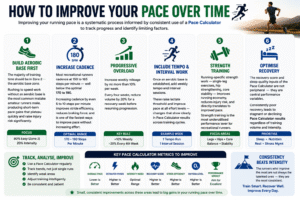
Improving your running pace is a systematic process informed by consistent use of a Pace Calculator to track progress and identify limiting factors:
Build Aerobic Base First: The majority of training time should be in Zone 2 — the aerobic base zone. Rushing to speed work without an aerobic base is the most common mistake amateur runners make, producing short-term pace gains that plateau quickly and raise injury risk significantly.
Increase Cadence: Most recreational runners cadence at 150 to 165 steps per minute — well below the optimal 170 to 190. Increasing cadence by even 5 to 10 steps per minute improves stride efficiency, reduces braking force, and is one of the fastest ways to improve pace without increasing effort. The Pace Calculator’s cadence and stride efficiency outputs track this improvement directly.
Progressive Overload: Increase weekly mileage by no more than 10% per week. Every four weeks, reduce volume by 20% for a recovery week before resuming progression.
Include Tempo and Interval Work: Once an aerobic base is established, add weekly tempo and interval sessions. These raise lactate threshold and improve pace at all effort levels — changes that show clearly in Pace Calculator results across training cycles.
Strength Training: Running-specific strength work — single-leg exercises, hip strengthening, core stability — improves running economy, reduces injury risk, and directly translates to improved pace. Strength training is the most underutilised performance lever for recreational runners.
Optimise Recovery: The recovery score and sleep quality inputs of the Pace Calculator are not peripheral — they are central performance variables. Consistently poor recovery leads to stagnant or declining Pace Calculator results regardless of training volume and intensity.
Common Pace Calculator Mistakes Runners Make
Even experienced runners misuse pace data. Here are the most frequent errors — all avoidable with a proper understanding of the Pace Calculator:
Averaging Across Varied Terrain: Comparing average pace from a hilly run against a flat course average is misleading without accounting for elevation impact. Always use the Pace Calculator’s elevation impact output to contextualise pace data against route difficulty.
Ignoring Wind Conditions: A fast pace on a tailwind day is not a representative performance benchmark. The Pace Calculator’s wind factor output quantifies this effect — always note wind conditions when interpreting pace results.
Training Too Fast on Easy Days: The most damaging mistake in recreational running. Running Zone 1 and Zone 2 sessions too fast blunts aerobic adaptation and accumulates fatigue that compromises quality sessions. The intensity index from the Pace Calculator reveals this pattern clearly.
Setting Race Pace from Best Training Runs: Race-day pacing should be based on consistent, representative training pace — not peak sessions achieved under ideal conditions. Use the Pace Calculator across multiple sessions to establish a reliable sustainable pace baseline rather than building race strategy on a single exceptional run.
Neglecting Cadence and Stride Data: Many runners focus exclusively on average pace and ignore the biomechanical outputs. The Pace Calculator’s cadence ratio and stride efficiency outputs often reveal mechanical inefficiencies that, once addressed, produce immediate pace improvements with no increase in training volume.
Frequently Asked Questions (FAQs)
What is a Pace Calculator? A Pace Calculator is a running performance tool that converts your distance, time, and physiological data into comprehensive performance metrics. At minimum, it calculates average pace in minutes per kilometre; our advanced Pace Calculator produces twenty distinct outputs from twenty inputs.
How does the Pace Calculator calculate average pace? The Pace Calculator converts your total hours and minutes into a total minute value, then divides by distance in kilometres: Average Pace = Total Minutes ÷ Distance. For a 10km run completed in 1 hour 30 minutes, the pace is 90 ÷ 10 = 9.0 min/km.
Is the Pace Calculator free to use? Yes. Our Pace Calculator is completely free with no account or registration required. Enter your twenty inputs and receive instant comprehensive results.
What is the marathon time projection in the Pace Calculator? The marathon projection multiplies your average pace by 42.2 (the marathon distance in kilometres) to estimate how long a full marathon would take at your current training pace. It is most useful when based on tempo or race-pace training runs rather than easy sessions.
How does the Pace Calculator use heart rate? Heart rate is combined with age and workout load to produce the intensity index — a measure of cardiovascular stress during the session. Higher heart rate relative to age and workout load produces a higher intensity index, indicating a more demanding session requiring more recovery.
What does the Performance Gap output mean? Performance gap is your average pace minus your target pace. A negative value means you ran faster than your target — a positive value means you fell short. This is the most direct measure of whether your session met its pace objective.
How accurate is the Pace Calculator’s marathon projection? The projection is mathematically precise given your inputs, but its predictive accuracy depends on whether your training pace is representative of your sustainable race effort. Base the marathon projection on tempo or threshold sessions rather than easy or all-out efforts for the most reliable race-day prediction.
What training zone should I use in the Pace Calculator? Enter the intended training zone for your session: 1 (easy recovery), 2 (aerobic base), 3 (tempo), 4 (threshold), or 5 (maximum effort). The Pace Calculator uses this to produce a zone adjustment factor that helps confirm whether your effort level matched your session’s intention.
Why does the Pace Calculator include sleep quality? Sleep is the primary physiological recovery mechanism for runners. Poor sleep directly impairs performance, increases injury risk, and reduces the quality of training adaptation. Including sleep quality in the Pace Calculator ensures this critical variable is captured in your performance analysis rather than ignored.
How often should I use the Pace Calculator? After every training session. Regular use of the Pace Calculator builds a comprehensive performance dataset that makes progress, plateaus, and emerging issues clearly visible over weeks and months of training.
Conclusion
Running is a data sport, and the runners who improve fastest are those who train with precision rather than intuition alone. A Pace Calculator is the analytical foundation that precision training requires — turning the raw data of each session into actionable performance insights that guide every decision about intensity, recovery, race planning, and long-term development.
Our free Pace Calculator delivers twenty distinct metrics from twenty carefully chosen inputs — from the foundational average pace and marathon time projection, through biomechanical efficiency scores and physiological condition measures, to environmental adjustments and training quality assessments. No other free running tool gives you this complete a picture of your performance in a single calculation.
Whether you are preparing for your first race, chasing a personal best, managing a heavy training block, or simply trying to understand why some runs feel harder than others, the Pace Calculator gives you the objective, quantified answers your training deserves. Use it after every session. Track your results over time. Let the data guide your decisions.
Because the runners who know their numbers are the runners who improve them — and it all starts with a Pace Calculator.