Discover your future retirement savings with our 401k Calculator
Table of Contents
- Introduction
- What Is a Sales Tax Calculator?
- Why You Need a Sales Tax Calculator
- How Sales Tax Works: The Basics Every Buyer and Seller Must Know
- Key Inputs in a Sales Tax Calculator Explained
- Tax Exclusive vs. Tax Inclusive: Understanding the Difference
- How to Use the Sales Tax Calculator Step by Step
- Understanding Your Results: Breaking Down the Summary
- How Discounts Interact with Sales Tax
- Shipping, Handling, and Their Impact on Your Total
- Sales Tax Rates Across the United States: What You Need to Know
- Real-Life Scenarios Using the Sales Tax Calculator
- Sales Tax for Businesses: Compliance, Collection, and Reporting
- Common Mistakes People Make When Calculating Sales Tax
- Frequently Asked Questions (FAQs)
- Conclusion
Introduction
Whether you are a consumer checking the final price of an online purchase, a small business owner calculating how much tax to collect at checkout, or a retailer reconciling your monthly tax obligations, one thing is certain — understanding sales tax is not optional. It is a daily financial reality for hundreds of millions of people across the United States and around the world.
A Sales Tax Calculator is the fastest, most accurate way to determine exactly how much tax applies to any transaction — whether you are working from a pre-tax price and need to find the total, or you have been given a final price and need to reverse-engineer the tax component. It eliminates guesswork, prevents costly errors, and gives both buyers and sellers the clarity they need to transact with confidence.
In this comprehensive guide, we will cover everything you need to know about sales tax — how it works, how rates vary, how discounts and shipping interact with taxable amounts, how businesses collect and remit tax, and how to use a Sales Tax Calculator effectively in any situation. By the end, you will have complete mastery over this often confusing but critically important aspect of everyday financial life.
What Is a Sales Tax Calculator?
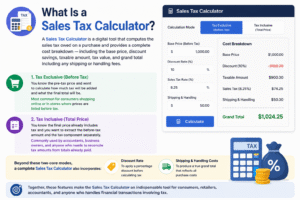
A Sales Tax Calculator is a digital tool that computes the sales tax owed on a purchase and provides a complete cost breakdown — including the base price, discount savings, taxable amount, tax value, and grand total including any shipping or handling fees.
A well-designed Sales Tax Calculator handles two fundamental calculation scenarios:
Tax Exclusive (Before Tax): You know the pre-tax price and want to calculate how much tax will be added and what the final total will be. This is the most common scenario for consumers shopping online or in stores where prices are listed before tax.
Tax Inclusive (Total Price): You know the final price already includes tax and you want to extract the before-tax amount and the tax component separately. This is commonly used by accountants, business owners, and anyone who needs to reconcile tax amounts from totals already paid.
Beyond these two core modes, a complete Sales Tax Calculator also incorporates:
- Discount rate — to apply a percentage discount before calculating tax
- Shipping and handling costs — to produce a true grand total that reflects all purchase costs
Together, these features make the Sales Tax Calculator an indispensable tool for consumers, retailers, accountants, and anyone who handles financial transactions involving tax.
Why You Need a Sales Tax Calculator
Sales tax sounds simple — but in practice, it is a source of constant confusion, miscalculation, and financial loss for both consumers and businesses. Here is why a dedicated Sales Tax Calculator is essential:
Accuracy in every transaction. Even a small error in sales tax calculation — misapplying a rate, forgetting to include shipping, or incorrectly reversing tax from a total — can compound into significant financial discrepancies over time.
Transparency for consumers. When you use a Sales Tax Calculator before completing a purchase, you know exactly what you will pay — no surprises at checkout. This is especially valuable when shopping across state lines, where rates vary dramatically.
Compliance for businesses. Retailers must collect the correct amount of sales tax and remit it to the appropriate tax authority. Overcollecting creates accounting complications. Undercollecting creates legal liability. A Sales Tax Calculator ensures every transaction is calculated correctly the first time.
Reverse calculation capability. Sometimes you only have the final price and need to work backwards to find the tax component — for receipts, expense reports, reimbursements, or accounting records. The tax-inclusive mode of a Sales Tax Calculator handles this instantly.
Discount and shipping clarity. Most purchases involve multiple adjustments. A Sales Tax Calculator that handles discounts and shipping fees in one calculation saves time and prevents the layered errors that manual multi-step calculations produce.
How Sales Tax Works: The Basics Every Buyer and Seller Must Know
Sales tax is a consumption tax levied by state and local governments on the sale of goods and, in many cases, certain services. It is collected at the point of sale by the retailer and then remitted to the relevant tax authority on a regular schedule (monthly, quarterly, or annually, depending on the jurisdiction and sales volume).
Key principles of sales tax:
It is a percentage of the sale price. Sales tax is expressed as a percentage (e.g., 8%) applied to the taxable sale amount. The result is added to the pre-tax price to produce the final total. A Sales Tax Calculator handles this arithmetic automatically.
Rates vary by location. In the United States, sales tax rates are set at the state level, with additional rates potentially added by counties and municipalities. The combined rate can vary from 0% (in states like Oregon, Montana, New Hampshire, Delaware, and Alaska) to over 10% in some localities.
Not everything is taxable. Many states exempt certain categories of goods from sales tax — commonly groceries, prescription medications, clothing, and agricultural equipment. What is taxable varies significantly by state.
Nexus determines collection obligation. For businesses, the obligation to collect sales tax in a given state depends on whether the business has “nexus” — a sufficient economic or physical presence in that state. Since the 2018 Supreme Court decision in South Dakota v. Wayfair, economic nexus rules mean that even online retailers without physical presence may be required to collect tax in states where they exceed sales thresholds.
Understanding these fundamentals is the foundation of using a Sales Tax Calculator effectively — because entering the correct rate and correctly identifying your taxable base determines the accuracy of every calculation.
Key Inputs in a Sales Tax Calculator Explained
Getting accurate results from a Sales Tax Calculator depends on understanding each input field and using it correctly.
Amount Type: Choose whether the amount you are entering is the price before tax (Tax Exclusive) or the total price including tax (Tax Inclusive). Selecting the wrong option will produce completely incorrect results, so this selection must be made carefully.
Amount / Base Price: Enter the price of the item or service before any discounts but before tax (for tax-exclusive mode), or the total final price including tax (for tax-inclusive mode).
Sales Tax Rate: The applicable sales tax rate as a percentage. For US transactions, this should reflect the combined state plus local rate at the destination of the sale. For example, a rate of 8.5% means $8.50 in tax per $100 of taxable sales. Always verify the applicable rate for your specific location using your state’s revenue department website, then enter it into the Sales Tax Calculator.
Discount Rate: If a discount is being applied to the item, enter it here as a percentage. The Sales Tax Calculator applies the discount to the base price first, then calculates tax on the discounted amount — which is the correct legal treatment in most jurisdictions.
Shipping / Handling Cost: If shipping and handling charges are part of the transaction total, enter them here. Note that whether shipping is taxable varies by state — some states tax shipping on taxable goods, others do not. If shipping is not taxable in your state, enter it here for grand total purposes but verify your local rules for tax application.
Tax Exclusive vs. Tax Inclusive: Understanding the Difference
This distinction is one of the most frequently confused aspects of sales tax calculation, and getting it wrong produces significant errors.
Tax Exclusive (Before Tax / Net Price): The price shown does not include tax. Tax is calculated on top of this price and added to arrive at the final total. This is standard practice in most US retail settings — prices on shelves and online are shown without tax, and tax is added at checkout.
Example: Item price = $100. Tax rate = 10%. Tax amount = $10. Total = $110.
Tax Inclusive (Gross Price / Total Price): The price shown already includes tax embedded within it. The Sales Tax Calculator in this mode extracts the tax component and reveals the pre-tax net amount.
Example: Total price = $110. Tax rate = 10%. Pre-tax amount = $110 ÷ 1.10 = $100. Tax component = $10.
Tax-inclusive pricing is common in many countries outside the United States — Australia (GST), UK (VAT), most of Europe — where displayed prices always include tax. It is also used in some US service contexts and for accounting reconciliation when working backwards from receipts.
The Sales Tax Calculator handles both modes seamlessly. Simply select the correct amount type before entering your figures to ensure your calculation is based on the right mathematical formula.
How to Use the Sales Tax Calculator Step by Step
Using the Sales Tax Calculator is fast and intuitive. Follow these steps for a complete, accurate calculation:
Step 1 — Select your Amount Type. Choose “Before Tax (Tax Exclusive)” if your price does not include tax, or “Total Price (Tax Inclusive)” if your price already includes tax.
Step 2 — Enter the Amount / Base Price. Type the price of the item or service in the amount field.
Step 3 — Enter the Sales Tax Rate. Input the applicable tax rate for your location. For US transactions, look up the combined state and local rate for your delivery or purchase destination.
Step 4 — Enter the Discount Rate (if applicable). If a discount applies to the purchase, enter the percentage here. The Sales Tax Calculator will apply the discount first, then calculate tax on the discounted price.
Step 5 — Enter Shipping and Handling costs (if applicable). Add any shipping or handling charges that form part of the total transaction cost.
Step 6 — Click Calculate. The Sales Tax Calculator instantly produces a complete itemized breakdown: initial base price, discount saved, before-tax net amount, sales tax value, after-tax gross total, shipping cost, and grand total.
Step 7 — Review and use your results. Whether you are confirming a purchase total, preparing an invoice, filing a tax return, or reconciling accounts, the Sales Tax Calculator gives you every figure you need in a single, organized summary.
Understanding Your Results: Breaking Down the Summary
The Sales Tax Calculator produces a detailed line-by-line breakdown designed for complete transparency:
Initial Base Price: The original price entered before any adjustments. This is your starting point.
Discount Value Saved: The dollar amount subtracted from the base price based on your discount percentage. This is shown clearly so you can confirm the discount was applied correctly.
Before-Tax Price (Net Amount): The taxable amount after the discount is applied. Tax is calculated on this figure, not on the original pre-discount price — which is the correct approach in most tax jurisdictions.
Sales Tax Value: The exact dollar amount of tax applied at your stated rate to the net amount. This is the figure you owe to — or pay to — the tax authority.
After-Tax Price (Gross Total): The pre-tax amount plus the sales tax. This is the price of the item before shipping is added.
Shipping & Handling Cost: Added separately so you can see how shipping contributes to the final total independently of the taxable amount.
Grand Total Price: The complete, final amount due — including the discounted price, sales tax, and all shipping and handling costs. This is the number that appears on your invoice or receipt, and the Sales Tax Calculator ensures it is accurate every time.
How Discounts Interact with Sales Tax
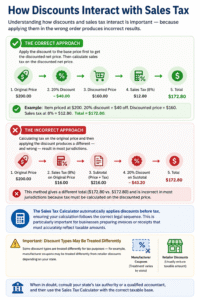
Understanding how discounts and sales tax interact is important — because applying them in the wrong order produces incorrect results.
The correct approach: Apply the discount to the base price first to get the discounted net price. Then calculate sales tax on the discounted net price. This is the standard treatment under US tax law for most promotional and volume discounts.
Example: Item priced at $200. 20% discount = $40 off. Discounted price = $160. Sales tax at 8% = $12.80. Total = $172.80.
The incorrect approach: Calculating tax on the original price and then applying the discount produces a different — and wrong — result in most jurisdictions.
The Sales Tax Calculator automatically applies discounts before tax, ensuring your calculation follows the correct legal sequence. This is particularly important for businesses preparing invoices or receipts that must accurately reflect taxable amounts.
Note that some discount types are treated differently for tax purposes — for example, manufacturer coupons may be treated differently from retailer discounts depending on your state. When in doubt, consult your state’s tax authority or a qualified accountant, and then use the Sales Tax Calculator with the correct taxable base.
Shipping, Handling, and Their Impact on Your Total
The taxability of shipping and handling charges is one of the most frequently misunderstood aspects of sales tax compliance — and it varies significantly by state.
States where shipping IS generally taxable: Arizona, California (when combined with price of goods), Colorado, Florida, Georgia, Illinois, New York, and many others. In these states, shipping charges on taxable goods are included in the taxable base.
States where shipping is generally NOT taxable: Virginia, California (separately stated), Missouri, and several others where shipping charges are exempt if separately itemized on the invoice.
The Sales Tax Calculator includes a dedicated shipping field so you can include these costs in your grand total calculation. For compliance purposes, confirm whether shipping is taxable in your specific state before including it in the tax base — the calculator separates shipping as a line item so you can include or exclude it from the taxable amount as your jurisdiction requires.
Sales Tax Rates Across the United States: What You Need to Know
Sales tax rates in the United States are among the most complex in the world — because they are set at the state, county, city, and even special district levels, with thousands of different combined rates applying across the country.
States with no sales tax: Alaska (state level), Delaware, Montana, New Hampshire, Oregon. Residents and businesses in these states pay no state sales tax, though Alaska localities may impose local taxes.
States with the lowest combined rates: Hawaii, Wisconsin, Wyoming, Maine, and Virginia typically rank among the lowest.
States with the highest combined rates: Louisiana, Tennessee, Arkansas, Washington, and Alabama regularly post combined state and local rates above 9%.
Why this matters for your Sales Tax Calculator: If you are buying or selling across state lines — particularly for e-commerce — you must apply the correct destination-state rate for each transaction. Using a single generic rate for all transactions will produce errors. Always look up the applicable combined rate and enter it precisely into the Sales Tax Calculator for each individual transaction.
Real-Life Scenarios Using the Sales Tax Calculator
Scenario 1 — The Online Shopper: Jennifer is buying a laptop priced at $999 from an online retailer that ships to her home in Texas, where the combined sales tax rate is 8.25%. She also gets a 10% loyalty discount and pays $15 shipping. Using the Sales Tax Calculator: discounted price = $899.10, tax = $74.18, shipping = $15. Grand total = $988.28. She knows exactly what to expect at checkout — no surprises.
Scenario 2 — The Small Business Owner: David owns a retail gift shop in Illinois. A customer purchases $340 worth of goods with a 5% discount and the local combined tax rate is 9%. David uses the Sales Tax Calculator to confirm: discounted base = $323, tax = $29.07, total = $352.07. He invoices accurately and remits the correct tax amount to the state.
Scenario 3 — The Accountant Reversing Tax: Maria has a receipt showing a total paid of $567.25 and needs to determine the before-tax amount and tax component for expense reporting. The applicable rate was 7.5%. She switches the Sales Tax Calculator to Tax Inclusive mode, enters $567.25 and 7.5%, and immediately gets: net amount = $527.67, tax = $39.58.
Sales Tax for Businesses: Compliance, Collection, and Reporting
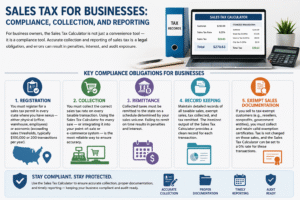
For business owners, the Sales Tax Calculator is not just a convenience tool — it is a compliance tool. Accurate collection and reporting of sales tax is a legal obligation, and errors can result in penalties, interest, and audit exposure.
Key compliance obligations for businesses:
Registration. You must register for a sales tax permit in every state where you have nexus — either physical (office, warehouse, employees) or economic (exceeding sales thresholds, typically $100,000 or 200 transactions per year).
Collection. You must collect the correct sales tax rate on every taxable transaction. Using the Sales Tax Calculator for every sale — or integrating it into your point-of-sale or e-commerce system — is the most reliable way to ensure accuracy.
Remittance. Collected taxes must be remitted to the state on a schedule determined by your sales volume. Failing to remit on time results in penalties and interest.
Record keeping. Maintain detailed records of all taxable sales, exempt sales, tax collected, and tax remitted. The itemized output of the Sales Tax Calculator provides a clean record for each transaction.
Exempt sales documentation. If you sell to tax-exempt customers (e.g., resellers, nonprofits, government entities), you must collect and retain valid exemption certificates. Tax is not charged on these sales, and the Sales Tax Calculator can be set to a 0% rate for these transactions.
Common Mistakes People Make When Calculating Sales Tax
Even with a Sales Tax Calculator, certain common errors persist. Here is what to watch out for:
Using the wrong tax rate. Applying a state rate without adding local rates is one of the most common mistakes for businesses, particularly in states like California, Illinois, and Colorado where local additions can significantly exceed the base state rate.
Applying tax before the discount. As discussed, tax should be calculated on the post-discount amount. The Sales Tax Calculator applies discounts first automatically, but manual calculations frequently get this order wrong.
Treating all goods as taxable. Many categories — groceries, medical supplies, clothing in some states — are exempt. Charging tax on exempt items is technically an overpayment by the customer and a compliance error for the seller.
Forgetting about use tax. If you purchase goods for business use from a seller who does not charge sales tax, you may owe use tax to your own state. This is a widely overlooked obligation.
Not updating rates. Sales tax rates change frequently. A rate that was accurate six months ago may no longer be correct. Always verify current rates before configuring your Sales Tax Calculator for ongoing business use.
Ignoring nexus changes. E-commerce businesses that have grown into new states may have new tax collection obligations they are unaware of. Failure to collect creates significant retroactive liability.
Frequently Asked Questions (FAQs)
What is the difference between tax-exclusive and tax-inclusive pricing?
Tax-exclusive pricing shows the price before tax is added — which is standard in most US retail environments. The tax is calculated and added on top at checkout. Tax-inclusive pricing means the displayed price already contains the tax — you need to extract the tax component mathematically. The Sales Tax Calculator handles both modes: simply select the appropriate “Amount Type” before calculating.
How do I find the correct sales tax rate for my location?
For US transactions, the combined rate includes the state base rate plus any applicable county and city rates. The best sources are your state’s Department of Revenue website, the Streamlined Sales Tax Governing Board database, or a tax-rate lookup tool that uses ZIP codes. Once you have the correct combined rate, enter it into the Sales Tax Calculator for accurate results.
Is shipping always subject to sales tax?
No — it depends on the state. Some states tax shipping on taxable goods; others exempt shipping if it is separately stated on the invoice. A few states have more nuanced rules. Always verify your specific state’s treatment before including shipping in your taxable base. The Sales Tax Calculator includes shipping as a separate line item so you can decide how to treat it based on your jurisdiction.
Can I use the Sales Tax Calculator for VAT (Value Added Tax) calculations?
Yes. While the tool is labeled as a Sales Tax Calculator, the math is identical for VAT calculations. Simply enter the VAT rate in place of the sales tax rate. For VAT-inclusive pricing (which is standard in most VAT-using countries), use the Tax Inclusive mode to extract the VAT component from a total price.
How does the discount affect the tax calculation?
The Sales Tax Calculator applies the discount to the base price first, then calculates tax on the discounted amount. This is the correct legal treatment in most US jurisdictions for standard retailer discounts. For example, on a $200 item with a 10% discount and 8% tax: discounted price = $180, tax = $14.40, total = $194.40 — not $216 minus 10%.
Do all products get taxed at the same rate?
Not necessarily. Most states have different rates or outright exemptions for certain categories — typically groceries, prescription drugs, clothing, and agricultural supplies. If you are calculating tax on a potentially exempt item, verify its taxability in your state before applying a rate. Use the Sales Tax Calculator with a 0% rate for confirmed exempt items to still generate a clean breakdown of the pre-tax price and grand total.
How often do sales tax rates change?
More frequently than most people realize. State and local governments adjust sales tax rates through legislation, ballot initiatives, and budget cycles. Local rates can change even when state rates remain stable. Businesses should review applicable rates at least quarterly and update their Sales Tax Calculator inputs accordingly to maintain compliance and accuracy.
Conclusion
Sales tax touches every purchase, every business transaction, and every financial record that involves the exchange of goods and services. Understanding it fully — and calculating it correctly every time — is not just good financial hygiene; it is a legal and commercial necessity.
The Sales Tax Calculator makes this entire process fast, accurate, and completely transparent. Whether you are a consumer verifying a checkout total, a retailer preparing an invoice, or an accountant reconciling receipts, the Sales Tax Calculator delivers every figure you need in a clean, itemized breakdown that leaves nothing to guesswork.
The key takeaways from this guide are practical and immediate: Always select the correct amount type (tax-exclusive or tax-inclusive). Use the accurate combined state and local rate for your transaction location. Apply discounts before tax, not after. Treat shipping appropriately based on your state’s rules. And revisit your rates regularly to ensure they reflect current legislation.
For businesses, the Sales Tax Calculator is a compliance tool as much as a convenience tool — one that protects you from undercollection, overcollection, and the audit risk that comes with systematic errors in tax accounting.
Use the Sales Tax Calculator confidently, consistently, and correctly — and transform one of the most confusing aspects of everyday finance into one of your simplest, most reliable calculations.