Calculate your exact age instantly with our fast and accurate Age Calculator
Table of Contents
- Introduction
- What Is Time Calculation?
- What Is This Tool?
- Why You Should Use This Tool
- Step-by-Step Usage Guide
- How the Tool Works: The Math Behind the Results
- Common Use Cases
- Real-World Applications Across Industries
- Tips for Accurate Time Calculations
- Common Mistakes to Avoid
- Frequently Asked Questions (FAQs)
- Conclusion
Introduction
Time is the one resource that cannot be stored, recovered, or replaced — and measuring it precisely matters in nearly every area of life. Whether you are tracking hours worked, computing the duration of a process, planning a schedule down to the second, or figuring out how long a task took across a shift, manual time arithmetic is slow, repetitive, and prone to error. A Time Calculator solves all of this instantly.
Unlike simple clock subtraction, a Time Calculator handles hours, minutes, and seconds simultaneously, giving you not only the total duration in each unit but also a clean, broken-down result: hours, minutes, and seconds combined. Enter a start time and end time, click Calculate, and get your complete answer in under a second.
In this complete guide, you will learn exactly what a Time Calculator is, how it works, what formulas it applies, and where it is most valuable in everyday life and professional work. By the end, you will have everything you need to use this tool accurately and efficiently every time you need a precise time measurement.
What Is Time Calculation?
Time calculation is the process of determining the difference, sum, or duration between two or more points in time. On the surface, this sounds simple — but time arithmetic is uniquely awkward because it does not follow the base-10 system we use for everything else.
Time operates in mixed bases:
- 60 seconds = 1 minute
- 60 minutes = 1 hour
- 24 hours = 1 day
This means that 9:30 + 0:45 does not equal 9:75. It equals 10:15, because 75 minutes overflows into 1 hour and 15 minutes. Every time you add or subtract across these boundaries — seconds rolling into minutes, minutes rolling into hours — the arithmetic requires a conversion step that is easy to botch manually.
Common time calculations people need to perform:
- Duration between two times — how long from 9:30 AM to 5:45 PM?
- Time elapsed with seconds — how long did a process run from 14:22:37 to 18:04:09?
- Payroll hours — how many hours and minutes did an employee work across a shift?
- Training and performance timing — how long did an athlete run a segment?
- Event planning — how much time is allocated between sessions in a schedule?
Manual arithmetic for each of these requires converting everything to seconds, performing the subtraction, then converting back — a multi-step process that is frustrating to repeat dozens of times per day. A Time Calculator performs all of it in a single operation.
What Is a Time Calculator?
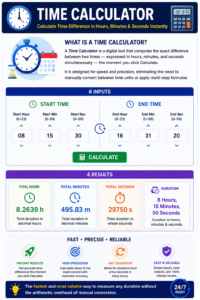
A Time Calculator is a digital tool that computes the exact difference between two times — expressed in hours, minutes, and seconds simultaneously — the moment you click Calculate. It is designed for speed and precision, eliminating the need to manually convert between time units or apply multi-step formulas.
This tool accepts six inputs:
- Start Hour — the hour component of the start time (0–23)
- Start Min — the minute component of the start time (0–59)
- Start Sec — the second component of the start time (0–59)
- End Hour — the hour component of the end time (0–23)
- End Min — the minute component of the end time (0–59)
- End Sec — the second component of the end time (0–59)
Once you click Calculate, the Time Calculator delivers four results:
- Total Hours — the total duration expressed as a decimal number of hours (e.g., 8.2639h)
- Total Minutes — the total duration expressed as a decimal number of minutes (e.g., 495.83m)
- Total Seconds — the total duration expressed as a whole number of seconds (e.g., 29750s)
- Duration — the clean breakdown in hours, minutes, and seconds combined (e.g., 8 Hours, 15 Minutes, 50 Seconds)
This tool is the fastest and most reliable way to measure any duration from a few seconds to many hours without the arithmetic overhead of manual conversion.
Why You Should Use a Time Calculator
Many people still calculate time differences in their heads or on paper — especially for simple tasks like logging work hours. But as the number of calculations increases, or as precision requirements grow to include seconds, the case for using a Time Calculator becomes undeniable.
Speed Manually converting start and end times to seconds, subtracting, and converting back takes 30–60 seconds per calculation — even for someone comfortable with the process. A Time Calculator delivers the same result in under two seconds. For professionals who perform dozens of these calculations per day, the time saving is substantial.
Accuracy Time arithmetic errors are common and often invisible. Adding 15 minutes to 9:50 and writing 9:65 instead of 10:05, or forgetting to carry hours when subtracting across midnight — these are easy mistakes that a Time Calculator eliminates entirely. Every calculation is performed with machine precision.
Multi-Unit Output Most manual calculations produce a result in one unit only — either hours or minutes. A Time Calculator simultaneously gives you the result in decimal hours, decimal minutes, raw seconds, and the formatted breakdown — so you can use whichever format your application requires without additional conversion.
Second-Level Precision When seconds matter — in laboratory timing, sports performance measurement, billing by the minute, or process analysis — a Time Calculator that handles hours, minutes, and seconds together is the only reliable option. Mental arithmetic at the seconds level is error-prone even for practiced users.
Repeatability Consistency across repeated calculations is critical in payroll, billing, and project tracking. This tool applies the same formula every time, producing consistent results regardless of how many calculations are performed or how fatigued the user is.
Step-by-Step Usage Guide
Using this tool is simple and fast. Follow these steps for accurate results every time.
Step 1 — Enter the Start Time Fill in the Start Hour, Start Min, and Start Sec fields with the hour, minute, and second of the time you are measuring from. Use 24-hour format — enter 14 for 2:00 PM, 9 for 9:00 AM. Leave seconds as 00 if your measurement does not require second-level precision.
Step 2 — Enter the End Time Fill in the End Hour, End Min, and End Sec fields with the hour, minute, and second of the time you are measuring to. The end time should be later than the start time for a positive result. The tool returns the absolute difference, so the result will always be positive regardless of which time is larger.
Step 3 — Click Calculate Press the Calculate button. The Time Calculator instantly computes and displays four result lines: total hours as a decimal, total minutes as a decimal, total seconds as a whole number, and the clean hours-minutes-seconds breakdown.
Step 4 — Read Your Results The result panel shows all four formats simultaneously. Use Total Hours if you need a decimal for payroll. Use Total Minutes for billing applications. Use Total Seconds for programming or data logging. Use the Duration line for human-readable reporting and scheduling.
Step 5 — Clear and Recalculate Click Clear to reset all fields and start a new calculation. You can run as many calculations as you need without reloading the page.
How the Tool Works: The Math Behind the Results
Understanding the math behind this tool gives you confidence in the results and helps you spot any input errors quickly.
Step 1 — Convert Everything to Seconds The tool first converts both the start and end times into total seconds from midnight (00:00:00): Total seconds = (Hours × 3600) + (Minutes × 60) + Seconds
For example: 9:30:00 = (9 × 3600) + (30 × 60) + 0 = 32,400 + 1,800 + 0 = 34,200 seconds And: 17:45:20 = (17 × 3600) + (45 × 60) + 20 = 61,200 + 2,700 + 20 = 63,920 seconds
Step 2 — Subtract to Get the Difference Difference = End seconds − Start seconds = 63,920 − 34,200 = 29,720 seconds
The Time Calculator uses Math.abs() to take the absolute value, so the result is always positive regardless of which time is larger.
Step 3 — Convert Back to Readable Units
- Total Hours = 29,720 ÷ 3600 = 8.2556h (decimal, 4 decimal places)
- Total Minutes = 29,720 ÷ 60 = 495.33m (decimal, 2 decimal places)
- Total Seconds = 29,720s (integer)
- Hours component = floor(29,720 ÷ 3600) = 8h
- Minutes component = floor((29,720 mod 3600) ÷ 60) = 15m
- Seconds component = 29,720 mod 60 = 20s
- Duration = 8 Hours, 15 Minutes, 20 Seconds
These six values form the complete output that the tool displays in the results panel.
Common Use Cases
This tool is indispensable across dozens of everyday scenarios. Here are the most common use cases that users encounter.
Payroll and Work Hour Tracking This is the single most common use of a Time Calculator. Employees, freelancers, and HR professionals use it to calculate the exact number of hours and minutes worked in a shift — from clock-in to clock-out. A result in decimal hours (e.g., 8.25h) is particularly useful because it can be directly multiplied by an hourly rate to compute earnings.
Project Time Logging Developers, designers, consultants, and other knowledge workers log time against specific tasks and projects. A Time Calculator makes it fast to compute the duration of each task block to the nearest second, producing accurate logs for client invoices or internal project tracking.
Sports and Athletic Performance Coaches and athletes use precise time measurement to track performance against personal bests and training targets. A Time Calculator that handles hours, minutes, and seconds simultaneously is ideal for events with run times that span multiple minutes, like cycling stages or long-distance races.
Lab and Scientific Timing In laboratory settings, reaction times, experiment durations, and sample incubation periods are measured to the second. A Time Calculator provides a precise duration record that can be logged alongside other experimental data.
Event and Schedule Planning Event planners use time calculations to allocate schedule blocks — how long from the keynote start to the coffee break, from the break to the next session, and so on through the day. A Time Calculator makes this planning fast and precise.
Media and Content Production Video editors, podcast producers, and content creators use time calculations to measure segment lengths, plan total running times, and ensure content fits within broadcast constraints. Accurate second-level precision is often required.
Real-World Applications Across Industries
Beyond everyday personal use, this is a standard operational tool in many professional industries.
Human Resources and Payroll Processing HR departments process time records for dozens or hundreds of employees every pay period. Accurate time calculation — down to the minute — is required for compliance with labor laws and accurate pay computation. A Time Calculator ensures every record is precise.
Healthcare Shift Management Hospitals and clinics operate around shift schedules that must be tracked accurately for staffing, overtime compliance, and patient care continuity. Nursing shifts, surgical procedure times, and patient monitoring intervals all benefit from precise time calculation.
Transportation and Logistics Shipping companies, airlines, and logistics operators track transit durations, dwell times, and delivery windows in hours, minutes, and seconds. A Time Calculator enables dispatchers and analysts to quickly compute elapsed time from departure and arrival records.
Legal and Billing Time Tracking Law firms, accountants, and consultants bill clients by the fraction of an hour. Recording time accurately — from the start to the end of each client interaction — and computing totals across multiple entries requires reliable time calculation.
Manufacturing and Process Engineering Production line cycle times, machine uptime, and maintenance windows are all measured to the second in modern manufacturing environments. This tool supports process engineers in quantifying performance and identifying bottlenecks.
Education and Testing Educators and test administrators need to track the exact duration of tests, sessions, and breaks to ensure fairness and compliance with examination rules. A Time Calculator makes this straightforward.
Tips for Accurate Time Calculations
Follow these guidelines to get the most reliable results from this tool every time.
Use 24-Hour Format for Clarity AM/PM notation creates ambiguity — especially around noon (12:00 PM) and midnight (12:00 AM), which are commonly confused. This tool uses 24-hour time (0–23 for hours), which is unambiguous. Noon is 12, midnight is 0, and 9:00 PM is 21. Always convert to 24-hour format before entering values.
Enter Seconds Even If They Are Zero Leaving the seconds fields empty may cause parsing errors. Enter 00 in Start Sec and End Sec if your time measurement does not involve seconds. The Time Calculator uses all six fields in its computation, so blank fields should be explicitly set to zero.
Double-Check Your Input Values A single-digit transposition — entering 16 instead of 61 for minutes, or swapping start and end hours — will produce a result that is off by a large margin. Always verify that your hour values are within 0–23 and minute/second values are within 0–59 before clicking Calculate.
Use Decimal Hours for Payroll The Total Hours output (e.g., 8.2500h) is already in the decimal format most payroll systems expect. You can enter this value directly into a spreadsheet or payroll software without further conversion. Avoid manually rounding the hours breakdown — use the decimal value for maximum accuracy.
For Multi-Session Totals, Sum the Seconds If you need to add the durations of multiple sessions — such as several work blocks throughout a day — the easiest approach is to note the Total Seconds value from each calculation and sum them, then perform one final calculation or divide by 3600 to convert to hours. This avoids the compounding errors that can occur when summing time in hours-minutes-seconds format directly.
Common Mistakes to Avoid
These are the most frequent errors users make when calculating time durations. Knowing them helps you avoid them.
Mistake 1 — Entering AM/PM Times Without Converting Entering 3 for 3:00 PM instead of 15, or 12 for noon when midnight should be 0 — are common errors when users forget to convert to 24-hour format. Always translate your times to 24-hour notation before entering them.
Mistake 2 — Confusing Start and End Fields Swapping the start and end times produces the same absolute result since the tool uses absolute difference — but it is still a bad habit that can cause confusion when reviewing inputs. Always enter the earlier time as start and the later time as end.
Mistake 3 — Ignoring the Seconds Field Many users enter hours and minutes but leave seconds at their default without checking whether that default is zero. Verify that the seconds fields contain the correct value for your measurement — especially in high-precision applications like laboratory timing.
Mistake 4 — Using the Duration Line for Payroll “8 Hours, 15 Minutes, 20 Seconds” looks like 8.15 hours to some people — but it is not. 15 minutes is 0.25 hours, not 0.15. For payroll and billing, always use the Total Hours decimal output (e.g., 8.2556h) — never the Duration line as if it were a decimal.
Mistake 5 — Not Accounting for Overnight Spans This tool calculates the absolute difference between two times within a single day. If your shift spans midnight — for example, 22:00 to 06:00 the next morning — a simple subtraction will give the wrong answer (16 hours instead of 8). For overnight spans, subtract the start from 24:00:00 and add the end time, or use a date-aware tool.
Frequently Asked Questions (FAQs)
What is a Time Calculator used for? A Time Calculator is used to compute the exact duration between a start time and an end time — in hours, minutes, and seconds simultaneously. It is used in payroll, project tracking, sports performance, scheduling, and any context where precise time measurement is needed.
What format should I enter times in? Use 24-hour format. Enter hours as a number from 0 to 23, minutes as 0 to 59, and seconds as 0 to 59. The Time Calculator does not use AM/PM notation — noon is entered as 12, and 3:00 PM is entered as 15.
What does “Total Hours” mean in the results? Total Hours is the duration expressed as a decimal fraction of an hour. For example, 8 hours and 15 minutes = 8.25 hours. This format is what most payroll and billing systems expect. A Time Calculator provides this value automatically so you do not need to convert it yourself.
Can this tool calculate overnight durations? The Time Calculator computes the absolute difference between the two entered times. For within-day durations, this is accurate. For overnight spans (where the end time is on the next calendar day), the result will be incorrect — you should manually handle the midnight crossover by splitting the duration into two parts.
Why are results shown in four formats? Different applications need the result in different formats. Payroll needs decimal hours, billing may need decimal minutes, programming and logging often need raw seconds, and human communication uses the hours-minutes-seconds breakdown. The Time Calculator provides all four simultaneously so you never need to perform a secondary conversion.
Is the result always positive? Yes. The Time Calculator takes the absolute value of the difference between start and end times, so the result is always a positive duration regardless of which time is larger. This is intentional — the tool measures duration, not direction.
Can I use this for scientific or laboratory timing? Yes. This tool provides second-level precision and outputs the total duration in seconds as a whole number, making it suitable for laboratory timing, experiment duration recording, and any scientific application that requires elapsed time measurement.
Conclusion
Measuring time accurately is a fundamental requirement across payroll, project management, sports, science, logistics, and dozens of other professional and personal contexts. Manual time arithmetic — with its awkward base-60 boundaries and multi-step conversions — is slow and error-prone. A Time Calculator eliminates every one of these friction points, delivering precise, multi-unit results instantly.
In this guide, we covered:
- What time calculation is and why its mixed-base arithmetic is challenging
- What this tool is and the six inputs it accepts
- Why using this tool is faster, more accurate, and more versatile than mental arithmetic
- Step-by-step instructions for getting perfect results every time
- The exact math the tool uses to convert between time units
- Common use cases from payroll to sports to lab timing
- Real-world applications across HR, healthcare, law, logistics, and manufacturing
- Practical tips for accuracy and the most common mistakes to avoid
- Answers to every frequently asked question
Whether you are logging a work shift, measuring a process duration, planning an event, or timing an athletic performance — a Time Calculator is the fastest, most reliable, and most precise way to get the answer right.
Start using the Time Calculator now — enter your start and end times and get your complete duration in hours, minutes, and seconds in under a second.