Take Home Paycheck Calculator
Find out if your debt level is healthy with our Debt to Icome Ratio Calculator
Table of Contents
- Introduction
- What Is a Take Home Pay Calculator?
- Why You Need a Take Home Pay Calculator
- How Does a Take Home Pay Calculator Work?
- Key Components of Your Paycheck
- Understanding Gross Pay vs. Net Pay
- Federal and State Taxes Explained
- Common Deductions That Reduce Your Take-Home Pay
- How to Use Our Take Home Pay Calculator – Step-by-Step
- Tips to Maximize Your Take-Home Pay
- Frequently Asked Questions (FAQs)
- Conclusion
Introduction
Every working American deserves to know exactly how much money they will actually receive after all taxes and deductions are applied. Yet, for millions of employees, the gap between their gross salary and their actual paycheck remains a confusing mystery. That mystery ends here.
A Take Home Pay Calculator is one of the most powerful and practical financial tools available to employees, freelancers, and anyone earning income in the United States. Whether you are starting a new job, negotiating a raise, or simply trying to plan your monthly budget, understanding your real take-home earnings is absolutely essential.
In this comprehensive guide, we will walk you through everything you need to know — from what a Take Home Pay Calculator is, how it works, what deductions affect your paycheck, and how you can use our free, easy-to-use calculator to get an instant, accurate picture of your finances. By the end of this article, you will have the knowledge and tools to take full control of your financial life.
What Is a Take Home Pay Calculator?
A Take Home Pay Calculator is a digital tool that helps you estimate the exact amount of money you will receive after all mandatory and voluntary deductions have been subtracted from your gross (pre-tax) income. It bridges the gap between what your employer promises to pay you and what actually lands in your bank account.
The term “take-home pay” refers to your net income — the money that is truly yours to spend, save, or invest after your employer has withheld taxes, insurance premiums, retirement contributions, and other deductions. A reliable Take Home Pay Calculator does the complex math for you in seconds.
Unlike generic salary calculators, a proper Take Home Pay Calculator accounts for multiple income sources (salary, bonuses, overtime, commissions, rental income, and investment income) as well as a wide range of deductions including federal income tax, state income tax, Social Security, Medicare, health insurance, 401(k) contributions, union dues, life insurance, loan repayments, childcare expenses, parking fees, and charitable donations.
The result is a clear, accurate picture of your true financial position — something that no simple salary announcement or job offer can give you on its own.

Why You Need a Take Home Pay Calculator
Financial clarity is the foundation of financial freedom. Without knowing your actual take-home pay, it is virtually impossible to build an accurate monthly budget, plan for major purchases, or set realistic savings goals. Here is why using a Take Home Pay Calculator is not optional — it is essential:
Budget Planning: When you know your exact net income, you can allocate money confidently toward rent, groceries, utilities, transportation, entertainment, and savings without guessing or overspending.
Job Offer Comparison: When evaluating two or more job offers, the salary number alone can be misleading. A Take Home Pay Calculator allows you to compare the actual net income from each offer after accounting for different benefit structures, tax implications, and deduction packages.
Raise Negotiation: Understanding how a raise translates into real dollars on your paycheck — after taxes — helps you negotiate more effectively and set meaningful targets.
Tax Planning: A Take Home Pay Calculator helps you identify whether your current withholdings are appropriate, whether you might owe taxes at year-end, or whether you could adjust your W-4 to optimize your cash flow throughout the year.
Retirement and Benefits Decisions: Contributions to 401(k) plans, health savings accounts (HSAs), and other pre-tax benefits reduce your taxable income and affect your take-home pay. A calculator helps you model different contribution levels to find the right balance.
Peace of Mind: Perhaps most importantly, knowing your numbers eliminates financial anxiety. When you understand exactly where every dollar of your paycheck goes, you feel more in control and confident about your financial future.
How Does a Take Home Pay Calculator Work?
A Take Home Pay Calculator works by gathering your income information, applying the applicable tax rates and deduction amounts, and then calculating your net pay based on your selected pay frequency.
The calculation follows this basic formula:
Gross Income − Total Deductions = Net Take-Home Pay
However, the real power of a good Take Home Pay Calculator lies in its ability to handle complexity. Here is a breakdown of how the calculation process typically unfolds:
Step One – Income Input: You enter all sources of income, including your base salary, bonuses, overtime pay, commissions, rental income, and investment income. Each of these contributes to your gross income.
Step Two – Pay Frequency Selection: You select how often you receive your paycheck — monthly, semi-monthly, bi-weekly, or annually. The calculator adjusts all figures to reflect the correct per-period amounts.
Step Three – Tax Calculations: The calculator applies federal income tax rates based on your income bracket, along with your state’s applicable income tax rate. It also calculates Social Security and Medicare (FICA) taxes, which are fixed percentages.
Step Four – Deduction Subtraction: All voluntary and mandatory deductions — health insurance, dental and vision coverage, 401(k) contributions, life insurance, union dues, loan repayments, parking fees, childcare costs, and charitable contributions — are subtracted from your gross income.
Step Five – Results Display: The Take Home Pay Calculator instantly displays your gross pay, total tax burden, retirement contributions, insurance costs, loan payments, fixed and variable expenses, savings amount, surplus cash, debt ratio, and effective tax rate — all in one clear, organized summary.
Key Components of Your Paycheck
Understanding every line item on your paycheck is empowering. Here are the key components that a Take Home Pay Calculator helps you track:
Salary: Your base compensation, typically expressed as an annual figure and divided by your pay periods.
Bonuses: Additional compensation paid for performance, holidays, or other milestones. Bonuses are taxable income and must be included in gross pay calculations.
Overtime Pay: Compensation for hours worked beyond the standard 40-hour workweek, typically paid at 1.5x your regular hourly rate.
Commissions: Variable income earned based on sales performance or other metrics. Like bonuses, commissions are fully taxable.
Rental Income: If you earn money from rental properties, this is considered taxable income and should be factored into your total gross income.
Investment Income: Dividends, interest, and capital gains from investment accounts can affect your tax bracket and overall take-home pay picture.
Federal Income Tax: The largest tax deduction for most Americans, calculated based on IRS tax brackets ranging from 10% to 37% depending on your taxable income.
State Income Tax: Varies by state. Some states (like Texas and Florida) have no state income tax, while others (like California and New York) have rates as high as 13%.
Social Security Tax: A fixed 6.2% of your gross wages up to the annual wage base limit.
Medicare Tax: A fixed 1.45% of all gross wages, with an additional 0.9% surcharge on earnings above $200,000.
Health Insurance Premiums: The portion of your employer’s health plan that you contribute from each paycheck.
401(k) or Retirement Plan Contributions: Pre-tax contributions to your retirement account reduce your taxable income and your take-home pay simultaneously.
Union Dues, Life Insurance, Loan Repayments, Parking, Childcare, and Charitable Donations: These are additional deductions, voluntary or mandatory, that further reduce your net paycheck.
Understanding Gross Pay vs. Net Pay
One of the most important distinctions every employee must understand is the difference between gross pay and net pay. Failing to understand this difference is one of the most common financial planning mistakes people make.
Gross Pay is your total earnings before any taxes or deductions are applied. It is the number your employer advertises when offering you a job — for example, “$60,000 per year” or “$5,000 per month.”
Net Pay — also called your take-home pay — is the amount that actually reaches your bank account after all taxes, insurance, retirement contributions, and other deductions have been withheld.
The gap between these two numbers can be substantial. For many Americans, between 25% and 40% of their gross income is lost to taxes and deductions before they even see it. This is precisely why a Take Home Pay Calculator is such a valuable tool — it shows you your real financial reality, not just the advertised number.
For example, if your gross monthly salary is $5,000, your actual take-home pay might be closer to $3,500 to $3,800 after all deductions. Without using a Take Home Pay Calculator, you might unknowingly plan a budget based on $5,000 — a budget that will quickly fail.
Federal and State Taxes Explained
Taxes are the single largest deduction from most American paychecks, and understanding them is critical for accurate financial planning.
Federal Income Tax is calculated using a progressive tax bracket system. As your income increases, higher portions of it are taxed at higher rates. For 2024, the tax brackets for single filers range from 10% on income up to $11,600 all the way up to 37% on income above $609,350. However, because the system is progressive, not all of your income is taxed at your top rate — only the portion that falls within each bracket is.
State Income Tax varies dramatically depending on where you live and work. States like Alaska, Florida, Nevada, South Dakota, Texas, Washington, and Wyoming have no state income tax at all, meaning residents keep significantly more of their earnings. States like California (up to 13.3%), Hawaii (up to 11%), and New Jersey (up to 10.75%) have very high state income tax rates that substantially reduce take-home pay.
FICA Taxes (Social Security and Medicare) are fixed, flat-rate taxes that apply to virtually all earned income. Social Security tax is 6.2% of your wages up to the annual wage base ($168,600 for 2024), and Medicare tax is 1.45% of all wages with no cap.
A good Take Home Pay Calculator accounts for all of these tax layers simultaneously, giving you a precise net figure rather than a rough estimate.
Common Deductions That Reduce Your Take-Home Pay
Beyond taxes, several deductions voluntarily or mandatorily reduce your paycheck. Being aware of each one helps you make smarter financial decisions.
Health Insurance Premiums: Employer-sponsored health insurance plans require employees to contribute a portion of the premium from each paycheck. These contributions are typically pre-tax, which means they reduce your taxable income.
Dental and Vision Insurance: Similar to health insurance, these small but meaningful deductions cover preventive and corrective care.
401(k) and Retirement Contributions: Contributing to a traditional 401(k) reduces your taxable income now (though you will pay taxes on withdrawals in retirement). Many financial advisors recommend contributing at least enough to capture your employer’s full matching contribution.
Health Savings Account (HSA) or Flexible Spending Account (FSA): Pre-tax contributions to these accounts for qualified medical expenses are a smart way to reduce your taxable income.
Life Insurance: Group term life insurance is a common employer-provided benefit with a small employee contribution.
Union Dues: If you belong to a labor union, dues are automatically deducted from your paycheck.
Loan Repayments: Some employers allow employee loans with automatic payroll deductions for repayment.
Parking and Commuter Benefits: Pre-tax deductions for qualified commuter expenses can reduce taxable income while covering the cost of parking or transit passes.
Wage Garnishments: Court-ordered deductions for child support, alimony, or debt repayment are mandatory and non-negotiable.
How to Use Our Take Home Pay Calculator – Step-by-Step
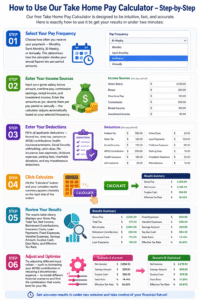
Our free Take Home Pay Calculator is designed to be intuitive, fast, and accurate. Here is exactly how to use it to get your results in under two minutes:
Step One – Select Your Pay Frequency: Choose how often you receive your paycheck — Monthly, Semi-Monthly, Bi-Weekly, or Annually. This determines how the calculator divides your annual figures into per-period amounts.
Step Two – Enter Your Income Sources: Input your gross salary, bonus amount, overtime pay, commission earnings, rental income, and investment income. Enter the amounts as you receive them per pay period or annually — the calculator adjusts automatically based on your selected frequency.
Step Three – Enter Your Deductions: Fill in all applicable deductions — federal tax, state tax, pension or 401(k) contributions, health insurance premiums, Social Security withholding, union dues, life insurance, loan payments, childcare expenses, parking fees, charitable donations, and any miscellaneous deductions.
Step Four – Click Calculate: Hit the “Calculate” button and your complete results summary appears instantly on the right side of the screen.
Step Five – Review Your Results: The results table clearly displays your Gross Pay, Total Tax, Net Income, Retirement Contributions, Insurance Costs, Loan Payments, Fixed Expenses, Variable Expenses, Savings Amount, Surplus Cash, Debt Ratio, and Effective Tax Rate.
Step Six – Adjust and Optimize: Try adjusting different input values — such as increasing your 401(k) contribution or reducing a discretionary expense — to model different financial scenarios and find the combination that works best for your life.
Tips to Maximize Your Take-Home Pay
While taxes are largely unavoidable, there are several smart strategies to legally and ethically maximize your take-home pay:
Maximize Pre-Tax Benefits: Contributing to pre-tax accounts like a traditional 401(k), HSA, or FSA reduces your taxable income, which means you pay less in federal and state taxes — effectively increasing your take-home pay in relative terms.
Review Your W-4 Withholding: Many employees have too much tax withheld from each paycheck, resulting in a large refund at tax time. While a refund feels good, it actually means you gave the government an interest-free loan. Adjust your W-4 to withhold closer to your actual tax liability so you can enjoy more money each pay period.
Take Advantage of Employer Matching: If your employer offers a 401(k) match, always contribute at least enough to get the full match. This is essentially free money that increases your total compensation.
Use Tax-Advantaged Accounts: HSAs, FSAs, dependent care FSAs, and commuter benefit accounts all allow you to pay for qualified expenses with pre-tax dollars, stretching your income further.
Negotiate Your Salary and Benefits: A higher salary obviously increases gross pay, but negotiating better benefits — like employer-paid health insurance or additional paid time off — can also improve your financial position significantly.
Minimize High-Interest Debt: Reducing loan repayment obligations over time frees up cash in your paycheck. Use our Take Home Pay Calculator to model how eliminating a loan would affect your monthly take-home amount.
Frequently Asked Questions (FAQs)
What is a Take Home Pay Calculator? A Take Home Pay Calculator is an online tool that calculates your net income — the amount you actually receive after all taxes, insurance, retirement contributions, and other deductions have been withheld from your gross pay.
Is the Take Home Pay Calculator free to use? Yes. Our Take Home Pay Calculator is completely free to use with no registration, no subscription, and no limitations. Simply enter your information and get your results instantly.
How accurate is the Take Home Pay Calculator? Our Take Home Pay Calculator uses the latest federal and state tax rates along with standard deduction rules to provide highly accurate estimates. However, results are for informational purposes and individual circumstances may vary. Always consult a tax professional for advice specific to your situation.
Can I use this calculator for multiple income sources? Absolutely. Our Take Home Pay Calculator is designed to handle multiple income streams including salary, bonus, overtime, commissions, rental income, and investment income — all at once.
What pay frequencies does the calculator support? The Take Home Pay Calculator supports four pay frequencies: Monthly, Semi-Monthly, Bi-Weekly, and Annually. Simply select your pay schedule from the dropdown menu.
Does the calculator account for state income taxes? Yes. You can input your estimated state tax deduction to reflect the specific tax rate applicable in your state.
How often should I use the Take Home Pay Calculator? It is a good practice to use the Take Home Pay Calculator whenever your financial situation changes — such as when you get a raise, change jobs, add a new deduction, or adjust your benefits during open enrollment.
Can I use this calculator to compare two job offers? Yes, and this is one of the most valuable use cases for a Take Home Pay Calculator. Run the numbers for each offer separately and compare the net income from each to make a truly informed decision.
What is the difference between gross pay and net pay? Gross pay is your total income before any deductions. Net pay — or take-home pay — is the amount you actually receive after all taxes and deductions have been applied.
What happens to the money deducted from my paycheck? Federal and state taxes go to government programs and services. Social Security and Medicare taxes fund retirement and healthcare benefits. 401(k) contributions go into your personal retirement account. Health insurance premiums are paid to your insurance provider. Other deductions go to the designated recipients (union, charity, etc.).
Conclusion
Understanding your real earnings is one of the most important financial skills you can develop. The gap between your gross salary and your actual take-home pay is not just a number — it is the difference between a budget that works and one that fails, between a savings plan that succeeds and one that never gets started.
Our Take Home Pay Calculator puts the power of financial clarity directly in your hands. By entering your income sources and deductions, you get an instant, accurate picture of your net income across multiple pay frequencies — no guessing, no confusion, no unpleasant surprises.
Whether you are planning your monthly budget, evaluating a new job offer, negotiating a raise, or simply trying to understand where your money goes, our Take Home Pay Calculator is the tool you need. It is free, fast, easy to use, and built for real people who want real answers.
Take control of your financial future today. Use the Take Home Pay Calculator above, know your real numbers, and start making decisions with confidence.
Financial freedom begins with financial clarity — and financial clarity begins with knowing exactly what you take home. Use our Take Home Pay Calculator now and start your journey toward smarter money management.