Check your results quickly with our online Greatest Common Factor calculator
Table of Contents
- Introduction
- What Is Rounding?
- What Is a Rounding Calculator?
- The Mathematical Rules of Rounding
- How to Use the Rounding Calculator Step by Step
- Understanding the Rounding Calculator’s Step-by-Step Process
- Rounding to Decimal Places vs. Rounding to Significant Figures
- Types of Rounding — Standard, Banker’s, Floor, Ceiling, and Truncation
- Rounding Calculator in Education and Mathematics
- Rounding Calculator in Finance and Accounting
- Rounding Calculator in Science and Engineering
- Rounding Calculator in Statistics and Data Analysis
- Rounding Calculator in Everyday Life
- When Rounding Errors Matter — Cumulative and Propagated Error
- Common Mistakes When Using a Rounding Calculator
- Frequently Asked Questions (FAQs)
- Conclusion
Introduction
Numbers are at the core of every calculation, measurement, and decision in mathematics, science, finance, and daily life. But raw numbers — especially those that result from division, measurement, or complex computation — are often longer and more precise than any practical situation requires. This is where rounding becomes essential, and it is precisely why the Rounding Calculator is one of the most frequently used tools in education and professional practice. Whether you are trimming a long decimal to two places for a price tag, rounding a scientific measurement to significant figures, or simplifying a statistical result for a report, the Rounding Calculator delivers instant, accurate, and clearly explained results.
In this comprehensive guide, we will explore everything about the Rounding Calculator — from the fundamental principles of rounding and its mathematical rules to step-by-step usage instructions, real-world applications across multiple disciplines, and expert tips for avoiding common mistakes. This guide is designed for students, educators, financial professionals, scientists, and anyone who regularly works with numbers and needs to round them accurately and efficiently. By the end, you will have a thorough understanding of the Rounding Calculator, how it works, when to use it, and why it matters across a wide spectrum of real-world contexts.
What Is Rounding?
Rounding is the process of reducing the number of digits in a number while keeping its value as close as possible to the original. The result is a simpler number — one that is easier to read, communicate, and use in further calculations — at the cost of a small, controlled reduction in precision.
Rounding is governed by a straightforward principle: look at the digit immediately to the right of the position you are rounding to, and decide whether to round up or round down.
- If that digit is 5 or greater → round up (increase the kept digit by 1)
- If that digit is 4 or less → round down (keep the digit as is, drop the rest)
Examples of basic rounding:
- 3.678 rounded to 2 decimal places → 3.68 (digit after 2nd decimal = 8 ≥ 5, so round up)
- 3.672 rounded to 2 decimal places → 3.67 (digit after 2nd decimal = 2 < 5, so round down)
- 147 rounded to the nearest ten → 150 (digit in ones place = 7 ≥ 5, round up)
- 143 rounded to the nearest ten → 140 (digit in ones place = 3 < 5, round down)
Rounding is not the same as truncation — truncation simply cuts off digits without considering their value. Rounding produces a result closer to the original number by considering which direction to adjust.
What Is a Rounding Calculator?
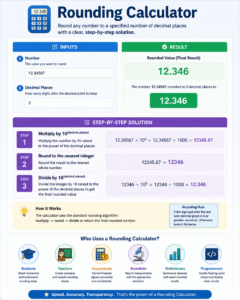
A Rounding Calculator is a digital tool that automatically rounds any number to a specified number of decimal places, displaying the rounded result and a full step-by-step breakdown of the calculation process.
The Rounding Calculator requires just two inputs:
- Number — the value you want to round (can be any decimal, positive or negative, integer or fractional)
- Decimal Places — how many digits after the decimal point to keep in the rounded result
From these two inputs, the Rounding Calculator applies the standard rounding algorithm and returns:
- The rounded value — the final result
- Step 1 — the number multiplied by 10^(decimal places)
- Step 2 — that product rounded to the nearest integer
- Step 3 — the integer divided back by 10^(decimal places) to produce the final rounded number
The Rounding Calculator is used extensively by students checking homework, teachers preparing examples, accountants formatting financial figures, scientists reporting measurements, statisticians summarizing datasets, and programmers handling floating-point output. Its value lies in speed, accuracy, and the transparency of its step-by-step solution.
The Mathematical Rules of Rounding
Understanding the rules behind the Rounding Calculator helps you apply rounding correctly in all situations, whether you are using the calculator or performing the operation manually.
Rule 1 — Identify the Rounding Position Determine which digit position you are rounding to. Common positions include:
- Ones (integers)
- Tenths (1 decimal place)
- Hundredths (2 decimal places)
- Thousandths (3 decimal places)
- Nearest ten, hundred, thousand, etc.
Rule 2 — Look at the Next Digit Examine the digit immediately to the right of the rounding position. This is the “deciding digit.”
Rule 3 — Apply the Rounding Rule
- Deciding digit ≥ 5 → increase the rounding digit by 1 (round up)
- Deciding digit < 5 → keep the rounding digit as is (round down)
Rule 4 — Drop All Remaining Digits After rounding, all digits to the right of the rounding position are dropped (or replaced with zeros if the rounded position is to the left of the decimal).
Rule 5 — Handle the “Exactly 5” Case When the deciding digit is exactly 5 with nothing after it (e.g., 2.5, 3.45), standard rounding rounds up. However, some disciplines use “banker’s rounding” (round half to even) to minimize bias over many calculations — discussed in detail in the types of rounding section.
The Rounding Calculator applies standard (half-up) rounding rules unless specified otherwise, making it suitable for the vast majority of educational, financial, and scientific rounding tasks.
How to Use the Rounding Calculator Step by Step
The Rounding Calculator is designed for simplicity — just two inputs and one click. Here is a complete guide:
Step 1 — Enter the Number Type the number you want to round into the “Number” field. This can be any real number — positive or negative, integer or decimal. Examples: 3.14159, −27.836, 0.00542, 1500.
Step 2 — Enter the Decimal Places Input how many decimal places you want in the rounded result:
- 0 → round to the nearest whole number (integer)
- 1 → round to the nearest tenth (e.g., 3.1)
- 2 → round to the nearest hundredth (e.g., 3.14)
- 3 → round to the nearest thousandth (e.g., 3.142)
Step 3 — Click Calculate Press the “Calculate” button. The Rounding Calculator applies the rounding algorithm and instantly displays:
- The final rounded value in bold
- A three-step process showing exactly how the result was computed
Step 4 — Review the Results Read the rounded value and examine the step-by-step process to verify that the rounding was applied correctly and understand the mechanics behind it.
Step 5 — Clear and Repeat Use the “Clear” button to reset both fields and start fresh with a new number.
Understanding the Rounding Calculator’s Step-by-Step Process
One of the most educational features of the Rounding Calculator is its transparent, three-step solution display. Here is what each step means:
Step 1 — Multiply by 10^(decimal places) The number is multiplied by a power of 10 equal to the number of decimal places requested. This effectively shifts the decimal point rightward by the specified number of places, transforming the rounding position into the ones place.
Example: Rounding 3.14159 to 2 decimal places:
3.14159 × 10² = 3.14159 × 100 = 314.159
Step 2 — Round to the Nearest Integer The shifted number is rounded to the nearest whole number using standard rounding (≥ 0.5 rounds up).
Math.round(314.159) = 314
Step 3 — Divide by 10^(decimal places) The integer result is divided by the same power of 10, shifting the decimal point back to its correct position.
314 ÷ 100 = 3.14
This three-step multiply-round-divide algorithm is the standard mathematical approach for rounding to a specified number of decimal places, and the Rounding Calculator makes every step visible — turning the calculator into an educational tool, not just an answer machine.
Rounding to Decimal Places vs. Rounding to Significant Figures
Two of the most common rounding conventions are rounding to decimal places and rounding to significant figures. The Rounding Calculator focuses on decimal places, but understanding the difference is important.
Rounding to Decimal Places Specifies how many digits appear after the decimal point in the result, regardless of the magnitude of the number. The Rounding Calculator uses this method.
- 3.14159 to 2 decimal places → 3.14
- 0.001234 to 2 decimal places → 0.00
- 12345.678 to 2 decimal places → 12345.68
Rounding to Significant Figures Specifies how many total meaningful digits the result contains, counting from the first non-zero digit. This method is common in scientific measurement.
- 3.14159 to 4 significant figures → 3.142
- 0.001234 to 3 significant figures → 0.00123
- 12345.678 to 4 significant figures → 12350
Key difference: Rounding to decimal places always produces a fixed number of digits after the decimal point. Rounding to significant figures produces a fixed total count of non-zero digits, regardless of position.
When should you use which?
- Decimal places → financial calculations, general mathematics, everyday use
- Significant figures → scientific measurements, laboratory data, experimental results
Types of Rounding — Standard, Banker’s, Floor, Ceiling, and Truncation
While the Rounding Calculator uses standard (half-up) rounding, it is valuable to understand the full range of rounding methods used across different disciplines.
Standard Rounding (Half-Up) The most common method: round up when the deciding digit is ≥ 5, round down when it is < 5. This is what the Rounding Calculator applies.
- 2.5 → 3 (rounded up)
- 2.4 → 2 (rounded down)
Banker’s Rounding (Round Half to Even) When the deciding digit is exactly 5 (with nothing after it), round to the nearest even number. This reduces cumulative rounding bias over large datasets.
- 2.5 → 2 (rounds to even)
- 3.5 → 4 (rounds to even)
- Used in: finance, accounting, statistics, IEEE floating-point standard
Floor Rounding (Round Down / Always Toward Negative Infinity) Always rounds down, regardless of the deciding digit.
- 2.9 → 2
- −2.1 → −3
- Used in: floor functions in programming, conservative capacity estimates
Ceiling Rounding (Round Up / Always Toward Positive Infinity) Always rounds up, regardless of the deciding digit.
- 2.1 → 3
- −2.9 → −2
- Used in: ceiling functions, conservative cost estimates
Truncation (Round Toward Zero) Simply removes digits after the specified position — no consideration of the deciding digit.
- 2.9 → 2
- −2.9 → −2
- Used in: integer conversion in programming, floor division
Understanding which rounding method is appropriate for your context helps you use the Rounding Calculator correctly and know when a different approach might be needed.
Rounding Calculator in Education and Mathematics
The Rounding Calculator is one of the most commonly used tools in mathematics education, introduced as early as primary school and continuing through university-level statistics and calculus.
Primary and Secondary School Students first learn to round whole numbers to the nearest ten, hundred, or thousand — then progress to rounding decimals to one, two, or three places. The Rounding Calculator helps students check their manual work, understand where they went wrong, and build confidence through immediate feedback.
A key educational benefit of the Rounding Calculator is its step-by-step display — students do not just see the answer; they see the mathematical process (multiply, round, divide) that produces it. This transforms the calculator from a shortcut into a teaching tool.
University Mathematics and Statistics At higher levels, rounding is essential for presenting results clearly. Statistical outputs — means, standard deviations, regression coefficients, p-values — are almost always rounded before being reported. The Rounding Calculator ensures that the correct number of decimal places is applied consistently across entire datasets.
Standardized Testing Exams including the SAT, ACT, GRE, and national mathematics assessments regularly include rounding questions. Students who practice with the Rounding Calculator and understand its step-by-step methodology develop strong intuition for rounding rules under exam conditions.
Rounding Calculator in Finance and Accounting
Rounding is a daily necessity in finance and accounting, where monetary values must be presented in standardized formats and legal accuracy is essential.
Currency Rounding Most currencies display values to 2 decimal places (cents, pence, etc.). The Rounding Calculator is used to round calculated prices, costs, taxes, and totals to the nearest cent — a seemingly simple operation that becomes critical at scale when rounding errors can accumulate into significant discrepancies.
Tax Calculations Sales tax, VAT, and income tax calculations frequently produce long decimals. Tax authorities in most countries specify exact rounding rules (typically to 2 decimal places). Using the Rounding Calculator ensures compliance with these regulations and prevents costly filing errors.
Financial Reporting Company financial statements — income statements, balance sheets, cash flow statements — are typically rounded to the nearest dollar, thousand, or million depending on the scale of the business. The Rounding Calculator ensures consistent, auditable rounding across all line items.
Interest Rate Calculations Loan amortization, bond pricing, and investment return calculations involve repeated multiplication and division that quickly produces many decimal places. The Rounding Calculator helps financial analysts present these results clearly and accurately without manual decimal management.
Payroll Processing Employee wages, deductions, and net pay calculations involve multiple rounding steps. Using the Rounding Calculator at each stage ensures that employees receive exactly the correct amount and that all figures reconcile correctly in accounting systems.
Rounding Calculator in Science and Engineering
In science and engineering, rounding is inseparable from the concept of measurement precision — every measurement has a limit of accuracy, and reported values should not claim more precision than the measuring instrument can provide.
Laboratory Measurements Scientists use the Rounding Calculator to round experimental measurements to the appropriate number of significant figures or decimal places, matching the precision of the instruments used. Reporting a measurement to 8 decimal places when the balance only reads to 3 is misleading — the Rounding Calculator helps prevent this.
Engineering Specifications and Tolerances Mechanical components, electrical circuits, and structural elements are designed to tolerances — allowable ranges of variation. Engineers use the Rounding Calculator to express dimensions, loads, and material properties to the precision required by the design specification, neither over- nor under-precise.
Computational Results Engineering software (finite element analysis, fluid dynamics simulation, circuit simulation) produces results with many decimal places. Engineers use the Rounding Calculator to round these to meaningful precision before incorporating them into reports, drawings, or further calculations.
Unit Conversion Converting between metric and imperial units frequently produces non-terminating decimals (e.g., 1 inch = 2.54 cm exactly, but converting many-digit inch values produces many-digit cm values). The Rounding Calculator provides clean, appropriately precise conversion results.
Rounding Calculator in Statistics and Data Analysis
Statistics relies on rounding at every stage — from data collection through analysis to communication of results.
Descriptive Statistics Mean, median, standard deviation, variance, and range are almost never whole numbers. The Rounding Calculator is used to present these statistics at a consistent and appropriate level of precision — typically 2 to 4 decimal places for most applied statistics.
Inferential Statistics P-values, confidence intervals, test statistics, and effect sizes all require rounding for presentation. A p-value of 0.04872 is typically rounded to 0.049 or 0.05 using the Rounding Calculator, depending on the convention of the journal or organization.
Survey Data Percentage results from surveys (e.g., 43.17% of respondents) are almost always rounded to one or two decimal places before reporting. The Rounding Calculator ensures these rounding steps are consistent and auditable across the full dataset.
Machine Learning Model accuracy, precision, recall, F1 scores, and loss values are numerical outputs that require rounding for human-readable reporting. Data scientists use the Rounding Calculator — or its equivalent in code — to standardize how these metrics are displayed.
Rounding Calculator in Everyday Life
Beyond academic and professional applications, the Rounding Calculator serves countless everyday purposes.
Shopping and Price Estimation When mentally estimating the total cost of items in a shopping cart, people naturally round prices (£3.97 → £4, £12.49 → £12) to make addition manageable. The Rounding Calculator formalizes this process for situations where precision matters.
Recipe Scaling Scaling recipes up or down often produces fractional quantities of ingredients. The Rounding Calculator rounds these to practical measurements — for example, rounding 1.333… cups to 1⅓ cups or simply 1.3 cups for practical purposes.
Time Estimates Project timelines, travel times, and scheduling estimates are almost always rounded. The Rounding Calculator helps produce realistic, communicable time estimates from calculated durations.
Tips and Splitting Bills Calculating a 18% tip on a restaurant bill or splitting a total among multiple people invariably produces decimals. The Rounding Calculator provides clean, fair results for these social calculations.
When Rounding Errors Matter — Cumulative and Propagated Error
One of the most important — and often overlooked — aspects of rounding is how errors accumulate over multiple calculations. Understanding this helps you use the Rounding Calculator wisely.
Cumulative Rounding Error When many rounded values are summed, the individual rounding errors (up to ±0.005 for 2 decimal places) accumulate. In financial accounting, this is why regulatory bodies specify exact rounding rules — even fractions of a cent, multiplied across millions of transactions, produce significant discrepancies.
Propagated Error in Multi-Step Calculations Rounding intermediate results in a multi-step calculation introduces error that compounds at each step. The best practice is to carry full precision through intermediate calculations and apply the Rounding Calculator only to the final result. Rounding at every step multiplies the error at each stage.
Order of Operations Matters Because rounding is not linear, (a + b) rounded is not always equal to (a rounded) + (b rounded). This is why the Rounding Calculator should be applied to final results, not intermediate values, wherever possible.
Common Mistakes When Using a Rounding Calculator
Even a simple tool like the Rounding Calculator can produce misleading results if used incorrectly. Here are the most frequent mistakes to avoid:
- Rounding intermediate steps instead of final results — Each intermediate rounding introduces error; apply the Rounding Calculator to the final computed value whenever possible
- Confusing decimal places with significant figures — A Rounding Calculator set to 2 decimal places gives 0.00 for 0.001234 — which may not be what you need if significant figures are required
- Entering text characters instead of numbers — The Rounding Calculator requires valid numeric input; letters, symbols, or formatted numbers (with commas or currency symbols) will produce errors
- Using a negative number of decimal places — Most Rounding Calculators do not support negative decimal places (which would round to tens, hundreds, etc.) — handle this case manually
- Assuming the Rounding Calculator uses banker’s rounding — Most standard tools use half-up rounding; verify which method your application requires before relying on results for financial or statistical work
- Over-rounding for precision-sensitive applications — In scientific or engineering work, rounding too aggressively can eliminate meaningful precision. Always round to the precision appropriate for your instrument or specification
Frequently Asked Questions (FAQs)
What is a Rounding Calculator? A Rounding Calculator is a digital tool that rounds any number to a specified number of decimal places, displaying the rounded result alongside a step-by-step explanation of the rounding process.
What rounding method does the Rounding Calculator use? The standard Rounding Calculator uses half-up rounding: when the deciding digit is ≥ 5, the number is rounded up; when it is < 5, the number is rounded down.
What does “decimal places” mean in the Rounding Calculator? Decimal places refers to the number of digits retained after the decimal point in the rounded result. For example, 0 decimal places rounds to an integer; 2 decimal places keeps two digits after the decimal (e.g., 3.14).
Can the Rounding Calculator handle negative numbers? Yes. The Rounding Calculator rounds negative numbers using the same rules as positive numbers. For example, −3.678 rounded to 2 decimal places gives −3.68.
What is the difference between rounding and truncating? Rounding considers the value of the deciding digit and adjusts up or down accordingly. Truncation simply cuts off digits without adjustment. The Rounding Calculator uses true rounding, not truncation.
Why does 2.5 round to 3 in the Rounding Calculator? The standard (half-up) rounding rule rounds up when the deciding digit is exactly 5. So 2.5 rounds to 3. This is the most common convention used in everyday math, finance, and education.
Can I use the Rounding Calculator to round to whole numbers? Yes. Set the decimal places to 0. For example, rounding 7.6 to 0 decimal places gives 8; rounding 7.4 to 0 decimal places gives 7.
How many decimal places should I round to? The appropriate number depends on your context: financial calculations typically use 2 (cents), scientific measurements use the precision of your instrument, and statistical reporting typically uses 2–4. The Rounding Calculator supports 0 to 20 decimal places.
Is the Rounding Calculator suitable for financial use? Yes, for standard financial rounding (to 2 decimal places using half-up rules). For applications requiring banker’s rounding (round half to even), verify that the Rounding Calculator uses that method or apply it manually.
Does rounding affect accuracy significantly? For single calculations, rounding error is at most half a unit at the rounding position — very small. However, cumulative rounding across many calculations can introduce significant error. Always round final results, not intermediate values.
Conclusion
Rounding is one of the most fundamental and universally necessary operations in all of mathematics and its applications. From expressing a price to two decimal places, to reporting a laboratory measurement to four significant figures, to simplifying a statistical result for publication, rounding gives us the ability to work with numbers at the level of precision that each situation actually requires — no more, no less.
The Rounding Calculator makes this operation instant, accurate, and educational. By providing not only the rounded result but also a transparent, step-by-step explanation of the rounding process — multiply, round to integer, divide — it transforms a simple computational tool into a learning resource that deepens understanding of why rounding works the way it does.
Whether you are a student building your mathematical foundation, a financial professional formatting monetary values, a scientist reporting experimental data, a statistician summarizing analytical results, or simply someone trying to round a recipe ingredient to a practical quantity, the Rounding Calculator delivers the answer you need in seconds, with the clarity and detail you need to trust it.
Bookmark this guide, practice with the Rounding Calculator using numbers from your own work, and apply rounding with the precision and confidence that every accurate, clearly communicated number deserves.