Right Triangle Calculator
Solve permutation and combination problems instantly with our fast and easy Permutation and Combination Calculator
Table of Contents
- Introduction
- What Is a Right Triangle?
- What Is This Tool and How Does It Work?
- Why You Should Use This Tool
- Step-by-Step Usage Guide
- Key Formulas and Components
- The Pythagorean Theorem Explained
- Trigonometric Ratios in Right Triangles
- Real-World Applications
- Tips for Accurate Results
- Common Mistakes to Avoid
- Frequently Asked Questions (FAQs)
- Conclusion
Introduction
Triangles are the most fundamental shapes in all of geometry, and among them, the right triangle holds a uniquely important place. It is the cornerstone of trigonometry, the basis of the Pythagorean theorem, and the building block behind everything from architectural blueprints to GPS navigation. Yet computing all the sides, angles, area, and perimeter of a right triangle manually is time-consuming and easy to get wrong. A Right Triangle Calculator solves every property of a right triangle instantly and accurately.
Whether you are a student working through geometry homework, a construction professional measuring angles on site, an engineer designing a structure, or a curious learner exploring mathematics — a Right Triangle Calculator gives you precise answers without the hassle of working through multiple formulas by hand. Enter just two known values and the tool computes everything else.
In this complete guide, you will learn exactly what a right triangle is, how a Right Triangle Calculator works, what formulas it uses, and where these calculations matter in the real world. By the time you finish reading, you will have everything you need to use this tool with complete confidence.
What Is a Right Triangle?
A right triangle is a triangle in which one of the three interior angles is exactly 90 degrees. This 90-degree angle is called the right angle, and it is usually marked with a small square in diagrams. The side directly opposite the right angle is the longest side of the triangle — called the hypotenuse. The other two sides are called the legs (often labeled a and b), and the two remaining angles (A and B) are both acute, meaning they are each less than 90 degrees.
One of the defining properties of a right triangle is that its two acute angles always add up to exactly 90 degrees. So if Angle A is 35°, then Angle B must be 55°. This relationship simplifies many calculations and is fundamental to how this tool operates.
Right triangles have several key measurements:
- Side a — one leg of the triangle
- Side b — the other leg of the triangle
- Side c (Hypotenuse) — the longest side, opposite the right angle
- Angle A — the angle opposite Side a
- Angle B — the angle opposite Side b
- Area — half the product of the two legs
- Perimeter — the sum of all three sides
- Height (h) — the altitude drawn from the right angle to the hypotenuse
Understanding these components is the foundation for using this tool effectively.
What Is a Right Triangle Calculator?
A Right Triangle Calculator is a digital tool that computes all the missing properties of a right triangle when you provide one or more known values. It uses the Pythagorean theorem, trigonometric ratios, and geometric formulas to find every unknown side, angle, area, perimeter, and height — all with a single click.
This tool accepts inputs for any combination of known values:
- Side lengths (a, b, or c)
- Angles (A or B, in degrees or radians)
- Area, perimeter, or height
You do not need to know all values upfront — as long as you provide enough information to define the triangle, the Right Triangle Calculator fills in the rest. For a right triangle, knowing just two of the independent measurements (at least one of which is a side length) is sufficient.
The tool supports both degrees and radians for angle inputs and outputs, making it flexible for different academic and professional contexts. Results are displayed to high precision, and all input fields are updated with the computed values so you can see the complete picture at a glance.
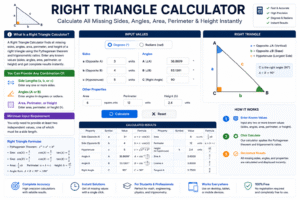
Why You Should Use a Right Triangle Calculator
Many people wonder whether it is worth relying on a Right Triangle Calculator when the formulas can be applied manually. The answer, in almost every situation, is yes.
Speed Solving a right triangle manually requires multiple formula applications — the Pythagorean theorem for sides, inverse trigonometric functions for angles, and separate area and perimeter formulas. A Right Triangle Calculator executes all of these simultaneously in under a second.
Accuracy Even small arithmetic errors cascade through multi-step triangle calculations. A single wrong decimal in the hypotenuse calculation affects every subsequent result — angles, area, and perimeter all become incorrect. A Right Triangle Calculator eliminates this risk entirely.
Accessibility You do not need to memorize trigonometric formulas to get correct results. This tool handles sin, cos, tan, and their inverses automatically — making it accessible to anyone, regardless of their math background.
Versatility The tool accepts multiple combinations of inputs. Whether you know two sides, one side and one angle, or any other valid pair of values, the tool adapts and computes all remaining properties.
Educational Value Students can use the tool to immediately verify their manual calculations. Working through a problem by hand and then confirming results with this tool is one of the most effective ways to build geometric intuition.
How to Use a Right Triangle Calculator Step by Step
Using this tool is straightforward. Follow these steps to get complete, accurate results every time.
Step 1 — Enter Your Known Values Fill in the fields for any values you already know. You can enter side lengths (a, b, or c), angles (A or B), area, perimeter, or height. Leave unknown fields at zero. The Right Triangle Calculator requires at least two independent known values — typically two sides, or one side and one angle.
Step 2 — Select the Angle Unit Choose Degrees or Radians from the Angle Unit dropdown. Most everyday problems use degrees. Scientific and engineering contexts sometimes use radians. Make sure your input angles match the unit you have selected.
Step 3 — Click Calculate Press the Calculate button. The Right Triangle Calculator instantly computes all missing values — hypotenuse, both angles, area, perimeter, and height — and populates all fields simultaneously. The Results panel on the right displays a clean summary.
Step 4 — Read the Results All output fields are filled in automatically. The Results panel shows the hypotenuse (c), area, perimeter, Angle A, Angle B, and height — all rounded to two decimal places for easy reading.
Step 5 — Reset and Recalculate Click Clear to reset all fields to zero and begin a new calculation. This is useful when switching to a different triangle or starting a fresh problem.
Key Formulas and Components
To fully understand what this tool computes, it helps to know the underlying formulas. Here is a complete breakdown.
Hypotenuse (Pythagorean Theorem) The most fundamental formula in right triangle geometry: c = √(a² + b²) Where a and b are the two legs and c is the hypotenuse.
Angle A Using the inverse tangent function: Angle A = arctan(a / b) This gives the angle in degrees (or radians, depending on the selected unit).
Angle B Since angles A and B must sum to 90°: Angle B = 90° − Angle A
Area Area = (a × b) / 2 The area of a right triangle is simply half the product of its two legs.
Perimeter Perimeter = a + b + c The total boundary length of the triangle.
Height (Altitude to the Hypotenuse) h = (a × b) / c This is the perpendicular distance from the right angle vertex to the hypotenuse — used frequently in advanced geometry and engineering.
Understanding these six formulas gives you complete insight into what the Right Triangle Calculator is doing with every input you provide.
The Pythagorean Theorem Explained
The Pythagorean theorem is the heart of right triangle geometry. Discovered by the ancient Greek mathematician Pythagoras (though known to earlier civilizations), this theorem states:
In a right triangle, the square of the hypotenuse equals the sum of the squares of the other two sides.
Written as a formula: c² = a² + b²
This single equation unlocks the entire right triangle. Given any two sides, you can always find the third. And since the angles are directly derived from the side ratios, the complete triangle is determined from just two side lengths.
Common right triangle side ratios (Pythagorean triples) that satisfy this theorem include:
- 3, 4, 5 — the most famous right triangle triple
- 5, 12, 13 — frequently used in engineering problems
- 8, 15, 17 — appears in surveying and construction
- 7, 24, 25 — used in advanced geometry
The Pythagorean theorem is at the core of what this tool uses to compute the hypotenuse whenever the two legs are known.
Trigonometric Ratios in Right Triangles
Beyond the Pythagorean theorem, right triangles are the foundation of all trigonometry. The six trigonometric functions — sine, cosine, tangent, and their reciprocals — are all defined in terms of right triangle side ratios.
For Angle A in a right triangle:
- sin(A) = opposite / hypotenuse = a / c
- cos(A) = adjacent / hypotenuse = b / c
- tan(A) = opposite / adjacent = a / b
These ratios are how a Right Triangle Calculator determines angles when side lengths are given. If you enter sides a and b, the tool uses arctan(a/b) to compute Angle A, then derives Angle B as the complement.
Conversely, if an angle is given along with one side, trigonometric functions allow the tool to compute the remaining sides:
- If Angle A and hypotenuse c are known: a = c × sin(A) and b = c × cos(A)
- If Angle A and side a are known: b = a / tan(A) and c = a / sin(A)
Mastering these relationships is the key to understanding the full power of a Right Triangle Calculator — and to applying trigonometry confidently in real-world problems.
Real-World Applications
This tool is used across dozens of professional and everyday contexts. Here are the most important real-world applications.
Construction and Architecture Right triangles are fundamental in building design. Carpenters use the 3-4-5 ratio to ensure walls are perfectly square. Roof pitch calculations, stair angle determination, and rafter length measurements all rely directly on right triangle math. A Right Triangle Calculator saves time and prevents costly measurement errors on site.
Surveying and Land Measurement Surveyors measure distances and angles across terrain using right triangle relationships. Triangulation — the process of determining a precise location from two known reference points — is built entirely on right triangle geometry.
Navigation and GPS Modern GPS systems use trigonometric calculations rooted in right triangle geometry to determine positions, distances, and bearings. Every time a navigation app routes you from one point to another, right triangle math is happening behind the scenes.
Engineering and Physics Force vectors, projectile motion, electrical circuits, and structural load analysis all involve resolving quantities into perpendicular components using right triangle relationships. A Right Triangle Calculator is a standard tool in the engineer’s workflow.
Interior Design and Carpentry Fitting diagonal elements — such as shelves, paneling, or cabinetry — into corners requires precise right triangle calculations. Knowing the exact diagonal length (hypotenuse) before cutting material prevents waste and ensures a perfect fit.
Astronomy and Navigation Astronomers use right triangle relationships to calculate the distances to celestial objects and the angles between them. Ancient sailors used the same geometry with the stars for ocean navigation before GPS existed.
Tips for Accurate Results
To get the most reliable results from this tool, follow these practical tips every time.
Always Check Your Angle Unit The most common input error is entering an angle in degrees when the tool is set to radians, or vice versa. Before calculating, always verify that the Angle Unit dropdown matches the unit of the angle you are entering. A 45° angle expressed in radians is approximately 0.7854 — a completely different number.
Provide at Least Two Independent Values A right triangle requires at least two known, independent pieces of information to be fully solvable. Two angles alone are not sufficient — you always need at least one side length. If you only provide angles, the shape of the triangle is defined but its scale is not.
Use Consistent Length Units All side length inputs must be in the same unit. Mixing centimeters and meters, or feet and inches, will produce incorrect results for area, perimeter, and hypotenuse. Standardize all measurements before entering them.
Verify Plausibility of Results After computing, check that the hypotenuse is longer than either leg — this is always true for a right triangle. Also check that both computed angles are positive and sum to 90°. If results look unusual, review your inputs.
Use the Height for Advanced Problems The altitude from the right angle to the hypotenuse (height h) creates two smaller triangles inside the original — each similar to the whole. This property is used in many advanced geometry proofs and engineering calculations.
Common Mistakes to Avoid
Even experienced users make avoidable errors when working with right triangle calculations. Here are the most important ones to watch for.
Mistake 1 — Confusing Legs with the Hypotenuse The hypotenuse is always opposite the right angle and is always the longest side. Entering the hypotenuse as side a or b — instead of c — will produce completely incorrect results. Always identify which side is opposite the 90° angle before entering values.
Mistake 2 — Using the Wrong Angle Unit Entering 45 degrees when the tool expects radians produces wildly incorrect angle computations. Check the Angle Unit setting every time before calculating. This is especially important when switching between problems.
Mistake 3 — Entering Only Two Angles Right triangles require at least one known side length in addition to any angle. If you enter only angles, the Right Triangle Calculator cannot determine the size of the triangle — only its shape.
Mistake 4 — Expecting Exact Integer Results Most right triangles do not have integer side lengths. Unless the values form a Pythagorean triple (like 3, 4, 5), the hypotenuse and heights will be irrational numbers. Rounding is expected and normal.
Mistake 5 — Forgetting to Click Calculate Values entered in the input fields do not auto-compute. Always click the Calculate button after entering your values. Changes to inputs only take effect after the button is pressed.
Frequently Asked Questions (FAQs)
What is a Right Triangle Calculator used for? A Right Triangle Calculator is used to find all the unknown properties of a right triangle — including the hypotenuse, both angles, area, perimeter, and altitude — when one or more values are already known. It is widely used by students, engineers, architects, surveyors, and builders.
How many values do I need to enter? You need at least two known, independent values — and at least one must be a side length. With just sides a and b, a Right Triangle Calculator can compute the hypotenuse, both angles, area, perimeter, and height.
Can I enter an angle and one side? Yes. A Right Triangle Calculator supports all valid combinations of inputs, including one side with one angle. The tool uses trigonometric functions to compute all remaining values from that combination.
What is the hypotenuse? The hypotenuse is the longest side of a right triangle — always opposite the 90° angle. It is calculated using the Pythagorean theorem: c = √(a² + b²). The Right Triangle Calculator computes it automatically when both legs are provided.
Does the calculator work in radians? Yes. The Right Triangle Calculator supports both degrees and radians. Select your preferred unit from the Angle Unit dropdown before entering angle values or reading angle results.
What is the height of a right triangle? The height (h) in a right triangle refers to the altitude drawn perpendicularly from the right angle vertex to the hypotenuse. It is calculated as h = (a × b) / c and is automatically computed by the Right Triangle Calculator.
Can I use this tool for non-right triangles? No. This tool is specifically designed for right triangles — those with exactly one 90° angle. For other triangle types, a separate general triangle calculator would be needed.
Conclusion
Right triangles are one of the most important and most useful shapes in all of mathematics. From the Pythagorean theorem to trigonometric ratios, from architectural design to GPS navigation — the properties of right triangles underpin an enormous range of real-world calculations. A Right Triangle Calculator makes all of those computations instant, accurate, and accessible to everyone.
In this guide, we covered:
- What a right triangle is and all its key components
- What this tool is and why it is so useful
- Step-by-step instructions for using the tool correctly
- All six core formulas — hypotenuse, angles, area, perimeter, and height
- The Pythagorean theorem and Pythagorean triples
- Trigonometric ratios and how the tool uses them
- Real-world applications across construction, engineering, navigation, and more
- Practical tips for accuracy and common mistakes to avoid
- Answers to the most frequently asked questions
Whether you are solving a straightforward geometry problem, verifying a measurement on a job site, or exploring the deeper connections between trigonometry and the real world, a Right Triangle Calculator is your most reliable and efficient companion.
Start using the Right Triangle Calculator today — enter your known values, click Calculate, and get complete results in seconds.