Molarity Calculator
Calculate Your Ideal Body Weight and Achieve Your Health Goals with Our Free Weight Calculator
Table of Contents
- Introduction
- What Is a Molarity Calculator?
- How a Molarity Calculator Works
- Key Inputs Every Molarity Calculator Uses
- Understanding Molarity, Moles, and Mass Concentration
- Step-by-Step Molarity Calculation Examples
- Molecular Weight – The Critical Input in Any Molarity Calculator
- Mass and Volume Unit Conversions Explained
- Molarity Calculator for Common Laboratory Solutions
- Practical Applications in Chemistry, Biology, and Pharmacy
- Common Mistakes When Using a Molarity Calculator
- FAQs
- Conclusion
Introduction
Solution concentration is one of the most frequently calculated quantities in chemistry, biology, medicine, and pharmaceutical science. Whether you are preparing a buffer for a biochemistry experiment, mixing a saline solution for clinical use, formulating a reagent for quality control, or solving a problem in a general chemistry course, the accuracy of your concentration calculation directly determines whether your work succeeds or fails. A single arithmetic error in a concentration calculation can render an entire experiment meaningless — or, in clinical settings, create a safety risk.
That is exactly why every working chemist, laboratory technician, pharmacist, and science student relies on a Molarity Calculator.
A Molarity Calculator is a precision digital tool that computes the molar concentration of a solution from three inputs: the mass of solute, the molecular weight of the compound, and the volume of the solution. It converts units automatically, applies the molarity formula without error, and returns not just molarity but also mass concentration and moles of solute — a complete concentration profile in a single step.
This guide covers everything you need to master the Molarity Calculator: the formula it uses, what each input means, how unit conversions work, how to read and interpret every output value, how to look up molecular weights correctly, and how to avoid the most common mistakes that lead to inaccurate concentration results. Whether you are new to solution chemistry or an experienced professional looking for a faster calculation workflow, this guide will make your Molarity Calculator use more accurate, more efficient, and more confident.
What Is a Molarity Calculator?
A Molarity Calculator is a digital chemistry tool that computes the molar concentration of a solution using the solute’s mass, its molecular weight, and the total volume of the solution. The result — expressed in moles per liter (mol/L), also written as M (molar) — is one of the most universally used concentration units across all branches of chemistry and life science.
Molarity is defined as the number of moles of solute dissolved in one liter of solution. It is the standard concentration unit because it connects mass measurements (which chemists can make directly on a balance) to the underlying chemistry (which operates in moles and molecules).
A well-designed Molarity Calculator computes three output values simultaneously:
- Molarity (M) — moles of solute per liter of solution
- Mass Concentration (g/L) — grams of solute per liter of solution
- Moles of Solute (mol) — the total moles of compound present in the measured mass
Beyond the outputs, a complete concentration calculation tool also shows the step-by-step calculation — the intermediate formula values, unit substitutions, and arithmetic — so the user can verify the result, understand the method, and reproduce it manually if needed.
A Molarity Calculator is used by:
- Chemistry students completing coursework, lab assignments, and exam problems
- Laboratory researchers preparing stock solutions, dilutions, and reaction mixtures
- Pharmacists and pharmaceutical chemists formulating drug solutions at precise concentrations
- Clinical laboratory technicians preparing reagents and calibration standards
- Quality control analysts verifying the concentration of raw materials and finished products
- Biochemists and molecular biologists preparing buffers, enzyme assays, and cell culture media
How a Molarity Calculator Works
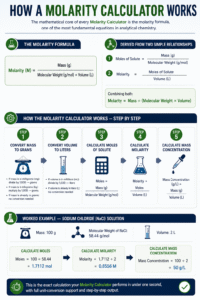
The mathematical core of every Molarity Calculator is the molarity formula, one of the most fundamental equations in analytical chemistry.
The Molarity Formula:
Molarity (M) = Mass (g) ÷ [Molecular Weight (g/mol) × Volume (L)]
This formula derives from two simpler relationships:
Moles of Solute = Mass (g) ÷ Molecular Weight (g/mol) Molarity = Moles of Solute ÷ Volume (L)
Combining both:
Molarity = Mass ÷ (Molecular Weight × Volume)
The concentration calculation tool executes the following steps automatically:
Step 1 — Convert mass to grams:
- If mass is in milligrams (mg): divide by 1,000 → grams
- If mass is in kilograms (kg): multiply by 1,000 → grams
- If mass is already in grams: no conversion needed
Step 2 — Convert volume to liters:
- If volume is in milliliters (mL): divide by 1,000 → liters
- If volume is already in liters (L): no conversion needed
Step 3 — Calculate moles of solute:
Moles = Mass (g) ÷ Molecular Weight (g/mol)
Step 4 — Calculate molarity:
Molarity = Moles ÷ Volume (L)
Step 5 — Calculate mass concentration:
Mass Concentration (g/L) = Mass (g) ÷ Volume (L)
Worked Example — Sodium Chloride (NaCl) solution:
- Mass: 100 g
- Molecular Weight of NaCl: 58.44 g/mol
- Volume: 2 L
Moles = 100 ÷ 58.44 = 1.7112 mol Molarity = 1.7112 ÷ 2 = 0.8556 M Mass Concentration = 100 ÷ 2 = 50 g/L
This is the exact calculation your Molarity Calculator performs in under one second, with full unit-conversion support and step-by-step output.
Key Inputs Every Molarity Calculator Uses
Understanding each input field ensures you enter accurate data and receive reliable concentration results. Here is a complete explanation of every parameter in the solution concentration tool.
Mass The measured mass of the solute — the substance being dissolved. This is weighed directly on an analytical or top-loading balance. Enter the numerical value you read from the balance; then select the correct unit from the dropdown. Typical laboratory measurements range from milligrams for small-scale reactions to grams for bulk solution preparation.
Mass Unit Select the unit in which you measured the mass:
- g (grams) — Most common for bench-scale laboratory work
- mg (milligrams) — Used for small-scale or high-potency compounds where only tiny amounts are weighed
- kg (kilograms) — Used in industrial or large-batch pharmaceutical manufacturing
The solution concentration tool converts all mass inputs to grams before applying the formula, so your result is correct regardless of which unit you select.
Molecular Weight (MW) The molecular weight of the solute in grams per mole (g/mol). This is the most technically critical input in the entire Molarity Calculator. Every chemical compound has a unique molecular weight, determined by the sum of atomic weights of all atoms in one molecule of that compound. Using an incorrect molecular weight produces a proportionally incorrect molarity result.
Sources for molecular weight:
- The compound’s certificate of analysis (CoA) from the supplier
- The chemical label on the reagent bottle
- Peer-reviewed chemical databases (PubChem, ChemSpider, NIST Chemistry WebBook)
- Periodic table calculation: sum of (atomic weight × number of atoms) for each element
MW Unit The molecular weight unit is fixed at g/mol — the universal standard for expressing molar mass in chemistry. No conversion is needed; simply enter the numerical value of the molecular weight.
Volume The total volume of the solution — not the volume of solvent added, but the final volume after the solute has been dissolved. This distinction is critical. When preparing solutions in a volumetric flask, you dissolve the solute first in a small amount of solvent, then dilute to the graduation mark. The graduation mark volume is the figure you enter into the Molarity Calculator.
Volume Unit Select liters (L) or milliliters (mL). The tool converts mL to L automatically. For most laboratory solution preparation, volume is measured in milliliters; for larger preparations it is measured in liters.
Understanding Molarity, Moles, and Mass Concentration
A Molarity Calculator outputs three distinct but related quantities. Understanding all three gives you a complete picture of your solution’s composition.
Molarity (M) — mol/L
Molarity is the primary concentration unit used in chemistry. It tells you how many moles of solute are present in every liter of solution. A 1 M (one molar) solution of NaCl contains 58.44 grams of NaCl per liter — exactly one mole.
Molarity is the preferred concentration unit because:
- It directly maps to stoichiometry — chemical reactions occur in molar ratios
- It allows simple dilution calculations using the formula C₁V₁ = C₂V₂
- It is independent of temperature (unlike molality, which uses mass of solvent)
- It is the concentration unit specified in virtually all published protocols and reagent recipes
Moles of Solute (mol)
Moles of solute tells you the total chemical amount of compound present in your measured mass, regardless of the volume in which it will be dissolved. This value is essential for:
- Stoichiometric calculations in reaction planning
- Verifying that you have enough material for multiple solution preparations
- Calculating yield in synthesis reactions
Mass Concentration (g/L)
Mass concentration expresses how many grams of solute are dissolved per liter of solution, without reference to molecular weight. It is a useful practical figure — particularly in food science, environmental analysis, and clinical chemistry — because it does not require knowledge of the compound’s molecular weight and can be measured directly by evaporation and weighing.
The relationship between the three outputs:
Moles = Mass (g) ÷ MW (g/mol) Molarity = Moles ÷ Volume (L) Mass Concentration = Mass (g) ÷ Volume (L)
All three values are computed simultaneously by the Molarity Calculator from a single set of inputs.
Step-by-Step Molarity Calculation Examples
Working through real examples is the fastest way to build confidence with any solution concentration tool. Here are four fully worked calculations covering common laboratory scenarios.
Example 1 — Sodium Chloride (NaCl), 0.9% Saline Preparing physiological saline: 9 g NaCl in 1,000 mL (1 L) water
- Mass: 9 g | MW: 58.44 g/mol | Volume: 1 L
- Moles = 9 ÷ 58.44 = 0.1540 mol
- Molarity = 0.1540 ÷ 1 = 0.154 M
- Mass Concentration = 9 ÷ 1 = 9 g/L
Example 2 — Glucose (C₆H₁₂O₆), Biochemistry Buffer Preparing a 200 mM glucose solution: 720 mg in 20 mL
- Mass: 720 mg → 0.72 g | MW: 180.16 g/mol | Volume: 20 mL → 0.02 L
- Moles = 0.72 ÷ 180.16 = 0.003997 mol
- Molarity = 0.003997 ÷ 0.02 = 0.1998 M ≈ 0.200 M
- Mass Concentration = 0.72 ÷ 0.02 = 36 g/L
Example 3 — Sulfuric Acid (H₂SO₄), Standard Solution Laboratory standard: 49 g in 500 mL
- Mass: 49 g | MW: 98.08 g/mol | Volume: 0.5 L
- Moles = 49 ÷ 98.08 = 0.4996 mol
- Molarity = 0.4996 ÷ 0.5 = 0.999 M ≈ 1.00 M
- Mass Concentration = 49 ÷ 0.5 = 98 g/L
Example 4 — Sodium Hydroxide (NaOH), Titration Solution Preparing 0.1 M NaOH: target 2 L
- Required moles = 0.1 × 2 = 0.2 mol
- Required mass = 0.2 × 40.00 = 8 g NaOH
- Verify with solution concentration tool: Mass 8 g | MW 40.00 | Volume 2 L
- Molarity = 8 ÷ (40.00 × 2) = 0.100 M ✓
These examples demonstrate exactly the type of calculations your Molarity Calculator handles instantly, eliminating arithmetic errors across every scenario from classroom exercises to industrial production.
Molecular Weight – The Critical Input in Any Molarity Calculator
Molecular weight is the single input that most often causes errors in molarity calculations, primarily because chemists sometimes use incorrect values, confuse the anhydrous and hydrated forms of a compound, or copy data from unreliable sources.
How Molecular Weight Is Calculated:
Molecular weight is the sum of the atomic weights of all atoms in one molecule of the compound, expressed in g/mol. For example:
- NaCl (Sodium Chloride): Na (22.99) + Cl (35.45) = 58.44 g/mol
- H₂O (Water): 2×H (2×1.008) + O (15.999) = 18.015 g/mol
- C₆H₁₂O₆ (Glucose): 6×C (72.06) + 12×H (12.096) + 6×O (95.994) = 180.15 g/mol
- NaOH (Sodium Hydroxide): Na (22.99) + O (15.999) + H (1.008) = 39.997 g/mol
- H₂SO₄ (Sulfuric Acid): 2×H (2.016) + S (32.06) + 4×O (63.996) = 98.072 g/mol
Hydrated vs. Anhydrous Forms Many chemical compounds exist in both anhydrous (water-free) and hydrated (water-containing) forms. The hydrated form contains additional water molecules in its crystal structure, which significantly increases its molecular weight compared to the anhydrous form.
- Anhydrous CaCl₂: 110.98 g/mol
- CaCl₂·2H₂O (dihydrate): 147.01 g/mol
Always check the bottle label to confirm whether your compound is anhydrous or hydrated before entering the molecular weight into your Molarity Calculator. Using the anhydrous MW for a hydrated compound will give a molarity result that is significantly too high.
Mass and Volume Unit Conversions Explained
Correct unit selection is as important as the calculation itself. A value entered in the wrong unit produces a result that is off by a factor of 1,000 — a catastrophic error in any laboratory or clinical context.
Mass Unit Conversions Used by the Solution Concentration Tool:
| Input Unit | Conversion to Grams | Example |
|---|---|---|
| Grams (g) | No conversion | 100 g → 100 g |
| Milligrams (mg) | ÷ 1,000 | 500 mg → 0.5 g |
| Kilograms (kg) | × 1,000 | 0.5 kg → 500 g |
Volume Unit Conversions Used by the Solution Concentration Tool:
| Input Unit | Conversion to Liters | Example |
|---|---|---|
| Liters (L) | No conversion | 2 L → 2 L |
| Milliliters (mL) | ÷ 1,000 | 250 mL → 0.250 L |
Critical Rule: Always verify that the unit you select in the dropdown matches the unit of your measurement. Entering 500 (intending mg) while the dropdown is set to g gives a mass 1,000 times larger than the actual value, producing a proportionally incorrect molarity result.
The concentration calculation tool handles all of these conversions automatically and invisibly, so your output is always in standard SI units regardless of which input units you select.
Molarity Calculator for Common Laboratory Solutions
A reference table of frequently prepared laboratory solutions, with the inputs and expected outputs for each, allows you to verify your tool is operating correctly and provides a ready reference for common preparations.
| Compound | MW (g/mol) | Mass | Volume | Molarity |
|---|---|---|---|---|
| NaCl (Saline) | 58.44 | 9 g | 1 L | 0.154 M |
| NaOH | 40.00 | 4 g | 1 L | 0.100 M |
| HCl | 36.46 | 3.646 g | 1 L | 0.100 M |
| Glucose | 180.16 | 18.016 g | 1 L | 0.100 M |
| KCl | 74.55 | 7.455 g | 1 L | 0.100 M |
| H₂SO₄ | 98.08 | 9.808 g | 1 L | 0.100 M |
| CaCl₂ | 110.98 | 11.098 g | 1 L | 0.100 M |
| Na₂CO₃ | 105.99 | 10.599 g | 1 L | 0.100 M |
| KMnO₄ | 158.03 | 3.161 g | 1 L | 0.020 M |
| EDTA | 372.24 | 37.224 g | 1 L | 0.100 M |
Use this table as a verification check. If your solution concentration tool returns a molarity that matches this table for a given compound and preparation, your inputs and unit selections are correct.
Practical Applications in Chemistry, Biology, and Pharmacy
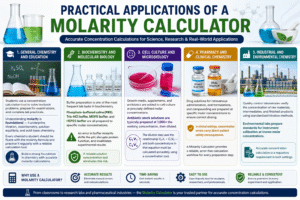
The Molarity Calculator serves a wide range of disciplines, each with its own specific concentration requirements and workflows.
General Chemistry and Education Students use a concentration calculation tool to solve textbook problems, prepare for examinations, and complete lab practicals. Understanding molarity is foundational — it underpins titration, stoichiometry, solution equilibria, and acid-base chemistry. Every chemistry student should be fluent with the molarity formula and practice it regularly with a reliable calculation tool.
Biochemistry and Molecular Biology Buffer preparation is one of the most frequent lab tasks in biochemistry. Phosphate-buffered saline (PBS), Tris-HCl buffer, MOPS buffer, and HEPES buffer are all prepared to specific molar concentrations. An error in buffer molarity shifts the pH, disrupts protein function, and invalidates experimental results. A reliable solution concentration tool eliminates this risk.
Cell Culture and Microbiology Growth media, supplements, and antibiotics are added to cell culture at precisely defined molar concentrations. Antibiotic stock solutions are typically prepared at 1,000× the working concentration, then diluted. The dilution step uses the relationship C₁V₁ = C₂V₂ — and both concentrations in that equation must be calculated accurately using a concentration tool.
Pharmacy and Clinical Chemistry Drug solutions for intravenous administration, oral formulations, and compounding are prepared at specific molar concentrations to ensure correct dosing. In clinical settings, concentration errors carry direct patient safety consequences. A Molarity Calculator provides a reliable, error-free calculation workflow for every preparation step.
Industrial and Environmental Chemistry Quality control laboratories verify the concentration of raw materials, intermediates, and finished products using standardized titration methods. Environmental labs prepare standards for instrument calibration at known molar concentrations. Accurate concentration calculation is a regulatory requirement in both settings Molarity Calculator.
Common Mistakes When Using a Molarity Calculator
Even with a reliable concentration calculation tool, certain input errors consistently produce incorrect results. Being aware of these mistakes allows you to catch them before they affect your work.
Using the Wrong Molecular Weight The most common and consequential mistake. Using an outdated, rounded, or incorrect MW value produces a proportionally wrong molarity. Always source molecular weight from the reagent’s certificate of analysis or a verified chemical database — not from memory.
Confusing Anhydrous and Hydrated Forms As noted above, the hydrated form of a compound has a significantly higher molecular weight. Preparing a solution with a hydrated compound while using the anhydrous MW gives a molarity that is too high — you are adding more mass (the water of crystallization counts toward the weighed mass) than the formula accounts for.
Using Solvent Volume Instead of Solution Volume Molarity is defined in terms of the total solution volume, not the volume of solvent added. If you dissolve 58.44 g NaCl in 950 mL of water and the final solution volume is 1,000 mL, enter 1,000 mL into the Molarity Calculator — not 950 mL. The difference is small but matters for precision work.
Misreading the Unit Dropdown Selecting “L” when your measurement is in “mL” shifts your volume by a factor of 1,000 and throws your molarity off by the same factor. Always confirm the unit dropdown matches your measurement before clicking Calculate.
Rounding Molecular Weight Too Aggressively Using 58 g/mol for NaCl instead of 58.44 g/mol introduces a 0.75% error. For routine work this may be acceptable; for standardization, titration, or pharmacopeial preparations, always use the full molecular weight with at least two decimal places.
Entering Mass in the Wrong Sign or Magnitude A decimal point misplacement — entering 1000 instead of 100, or 0.01 instead of 0.1 — produces a result that is off by an order of magnitude. Always cross-check your entered value against the balance reading before calculating.
FAQs
What is a Molarity Calculator used for? A Molarity Calculator is used to compute the molar concentration of a solution from the solute’s mass, molecular weight, and the solution volume. It also outputs mass concentration and moles of solute. It is used across chemistry, biochemistry, pharmacy, and clinical laboratory work.
What is molarity and how is it different from molality? Molarity (M) is moles of solute per liter of solution. Molality (m) is moles of solute per kilogram of solvent. Molarity is the more commonly used unit in laboratory work because volumes are easier to measure than solvent masses. Molality is preferred in situations where temperature variation is significant, since solution volume (and therefore molarity) changes with temperature while molality does not.
Where do I find the molecular weight of a compound? The molecular weight is printed on the reagent bottle label and on the certificate of analysis provided by the supplier. You can also look it up on PubChem (pubchem.ncbi.nlm.nih.gov), ChemSpider, or the NIST Chemistry WebBook. Always verify the form of the compound (anhydrous vs. hydrated) before using the molecular weight value.
What is the difference between molarity and mass concentration? Molarity (mol/L) accounts for the molecular weight of the solute and expresses concentration in chemical units (moles). Mass concentration (g/L) simply expresses how many grams are dissolved per liter, without reference to molecular weight. Molarity is used for stoichiometric calculations; mass concentration is used in gravimetric analysis and food/environmental chemistry Molarity Calculator.
How do I prepare a solution of a specific molarity from my Molarity Calculator result? First, calculate the required mass: Mass (g) = Molarity × Molecular Weight × Volume (L). Weigh that mass precisely, transfer it to a volumetric flask, dissolve in a small amount of solvent, then dilute to the graduation mark and mix thoroughly. Verify the result by re-entering your actual weighed mass into the concentration tool to confirm you hit your target molarity.
Can I use a Molarity Calculator for dilution calculations? The tool directly calculates the concentration of a prepared solution. For dilution calculations, use the dilution formula C₁V₁ = C₂V₂: calculate your stock solution’s molarity with the concentration tool, then use C₁ (stock molarity), V₂ (target volume), and C₂ (target molarity) to solve for V₁ (volume of stock to take).
What does the step-by-step output show? The step-by-step output displays the intermediate formula values substituted in — showing the exact arithmetic used to compute molarity, mass concentration, and moles of solute. This feature is especially useful for students verifying their manual calculations and for laboratory documentation where the calculation method must be recorded.
Why does my actual solution concentration differ slightly from the calculated value? Small differences arise from balance precision, volumetric equipment tolerances, weighing errors, and temperature-related volume changes. The concentration calculation tool gives a theoretically exact result based on your inputs. To minimize real-world discrepancy, use a calibrated analytical balance, a class-A volumetric flask, and follow good laboratory technique Molarity Calculator.
Conclusion
Accurate solution concentration is the foundation of reliable chemistry. Every experiment, assay, formulation, and titration depends on solutions prepared at precisely the right molar concentration — and every one of those preparations begins with a calculation that a concentration tool can execute instantly, accurately, and without error.
The solution concentration tool simplifies what is otherwise a multi-step manual calculation — unit conversion, moles calculation, and division — into a single-click result that includes molarity, mass concentration, moles of solute, and a full step-by-step breakdown. Whether you are preparing your first buffer solution in a teaching lab or running a high-throughput quality control operation in a pharmaceutical facility, the accuracy and speed of a reliable concentration calculation tool are indispensable.
The range of applications covered by this solution concentration tool spans every level of chemical work: introductory chemistry education, advanced research, clinical laboratory practice, environmental monitoring, and industrial manufacturing. In every context, the requirement is the same — an accurate, documented concentration calculation that can be verified, reproduced, and trusted.
Small input errors in concentration calculations have large downstream consequences. A 10% error in molarity shifts every stoichiometric calculation that follows by the same margin. A wrong molecular weight from a hydrated-vs-anhydrous mixup can double the apparent concentration of a compound. A misread unit selector can throw results off by three orders of magnitude. Your molar concentration tool eliminates all of these errors at the source — provided you enter accurate inputs with correct unit selections.
Use your concentration calculation tool for every solution preparation, verify molecular weights from authoritative sources, confirm that solution volume — not solvent volume — is what you enter, and document your results with the step-by-step output. The result is not just a number — it is a scientifically valid, reproducible concentration value that every subsequent experiment in your workflow can depend on.
Accurate chemistry begins with accurate concentration — and accurate concentration begins with a reliable solution preparation tool.