Hex Calculator
Calculate powers and exponents instantly with our fast and accurate Exponent Calculator
Table of Contents
- Introduction
- What Is a Hex Calculator?
- Understanding the Hexadecimal Number System
- How Does a Hex Calculator Work?
- Decimal to Hexadecimal Conversion – Step by Step
- Hexadecimal to Decimal Conversion – Step by Step
- How to Use a Hex Calculator
- Real-Life Applications of a Hex Calculator
- Hexadecimal in Colors, Memory, and Networking
- Properties and Rules of Hexadecimal You Should Know
- Tips for Using a Hex Calculator Effectively
- Common Mistakes to Avoid
- Frequently Asked Questions (FAQs)
- Conclusion
Introduction
In the world of computing, programming, and digital electronics, numbers do not always look the way we expect them to. While we are accustomed to the decimal system we use every day — counting in tens — computers operate in a fundamentally different numerical language. That language is the hexadecimal system, and it sits at the very heart of modern computing. Understanding this number system can feel confusing and unfamiliar at first glance, but a Hex Calculator makes the entire process straightforward, fast, and completely error-free.
Whether you are a software developer reading memory dumps, a web designer working with HTML color codes, a network engineer analyzing MAC addresses, or a student preparing for a computer science exam, a Hex Calculator is a tool you will find yourself using constantly. It removes the need for tedious manual arithmetic and replaces that effort with instant, accurate, and clearly explained results.
A Hex Calculator converts numbers between the hexadecimal (base 16) and decimal (base 10) number systems in a single click. Instead of manually dividing by 16 through multiple steps or working out positional multiplications by hand, you simply enter your value and receive an accurate answer accompanied by a complete step-by-step breakdown. This makes the tool valuable not only as a time-saver but also as an educational resource for learning how hexadecimal conversion actually works.
In this comprehensive guide, we will take you through every aspect of the hexadecimal number system and show you how to use a Hex Calculator like an expert. We will cover the underlying math, the real-world applications, the key properties of hexadecimal, practical usage tips, and the common mistakes you must avoid. By the time you reach the end of this article, you will have a thorough, confident understanding of hexadecimal conversion and why this tool is so indispensable in the digital age.
What Is a Hex Calculator?
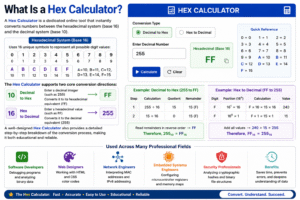
A Hex Calculator is a dedicated online tool that instantly converts numbers between the hexadecimal system (base 16) and the decimal system (base 10). The hexadecimal system uses 16 unique symbols to represent all possible digit values: the numerals 0 through 9 represent the values zero to nine, while the letters A through F represent the values ten through fifteen. So A equals 10, B equals 11, C equals 12, D equals 13, E equals 14, and F equals 15.
The Hex Calculator supports two core conversion directions:
- Decimal to Hex — You enter a standard decimal integer such as 255, and the calculator converts it to its hexadecimal equivalent, which is FF
- Hex to Decimal — You enter a hexadecimal value such as FF, and the calculator converts it back to the decimal equivalent, which is 255
Beyond simply displaying the final answer, a well-designed Hex Calculator also provides a detailed step-by-step breakdown of the conversion process. For decimal-to-hex, this means showing each division step and its remainder. For hex-to-decimal, it means displaying each digit’s positional value and the multiplication used to compute it. This transparency makes the tool genuinely educational, not just convenient.
The Hex Calculator is used across an enormous range of professional disciplines. Software developers use it when debugging programs and analyzing binary data. Web designers use it to work with HTML and CSS color codes. Network engineers use it to interpret MAC addresses and IPv6 addressing. Embedded systems engineers use it to configure microcontroller registers and memory maps. Security professionals use it to analyze cryptographic hashes and binary file structures. In every one of these cases, the Hex Calculator saves time, prevents errors, and deepens the user’s understanding of the underlying data.
Understanding the Hexadecimal Number System
Before you can make full use of a Hex Calculator, you need a solid understanding of the hexadecimal number system itself. Most people spend their entire lives working exclusively with the decimal system (base 10), which uses ten digits — 0 through 9 — and assigns each column a value that is a power of ten. The ones column represents 10⁰, the tens column represents 10¹, the hundreds column represents 10², and so on.
The hexadecimal system follows exactly the same positional logic, but with a base of 16 instead of 10. Each column in a hexadecimal number represents a power of 16. The rightmost column is 16⁰ (= 1), the next column to the left is 16¹ (= 16), then 16² (= 256), then 16³ (= 4,096), and so on.
Here is the complete symbol mapping between decimal values and their hexadecimal equivalents:
| Decimal | 0 | 1 | 2 | 3 | 4 | 5 | 6 | 7 | 8 | 9 | 10 | 11 | 12 | 13 | 14 | 15 |
|---|---|---|---|---|---|---|---|---|---|---|---|---|---|---|---|---|
| Hex | 0 | 1 | 2 | 3 | 4 | 5 | 6 | 7 | 8 | 9 | A | B | C | D | E | F |
Why is hexadecimal used so widely in computing? The answer lies in its natural relationship with the binary system. Binary uses only two digits — 0 and 1 — and is the fundamental language of all digital hardware. However, binary numbers become extremely long very quickly. The decimal number 255, for example, is 11111111 in binary — eight digits. In hexadecimal, that same number is just FF — two digits. This dramatic compression makes hexadecimal the preferred human-readable representation of binary data.
One hexadecimal digit represents exactly four binary bits (called a nibble), and two hexadecimal digits represent exactly one byte (8 bits). This clean, consistent relationship between hex and binary is the core reason that hexadecimal is the standard representation in programming, memory management, networking, and data analysis. Learning to work fluently with hexadecimal — with the help of a Hex Calculator — is one of the most valuable skills in the computing field.
Important examples to remember:
- Decimal 15 = Hex F
- Decimal 16 = Hex 10
- Decimal 31 = Hex 1F
- Decimal 32 = Hex 20
- Decimal 255 = Hex FF
- Decimal 256 = Hex 100
- Decimal 1000 = Hex 3E8
- Decimal 4096 = Hex 1000
- Decimal 65535 = Hex FFFF
- Decimal 16777215 = Hex FFFFFF
How Does a Hex Calculator Work?
The Hex Calculator uses two distinct mathematical algorithms, one for each direction of conversion. Understanding both helps you verify results and builds your mathematical intuition for working with hexadecimal.
Algorithm 1 — Decimal to Hexadecimal (Repeated Division by 16):
The calculator takes the decimal number and repeatedly divides it by 16, recording the integer quotient and the remainder at each step. This process continues until the quotient reaches zero. The remainders collected from each division step are then read in reverse order — from the last remainder back to the first — to form the hexadecimal number. Any remainder between 10 and 15 is automatically replaced with the corresponding letter A through F. The calculator performs all of these steps instantly and displays each one clearly.
Algorithm 2 — Hexadecimal to Decimal (Positional Multiplication and Summation):
The calculator reads each hex digit from right to left, assigning a position number starting at zero for the rightmost digit. Each digit’s numeric value (0–15, with A=10 through F=15) is multiplied by 16 raised to the power of its position. All the resulting products are then added together to produce the final decimal value. This is exactly the same positional logic used in the decimal system — the only difference is that the base is 16 instead of 10.
Both algorithms are executed in milliseconds by the Hex Calculator, and the step-by-step output makes every stage of the calculation fully visible and verifiable. This means you are never blindly trusting a black box — you can follow the logic yourself and confirm the result independently.
Decimal to Hexadecimal Conversion – Step by Step
Here are four fully worked examples showing the division process that the Hex Calculator performs automatically:
Example 1 — Convert 255 to Hexadecimal:
- 255 ÷ 16 = 15 remainder 15 → F
- 15 ÷ 16 = 0 remainder 15 → F
- Read remainders bottom to top: FF
- Result: 255 = FF
Example 2 — Convert 1000 to Hexadecimal:
- 1000 ÷ 16 = 62 remainder 8
- 62 ÷ 16 = 3 remainder 14 → E
- 3 ÷ 16 = 0 remainder 3
- Read bottom to top: 3E8
- Result: 1000 = 3E8
Example 3 — Convert 4096 to Hexadecimal:
- 4096 ÷ 16 = 256 remainder 0
- 256 ÷ 16 = 16 remainder 0
- 16 ÷ 16 = 1 remainder 0
- 1 ÷ 16 = 0 remainder 1
- Read bottom to top: 1000
- Result: 4096 = 1000
Example 4 — Convert 65535 to Hexadecimal:
- 65535 ÷ 16 = 4095 remainder 15 → F
- 4095 ÷ 16 = 255 remainder 15 → F
- 255 ÷ 16 = 15 remainder 15 → F
- 15 ÷ 16 = 0 remainder 15 → F
- Read bottom to top: FFFF
- Result: 65535 = FFFF
As these examples clearly show, even a moderately large number like 65535 requires four complete division cycles to convert manually. The Hex Calculator handles all four cycles simultaneously and presents the full working in under a second, making it an indispensable efficiency tool.
Hexadecimal to Decimal Conversion – Step by Step
Here are four fully worked examples of the positional multiplication process:
Example 1 — Convert FF to Decimal:
- F at position 1 (value 15): 15 × 16¹ = 15 × 16 = 240
- F at position 0 (value 15): 15 × 16⁰ = 15 × 1 = 15
- Total: 240 + 15 = 255
- Result: FF = 255
Example 2 — Convert 3E8 to Decimal:
- 3 at position 2: 3 × 16² = 3 × 256 = 768
- E (=14) at position 1: 14 × 16¹ = 14 × 16 = 224
- 8 at position 0: 8 × 16⁰ = 8 × 1 = 8
- Total: 768 + 224 + 8 = 1000
- Result: 3E8 = 1000
Example 3 — Convert FFFF to Decimal:
- F (=15) at position 3: 15 × 16³ = 15 × 4096 = 61,440
- F (=15) at position 2: 15 × 16² = 15 × 256 = 3,840
- F (=15) at position 1: 15 × 16¹ = 15 × 16 = 240
- F (=15) at position 0: 15 × 16⁰ = 15 × 1 = 15
- Total: 61,440 + 3,840 + 240 + 15 = 65,535
- Result: FFFF = 65,535
Example 4 — Convert 1A3F to Decimal:
- 1 at position 3: 1 × 16³ = 1 × 4096 = 4,096
- A (=10) at position 2: 10 × 16² = 10 × 256 = 2,560
- 3 at position 1: 3 × 16¹ = 3 × 16 = 48
- F (=15) at position 0: 15 × 16⁰ = 15 × 1 = 15
- Total: 4,096 + 2,560 + 48 + 15 = 6,719
- Result: 1A3F = 6,719
Notice how the positional multiplication adds up to a large decimal value even for a short 4-digit hex number. For longer hex strings, this arithmetic becomes extremely tedious and error-prone — which is precisely where the Hex Calculator delivers the most value.
How to Use a Hex Calculator
Using a Hex Calculator requires no technical expertise. The interface is clean, simple, and designed for efficiency. Here is a detailed step-by-step guide:
Step One – Identify Your Conversion Direction
Before entering any values, decide clearly whether you are converting from decimal to hex or from hex to decimal. Read your source value carefully and determine its format. Most versions of the Hex Calculator provide separate labeled input fields for each direction, making it easy to identify where to enter your value.
Step Two – Enter Your Decimal Value (for Decimal to Hex)
Click on the decimal input field and type your whole number. Examples of valid inputs include 255, 1024, 4096, 65535, and 16777215. Do not include commas, spaces, decimal points, or any non-numeric characters. Enter only the raw integer value and the calculator will process it correctly.
Step Three – Enter Your Hex Value (for Hex to Decimal)
Click on the hexadecimal input field and type your hex value. Valid characters are the digits 0 through 9 and the letters A through F. The input is not case-sensitive, so FF, ff, and Ff are all accepted as the same value. Do not include the “0x” programming prefix — just enter the hex digits themselves, such as FF, 3E8, 1A3F, or FFFF.
Step Four – Click the Convert Button
Press the “Convert” button to initiate the calculation. The Hex Calculator will process your input using the appropriate algorithm and display the results panel with the converted value and a full step-by-step breakdown of the calculation process.
Step Five – Review the Step-by-Step Output Carefully
Do not skip the step-by-step output. This breakdown is the most educational part of the entire tool. For decimal-to-hex conversions, it shows each division cycle and remainder. For hex-to-decimal, it shows each digit’s positional value and its contribution to the total. Studying these steps teaches you how hexadecimal conversion actually works, building genuine mathematical understanding alongside the convenience of instant results.
Step Six – Clear and Perform a New Calculation
Press the “Clear” button to reset all input fields and the results display to their default state. This ensures that a previous calculation does not interfere with your next one. Always clear between separate calculations to avoid any confusion, especially when switching between different conversion directions.
Real-Life Applications of a Hex Calculator
The Hex Calculator is not a niche academic tool — it has powerful, high-frequency real-world applications across dozens of professional fields. Here is a comprehensive look at where hexadecimal and the Hex Calculator are used in practice every day:
Web Design and Front-End Development — HTML and CSS Color Codes
Every color rendered on a website is defined using a hexadecimal color code. The format is #RRGGBB, where RR represents the red channel, GG represents the green channel, and BB represents the blue channel — each ranging from 00 (none) to FF (full intensity). Pure red is #FF0000, pure blue is #0000FF, white is #FFFFFF, and black is #000000. Mixed colors like coral (#FF6347), sky blue (#87CEEB), or forest green (#228B22) are all precisely defined combinations of these three hex channel values. Web designers use a Hex Calculator constantly to translate RGB values into hex codes and to manually adjust color values when fine-tuning a design system or brand palette.
Software Development and Low-Level Programming
Every professional programmer who works in C, C++, Assembly, or any systems-level language encounters hexadecimal values constantly. Memory addresses, bitwise operation masks, hardware register values, and binary file offsets are all expressed in hex. When you open a debugger and see output like 0x00FF7A2C next to a memory address, or 0xFF as a bitmask value in a register configuration, you are looking at hexadecimal in its native environment. A Hex Calculator is a constant companion for developers in these domains.
Computer Networking — MAC Addresses and IPv6
MAC (Media Access Control) addresses are the unique hardware identifiers assigned to every network interface card. They are expressed in hexadecimal format: for example, 00:1A:2B:3C:4D:5E. IPv6 addresses are also entirely hexadecimal: a full IPv6 address looks like 2001:0DB8:AC10:FE01:0000:0000:0000:0001, consisting of eight groups of four hexadecimal digits separated by colons. Network engineers, system administrators, and security analysts work with these addresses daily and rely on tools like the Hex Calculator to interpret, troubleshoot, and document them.
Embedded Systems and Microcontroller Programming
Engineers programming microcontrollers — such as Arduino, PIC, STM32, or ARM Cortex devices — write firmware that directly accesses hardware registers and peripheral interfaces. These memory-mapped hardware locations are always referenced by hexadecimal addresses, and their configuration values are always specified in hexadecimal. For example, setting a GPIO port register might require writing 0x3F to address 0x48000014. The Hex Calculator is used constantly during this work to convert between the decimal values a developer is thinking in and the hex values the hardware specification requires.
Cybersecurity and Cryptographic Analysis
All major cryptographic hash functions — MD5, SHA-1, SHA-256, SHA-512 — produce their output as hexadecimal strings. An MD5 hash is 32 hex characters, and a SHA-256 hash is 64 hex characters. Security professionals performing code audits, penetration tests, or forensic investigations work with these hash values constantly and use a Hex Calculator to verify, compare, and analyze them. Similarly, cryptographic keys, digital signatures, and certificate serial numbers are all expressed in hexadecimal.
Digital Forensics and Data Recovery
When data recovery engineers or forensic analysts examine corrupted storage devices, they work directly with raw hex data from disk sectors and file headers. Every file type has a unique “magic number” signature in its header expressed in hexadecimal — for example, PDF files begin with 25504446 (which is %PDF in ASCII) and JPEG files begin with FFD8FF. Identifying these signatures and converting hex values to decimal (and vice versa) during forensic analysis is standard practice, and the Hex Calculator makes this work faster and more accurate.
Hexadecimal in Colors, Memory, and Networking
To truly appreciate the daily relevance of the Hex Calculator, it helps to go deeper into three of the most common areas where hexadecimal values appear in modern computing:
Colors in Web and Graphic Design
HTML and CSS define colors using 6-digit hexadecimal codes in the format #RRGGBB. Each pair of hex digits controls one color channel with a range of 00 to FF, giving 256 possible levels for each of the three channels. The total number of representable colors is 256 × 256 × 256 = 16,777,216 — which is why screens are commonly described as supporting “16 million colors.” Understanding this relationship makes the Hex Calculator an essential tool for any designer who needs to move between RGB decimal values and their hex equivalents when specifying brand colors, theme palettes, or accessibility-compliant contrast ratios.
Memory Addressing in Programming and Operating Systems
Every byte of RAM in a computer system has a unique address, and these addresses are always expressed in hexadecimal. When a program crashes and produces a segmentation fault, the error often includes a hex memory address indicating exactly where the illegal access occurred. When you examine a core dump or use a debugger like GDB, all memory locations are displayed in hex. Operating system kernel maps, virtual address spaces, and hardware memory-mapped I/O registers are all specified using hexadecimal ranges. Converting between these hex addresses and decimal values during system analysis is a daily task for systems programmers, and the Hex Calculator is the fastest way to do it.
IPv6 and Network Protocol Analysis
With the global transition from IPv4 to IPv6 accelerating, network professionals increasingly need to work fluently with 128-bit hexadecimal addresses. A full unabbreviated IPv6 address consists of 32 hexadecimal digits organized into 8 groups of 4, separated by colons. Understanding, subnetting, and troubleshooting these addresses requires confident hexadecimal literacy. The Hex Calculator supports this work by providing instant decimal-to-hex and hex-to-decimal conversions for any values encountered during network configuration and analysis.
Properties and Rules of Hexadecimal You Should Know
Understanding the core mathematical properties of hexadecimal makes you a more skilled and efficient user of the Hex Calculator. It also helps you quickly sanity-check results and develop your intuition for working with hex values.
Property 1 — Positional Values (Powers of 16)
The value of each column in a hexadecimal number is determined by its position from the right, starting at position 0:
- Position 0: 16⁰ = 1
- Position 1: 16¹ = 16
- Position 2: 16² = 256
- Position 3: 16³ = 4,096
- Position 4: 16⁴ = 65,536
- Position 5: 16⁵ = 1,048,576
Property 2 — Relationship Between Hex and Binary
One hex digit represents exactly 4 binary bits (a nibble). This means:
- 1 hex digit → values 0 to 15 (0000 to 1111 in binary)
- 2 hex digits (1 byte) → values 0 to 255 (00000000 to 11111111 in binary)
- 4 hex digits (2 bytes) → values 0 to 65,535
- 8 hex digits (4 bytes) → values 0 to 4,294,967,295
Property 3 — Maximum Values by Digit Length
Knowing the maximum decimal value that fits into a given number of hex digits is extremely useful:
- 1 digit max: F = 15
- 2 digits max: FF = 255
- 3 digits max: FFF = 4,095
- 4 digits max: FFFF = 65,535
- 6 digits max: FFFFFF = 16,777,215 (max RGB color value)
- 8 digits max: FFFFFFFF = 4,294,967,295 (max 32-bit unsigned integer)
Property 4 — Powers of 2 in Hex
Powers of 2 produce particularly clean hexadecimal values, which is why they appear so frequently in computing:
- 2⁴ = 16 = 10 in hex
- 2⁸ = 256 = 100 in hex
- 2¹² = 4,096 = 1000 in hex
- 2¹⁶ = 65,536 = 10000 in hex
Property 5 — Case Insensitivity
Hexadecimal is not case-sensitive. “FF”, “ff”, and “Ff” all represent the decimal value 255. However, uppercase is the professional standard in most technical documentation, hardware specification sheets, and source code comments.
Property 6 — The 0x Programming Prefix
In most programming languages, hexadecimal literals in source code are prefixed with “0x” to distinguish them from decimal values. For example, 0xFF in C or Python represents the decimal number 255. This prefix is a code syntax convention and should not be entered into the input field of a Hex Calculator — just enter the hex digits themselves.
Tips for Using a Hex Calculator Effectively
To get the maximum value from every calculation you perform with a Hex Calculator, keep these professional tips in mind:
- Confirm your input characters are valid — hex input accepts only 0–9 and A–F. Any other character will produce an error. Before pressing Convert, scan your hex input to confirm every character is within this valid range.
- Enter only whole positive integers for decimal input — the standard Hex Calculator is designed for non-negative integers. Negative numbers and fractional decimals require specialized handling beyond standard hex conversion.
- Study the step-by-step breakdown every time — do not get into the habit of just reading the final answer and moving on. Each time you review the steps, you reinforce your understanding of how the conversion algorithm works, and you will start to develop a natural feel for hexadecimal values over time.
- Memorize the key anchor values — knowing that FF = 255, 100 = 256, FFFF = 65,535, and FFFFFF = 16,777,215 gives you quick reference points that let you instantly check whether a calculator result seems approximately correct.
- Always clear between separate calculations — using the Clear button before starting a new conversion prevents any possible confusion between different inputs and ensures your results panel shows only the current calculation.
- Cross-check important results manually — for critical professional work, use the step-by-step output to verify the first one or two division steps manually. This builds confidence in your result and catches any input errors early.
- Bookmark a trusted Hex Calculator for fast access during programming sessions, design work, network configuration, and study sessions. Having the tool available in one click eliminates workflow interruptions.
Common Mistakes to Avoid
Even with a reliable digital tool available, mistakes still happen. Here are the most common errors users make when working with a Hex Calculator and exactly how to prevent each one:
Mistake 1 — Entering Invalid Characters in the Hex Field
The most frequent error is typing a letter beyond F into the hexadecimal input field. Users sometimes type G, H, K, X, or other letters without realizing they are invalid in hexadecimal. Remember firmly: the only valid letter characters in hexadecimal are A, B, C, D, E, and F. Every other letter is invalid. If you enter an invalid character, the Hex Calculator will return an error or produce a completely wrong result.
Mistake 2 — Entering a Hex Value in the Decimal Field
Some users accidentally type a hexadecimal value (like FF or 3E8) into the decimal input field. Because FF contains the letter F, the decimal parser does not recognize it as a valid number and either returns an error or ignores the letters, converting only the numeric portion. Always check which input field you are typing into before pressing Convert.
Mistake 3 — Including the “0x” Prefix in the Calculator Input
Programmers are accustomed to writing hex values with the “0x” prefix in their code (e.g., 0xFF). However, the “0x” prefix is a programming language syntax convention and should not be entered into the hex input field of a Hex Calculator. Just type the hex digits directly: FF, not 0xFF.
Mistake 4 — Treating Hex Letters as Alphabetic Characters
A beginner seeing the output “3E8” might wonder why their number calculation produced a result containing a letter. It is important to internalize that A through F in hexadecimal are numeric digits, not letters of the alphabet. They each represent a specific numeric value (A=10, B=11, C=12, D=13, E=14, F=15) and function exactly like any other digit in the number system.
Mistake 5 — Assuming Leading Zeros Are Unnecessary
In many computing contexts, hexadecimal values must be expressed with a fixed number of digits, using leading zeros to reach that width. For example, the decimal value 5 would be written as 05 in hex to express one full byte, or 0005 to express two bytes. While the Hex Calculator gives you the minimal-digit result by default, always check your target specification to confirm whether zero-padding is required.
Mistake 6 — Not Reading the Step-by-Step Breakdown
Many users press Convert, read the answer, and immediately close the tool. This wastes the most valuable feature of the Hex Calculator. The step-by-step breakdown is not decoration — it is a detailed worked solution that teaches you the algorithm, helps you catch input errors, and builds your long-term hexadecimal competence. Read it every time.
Frequently Asked Questions (FAQs)
What is a Hex Calculator used for?
A Hex Calculator is used to convert numbers between the hexadecimal (base 16) and decimal (base 10) number systems quickly and accurately. It is an essential tool for software developers, web designers, network engineers, embedded systems engineers, cybersecurity professionals, and computer science students who regularly work with hexadecimal values in their daily tasks.
What characters are valid in the hexadecimal input field?
Valid hexadecimal input uses only the digits 0 through 9 and the letters A through F (uppercase or lowercase). Any other character — including G, H, X, special symbols, spaces, or the “0x” prefix — is invalid and will cause an error. The Hex Calculator is designed to accept only properly formatted hex values.
Why does hexadecimal use letters A through F?
The hexadecimal system requires 16 unique digit symbols to represent values from 0 to 15. The standard decimal numeral system only provides 10 digits (0–9), so the letters A through F were adopted to represent the six additional values: A=10, B=11, C=12, D=13, E=14, F=15. The Hex Calculator handles all these letter-value substitutions automatically.
Is the Hex Calculator free to use?
Yes. Most online versions of the Hex Calculator are completely free, require no registration, sign-up, or subscription, and work instantly in any modern web browser on desktops, laptops, tablets, and smartphones without needing any app installation.
Can the Hex Calculator handle very large numbers?
Absolutely. The Hex Calculator processes extremely large values — such as 4,294,967,295 (= FFFFFFFF) or 16,777,215 (= FFFFFF) — instantly and with perfect accuracy. These are values that would require many tedious manual division steps to convert by hand, making the calculator especially valuable for large numbers.
What does the “0x” prefix mean in programming code?
The “0x” prefix is a programming language syntax convention that signals the following value is hexadecimal. For example, 0xFF in C, C++, Java, or Python means the decimal value 255. When using the Hex Calculator, do not include the “0x” prefix in your input — just type the hex digits themselves (FF, 3E8, FFFF, etc.).
Is hexadecimal case-sensitive?
No. Hexadecimal is not case-sensitive. “FF”, “ff”, and “Ff” all represent exactly the same numeric value. However, uppercase letters are the accepted professional convention in most technical documentation, hardware datasheets, and programming style guides, and the Hex Calculator outputs results in uppercase by default.
Can I convert hexadecimal to binary using a Hex Calculator?
Some advanced versions of the Hex Calculator include hex-to-binary and binary-to-hex conversion modes in addition to the standard decimal conversion. If the tool you are using does not include a binary conversion option, you can easily convert hex to decimal using the Hex Calculator first, and then use a separate binary calculator to complete the conversion to binary.
What is the largest 4-digit hexadecimal number?
The largest 4-digit hexadecimal number is FFFF, which equals 65,535 in decimal. This is also the maximum value that can be stored in a 16-bit (2-byte) unsigned integer. In computing, this value frequently appears as a boundary value in networking, memory addressing, and data structure design.
Why is hexadecimal preferred over binary in computing?
Binary is the true native language of digital hardware, but binary numbers become extremely long and difficult for humans to read and write. A single byte in binary is 8 characters long (e.g., 11111111), whereas the same byte in hexadecimal is just 2 characters (FF). Hexadecimal provides a compact, human-readable representation of binary data while maintaining a direct structural correspondence with it. This is why developers, engineers, and analysts use hexadecimal — and tools like the Hex Calculator — as their standard way of working with binary data.
Conclusion
The Hex Calculator is one of the most practical, versatile, and professionally essential tools in the digital world today. It transforms what would otherwise be a tedious and error-prone manual process into an instant, accurate, and educational experience. Whether you are converting decimal values to hexadecimal for web design, analyzing hex values in a debugger, interpreting IPv6 addresses in a network trace, or programming hardware registers in embedded firmware — the Hex Calculator delivers the results you need with speed and clarity.
Hexadecimal is genuinely the language of the digital world. It appears in HTML color codes, memory addresses, MAC addresses, IPv6 packets, cryptographic hashes, binary file headers, and microcontroller registers. Proficiency with hexadecimal is not an optional extra for technology professionals — it is a core competency. A reliable Hex Calculator gives you the power to handle all hexadecimal conversions instantly, correctly, and with full visibility into the calculation process, so you always understand the result you are working with.
The step-by-step breakdown that every good Hex Calculator provides does more than give you the right number. It teaches you the algorithm, shows you the logic, and gradually builds the kind of mathematical intuition that allows you to work with hexadecimal values confidently — even without a calculator, for simpler conversions. Each time you review the steps, you are investing in your own technical skills.
Whether you are encountering hexadecimal for the very first time as a student, returning to it as a developer who needs a quick reference, or using it daily as an engineer in production systems — the Hex Calculator is your most efficient, accurate, and trustworthy tool for all things hexadecimal. Use it consistently, study the steps it shows you, and let it power your technical work with the speed, precision, and confidence that the digital world demands.