Distance Calculator
Calculate confidence intervals instantly with our fast and accurate Confidence Interval Calculator
Table of Contents
- Introduction
- What Is a Distance Calculator?
- Understanding Distance – The Mathematical Foundation
- 2D Distance – The Euclidean Distance Formula
- 3D Distance – Extending Measurement to Three Dimensions
- Geographic Distance – The Haversine Formula
- How to Use a Distance Calculator Step by Step
- Real-Life Applications of a Distance Calculator
- Distance Formulas at a Glance
- Units of Measurement in a Distance Calculator
- Tips for Using a Distance Calculator Effectively
- Common Mistakes to Avoid
- Frequently Asked Questions (FAQs)
- Conclusion
Introduction
Distance is one of the most fundamental measurements in mathematics, science, engineering, geography, and everyday life. Whether you are plotting points on a coordinate grid, finding the straight-line distance between two cities, calculating the length of a 3D diagonal in engineering design, or determining how far apart two GPS coordinates are on a map, the ability to accurately compute distance is a skill that touches virtually every quantitative discipline. Manual distance calculations can be tedious, time-consuming, and prone to error — especially when working in three dimensions or with geographic coordinates. That is exactly why a Distance Calculator is such an essential and widely used tool.
A Distance Calculator instantly computes the straight-line (or great-circle) distance between two points given their coordinates — whether those points exist in a flat 2D plane, in three-dimensional space, or on the curved surface of the Earth. You simply enter your coordinate values, press calculate, and receive an accurate result with a clear breakdown of the formula used. This eliminates the need for manual arithmetic, reduces errors, and dramatically speeds up your workflow.
In this complete guide, we will walk you through everything you need to know about distance measurement and how to use a Distance Calculator like a professional. We will cover the fundamental distance formulas for 2D, 3D, and geographic calculations, explain the mathematics behind each one, explore real-world applications across multiple fields, and provide practical tips for getting the most from your calculations. Whether you are a student, engineer, geographer, data scientist, or simply curious about how distance is measured mathematically, this article will give you a thorough and confident understanding of the topic. Let us begin.
What Is a Distance Calculator?
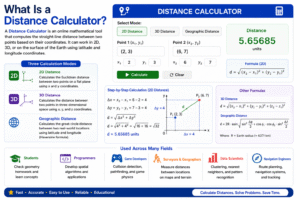
A Distance Calculator is an online mathematical tool that computes the straight-line distance between two points based on their coordinates. Depending on the type of calculation required, a Distance Calculator can work in two-dimensional (2D) space, three-dimensional (3D) space, or on the surface of the Earth using geographic (latitude and longitude) coordinates.
A complete Distance Calculator supports three modes:
- 2D Distance — calculates the Euclidean distance between two points on a flat plane using x and y coordinates
- 3D Distance — calculates the distance between two points in three-dimensional space using x, y, and z coordinates
- Geographic Distance — calculates the great-circle distance between two real-world locations using latitude and longitude coordinates, applying the Haversine formula
The Distance Calculator accepts simple comma-separated coordinate inputs and delivers instant, accurate results along with the intermediate calculation steps — the differences in each coordinate axis (Δx, Δy, Δz) and the square root computation used to arrive at the final distance value.
This tool is used across a remarkably wide range of fields. Mathematics students use it to check geometry homework. Programmers use it for spatial algorithm development. Game developers use it for collision detection and pathfinding logic. Surveyors and geographers use it to compute distances between locations. Data scientists use it for clustering algorithms and nearest-neighbor calculations. Navigation engineers use it for route planning. In every one of these contexts, a Distance Calculator saves time, prevents arithmetic errors, and delivers reliable results with educational transparency.
Understanding Distance – The Mathematical Foundation
Before using a Distance Calculator, it is valuable to understand what distance actually means in a mathematical context. In mathematics, the distance between two points is defined as the length of the straight line connecting them — also called the Euclidean distance in flat (non-curved) space.
This concept is rooted in the Pythagorean theorem, which states that in a right triangle, the square of the hypotenuse (the longest side) equals the sum of the squares of the other two sides:
c² = a² + b²
When applied to two points on a coordinate plane, the horizontal separation (Δx) and vertical separation (Δy) between the points form the two shorter sides of a right triangle, and the straight-line distance between the points is the hypotenuse. This geometric insight is the foundation of every distance formula used by a Distance Calculator, from the simplest 2D case to the complex Haversine formula for geographic coordinates.
The concept of Euclidean distance extends naturally from two dimensions to three dimensions by adding a third axis (z), and further adaptations allow it to work on curved surfaces like the Earth. Understanding this foundational geometry makes every output from a Distance Calculator more meaningful and easier to verify.
2D Distance – The Euclidean Distance Formula
The 2D distance formula is the most widely taught and used distance formula in mathematics. It calculates the straight-line distance between two points in a flat two-dimensional plane, such as a graph, a map on flat paper, or a screen coordinate system.
The 2D Distance Formula:
d = √[(x₂ – x₁)² + (y₂ – y₁)²]
Where:
- (x₁, y₁) are the coordinates of the first point
- (x₂, y₂) are the coordinates of the second point
- d is the straight-line distance between them
Step-by-step example — find the distance between (0, 0) and (3, 4):
- Δx = 3 – 0 = 3
- Δy = 4 – 0 = 4
- d = √(3² + 4²) = √(9 + 16) = √25 = 5
The distance is 5 units. This is a classic example of the 3-4-5 Pythagorean triple, and it perfectly illustrates how the distance formula is simply the Pythagorean theorem applied to coordinate geometry.
Another example — find the distance between (-2, 3) and (4, -5):
- Δx = 4 – (-2) = 6
- Δy = -5 – 3 = -8
- d = √(6² + (-8)²) = √(36 + 64) = √100 = 10
The distance is 10 units. A reliable Distance Calculator computes both of these examples instantly, showing Δx, Δy, the squared values, and the final square root result in a clear, readable format.
3D Distance – Extending Measurement to Three Dimensions
When working with objects or locations in three-dimensional space — such as points in a 3D model, coordinates in a physics simulation, atoms in a molecular structure, or positions in a 3D game world — the standard 2D formula must be extended to include a third axis.
The 3D Distance Formula:
d = √[(x₂ – x₁)² + (y₂ – y₁)² + (z₂ – z₁)²]
This is a direct extension of the 2D formula, adding the squared difference in the z-coordinate to the sum under the square root.
Step-by-step example — find the distance between (0, 0, 0) and (1, 2, 3):
- Δx = 1 – 0 = 1
- Δy = 2 – 0 = 2
- Δz = 3 – 0 = 3
- d = √(1² + 2² + 3²) = √(1 + 4 + 9) = √14 ≈ 3.742
Another example — find the distance between (2, -1, 4) and (5, 3, -2):
- Δx = 5 – 2 = 3
- Δy = 3 – (-1) = 4
- Δz = -2 – 4 = -6
- d = √(3² + 4² + (-6)²) = √(9 + 16 + 36) = √61 ≈ 7.810
The 3D distance formula is essential in engineering, architecture, 3D animation, robotics, and physics. Any time you need to measure the straight-line distance between two locations in space — rather than following a path along surfaces — this formula and a reliable Distance Calculator are exactly what you need.
Geographic Distance – The Haversine Formula
Measuring the distance between two real-world locations on the surface of the Earth requires a fundamentally different approach. The Earth is a sphere (technically an oblate spheroid), so the straight-line distance between two GPS coordinates is measured along the curved surface — this is called the great-circle distance, and it is calculated using the Haversine Formula.
The Haversine Formula:
a = sin²(Δlat/2) + cos(lat₁) × cos(lat₂) × sin²(Δlon/2)
d = 2R × arctan2(√a, √(1-a))
Where:
- lat₁, lon₁ are the latitude and longitude of the first point (in radians)
- lat₂, lon₂ are the latitude and longitude of the second point
- R is the Earth’s mean radius ≈ 6,371 km
- d is the great-circle distance between the two points
This formula accounts for the curvature of the Earth, making it accurate for both short distances (a few kilometers) and very long distances (thousands of kilometers between continents).
Example — distance between Karachi (24.86°N, 67.00°E) and Islamabad (33.68°N, 73.04°E):
Applying the Haversine formula with these coordinates produces a geographic distance of approximately 1,162 km — the real-world straight-line distance over the Earth’s surface between these two major Pakistani cities.
The geographic mode of a Distance Calculator handles all the trigonometric conversions from degrees to radians, applies the Haversine formula, multiplies by the Earth’s radius, and delivers the result in kilometers — making it effortless to compute real-world distances between any two GPS coordinates on the planet.
How to Use a Distance Calculator Step by Step
Using a Distance Calculator is simple and requires no specialized mathematical knowledge. Here is a complete step-by-step guide for all three calculation modes:
Step One – Choose Your Calculation Mode
Identify which type of distance you need to calculate:
- 2D Distance — for flat-plane geometry with x and y coordinates
- 3D Distance — for three-dimensional space with x, y, and z coordinates
- Geographic Distance — for real-world GPS coordinates using latitude and longitude
Select the corresponding section of the Distance Calculator interface.
Step Two – Enter Your First Point’s Coordinates
In the first input field, type the coordinates of your starting point in comma-separated format:
- For 2D: enter as x1, y1 (e.g., 0, 0)
- For 3D: enter as x1, y1, z1 (e.g., 0, 0, 0)
- For Geo: enter as Lat1, Lon1 (e.g., 24.86, 67.00)
Step Three – Enter Your Second Point’s Coordinates
In the second input field, type the coordinates of your ending point in the same format as the first point. Make sure both points use the same coordinate system and number of dimensions — mixing 2D and 3D coordinates will produce an error or incorrect result.
Step Four – Click the Calculate Button
Press the “Calculate” button. The Distance Calculator immediately processes your inputs, applies the appropriate formula, and displays the result along with the key intermediate values: the differences in each axis (Δx, Δy, Δz), the squared values, and the final square root computation.
Step Five – Review the Result and Intermediate Steps
Study the output carefully — not just the final answer. The breakdown showing Δx, Δy, and the squared sum helps you verify that the correct points were entered and that the formula was applied correctly. This transparency is one of the most valuable features of a well-designed Distance Calculator.
Step Six – Clear and Perform a New Calculation
Press the “Clear” button to reset the input fields and results panel to their default state. Always clear between separate calculations to avoid any confusion between different sets of coordinates. The Distance Calculator resets each section independently, so you can clear one mode without affecting the others.
Real-Life Applications of a Distance Calculator
A Distance Calculator is not a purely academic tool — it has powerful, high-frequency applications across dozens of professional fields and everyday situations. Here is a comprehensive look at where distance calculation is applied in the real world:
Navigation and Route Planning
GPS navigation systems use distance calculations constantly to determine the straight-line distance between a user’s current location and their destination, compute estimated travel times, and optimize routing decisions. The geographic mode of a Distance Calculator using the Haversine formula is the mathematical foundation for these navigation features in apps like Google Maps, Apple Maps, and Waze.
Game Development and Simulation
Every game that involves spatial logic — from 2D platformers to 3D first-person shooters — requires constant distance calculations. Collision detection (determining when two objects touch), line-of-sight checks, enemy AI pathfinding, and physics simulations all depend on computing the Euclidean distance between points hundreds or thousands of times per second. Game developers use a Distance Calculator to verify and prototype these algorithms before implementing them in code.
Architecture and Civil Engineering
Architects and civil engineers use 3D distance calculations to determine structural dimensions, verify that elements are positioned correctly in a 3D model, and calculate the lengths of diagonal components in trusses, frameworks, and building structures. A Distance Calculator makes these verifications fast and error-free during the design and review process.
Data Science and Machine Learning
Euclidean distance is the foundation of many machine learning algorithms, including k-means clustering (which groups data points by minimizing within-cluster distance), k-nearest neighbors (KNN), principal component analysis (PCA), and support vector machines (SVM). Data scientists use a Distance Calculator for quick sanity checks and prototyping when developing spatial models and feature engineering pipelines.
Physics and Chemistry
The distance between atoms in a molecule (the bond length), the distance between particles in a physics simulation, and the separation between celestial objects in an orbital mechanics model are all computed using three-dimensional distance formulas. Scientists in these fields rely on accurate distance calculations daily, and a Distance Calculator is a fast and reliable tool for verification and exploration.
Sports Analytics and Performance Tracking
Modern sports analytics uses GPS tracking to record the positions of players throughout a match. Computing how far each player ran, the distance covered in specific game phases, and the spacing between teammates and opponents all require real-time 2D and geographic distance calculations. Performance analysts use a Distance Calculator as part of their data processing toolkit.
Logistics and Supply Chain Management
Logistics companies compute distances between warehouses, distribution centers, and delivery addresses to optimize vehicle routing, estimate fuel consumption, and calculate delivery time estimates. The geographic Distance Calculator is a core component of the software systems that power global supply chain operations.
Astronomy and Space Science
Distances in space are computed using three-dimensional coordinate systems referenced to the center of the solar system, galaxy, or observable universe. Astronomers calculate the distances between stars, planets, and galaxies using the same 3D Euclidean distance formula, applied at scales ranging from kilometers to light-years. A Distance Calculator provides a practical way to verify calculations at any scale.
Distance Formulas at a Glance
Here is a clear summary of the three formulas used by a Distance Calculator, organized for quick reference:
| Type | Formula | Input | Output |
|---|---|---|---|
| 2D Euclidean | d = √[(x₂-x₁)² + (y₂-y₁)²] | x1,y1 and x2,y2 | Distance in units |
| 3D Euclidean | d = √[(x₂-x₁)² + (y₂-y₁)² + (z₂-z₁)²] | x1,y1,z1 and x2,y2,z2 | Distance in units |
| Geographic (Haversine) | d = 2R × arctan2(√a, √(1-a)) | Lat/Lon coordinates | Distance in km |
All three formulas are rooted in the Pythagorean theorem — adapted for flat 2D space, flat 3D space, and curved spherical surfaces respectively. Understanding this shared foundation helps you choose the right mode and interpret your results correctly.
Units of Measurement in a Distance Calculator
The unit of the distance result depends entirely on the unit of the input coordinates:
- For 2D and 3D Euclidean calculations, the output is in the same unit as the input coordinates. If you enter coordinates in meters, the result is in meters. If you enter coordinates in pixels, the result is in pixels. If you enter coordinates in feet or kilometers, the result is in those units.
- For Geographic distance calculations, the Haversine formula uses the Earth’s radius in kilometers (6,371 km) by default, so the output is always in kilometers. Some versions of the Distance Calculator also provide the result in miles alongside the kilometer value for convenience.
Important note on geographic inputs: Latitude and longitude must be entered in decimal degrees — for example, 24.86 rather than 24°51’36”. If your coordinates are in degrees-minutes-seconds (DMS) format, convert them to decimal degrees first: decimal degrees = degrees + (minutes/60) + (seconds/3600).
Tips for Using a Distance Calculator Effectively
To get the most accurate and reliable results from every calculation, keep these professional tips in mind when using a Distance Calculator:
- Always double-check coordinate order. For geographic calculations, latitude comes before longitude — entering them in reverse (longitude first) will produce a completely wrong distance result. For 2D and 3D calculations, confirm which value is x, which is y, and which is z before entering.
- Use decimal notation consistently. Enter coordinates as decimal numbers (e.g., 24.86) rather than fractions or mixed formats. Inconsistent number formats can cause parsing errors or incorrect results.
- Verify your coordinate system. Make sure both points use the same coordinate reference system. Mixing GPS coordinates from different datum systems, or mixing screen pixels with real-world meters, will produce meaningless results.
- For geographic calculations, use decimal degrees. Convert degrees-minutes-seconds to decimal degrees before entering coordinates into the geographic mode of the Distance Calculator.
- Check the intermediate values. The Δx, Δy, and Δz values shown in the output can help you quickly verify that your coordinates were parsed correctly. If these differences look wrong, re-examine your input format.
- Use the Clear button between calculations. Always reset input fields before starting a new calculation to ensure no leftover values from a previous entry affect your new result.
- Bookmark your preferred Distance Calculator for instant access during technical work, homework sessions, or field research. Having it a single click away saves time and keeps your workflow uninterrupted.
Common Mistakes to Avoid
Even with a reliable digital tool available, users frequently make errors in input or interpretation. Here are the most common mistakes and how to prevent each one:
Entering Coordinates in the Wrong Order
The most frequent geographic mistake is reversing latitude and longitude. Latitude measures north-south position (ranging from -90 to +90) and longitude measures east-west position (ranging from -180 to +180). Entering them in reverse gives the calculator a completely different location. Always enter as Latitude, Longitude — not longitude first.
Using Degrees-Minutes-Seconds Instead of Decimal Degrees
The geographic mode of a Distance Calculator expects coordinates in decimal degrees. Entering values like “24°51’36″” directly will cause a parsing error. Convert to decimal degrees first: 24°51’36” = 24 + 51/60 + 36/3600 = 24.86°.
Mixing Different Coordinate Systems
Entering one point in GPS decimal degrees and another in UTM grid coordinates, or using meters for one point and feet for another, will produce completely incorrect results. Always confirm that both points use the same coordinate system and the same unit of measurement before using a Distance Calculator.
Confusing 2D and 3D Mode
If you have 3D coordinates but use the 2D mode, the z-coordinate is ignored and the result only reflects the horizontal distance in the x-y plane — which may be significantly shorter than the true 3D distance. Always select the appropriate mode for your data.
Treating the Result as a Traveled Distance
The Distance Calculator computes the straight-line (as-the-crow-flies) distance between two points — not the distance along a road, path, or terrain surface. For navigation and routing purposes, the actual travel distance along roads will always be greater than the straight-line result. A Distance Calculator gives you the theoretical minimum distance, not the practical travel path.
Forgetting Negative Signs on Coordinates
Geographic coordinates south of the equator are negative latitudes (e.g., Sydney, Australia is approximately -33.87°, 151.21°), and coordinates west of the prime meridian are negative longitudes (e.g., New York City is approximately 40.71°, -74.01°). Forgetting the negative sign places the point in the wrong hemisphere, producing a large error in the geographic distance result.
Frequently Asked Questions (FAQs)
What is a Distance Calculator and what does it do?
A Distance Calculator is an online tool that computes the straight-line distance between two points based on their coordinates. It supports 2D Euclidean distance (for flat-plane coordinates), 3D Euclidean distance (for three-dimensional space coordinates), and geographic distance (for real-world latitude and longitude coordinates using the Haversine formula). A Distance Calculator delivers instant, accurate results with step-by-step working for verification and learning.
What is the difference between 2D and 3D distance?
2D distance measures the straight-line separation between two points on a flat plane using x and y coordinates. 3D distance extends this measurement to three-dimensional space by adding a z-coordinate. The 3D result is always greater than or equal to the 2D result for the same x and y values because it also accounts for the vertical (z) separation between the points. A Distance Calculator handles both calculations with equal speed and accuracy.
What is the Haversine formula used in geographic distance?
The Haversine formula is a trigonometric equation used to calculate the great-circle distance between two points on the surface of a sphere given their latitude and longitude coordinates. It accounts for the curvature of the Earth and produces the shortest possible over-surface distance between two geographic locations. The geographic mode of a Distance Calculator applies this formula using the Earth’s mean radius of 6,371 km to deliver results in kilometers.
Is the Distance Calculator free to use?
Yes. Most online versions of the Distance Calculator are completely free, require no registration, subscription, or software installation, and work instantly in any modern web browser on desktops, tablets, and smartphones. The tool is available around the clock for immediate use whenever a distance calculation is needed.
Does the Distance Calculator give the driving distance between two cities?
No. The Distance Calculator computes the straight-line (as-the-crow-flies) distance between two points — not the driving distance along roads or any other route. The straight-line geographic distance is always shorter than (or equal to) the actual driving distance. For driving distances and route planning, use a dedicated navigation service like Google Maps in addition to the Distance Calculator for straight-line reference values.
What coordinate format does the geographic Distance Calculator accept?
The geographic mode of the Distance Calculator accepts coordinates in decimal degrees format — for example, 24.86 for latitude and 67.00 for longitude. Coordinates south of the equator should be entered as negative latitudes (e.g., -33.87 for Sydney), and coordinates west of the prime meridian should be entered as negative longitudes (e.g., -74.01 for New York). Degrees-minutes-seconds must be converted to decimal degrees before entry.
Can I use the Distance Calculator for non-geographic coordinate systems?
Yes. The 2D and 3D Euclidean modes of the Distance Calculator work with any coordinate system — not just geographic ones. You can use them for pixel coordinates on a screen, meter-based engineering coordinates, unit coordinates in a game world, or any other Cartesian coordinate system. The output unit will match whatever unit your input coordinates are expressed in.
What is the maximum distance the geographic calculator can compute?
There is no practical maximum. The Haversine formula used in the geographic mode of the Distance Calculator works correctly for any pair of latitude and longitude coordinates anywhere on Earth — from two points just meters apart to two points on opposite sides of the planet (maximum great-circle distance: approximately 20,037 km, which is half the Earth’s circumference).
Conclusion
The Distance Calculator is one of the most versatile, universally applicable, and practically valuable mathematical tools available online today. Whether you are measuring the gap between two points on a coordinate grid, computing the diagonal distance between two corners of a 3D structure, or finding the real-world straight-line distance between two cities on opposite sides of a country, this tool delivers instant, accurate, and clearly explained results for every scenario.
Distance measurement is a foundational operation that underpins an enormous range of disciplines — from pure mathematics and physics to engineering, game development, data science, navigation, logistics, biology, and astronomy. Having a reliable Distance Calculator available means you are always equipped to handle these calculations quickly and confidently, without the risk of manual arithmetic errors compounding across multiple formula steps.
The step-by-step output of a Distance Calculator — showing Δx, Δy, Δz, the squared differences, and the final square root — does more than just deliver a number. It reveals the logic of the Pythagorean theorem in action, deepens your understanding of spatial geometry, and gives you the tools to verify every result independently. Whether you use the 2D Euclidean mode, the 3D mode, or the geographic Haversine mode, the process is always transparent, verifiable, and educational.
Whether you are a student checking a geometry answer, an engineer verifying a structural dimension, a developer prototyping a spatial algorithm, a data scientist computing feature distances, or a traveler curious about the straight-line distance between two cities — the Distance Calculator is your most accurate, efficient, and dependable tool for every distance measurement challenge you will ever encounter. Use it confidently, study the steps it shows you, and let it power your spatial calculations with the speed, precision, and clarity that modern technical work demands.