Binary Calculator
Calculate percent error instantly with our easy-to-use Percent Error Calculator
Table of Contents
- Introduction
- What Is a Binary Calculator?
- What Is the Binary Number System?
- What Is a Binary System Converter?
- How Binary Numbers Work — Place Values and Positional Notation
- How to Convert Binary to Decimal
- How to Convert Decimal to Binary
- Binary Arithmetic — Addition, Subtraction, Multiplication, and Division
- Binary System Converter in Computer Science
- Binary System Converter in Digital Electronics
- Binary System Converter in Networking and Data Communication
- Binary System Converter in Cryptography and Security
- Binary System Converter in Education
- Binary vs. Octal vs. Hexadecimal — A Comparison
- Common Mistakes When Using a Binary System Converter
- Frequently Asked Questions (FAQs)
- Conclusion
Introduction
In the digital age, every piece of information processed by a computer — every image, every word, every sound, every instruction — is ultimately expressed as a sequence of ones and zeros. This is the language of machines, and it is built on one of the most fundamental concepts in computer science and mathematics: the binary number system. A Binary System Converter is the essential tool that bridges the gap between the binary world of computers and the decimal world of human understanding, making it possible to translate numbers instantly and accurately between different numeral systems.
Whether you are a computer science student learning about number systems for the first time, a software developer working with low-level data representations, an electronics engineer designing digital circuits, or simply a curious learner wanting to understand how computers think, this guide will give you a complete, practical understanding of the Binary System Converter and everything it does. We will explore the binary number system in depth, explain how conversion between binary and decimal works, walk through practical examples, and show where the Binary System Converter is used across a wide range of academic and professional disciplines.
This is your definitive resource for understanding the Binary System Converter — from its mathematical foundations to its real-world applications in computing, engineering, and beyond.
What Is a Binary Calculator?
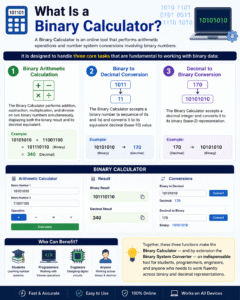
A Binary Calculator is an online tool that performs arithmetic operations and number system conversions involving binary numbers. It is designed to handle three core tasks that are fundamental to working with binary data:
Binary Arithmetic Calculation The Binary Calculator performs addition, subtraction, multiplication, and division on two binary numbers simultaneously, displaying both the binary result and its decimal equivalent. For example, adding 10101010 and 11001100 in binary and seeing the result in both formats instantly.
Binary to Decimal Conversion The Binary Calculator accepts a binary number (a sequence of 0s and 1s) and converts it to its equivalent decimal (base-10) value. For example, converting 10101010 → 170 in decimal.
Decimal to Binary Conversion The Binary Calculator accepts a decimal integer and converts it to its binary (base-2) representation. For example, converting 170 → 10101010 in binary.
Together, these three functions make the Binary Calculator — and by extension the Binary System Converter — an indispensable tool for students learning number systems, programmers working with bitwise operations, engineers designing digital circuits, and anyone who needs to work fluently across binary and decimal representations.
What Is the Binary Number System?
The binary number system is a base-2 numeral system that uses only two digits — 0 and 1 — to represent all numbers. It is the foundational language of digital computing and electronics, because the two binary states (0 and 1) map perfectly onto the two physical states of digital circuits: off/on, low voltage/high voltage, or false/true.
In contrast to our everyday decimal (base-10) system, which uses ten digits (0–9) and powers of 10 as place values, the binary system uses powers of 2 as place values. Every binary digit (called a “bit”) represents a power of 2, with the rightmost bit representing 2⁰ = 1, the next representing 2¹ = 2, then 2² = 4, 2³ = 8, and so on.
Key properties of the binary number system:
- Base: 2
- Digits used: 0 and 1
- Each digit: called a “bit” (binary digit)
- Groups of 8 bits: called a “byte”
- Groups of 4 bits: called a “nibble”
- Place values: powers of 2 (1, 2, 4, 8, 16, 32, 64, 128…)
The binary system was formalized by Gottfried Wilhelm Leibniz in 1703, though its roots go back even further in mathematics and philosophy. Today, it is the universal language of every digital device on the planet — from microprocessors and memory chips to smartphones and supercomputers. A Binary System Converter makes this language accessible to users who need to move between binary and human-readable number formats.
What Is a Binary System Converter?
A Binary System Converter is a tool — digital or manual — that translates numbers between the binary (base-2) number system and other numeral systems, most commonly the decimal (base-10) system. It is an essential component of the broader Binary Calculator, and the skill of binary-decimal conversion is foundational to computer science, digital electronics, and programming.
A Binary System Converter performs two primary functions:
Binary-to-Decimal Conversion Given a binary number such as 11010110, the Binary System Converter computes its decimal equivalent (214 in this case) by evaluating the sum of all active bit positions.
Decimal-to-Binary Conversion Given a decimal number such as 214, the Binary System Converter produces the binary representation (11010110) by repeatedly dividing by 2 and recording remainders.
Beyond these two core functions, a full-featured Binary System Converter may also handle conversions between binary and octal (base-8), binary and hexadecimal (base-16), and even direct arithmetic operations on binary values.
The Binary System Converter is a critical tool in classrooms, coding environments, circuit design workspaces, and network engineering — anywhere that binary data must be interpreted, communicated, or debugged by humans.
How Binary Numbers Work — Place Values and Positional Notation
Understanding binary place values is the key to using any Binary System Converter effectively. Just as decimal numbers use powers of 10 as column values (ones, tens, hundreds, thousands…), binary numbers use powers of 2.
Binary place value table (right to left):
| Bit Position | 7 | 6 | 5 | 4 | 3 | 2 | 1 | 0 |
|---|---|---|---|---|---|---|---|---|
| Power of 2 | 2⁷ | 2⁶ | 2⁵ | 2⁴ | 2³ | 2² | 2¹ | 2⁰ |
| Decimal Value | 128 | 64 | 32 | 16 | 8 | 4 | 2 | 1 |
A binary number like 10101010 is read as:
- Bit 7 = 1 → contributes 128
- Bit 6 = 0 → contributes 0
- Bit 5 = 1 → contributes 32
- Bit 4 = 0 → contributes 0
- Bit 3 = 1 → contributes 8
- Bit 2 = 0 → contributes 0
- Bit 1 = 1 → contributes 2
- Bit 0 = 0 → contributes 0
Total = 128 + 32 + 8 + 2 = 170
This positional structure is exactly what the Binary System Converter uses to translate between binary and decimal representations.
How to Convert Binary to Decimal
Converting binary to decimal is one of the two core functions of the Binary System Converter. The method is straightforward and always produces an exact result.
Method: Sum of Active Bit Powers
For each bit in the binary number that equals 1, add the corresponding power of 2 to a running total.
Step-by-Step Process:
- Write the binary number
- Assign powers of 2 from right to left, starting at 2⁰
- Multiply each bit (0 or 1) by its corresponding power of 2
- Sum all the products
Example 1: Binary 1101 → Decimal
(1 × 2³) + (1 × 2²) + (0 × 2¹) + (1 × 2⁰) = 8 + 4 + 0 + 1 = 13
Example 2: Binary 11001100 → Decimal
(1×128) + (1×64) + (0×32) + (0×16) + (1×8) + (1×4) + (0×2) + (0×1) = 128 + 64 + 8 + 4 = 204
The Binary System Converter performs this entire calculation instantly, eliminating the manual addition steps and reducing the chance of arithmetic error — especially for long binary strings.
How to Convert Decimal to Binary
Converting decimal to binary is the reverse operation of the Binary System Converter, translating from the familiar base-10 world back into the binary language of digital systems.
Method: Repeated Division by 2
- Divide the decimal number by 2
- Record the remainder (0 or 1) — this becomes the least significant bit (rightmost)
- Divide the quotient by 2 again and record the new remainder
- Repeat until the quotient equals 0
- Read the remainders from bottom to top — this is the binary number
Example: Decimal 45 → Binary
| Step | Quotient | Remainder |
|---|---|---|
| 45 ÷ 2 | 22 | 1 |
| 22 ÷ 2 | 11 | 0 |
| 11 ÷ 2 | 5 | 1 |
| 5 ÷ 2 | 2 | 1 |
| 2 ÷ 2 | 1 | 0 |
| 1 ÷ 2 | 0 | 1 |
Reading remainders bottom to top: 101101
Verification: 32 + 8 + 4 + 1 = 45 ✓
The Binary System Converter automates this entire division process, returning the binary result in milliseconds for any decimal integer you enter.
Binary Arithmetic — Addition, Subtraction, Multiplication, and Division
Binary arithmetic follows the same principles as decimal arithmetic, but with only two digits. A Binary System Converter that includes a calculator function handles all four operations, displaying results in both binary and decimal.
Binary Addition Rules:
- 0 + 0 = 0
- 0 + 1 = 1
- 1 + 0 = 1
- 1 + 1 = 10 (write 0, carry 1)
- 1 + 1 + 1 = 11 (write 1, carry 1)
Example: 10101010 + 11001100
Decimal: 170 + 204 = 374 Binary result: 101110110
Binary Subtraction follows the borrowing principle (base-2 borrowing instead of base-10).
Binary Multiplication uses AND logic — multiplying by 0 gives 0, multiplying by 1 preserves the number — then shifts and adds partial products.
Binary Division uses repeated subtraction, similar to long division in decimal.
The Binary System Converter performs all four operations by converting binary inputs to decimal, performing the arithmetic, then converting the result back to binary — giving you both representations simultaneously.
Binary System Converter in Computer Science
The Binary System Converter is an absolutely fundamental tool in computer science, because all data in a computer — integers, floating-point numbers, characters, instructions, addresses — is stored and processed in binary format.
Data Types and Storage
- A single bit is the smallest unit of data: 0 or 1
- A byte (8 bits) can represent values from 0 (00000000) to 255 (11111111)
- A 16-bit integer represents values from 0 to 65,535
- A 32-bit integer represents values from 0 to 4,294,967,295
- A 64-bit integer can represent values up to approximately 18.4 quintillion
Programmers use the Binary System Converter to:
- Debug bitwise operations — AND, OR, XOR, NOT, shift operations
- Understand memory addresses — Memory is addressed in binary; debuggers display values in hex (which is directly related to binary)
- Work with file formats — Many binary file formats use bit flags, binary fields, and packed binary structures
- Understand character encoding — ASCII values, UTF-8 byte sequences, and Unicode code points all have binary representations
Every programming language has built-in functions for binary conversion (such as bin() in Python, Integer.toBinaryString() in Java, toString(2) in JavaScript), and the Binary System Converter provides a manual, visual way to understand and verify these conversions.
Binary System Converter in Digital Electronics
In digital electronics, the binary system is not just a mathematical abstraction — it is a physical reality. Every logic gate, flip-flop, register, and memory cell in a digital circuit operates in binary.
Logic Gates and Binary States
- AND gate: output is 1 only if both inputs are 1
- OR gate: output is 1 if at least one input is 1
- NOT gate: output inverts the input (0→1, 1→0)
- XOR gate: output is 1 if inputs differ
Electronics engineers use the Binary System Converter to:
- Translate sensor values from ADC (Analog-to-Digital Converter) outputs into human-readable numbers
- Verify register contents when programming microcontrollers and embedded systems
- Design truth tables for combinational logic circuits
- Program memory addresses and instruction codes in assembly language and machine code
In microprocessor design, understanding binary is non-negotiable. Every assembly instruction, every memory address, and every CPU register value exists as a binary pattern — and the Binary System Converter is the tool that makes these patterns interpretable.
Binary System Converter in Networking and Data Communication
Computer networking is built on binary data transmission, and the Binary System Converter is an essential tool for understanding and working with network addresses, packet structures, and protocol headers.
IP Addresses and Subnet Masks IPv4 addresses are 32-bit binary numbers, typically displayed in “dotted decimal” notation (e.g., 192.168.1.1). Network engineers use the Binary System Converter to convert IP addresses to binary to understand subnetting, identify network vs. host portions, and calculate subnet masks.
For example:
192.168.1.1 in binary = 11000000.10101000.00000001.00000001
Understanding this binary representation is essential for designing network topologies, configuring routers, and troubleshooting connectivity issues.
MAC Addresses Hardware MAC addresses are 48-bit binary numbers, usually displayed in hexadecimal. The Binary System Converter helps network engineers translate between binary, decimal, and hexadecimal when analyzing network traffic at the packet level.
Data Packet Structure Network protocols (TCP, UDP, IP, Ethernet) encode header information in precise binary fields. Protocol analyzers and network engineers rely on binary conversion to interpret packet captures and diagnose network problems.
Binary System Converter in Cryptography and Security
Cryptography — the science of secure communication — is deeply rooted in binary mathematics. The Binary System Converter is a useful tool for students and professionals learning about cryptographic algorithms.
Bitwise XOR Encryption The simplest form of binary encryption involves XORing a plaintext binary stream with a key binary stream. Understanding how XOR works at the binary level requires the Binary System Converter to visualize the bit-by-bit operation.
Hash Functions Cryptographic hash functions (MD5, SHA-1, SHA-256) produce fixed-length binary outputs. Security analysts and developers use the Binary System Converter to examine hash values in binary and understand properties like bit diffusion and avalanche effects.
Bitmasking in Security Permission systems, firewall rules, and access control lists use bitmask logic — where individual bits represent specific permissions or flags. The Binary System Converter makes it straightforward to construct and interpret bitmasks, supporting precise security configuration.
Binary System Converter in Education
The Binary System Converter is one of the most important educational tools in computer science and mathematics curricula. Students at secondary school, college, and university level encounter binary number systems across multiple courses.
Computer Science Education Binary conversion is typically one of the first topics covered in computer science courses. Students use the Binary System Converter to:
- Practice and verify manual binary-decimal conversions
- Understand the relationship between binary and hexadecimal (groups of 4 bits)
- Learn bitwise operations and their applications
- Explore how characters are encoded in ASCII and Unicode
Mathematics Education Number base conversion is a standard topic in mathematics, teaching students that the decimal system is just one of many possible positional numeral systems. The Binary System Converter provides an interactive, immediate way to explore these concepts and verify hand calculations.
Competitive Programming Many programming competitions and technical interviews include problems involving binary representations, bitwise operations, and number system conversions. Students who are fluent with binary — aided by regular practice with the Binary System Converter — perform significantly better on these challenges.
Binary vs. Octal vs. Hexadecimal — A Comparison
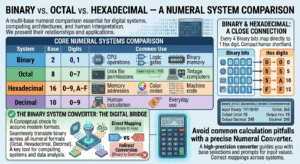
The binary system is one of several numeral systems used in computing. Understanding how it relates to octal (base-8) and hexadecimal (base-16) is essential for working effectively with digital systems.
| System | Base | Digits | Common Use |
|---|---|---|---|
| Binary | 2 | 0, 1 | CPU operations, logic gates, memory |
| Octal | 8 | 0–7 | Unix file permissions, older computing |
| Hexadecimal | 16 | 0–9, A–F | Memory addresses, color codes, machine code |
| Decimal | 10 | 0–9 | Human calculation, everyday use |
Binary and hexadecimal are especially closely related — every 4 binary bits correspond exactly to one hex digit. This makes hexadecimal a compact, human-readable shorthand for binary:
| Binary | Hex | Decimal |
|---|---|---|
| 0000 | 0 | 0 |
| 0101 | 5 | 5 |
| 1010 | A | 10 |
| 1111 | F | 15 |
The Binary System Converter is the bridge between binary and these related systems, allowing seamless translation across all numeral formats used in computing.
Common Mistakes When Using a Binary System Converter
Even with a reliable Binary System Converter, errors in input or interpretation are common. Here are the most frequent mistakes to avoid:
- Entering non-binary characters — Binary numbers contain only 0s and 1s. Accidentally including a 2, 3, or any other digit produces an invalid binary input and incorrect results
- Confusing binary and decimal — The number “10” means ten in decimal but two in binary. Always know which number system you are working in
- Ignoring leading zeros — Leading zeros in binary are significant for data width (e.g., a byte is always 8 bits: 00001010, not 1010). The Binary System Converter may or may not preserve leading zeros depending on the implementation
- Reversing bit order — Binary numbers are read left to right with the most significant bit (MSB) on the left. Reversing the order completely changes the value
- Arithmetic overflow — When performing binary addition or multiplication, the result may require more bits than either input. Always check that your result fits within the expected bit width
Frequently Asked Questions (FAQs)
What is a Binary System Converter? A Binary System Converter is a tool that translates numbers between the binary (base-2) number system and other numeral systems — most commonly decimal (base-10). It performs binary-to-decimal and decimal-to-binary conversions instantly and accurately.
What is the binary number system? The binary number system is a base-2 positional numeral system that uses only two digits — 0 and 1 — to represent all numbers. It is the foundational language of digital computers and electronics.
How does a Binary System Converter convert binary to decimal? The Binary System Converter multiplies each binary digit by its corresponding power of 2 (starting from 2⁰ on the right) and sums all the results. For example, 1011 = (1×8) + (0×4) + (1×2) + (1×1) = 11.
How does a Binary System Converter convert decimal to binary? The Binary System Converter uses repeated division by 2, recording the remainder (0 or 1) at each step, then reads the remainders in reverse order to produce the binary result.
Why do computers use binary instead of decimal? Because digital circuits naturally have two states — on and off (or high voltage and low voltage) — which map directly to binary 1 and 0. Building electronic systems around two states is far simpler, more reliable, and more energy-efficient than supporting ten distinct states.
What is a bit? A bit is a single binary digit — either 0 or 1. It is the smallest unit of data in computing. Eight bits form a byte.
What is the largest number an 8-bit binary number can represent? The largest 8-bit binary number is 11111111, which equals 255 in decimal. An 8-bit system can represent values from 0 to 255 (256 total values).
How is binary related to hexadecimal? Every group of 4 binary bits corresponds exactly to one hexadecimal digit (0–F). This makes hexadecimal a convenient, compact representation of binary data. The Binary System Converter can be extended to handle binary-hexadecimal conversions as well.
Can the Binary System Converter handle negative numbers? Standard Binary System Converters work with non-negative integers. Negative numbers in binary use representations like two’s complement, which requires a different conversion approach.
What is the binary representation of the number 255? 255 in binary is 11111111 — eight 1-bits, each contributing a power of 2 from 2⁰ to 2⁷: 1 + 2 + 4 + 8 + 16 + 32 + 64 + 128 = 255.
Conclusion
The Binary System Converter is far more than a simple math tool — it is a gateway into the fundamental language of all digital technology. Every calculation your computer performs, every image your screen displays, every message you send over the internet exists, at its lowest level, as a sequence of binary digits. Understanding binary and knowing how to convert fluently between binary and decimal is an essential skill for computer science students, software developers, hardware engineers, network professionals, and anyone who works seriously with digital systems.
The Binary System Converter makes this skill accessible to everyone — instantly translating between binary and decimal, performing binary arithmetic operations, and providing a clear, step-by-step window into a number system that underpins the entire digital world. Whether you are verifying a manual calculation, debugging a bitwise operation, understanding a network address, or simply satisfying your curiosity about how computers think, the Binary System Converter delivers accurate, immediate results with no manual arithmetic required.
Master binary, and you master the language of machines. The Binary System Converter is your translator, your teacher, and your most reliable computational companion in that journey. Use it regularly, understand the principles behind it, and you will find that the world of digital computing becomes far more transparent, logical, and approachable — one bit at a time.