Stopwatch & Timer
Track elapsed time with precision start, stop, and lap features.
Estimate Concrete Volume and Material Requirements with Fast and Accurate Results Using Our Free Concrete Calculator
Table of Contents
- Introduction
- What Is a Stopwatch & Timer Tool?
- How Does a Stopwatch & Timer Work?
- Key Features of an Online Stopwatch & Timer
- Stopwatch Mode vs. Countdown Timer Mode — What Is the Difference?
- How to Use a Stopwatch & Timer Step by Step
- Top Uses of a Stopwatch & Timer in Daily Life
- Stopwatch & Timer for Study and Productivity
- Stopwatch & Timer for Exercise and Fitness
- Stopwatch & Timer for Cooking and Kitchen Use
- Time Management Benefits of Using a Stopwatch & Timer
- Why an Online Stopwatch & Timer Is Better Than a Physical Clock
- Stopwatch & Timer for Professional and Business Use
- Tips to Get the Most Out of Your Stopwatch & Timer
- FAQs About Stopwatch & Timer
- Conclusion
Introduction
Time is the most valuable and non-renewable resource in our lives. Whether you are a student studying for exams, an athlete training for a competition, a chef perfecting a recipe, or a professional managing a project deadline — knowing exactly how much time is passing or remaining is absolutely critical to your success. This is where a powerful, reliable Stopwatch & Timer tool becomes your most trusted daily companion.
A Stopwatch & Timer is a dual-function online time-tracking tool that gives you complete control over how you measure and manage time. With just a single click, you can start, pause, resume, and reset your time display in precision HH:MM:SS format — making it incredibly useful for virtually every aspect of modern life.
Gone are the days of fumbling with physical clocks or searching for a mobile app every time you need to track time. A free online Stopwatch & Timer is available directly in your browser — no downloads, no sign-ups, no complicated settings. Just open, click Start, and begin tracking your time with perfect precision.
In this comprehensive guide, we will explore everything there is to know about the Stopwatch & Timer — from how it works and its key features to its countless real-world applications and expert tips for getting the most out of this essential time management tool.
What Is a Stopwatch & Timer Tool?
A Stopwatch & Timer is a digital time-tracking tool that combines two powerful functions in a single, easy-to-use interface:
The Stopwatch counts upward from zero, measuring elapsed time from the moment you press Start. It keeps running until you pause or reset it, giving you an accurate reading of how much time has passed.
The Countdown Timer counts downward from a pre-set duration — entered in minutes and seconds — and alerts you when the time runs out. It displays the time remaining in real time, helping you stay aware of approaching deadlines or the end of a task window.
Together, these two modes make the Stopwatch & Timer a versatile time management tool suitable for an enormous range of personal, academic, professional, and fitness applications.
The online Stopwatch & Timer displays time in the standard HH:MM:SS format — hours, minutes, and seconds — ensuring you can track everything from a quick 30-second task to a multi-hour work session with equal precision. The tool updates in real-time every second, giving you a live time display that is always current and accurate.
What makes a Stopwatch & Timer truly powerful is its simplicity. There are no complicated menus, no subscriptions, and no technical knowledge required. Anyone — from a young student to a senior professional — can use it instantly.
How Does a Stopwatch & Timer Work?
Understanding how the Stopwatch & Timer works helps you use it more effectively and confidently. Here is a clear breakdown of the mechanics behind this essential tool:
The Stopwatch Function When you activate the Stopwatch mode, the tool begins counting upward from 00:00:00 at one-second intervals. Every second, the time display updates to show the new elapsed time. The status panel simultaneously shows that the timer is Running and displays the total elapsed time in seconds for quick reference.
When you press Pause, the Stopwatch & Timer freezes the current time and changes the status to Paused. The elapsed time is preserved exactly as it was — no seconds are lost. Pressing Resume picks up from exactly where you left off, continuing the count without any interruption.
The Countdown Timer Function When you switch to Countdown Timer mode, you can set your desired duration by entering the number of minutes and seconds in the input fields. Once you press Start, the Stopwatch & Timer begins counting down from your entered time, updating the time remaining every second.
When the countdown reaches 00:00:00, the tool automatically stops and displays a “Time’s Up!” alert in the status panel, clearly indicating that the set time has expired. This is especially useful for cooking timers, study sessions, workout timers, and any other activity where completing a task within a fixed window is important.
The Reset Function Pressing Reset at any time immediately stops the timer, clears the time display back to 00:00:00, and returns the status to Ready — preparing the Stopwatch & Timer for a fresh new session. This makes it quick and easy to restart a timing session without any delay.
Key Features of an Online Stopwatch & Timer
A well-designed Stopwatch & Timer comes with a set of essential features that make it far more useful than a basic clock. Here are the key features that define a powerful online Stopwatch & Timer:
Dual-Mode Functionality The ability to switch seamlessly between Stopwatch mode and Countdown Timer mode makes this tool extremely versatile. Whether you need to measure elapsed time or track time remaining, a single tool handles both needs.
Real-Time HH:MM:SS Display The large, bold time display in HH:MM:SS format updates every second, making it easy to read at a glance even from a distance. This is critical for users who need to monitor elapsed time or time remaining while doing other activities.
Start, Pause, Resume, and Reset Controls The ability to pause and resume without losing your count is one of the most practical features of a Stopwatch & Timer. It allows you to handle interruptions without resetting your entire session — perfect for study breaks, phone calls, or unexpected pauses during a workout.
Status Panel with Live Updates A live status panel showing the current state — Running, Paused, Counting Down, Time’s Up!, Ready, or Reset — keeps you informed at all times. This real-time feedback makes the Stopwatch & Timer especially intuitive and user-friendly.
Flexible Time Input for Countdown The Countdown Timer mode allows you to set any duration using the minutes and seconds fields, giving you complete flexibility whether you need a 30-second timer, a 5-minute timer, or a 60-minute countdown clock.
Responsive Design for All Devices A modern online stopwatch is fully responsive — it adapts perfectly to desktops, laptops, tablets, and mobile phones. You get the same clean, functional time display and smooth controls regardless of the device you are using.
No Download or Installation Required A browser-based Stopwatch & Timer requires no app download, no account creation, and no installation. It is instantly accessible from any device with a web browser and internet connection — making it the most convenient free online timer available.
Stopwatch Mode vs. Countdown Timer Mode — What Is the Difference?
Many users are unsure when to use Stopwatch mode versus Countdown Timer mode. Here is a clear comparison to help you choose the right mode for your needs:
| Feature | Stopwatch Mode | Countdown Timer Mode |
|---|---|---|
| Direction | Counts upward from 00:00:00 | Counts downward to 00:00:00 |
| Primary Use | Measuring elapsed time | Tracking time remaining |
| Input Required | None — starts immediately | Set minutes and seconds |
| Alert on Finish | No automatic alert | Time’s Up! notification |
| Best For | Races, tasks, lap timing | Study sessions, cooking, workouts |
| Reset Behavior | Returns to 00:00:00 | Returns to set duration |
Use the Stopwatch when you want to know how long something takes — a run, a task, a meeting, or any activity where measuring elapsed time is the goal.
Use the Countdown Timer when you have a fixed time budget and need to know when it runs out — a pomodoro timer study session, a cooking recipe step, a workout interval, or any deadline-driven activity.
Together, the two modes of the Stopwatch & Timer cover every time-tracking scenario you will ever encounter.
How to Use a Stopwatch & Timer Step by Step
Using the Stopwatch & Timer is incredibly simple. Follow these step-by-step instructions to get started immediately:
Using the Stopwatch Mode:
Step 1 — Open the Stopwatch & Timer tool in your browser. By default, it opens in Stopwatch mode.
Step 2 — Check the status panel on the right — it should display Status: Ready and Mode: Stopwatch Active.
Step 3 — Click the Start button. The time display begins counting upward from 00:00:00 in HH:MM:SS format. The status changes to Running.
Step 4 — Click Pause at any time to freeze the timer. The elapsed time is preserved and the status shows Paused.
Step 5 — Click Resume (the button label changes from Start to Resume after pausing) to continue from where you stopped.
Step 6 — Click Reset to clear everything and return the Stopwatch & Timer to its initial Ready state.
Using the Countdown Timer Mode:
Step 1 — Click the Countdown tab at the top of the tool to switch from Stopwatch to Countdown Timer mode.
Step 2 — Enter your desired minutes and seconds in the input fields. For example, enter 25 minutes and 0 seconds for a classic pomodoro timer session.
Step 3 — Click Start. The time display begins counting down from your entered time. The status shows Counting Down with the time remaining in seconds.
Step 4 — Click Pause if you need to stop momentarily. Click Resume to continue the countdown.
Step 5 — When the countdown reaches 00:00:00, the Stopwatch & Timer automatically stops and displays “Time’s Up!” in the status panel.
Step 6 — Click Reset to restore the countdown clock to your original set duration, ready for a new session.
Top Uses of a Stopwatch & Timer in Daily Life
The Stopwatch & Timer is one of the most universally useful tools ever created. Here are the most popular real-world applications:
Academic Study Sessions — Students use the Stopwatch & Timer to implement the pomodoro timer technique, alternating 25-minute study blocks with 5-minute breaks to maximize focus and retention.
Sports and Athletic Training — Coaches and athletes use the online stopwatch to measure sprint times, lap times, and rest intervals during training sessions.
Cooking and Baking — The cooking timer function of the Countdown Timer mode is essential for perfectly timed recipes — boiling eggs, baking bread, marinating meat, and much more.
Workplace Productivity — Professionals use the Stopwatch & Timer to track how long specific tasks take, improving time management and helping identify where hours are being spent.
Presentations and Public Speaking — Speakers use the online stopwatch to time their presentations during practice, ensuring they stay within their allotted slot.
Meditation and Mindfulness — The countdown clock function is perfect for timed meditation sessions — simply set your desired duration and close your eyes, knowing the timer will alert you when your session ends.
Games and Competitions — Board games, trivia nights, quiz competitions, and classroom activities all benefit from the precision of a digital timer to keep rounds fair and time-limited.
Exam Practice — Students preparing for timed exams use the Stopwatch & Timer to simulate test conditions, practicing answering questions within the exact time limits they will face.
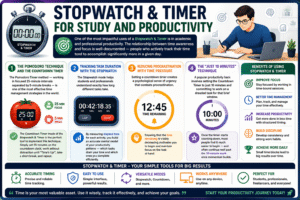
Stopwatch & Timer for Study and Productivity
One of the most impactful uses of a Stopwatch & Timer is in academic and professional productivity. The relationship between time awareness and focus is well-documented — people who actively track their time tend to accomplish significantly more in a given day.
The Pomodoro Technique and the Countdown Timer The pomodoro timer method — working in focused 25-minute intervals separated by 5-minute breaks — is one of the most effective time management strategies in the world. The Countdown Timer mode of the Stopwatch & Timer is the perfect tool to implement this technique. Simply set 25 minutes on the countdown clock, work without distraction until “Time’s Up!”, take a short break, and repeat.
Tracking Task Duration with the Stopwatch The Stopwatch mode helps students and professionals understand exactly how long different tasks take. By measuring elapsed time for each activity, you build an accurate mental model of your productivity patterns — which tasks drain your time and which ones you complete efficiently.
Reducing Procrastination with Time Pressure Setting a countdown timer creates a psychological sense of urgency that combats procrastination. Knowing that the time remaining is visibly decreasing motivates you to begin and maintain focus on the task at hand.
The “Just 10 Minutes” Technique A popular productivity hack involves setting the Countdown Timer to just 10 minutes and committing to work on a dreaded task for that brief window. Once the timer starts counting down, most people find it much easier to begin — and often continue well past the 10-minute mark once momentum builds.
Stopwatch & Timer for Exercise and Fitness
Precision timing is absolutely essential in fitness and athletic training, and the Stopwatch & Timer delivers exactly that.
Interval Training (HIIT) High-Intensity Interval Training (HIIT) workouts rely on alternating periods of intense effort and rest. The Stopwatch & Timer lets you set precise work intervals (e.g., 40 seconds) and rest intervals (e.g., 20 seconds) using the Countdown Timer mode — keeping your workout timer accurate and your training effective.
Running and Sprint Timing The online stopwatch is the gold standard for measuring sprint times, mile runs, and lap times during athletic training. Athletes and coaches can use the elapsed time data to track progress and set performance benchmarks.
Strength Training Rest Periods Resting for the correct amount of time between sets is crucial for muscle development. The countdown clock ensures you recover for exactly the right duration — not too short (which reduces performance) and not too long (which reduces training intensity).
Yoga and Stretching Holds Holding yoga poses or stretches for precise durations is much easier when you can see the time remaining on a countdown timer. Set 30, 60, or 90 seconds and focus entirely on your form while the Stopwatch & Timer keeps track of your time.
Tracking Workout Duration The Stopwatch mode is ideal for measuring the total elapsed time of your entire workout session, helping you ensure you are investing the right amount of time in your fitness each day.
Stopwatch & Timer for Cooking and Kitchen Use
The kitchen is one of the most time-sensitive environments in daily life, and the Stopwatch & Timer is an indispensable kitchen tool.
Perfect Boiled Eggs — Set the Countdown Timer to exactly 6 minutes for a soft boil, 8 minutes for medium, or 12 minutes for hard — the time display counts down precisely, so you never over- or under-cook again.
Baking Precision — Bread, cakes, pastries, and biscuits all depend on exact baking times. Use the cooking timer function to set the oven timer duration and monitor it visually on your screen.
Marinating and Soaking — Whether marinating chicken for 30 minutes or soaking lentils for 2 hours, the countdown clock keeps you on schedule without you having to check the clock constantly.
Multi-Dish Cooking — Professional chefs and home cooks alike use multiple Stopwatch & Timer sessions to manage several dishes simultaneously, ensuring every element of a meal is ready at the right moment.
Tea and Coffee Brewing — The perfect cup of tea requires brewing for an exact number of minutes. A countdown timer set to 3–4 minutes ensures the ideal extraction every single time.
Time Management Benefits of Using a Stopwatch & Timer
Effective time management is the foundation of a productive, balanced life — and the Stopwatch & Timer is a powerful ally in achieving it.
Awareness of Time Expenditure Most people dramatically underestimate or overestimate how long tasks take. Using the Stopwatch to measure elapsed time across your day builds accurate self-awareness about your real time usage — the first step toward meaningful improvement.
Creating Urgency and Focus The visible countdown of the Countdown Timer creates a productive sense of urgency that drives focus and discourages distractions. When you know the time remaining is limited, you naturally prioritize.
Building Better Habits Through Consistency Using the Stopwatch & Timer consistently for study, work, and fitness creates structured routines. Over time, these routines become habits — and habits are the engine of long-term success and productivity.
Reducing Meeting Overruns Teams that use a digital timer during meetings consistently finish on time. Assigning specific time slots to agenda items and using the countdown clock to enforce them is one of the simplest and most effective time management practices in professional settings.
Tracking Personal Records Whether you are trying to solve a puzzle faster, run a mile in less time, or complete a task more efficiently, the online stopwatch lets you track your personal bests and measure improvement over time.
Why an Online Stopwatch & Timer Is Better Than a Physical Clock
In the age of digital tools, the online Stopwatch & Timer offers significant advantages over traditional physical clocks and timers:
Always Accessible — An online stopwatch is available on any device with a browser — your laptop, tablet, or phone. No need to carry a physical device.
No Battery Required — Physical timers run out of battery at the worst possible moments. An online Stopwatch & Timer runs on your device’s power with no interruptions.
Larger, Clearer Display — The time display on a screen is far easier to read than the small digits on a physical kitchen timer or stopwatch, especially from across a room.
Dual Functionality in One Tool — Most physical timers can either count up or count down — not both. The online Stopwatch & Timer handles both modes seamlessly in a single interface.
Instant Reset and Reconfiguration — Changing the countdown duration or resetting the Stopwatch & Timer takes one click — no dials to turn, no buttons to hold down.
Free of Charge — A high-quality free online timer costs nothing, while physical timers and stopwatches require purchase and eventual replacement.
Works Silently — Unlike physical kitchen timers that tick loudly, an online stopwatch operates silently — ideal for offices, libraries, classrooms, and quiet study environments.
Stopwatch & Timer for Professional and Business Use
The Stopwatch & Timer is not just a personal productivity tool — it has significant value in professional and business contexts as well.
Client Billing and Time Tracking — Freelancers and consultants use the online stopwatch to measure exact elapsed time spent on client projects, ensuring accurate and fair billing.
Employee Training and Assessments — HR professionals use the Countdown Timer mode to enforce time limits on skills tests, assessment activities, and training exercises.
Customer Service Quality Control — Call centers and customer support teams use the digital timer to measure average handling time, first-response time, and resolution speed.
Event Planning and Stage Management — Event planners use the Stopwatch & Timer during rehearsals and live events to ensure each segment runs exactly on schedule.
Legal and Court Proceedings — Attorneys practicing oral arguments use the countdown clock to ensure their presentations stay within the time limits set by courts or competition rules.
Research and Laboratory Work — Scientists and researchers rely on precise time measurement for experiments that require exact timing of reactions, incubation periods, and observation windows.
Tips to Get the Most Out of Your Stopwatch & Timer
Follow these expert tips to maximize the value you get from your Stopwatch & Timer:
Use the Pomodoro Technique Daily — Set the Countdown Timer to 25 minutes for focused work and 5 minutes for rest. After four rounds, take a longer 20-minute break. This rhythm, powered by the Stopwatch & Timer, is one of the most effective time management strategies known.
Log Your Times — After each stopwatch session, note down the elapsed time for each task. Over time, this log reveals patterns in your productivity and helps you allocate time more realistically.
Set Stretch Goals with the Countdown Timer — If a task normally takes 30 minutes, set the countdown clock to 25 minutes and challenge yourself to complete it faster. Time pressure sharpens focus dramatically.
Use the Stopwatch During Exercise — Switch to Stopwatch mode for open-ended workouts where you want to measure total elapsed time, and use Countdown Timer mode for structured interval training.
Minimize Distractions During Countdown — Once the countdown timer is running, close unnecessary browser tabs, silence your phone, and commit fully to the task. The time remaining display on the Stopwatch & Timer is your commitment anchor.
Restart with Intent — Every time you click Reset, take a moment to set a clear intention for the next session before pressing Start again. This mental reset, combined with the physical reset of the Stopwatch & Timer, maximizes focus.
Combine Both Modes in a Single Workflow — Use the Stopwatch to measure how long your full workday runs, and the Countdown Timer to manage individual tasks within it. Together, the two modes of the Stopwatch & Timer give you both macro and micro control over your time.
FAQs About Stopwatch & Timer
Q1. What is the difference between a Stopwatch and a Timer? A Stopwatch measures elapsed time by counting upward from zero — useful for knowing how long something took. A Countdown Timer counts downward from a set duration — useful for knowing how much time remaining you have for a task. The Stopwatch & Timer tool combines both modes in one interface.
Q2. Is the online Stopwatch & Timer accurate? Yes. The online stopwatch updates every second using JavaScript’s setInterval function, providing precise time measurement in HH:MM:SS format. For standard daily use — study, cooking, fitness, and productivity — the accuracy is more than sufficient.
Q3. Can I pause and resume the Stopwatch & Timer without losing my time? Absolutely. The Stopwatch & Timer preserves your elapsed time exactly when paused. When you click Resume, the timer continues from the exact second where it was paused — no time is lost.
Q4. How do I use the Countdown Timer mode? Click the Countdown tab, enter your desired minutes and seconds in the input fields, then click Start. The countdown clock will count down from your set time and display “Time’s Up!” when it reaches zero.
Q5. Does the Stopwatch & Timer work on mobile devices? Yes. The Stopwatch & Timer is fully responsive and works seamlessly on smartphones and tablets. The time display and control buttons adapt to any screen size, making it a true free online timer accessible on any device.
Q6. What happens when the Countdown Timer reaches zero? When the time remaining reaches 00:00:00, the Stopwatch & Timer automatically stops and displays “Time’s Up!” and “Finished” in the status panel. The tool does not restart automatically — you control what happens next.
Q7. Can I use the Stopwatch & Timer for the Pomodoro Technique? Yes — the Countdown Timer mode is perfect for the pomodoro timer technique. Set 25 minutes for your work session, press Start, and the countdown clock will alert you when it’s time to take a break.
Q8. Is there a limit to how long the Stopwatch can run? No. The Stopwatch mode can run continuously — tracking elapsed time in hours, minutes, and seconds — for as long as your browser session remains open. It is suitable for tracking even multi-hour activities.
Q9. Do I need to create an account to use the Stopwatch & Timer? No. The Stopwatch & Timer is a completely free online timer that requires no account, no registration, and no download. Open it in your browser and start using it immediately.
Q10. Can the Stopwatch & Timer be used for professional time tracking? Yes. Freelancers, consultants, researchers, and professionals use the online stopwatch to track elapsed time on billable tasks and projects. While it does not automatically log sessions, it provides precise time measurement that you can manually record.
Conclusion
Time is the one resource that cannot be earned back once spent — and the Stopwatch & Timer gives you the power to make every second count. Whether you are using the Stopwatch to measure elapsed time or the Countdown Timer to track time remaining, this free online tool delivers precision, simplicity, and versatility in one clean, easy-to-use interface.
From students and athletes to chefs and professionals, the Stopwatch & Timer serves every person who values their time. It eliminates the guesswork, reduces wasted minutes, and creates the structure and accountability that separate high-performers from the rest.
Here is what we have covered in this guide:
- The Stopwatch & Timer combines upward-counting Stopwatch mode and downward-counting Countdown Timer mode
- The HH:MM:SS time display updates in real time every second
- Start, Pause, Resume, and Reset functions give you complete control at every moment
- Applications span study, fitness, cooking, business, meditation, events, and everyday productivity
- The free online timer is accessible on any device with no downloads or accounts required
- Time management powered by the Stopwatch & Timer builds better habits, sharper focus, and measurable results
The best version of your productive self starts with one simple action — pressing Start on your Stopwatch & Timer. Begin tracking your time today, build your awareness of how you spend each hour, and watch your productivity, performance, and results transform completely.
Your time is valuable. Use the Stopwatch & Timer to treat it that way.