Concrete Calculator
Calculate Your Daily Water Needs for Better Hydration and Health Using Our Free Water Intake Calculator
Table of Contents
- Introduction
- What Is a Concrete Calculator?
- Why Accurate Concrete Estimation Matters
- How Our Concrete Calculator Works
- Understanding the Three Input Fields
- The Formula Behind the Concrete Calculator
- Understanding the Four Results
- Step-by-Step Guide to Using the Concrete Calculator
- Practical Calculation Examples
- Common Concrete Projects and Typical Dimensions
- 80-lb Bags vs. 60-lb Bags – Which Should You Choose?
- Who Should Use a Concrete Calculator?
- Benefits of Using an Online Concrete Calculator
- Common Mistakes in Concrete Estimation
- Frequently Asked Questions (FAQs)
- Conclusion
Introduction
Every concrete project — whether a small garden path, a backyard patio, a driveway, or a full foundation slab — requires one critical calculation before you purchase a single bag of mix or order a ready-mix truck: how much concrete do you actually need? Order too little and your pour stops midway, leaving cold joints that weaken the structure. Order too much and you waste money on material that hardens in the bag or drum. Neither outcome is acceptable, especially when concrete costs and labor add up quickly.
A concrete calculator eliminates this uncertainty entirely. Instead of guessing, estimating by eye, or relying on rough rules of thumb, a concrete calculator takes the exact dimensions of your pour — length, width, and thickness — and instantly returns the precise volume in cubic yards, cubic feet, and the number of pre-mixed bags required. The math is done for you, in seconds, before you make a single purchasing decision.
Our free online concrete calculator is designed for homeowners, contractors, landscapers, and DIY builders who need fast, reliable material estimates without complex formulas or expensive estimating software. In this comprehensive guide, we will walk through exactly how the tool works, explain every output metric, share practical examples, and answer every common question about concrete volume estimation.
What Is a Concrete Calculator?
A concrete calculator is a digital tool that computes the volume of concrete required to fill a rectangular slab or section based on three dimensions: length, width, and thickness. The result is expressed in cubic yards and cubic feet — the standard units for concrete volume — along with an estimated count of pre-mixed bags needed to complete the pour.
Our concrete calculator produces four results for every calculation:
- Cubic Yards — the standard ordering unit for ready-mix concrete delivery
- Cubic Feet — a useful intermediate measurement for material planning
- 80-lb Bags Required — the number of standard large pre-mix bags needed
- 60-lb Bags Required — the number of medium pre-mix bags needed as an alternative
A concrete calculator is used for any flat, rectangular pour: slabs, patios, driveways, sidewalks, footings, pads, steps, and more. For irregular shapes, the area can be broken into multiple rectangles, each calculated separately using the concrete calculator, with totals added together.
Our concrete calculator is completely free, works instantly on any device, and requires no registration or technical expertise. Simply enter your dimensions and click Calculate.
Why Accurate Concrete Estimation Matters
Concrete is one of the most unforgiving building materials when it comes to quantity errors. Here is why precise estimation — using a reliable concrete calculator — is essential before every pour:
Avoiding Cold Joints When a concrete pour runs out of material before completion, the partially set section cools and begins to cure before fresh concrete is added. The resulting seam — called a cold joint — is a structural weakness that can crack, allow water infiltration, and reduce the load-bearing capacity of the finished slab.
Controlling Material Costs Ready-mix concrete is sold by the cubic yard, with minimum order charges and delivery fees on top. Over-ordering by even half a cubic yard can add significant cost. A concrete calculator gives you the exact volume you need so you order just enough — with only a small waste buffer.
Bag Count Planning For smaller projects using pre-mixed bags, knowing the exact bag count in advance lets you purchase the right amount on a single trip to the hardware store. Running out mid-pour and leaving to buy more bags can leave concrete setting unevenly in the forms.
Time Management Concrete has a working time — typically 30–90 minutes depending on the mix and weather. Knowing the exact volume beforehand helps you plan your crew size, equipment needs, and pour schedule so you can finish within the working window.
Permit and Inspection Compliance Many building permits require material quantity estimates in the application. An accurate concrete calculator result gives you the numbers needed for permits and inspection documentation.
How Our Concrete Calculator Works
Our concrete calculator uses a straightforward volumetric formula to convert your slab dimensions into the concrete volume and bag counts you need. Here is the complete logic:
Step 1 – Read the Three Inputs The tool reads Length (ft), Width (ft), and Thickness (inches) from the input fields.
Step 2 – Convert Thickness to Feet Since length and width are already in feet, thickness must be converted: Thickness (ft) = Thickness (inches) ÷ 12
Step 3 – Calculate Cubic Feet Cubic Feet = Length × Width × Thickness (ft)
Step 4 – Convert to Cubic Yards Cubic Yards = Cubic Feet ÷ 27 (since 1 cubic yard = 27 cubic feet)
Step 5 – Calculate Bag Counts
- 80-lb Bags:
Cubic Yards × 45(approximately 45 eighty-pound bags fill one cubic yard) - 60-lb Bags:
Cubic Yards × 60(approximately 60 sixty-pound bags fill one cubic yard)
Both bag counts are rounded up using Math.ceil() to ensure you never run short.
This is the complete formula that powers our concrete calculator — simple, accurate, and applied identically for every project size from a small post footing to a full garage slab.
Understanding the Three Input Fields
Our concrete calculator has three input fields. Entering accurate dimensions is the key to a reliable result:
Length (ft) The longest horizontal dimension of your pour area, measured in feet. For a rectangular patio that is 20 feet long and 10 feet wide, enter 20 here. Measure to the inside face of your forms for the most accurate reading.
Width (ft) The shorter horizontal dimension of your pour area, also in feet. In the example above, enter 10. For a square slab, length and width are the same value.
Thickness (inches) The depth of the concrete pour, measured in inches — not feet. Common residential slab thicknesses:
- 3–4 inches — walkways, garden paths, thin decorative slabs
- 4 inches — standard residential driveways and patios
- 5–6 inches — heavy vehicle driveways, parking areas
- 8–12 inches — structural foundations, load-bearing footings
The concrete calculator automatically converts thickness from inches to feet before computing the volume, so you do not need to do this conversion yourself.
The Formula Behind the Concrete Calculator
Understanding the math behind the concrete calculator helps you verify results and adapt to non-standard situations:
Volume Formula:
Cubic Feet = Length (ft) × Width (ft) × [Thickness (in) ÷ 12] Cubic Yards = Cubic Feet ÷ 27
Why divide by 12? Because there are 12 inches in one foot. Entering thickness in inches without converting would make the volume calculation 12× too large.
Why divide by 27? Because one cubic yard = 3 ft × 3 ft × 3 ft = 27 cubic feet. Ready-mix concrete is universally ordered in cubic yards, so this conversion is necessary for any delivery or volume-based purchase.
Bag Yield Factors:
- One 80-lb bag yields approximately 0.60 cubic feet of mixed concrete → ~45 bags per cubic yard
- One 60-lb bag yields approximately 0.45 cubic feet of mixed concrete → ~60 bags per cubic yard
These yield figures are industry-standard approximations used by most concrete bag manufacturers including Quikrete and Sakrete. The concrete calculator applies these factors automatically and rounds up to the nearest whole bag.
Understanding the Four Results
After clicking Calculate, the concrete calculator displays four result rows:
Cubic Yards The primary ordering unit for ready-mix concrete. When calling a concrete plant for a delivery, quote this number. Always add a 5–10% waste buffer for spills, overfill, and uneven subgrade. For example, if the concrete calculator returns 2.47 cubic yards, order 2.75 cubic yards.
Cubic Feet The intermediate volumetric measure. This is useful for cross-checking your inputs, calculating density-based weight estimates, and working with material specs that reference cubic feet rather than cubic yards.
80-lb Bags The number of standard 80-pound pre-mixed concrete bags needed to complete the pour. This is the most common bag size sold at hardware stores and home improvement centers. 80-lb bags are more economical per unit of concrete but are heavy to handle — each weighs approximately 36 kg (80 lbs) and requires physical strength or a helper.
60-lb Bags The number of 60-pound pre-mixed bags needed as an alternative. Slightly more expensive per cubic foot of yield, but easier to handle for one person, especially when mixing by hand or in a wheelbarrow. Good choice for smaller pours, repairs, and projects where multiple trips to the mixer are manageable.
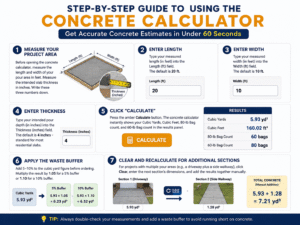
Step-by-Step Guide to Using the Concrete Calculator
Using our concrete calculator takes under 60 seconds. Here is the complete process:
Step 1 – Measure Your Project Area Before opening the concrete calculator, measure the length and width of your pour area in feet. Measure the intended slab thickness in inches. Write these three numbers down.
Step 2 – Enter Length Type your measured length (in feet) into the Length (ft) field. The default is 20 ft.
Step 3 – Enter Width Type your measured width (in feet) into the Width (ft) field. The default is 10 ft.
Step 4 – Enter Thickness Type your intended pour depth (in inches) into the Thickness (inches) field. The default is 4 inches — standard for most residential slabs.
Step 5 – Click “Calculate” Press the amber Calculate button. The concrete calculator instantly shows your Cubic Yards, Cubic Feet, 80-lb Bag count, and 60-lb Bag count in the results panel.
Step 6 – Apply the Waste Buffer Add 5–10% to the cubic yard figure before ordering. Multiply the result by 1.05 for a 5% buffer or 1.10 for a 10% buffer.
Step 7 – Clear and Recalculate for Additional Sections For projects with multiple pour areas (e.g., a driveway plus a side walkway), click Clear, enter the next section’s dimensions, and add the results together manually.
Practical Calculation Examples
Let us run three real projects through the concrete calculator to show how results scale with project size:
Example 1 – Standard Patio (20 ft × 10 ft × 4 in)
- Cubic Feet: 20 × 10 × (4 ÷ 12) = 66.67 cu ft
- Cubic Yards: 66.67 ÷ 27 = 2.47 cu yd
- 80-lb Bags: ceil(2.47 × 45) = 112 bags
- 60-lb Bags: ceil(2.47 × 60) = 149 bags
Example 2 – Narrow Sidewalk (30 ft × 4 ft × 4 in)
- Cubic Feet: 30 × 4 × (4 ÷ 12) = 40.00 cu ft
- Cubic Yards: 40 ÷ 27 = 1.48 cu yd
- 80-lb Bags: ceil(1.48 × 45) = 67 bags
- 60-lb Bags: ceil(1.48 × 60) = 89 bags
Example 3 – Small Equipment Pad (6 ft × 6 ft × 6 in)
- Cubic Feet: 6 × 6 × (6 ÷ 12) = 18.00 cu ft
- Cubic Yards: 18 ÷ 27 = 0.67 cu yd
- 80-lb Bags: ceil(0.67 × 45) = 31 bags
- 60-lb Bags: ceil(0.67 × 60) = 41 bags
Each of these results is generated instantly by the concrete calculator — no manual math required.
Common Concrete Projects and Typical Dimensions
Here is a reference table of typical project dimensions to help you set up your concrete calculator inputs:
| Project Type | Typical Length | Typical Width | Typical Thickness |
|---|---|---|---|
| Residential Driveway | 20–40 ft | 10–16 ft | 4–6 in |
| Backyard Patio | 12–20 ft | 10–16 ft | 4 in |
| Sidewalk Section | 4–6 ft wide | Varies | 4 in |
| Garage Slab | 20–24 ft | 20–22 ft | 4–6 in |
| Shed Foundation | 8–12 ft | 8–10 ft | 4 in |
| Fence Post Footing | 0.67 ft dia | N/A | 24–36 in deep |
| Pool Deck | Varies | Varies | 4 in |
| Equipment Pad | 4–8 ft | 4–6 ft | 6 in |
Always measure your actual project before using the concrete calculator — these are starting reference points, not substitutes for accurate field measurements.
80-lb Bags vs. 60-lb Bags – Which Should You Choose?
Our concrete calculator shows bag counts for both 80-lb and 60-lb options. Here is how to decide which is right for your project:
Choose 80-lb Bags When:
- You have helpers to handle the weight
- You are mixing in a drum or mechanical mixer
- You want the lowest cost per cubic foot of concrete
- Your project requires 20+ bags (economy of scale matters more)
Choose 60-lb Bags When:
- You are working alone and hand-mixing in a wheelbarrow
- The pour area is in a tight or hard-to-access location where carrying heavy bags is impractical
- You are doing a small repair (under 0.5 cubic yards)
- Physical handling ease is a priority over cost savings
Cost comparison example (based on approximate retail pricing): A 1.5 cubic yard pour (about a small patio) requires approximately 68 × 80-lb bags or 90 × 60-lb bags. At $7–9 per 80-lb bag and $5–7 per 60-lb bag, the 80-lb option is typically 15–20% less expensive per cubic foot of concrete produced.
Who Should Use a Concrete Calculator?
Our concrete calculator is designed for a wide audience:
- Homeowners and DIY builders planning patios, driveways, walkways, or shed foundations
- General contractors who need fast material estimates for client bids and project planning
- Landscapers and hardscape installers estimating concrete needs for outdoor living projects
- Structural engineers and architects performing preliminary material takeoffs
- Building inspectors and permit applicants who need volume figures for project documentation
- Hardware store employees helping customers estimate bag quantities for upcoming projects
- Students in construction management or civil engineering programs learning material estimation
- Property developers performing rough-order cost estimates for new construction
Anyone who works with concrete in any capacity — from a first-time homeowner pouring a small garden path to a professional contractor managing a multi-phase development — benefits from a fast, accurate concrete calculator.
Benefits of Using an Online Concrete Calculator
There are clear advantages to using a dedicated concrete calculator over manual estimation:
Instant Results Three inputs, one click, four results. Our concrete calculator eliminates all manual arithmetic — no paper, no pencil, no formula lookup.
Prevents Costly Errors Under-ordering causes cold joints and structural weakness. Over-ordering wastes money. The concrete calculator gives you the precise volume so you can order exactly what you need plus a sensible buffer.
Two Bag Size Options Showing both 80-lb and 60-lb bag counts simultaneously saves you from doing separate calculations for each bag size. The concrete calculator handles both in one step.
Handles Any Project Size From a 2-square-foot post footing to a 2,000-square-foot foundation slab, the concrete calculator scales accurately across the full range of residential and light commercial projects.
Free and Mobile-Friendly No cost, no sign-up, works on any smartphone, tablet, or desktop. Pull up the concrete calculator on your phone while standing on the job site with a tape measure in hand.
Common Mistakes in Concrete Estimation
Even experienced builders make these errors — a reliable concrete calculator helps you avoid all of them:
Forgetting to Add a Waste Buffer The concrete calculator gives you the theoretical exact volume. Real pours always involve minor spills, uneven subgrades, and overfill. Always add 5–10% to the calculated cubic yard figure before placing an order.
Entering Thickness in Feet Instead of Inches The tool’s Thickness field expects inches. Entering 0.33 ft instead of 4 inches would produce a wildly incorrect result. Always enter thickness in inches as labeled.
Ignoring Subgrade Settlement If your subgrade (the ground beneath the pour) is soft or uneven, your actual slab thickness may vary. Measure the deepest point of your excavation, not just the average, when deciding the thickness to enter.
Not Accounting for Reinforcement Rebar and wire mesh displace a small volume of concrete. For most residential slabs, this displacement is negligible, but for heavy reinforcement in structural applications, a small deduction (typically 1–3%) may be warranted.
Using Area Instead of Volume Some people estimate concrete by multiplying area (sq ft) by a rough per-square-foot bag count. This ignores thickness variation and leads to significant errors. Always use a proper concrete calculator based on all three dimensions.
Frequently Asked Questions (FAQs)
Q1: What is a concrete calculator used for? A concrete calculator estimates the volume of concrete needed to fill a rectangular slab based on its length, width, and thickness. It returns results in cubic yards, cubic feet, and the number of 80-lb and 60-lb pre-mixed bags required.
Q2: How many 80-lb bags of concrete are in a cubic yard? Approximately 45 bags. Each 80-lb bag yields about 0.60 cubic feet of mixed concrete, and one cubic yard equals 27 cubic feet (27 ÷ 0.60 ≈ 45). Our concrete calculator applies this factor automatically and rounds up to the nearest whole bag.
Q3: How many 60-lb bags of concrete are in a cubic yard? Approximately 60 bags. Each 60-lb bag yields about 0.45 cubic feet of mixed concrete (27 ÷ 0.45 = 60). The concrete calculator calculates this alongside the 80-lb count so you can compare both options instantly.
Q4: Should I add extra concrete beyond what the calculator shows? Yes — always add a 5–10% waste buffer to the cubic yard result before ordering. This accounts for spills, overfill, slight variations in subgrade depth, and the concrete that remains in the drum or mixer. Enter your dimensions in the concrete calculator, then multiply the cubic yard result by 1.05 to 1.10.
Q5: Can I use the concrete calculator for a round slab or circular area? Our concrete calculator is designed for rectangular slabs. For circular pours (round patios, circular footings), calculate the area manually using the formula π × radius² and then treat the result as the “Length × Width” equivalent before applying the thickness conversion. Alternatively, break the circle into approximate rectangles for a rough estimate.
Q6: What is the standard driveway thickness I should enter? For a standard residential driveway that supports passenger vehicles, enter 4 inches as the thickness. For a driveway that will bear heavier vehicles (pickup trucks, RVs, delivery vehicles), use 5–6 inches. Enter whichever value matches your project specification in the tool.
Q7: How accurate is the concrete calculator? The concrete calculator is mathematically exact based on your inputs — it applies the standard volumetric formula without rounding errors (except the final bag count, which is rounded up). The accuracy of the real-world result depends entirely on the accuracy of your field measurements.
Q8: Can I use this for a concrete footing or foundation? Yes. Enter the length and width of the footing, and enter the depth of the footing as the “thickness” (in inches). For a 12-inch deep footing, enter 12 in the thickness field. The concrete calculator will return the correct cubic volume for that footing.
Q9: What is the difference between cubic feet and cubic yards in concrete estimation? Cubic feet is the raw volumetric result of multiplying length × width × thickness (converted to feet). Cubic yards is cubic feet divided by 27 — it is the standard unit used by ready-mix concrete suppliers for ordering. Always quote your order in cubic yards when calling a concrete plant.
Q10: Is the concrete calculator free? Yes — completely free. No account, no subscription, no hidden fees. Use the concrete calculator as many times as you need, for any project, on any device.
Conclusion
Concrete is one of the most widely used construction materials in the world — and wasting it, or running short of it, are equally costly mistakes. Whether you are pouring a backyard patio this weekend or bidding a multi-section driveway for a client, knowing your exact material requirements before you start is not optional — it is essential.
Our free online concrete calculator gives you that knowledge instantly. Enter your slab’s length, width, and thickness, click Calculate, and receive four precise outputs: cubic yards for ordering, cubic feet for planning, and both 80-lb and 60-lb bag counts for purchasing. No formulas, no unit conversions, no guesswork — just accurate results in seconds.
Key takeaways from this complete guide:
- A concrete calculator converts length, width, and thickness into cubic yards, cubic feet, and bag counts
- The formula is: Length × Width × (Thickness ÷ 12) = Cubic Feet → ÷ 27 = Cubic Yards
- One cubic yard requires approximately 45 × 80-lb bags or 60 × 60-lb bags
- Always add a 5–10% waste buffer to the calculated cubic yard total before ordering
- Standard residential slabs are 4 inches thick — heavier-use areas require 5–6 inches
- Our tool is completely free, works on all devices, and produces instant results for projects of any size
Use our concrete calculator now — enter your project dimensions, click Calculate, and walk into the hardware store or call your ready-mix supplier with complete confidence in your material order.