Day of the Week Calculator
Need to calculate the exact time between two events? Use our free Time Duration Calculator.
Table of Contents
- Introduction
- What Is a Day of the Week Calculator?
- Why Knowing the Day of the Week Matters
- How Our Day of the Week Calculator Works
- How to Use the Day of the Week Calculator – Step by Step
- Day of Year – What the Number Tells You
- Leap Year Detection in the Day of the Week Calculator
- Weekday Count in a Year – A Unique Feature Explained
- The Mini Monthly Calendar in the Day of the Week Calculator
- Practical Examples Using the Day of the Week Calculator
- Historical and Future Date Lookups
- Common Uses of a Day of the Week Calculator
- Benefits of Using an Online Day of the Week Calculator
- Who Should Use a Day of the Week Calculator?
- Frequently Asked Questions (FAQs)
- Conclusion
Introduction
Have you ever needed to know what day of the week a specific date falls on — a birthday, an anniversary, a historical event, or a future deadline? Most people open a calendar app, scroll to the right month, and squint at the date. But what if you need to check a date in 1985, or plan something for 2045? Standard calendar apps are slow, limited, and require significant scrolling for dates far in the past or future.
That is exactly why a day of the week calculator is such a valuable tool. A day of the week calculator lets you enter any date — any month, any day, any year — and instantly tells you what day of the week it falls on. No scrolling, no guessing, no mental calendar gymnastics.
Our free online day of the week calculator goes far beyond just naming the weekday. It also tells you the date’s position in the year, how many days are left in the year, whether the year is a leap year, how many times that specific weekday occurs in the entire year, and even displays a full mini calendar for that month with your selected date highlighted. In a single click, you get a complete date profile that would take minutes to piece together from a standard calendar.
In this complete guide, we will explain how the day of the week calculator works, walk through its features in detail, share practical examples, and answer every common question. By the end, you will understand exactly how to use the day of the week calculator for any date — past, present, or future.
What Is a Day of the Week Calculator?
A day of the week calculator is a digital tool that determines the name of the weekday (Sunday through Saturday) for any given calendar date. You input a month, day, and year, and the day of the week calculator instantly returns the correct day name along with a rich set of additional date statistics.
Our day of the week calculator provides six pieces of information for every date:
- The weekday name — Monday, Tuesday, Wednesday, Thursday, Friday, Saturday, or Sunday
- Day of the year — which numbered day out of 365 or 366 the date represents
- Total days in the year — 365 for regular years, 366 for leap years
- Days remaining in the year — how many days are left after the selected date
- Weekday count statistics — how many times that specific weekday occurs in the year, and how many are still to come
- Mini monthly calendar — a visual grid of the entire month with your selected date highlighted in blue
The day of the week calculator supports any valid date — from ancient historical dates to far-future dates — making it useful for genealogists, historians, event planners, developers, students, and curious minds of all kinds.
Why Knowing the Day of the Week Matters
The day of the week is more than a label — it determines how we schedule, plan, celebrate, and remember events. Here are the most common reasons people use a day of the week calculator:
Birthday and Anniversary Planning Knowing what day of the week a birthday or anniversary falls on helps you plan parties, book venues, and coordinate guests. Use the day of the week calculator to check whether a special date is on a weekend or a weekday this year — and every year.
Historical Curiosity What day of the week were you born? What day did a famous historical event occur? The day of the week calculator can answer these questions for any date in history with complete accuracy.
Business and Legal Deadlines Contracts, tax filings, court dates, and business agreements often specify deadlines as specific calendar dates. Knowing whether a deadline falls on a Monday or a Saturday can determine whether it needs to be moved to the next business day.
Academic and School Calendars Students and teachers use the day of the week calculator to plan assignment due dates, exam schedules, and semester timelines.
Event and Wedding Planning Most weddings and major events happen on Saturdays. A day of the week calculator helps couples and planners confirm that their chosen date is the right day of the week for the occasion.
Religious Observance Many religious calendars are tied to specific days of the week. A day of the week calculator helps communities plan services, observances, and holidays around the correct day.
How Our Day of the Week Calculator Works
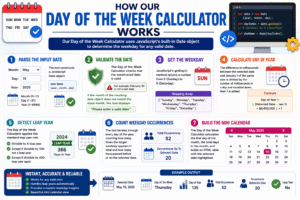
Our day of the week calculator uses JavaScript’s built-in Date object to determine the weekday for any valid date. Here is the logic behind the calculation:
Step 1 — Parse the Input Date The tool reads the selected month (0–11 internally), the entered day (1–31), and the entered year (1–9999) and constructs a JavaScript Date object: new Date(year, month, day).
Step 2 — Validate the Date The day of the week calculator checks that the constructed date is valid — for example, February 30 is not a real date. If the month of the resulting date object does not match the input month, the tool displays an error: “Please enter a valid date.”
Step 3 — Get the Weekday JavaScript’s getDay() method returns a number from 0 (Sunday) to 6 (Saturday). The day of the week calculator maps this to the weekday name using an array: ["Sunday", "Monday", "Tuesday", "Wednesday", "Thursday", "Friday", "Saturday"].
Step 4 — Calculate Day of Year The difference in milliseconds between the selected date and January 1 of the same year is divided by the number of milliseconds in a day and rounded down, then 1 is added.
Step 5 — Detect Leap Year The day of the week calculator applies the standard leap year rule:
- Divisible by 4: leap year
- Except if divisible by 100: not a leap year
- Except if divisible by 400: leap year again
Step 6 — Count Weekday Occurrences The tool iterates through every day of the year, counting how many times the target weekday appears in total and how many have passed before or on the selected date.
Step 7 — Build the Mini Calendar The day of the week calculator calculates the first day of the month, the total days in the month, and builds an HTML table with the selected date highlighted.
How to Use the Day of the Week Calculator – Step by Step
Using our day of the week calculator is simple and takes only a few seconds:
Step 1 – Select the Month From the Month dropdown, select the month of your target date. The dropdown lists all 12 months from January through December.
Step 2 – Enter the Day In the Day field, type the day number (1 to 31) of your target date.
Step 3 – Enter the Year In the Year field, type the four-digit year. The day of the week calculator accepts any year from 1 to 9999.
Step 4 – Click “Calculate” Press the blue Calculate button. The day of the week calculator instantly processes your input and displays the full results panel on the right.
Step 5 – Read Your Results The results show:
- The full date and its weekday name in bold
- Day of year and days remaining statistics
- Weekday count data for the year
- A mini monthly calendar with your date highlighted in blue
Step 6 – Clear and Try Another Date Click Clear to reset the day and year fields, then enter a new date for another lookup.
Quick Start: The tool defaults to August 3, 2026 — click Calculate immediately to see a sample result, then enter your own date.
Day of Year – What the Number Tells You
One of the most informative features of our day of the week calculator is the “day of year” statistic. This tells you the ordinal position of your date within its year — January 1 is day 1, December 31 is day 365 (or 366 in a leap year).
Why is this useful?
- Progress tracking — knowing it is day 200 of 365 tells you the year is 54.8% complete
- Julian date references — many scientific, military, and astronomical systems use day-of-year numbering
- Seasonal planning — day 91 is approximately the start of spring in the Northern Hemisphere
- Deadline tracking — project managers and planners use day-of-year numbers to calculate durations without dealing with month boundaries
The day of the week calculator displays:
- “It is the #X day out of a total of Y days in [year]. There are Z days left in [year].”
This gives you both a position and a countdown in a single, clear sentence.
Leap Year Detection in the Day of the Week Calculator
The day of the week calculator automatically detects whether the year you entered is a leap year and adjusts all calculations accordingly.
The Leap Year Rule:
- If the year is divisible by 4: it is a leap year
- Exception: if also divisible by 100: it is NOT a leap year
- Exception to the exception: if also divisible by 400: it IS a leap year
Examples:
- 2024 — divisible by 4, not by 100 → Leap year (366 days) ✓
- 1900 — divisible by 100, not by 400 → Not a leap year (365 days) ✗
- 2000 — divisible by 400 → Leap year (366 days) ✓
- 2026 — not divisible by 4 → Not a leap year (365 days) ✗
Why does this matter for the day of the week calculator? The total days in the year (365 vs. 366), the day-of-year position, and the weekday count in the year all depend on whether February has 28 or 29 days. The day of the week calculator applies the correct rule automatically for every year you enter — no need to check whether it is a leap year yourself.
Weekday Count in a Year – A Unique Feature Explained
Our day of the week calculator includes a uniquely informative statistic that most date tools do not provide: the total count of a specific weekday in a year, and how many of those weekdays remain after your selected date.
Why does this matter?
Each year has either 52 or 53 occurrences of each weekday. The distribution depends on what day of the week January 1 falls on and whether it is a leap year. For example:
- In a regular year starting on Wednesday, there are 53 Wednesdays but only 52 Mondays
- In a leap year, two weekdays occur 53 times
The day of the week calculator displays this information as: “It is the #X [Weekday] out of a total of Y [Weekday]s in [year]. There are Z [Weekday]s left in [year].”
Real-world uses of this statistic:
- Retail and business — knowing how many Saturdays are left in the year helps plan promotional events
- Payroll — biweekly pay periods depend on the number of specific weekdays in a year
- Sports schedules — leagues schedule games on specific days and need total counts
- Religious calendars — counting the total Sundays or Fridays remaining in a year is useful for congregation planning
- Personal milestones — knowing “this is my 34th Monday of the year” adds interesting context to any date
The Mini Monthly Calendar in the Day of the Week Calculator
One of the most visually useful features of our day of the week calculator is the mini monthly calendar that appears in the results panel after every calculation.
The mini calendar shows:
- All seven days of the week as column headers (S, M, T, W, T, F, S)
- All dates in the selected month placed in their correct grid positions
- The selected date highlighted in blue — making it instantly visible at a glance
- The month and year as a header above the grid
This mini calendar gives you immediate visual context — you can see at a glance where your date falls in the week, how close it is to the start or end of the month, and how the rest of the month is distributed around it. The day of the week calculator builds this calendar dynamically for any month in any year, so it is always accurate regardless of whether the year is a leap year or what day the month starts on.
Practical Examples Using the Day of the Week Calculator
Let us run a few real examples through the day of the week calculator:
Example 1 – A Recent Date
- Input: August 3, 2026
- Result: Monday
- Day of year: 215 of 365 | Days left: 150
- Total Mondays in 2026: 52 | Mondays remaining: 21
Example 2 – A Historical Birthday
- Input: July 4, 1776 (US Declaration of Independence)
- Result: Thursday
- The famous document was signed on a Thursday
Example 3 – A Famous Historical Date
- Input: September 11, 2001
- Result: Tuesday
- The tragic events of that day occurred on a Tuesday
Example 4 – A Future Date
- Input: January 1, 2030
- Result: Tuesday
- The next decade begins on a Tuesday
Example 5 – A Leap Year Date
- Input: February 29, 2024
- Result: Thursday
- Day of year: 60 of 366 (leap year confirmed)
Each of these results is produced instantly by the day of the week calculator — along with the full day-of-year statistics and a mini calendar of the month.
Historical and Future Date Lookups
One of the most powerful aspects of our day of the week calculator is its ability to handle any date across thousands of years — not just recent dates or dates within a few years of today.
Historical date lookups: Genealogists use the day of the week calculator to find the weekday of birth certificates, marriage records, and death dates. Historians use it to contextualize events — knowing that a battle began on a Sunday or a treaty was signed on a Friday adds texture to historical narratives.
Far-future date lookups: Project planners, event organizers, and futurists use the day of the week calculator to plan events decades in advance. Checking whether a proposed date in 2035 or 2042 falls on a weekend is easy with the day of the week calculator — just change the year and click Calculate.
The tool accepts years from 1 to 9999 — a range that covers virtually all practical historical and future planning needs. The underlying JavaScript Date object handles the astronomical calendar correctly, including all leap year rules across the full range.
Common Uses of a Day of the Week Calculator
The day of the week calculator has a remarkably wide range of practical applications:
Personal Life
- Find the weekday of your birthday or your children’s birthdays
- Determine what day of the week a special anniversary falls on
- Check whether a holiday falls on a weekday or weekend
- Plan vacations around specific day-of-week preferences
Professional and Business
- Verify contract and deadline dates before finalizing agreements
- Plan project milestones and sprint reviews on preferred weekdays
- Confirm that delivery, installation, or service dates are business days
- Schedule recurring meetings based on a reliable weekday reference
Education
- Students use the day of the week calculator to plan assignment submissions
- Teachers use it to align curriculum calendars with the school week
- History teachers use it to contextualize historical events for students
Legal and Financial
- Lawyers confirm that statutory deadlines fall on business days
- Accountants verify tax filing dates and fiscal year boundaries
- Banks and financial institutions schedule payment processing windows
Events and Weddings
- Couples confirm that their chosen wedding date is a Saturday
- Event planners lock in venue bookings for specific weekdays
- Conference organizers build multi-day schedules around the day of the week
Benefits of Using an Online Day of the Week Calculator
There are clear, practical advantages to using our day of the week calculator over manually consulting a calendar:
Works for Any Date in History or the Future A standard calendar app only shows a few years at a time. Our day of the week calculator handles any date from year 1 to year 9999 with equal ease.
Instant Comprehensive Results In one click, the day of the week calculator gives you the weekday, day of year, days remaining, leap year status, weekday count, and a mini calendar — information that would take multiple steps to gather from a standard calendar.
Visual Calendar Context The highlighted mini calendar in our day of the week calculator gives you immediate visual context — something a simple text answer never provides.
Zero Calculation Errors Manual day-of-week calculation is notoriously error-prone, especially for dates outside the current year. The day of the week calculator uses proven algorithmic logic with zero risk of human error.
Completely Free No subscription, no registration, no ads. Our day of the week calculator is available to everyone at no cost.
Works on All Devices The day of the week calculator is fully responsive — use it on a desktop computer, tablet, or smartphone with equal ease.
Who Should Use a Day of the Week Calculator?
Our day of the week calculator is the perfect tool for:
- Genealogists and family historians researching ancestral birth, marriage, and death dates
- Event planners and wedding coordinators confirming the correct day of the week for bookings
- Students and teachers aligning academic schedules with calendar dates
- Lawyers and accountants verifying deadline and filing date weekdays
- Project managers planning milestones and sprint review schedules
- HR professionals planning onboarding, review, and payroll cycles
- Writers and authors ensuring historical fiction has accurate day-of-week references
- Trivia and quiz enthusiasts checking historical date facts
- Parents finding the weekday of their child’s birth date
- Anyone curious about any date — past, present, or future
No matter your reason for needing to know the day of the week for a specific date, our day of the week calculator delivers the answer instantly and completely.
Frequently Asked Questions (FAQs)
Q1: What is a day of the week calculator used for? A day of the week calculator is used to find the name of the weekday (Monday through Sunday) for any calendar date. It is used for event planning, historical research, legal deadline verification, birthday lookups, and any situation where knowing the day of the week for a specific date matters.
Q2: How far back or forward can the day of the week calculator go? Our day of the week calculator accepts any year from 1 to 9999, making it suitable for virtually all historical and future date lookups. It correctly applies the Gregorian calendar rules, including all leap year logic, across the full range.
Q3: What is “day of year” in the day of the week calculator results? The “day of year” is the ordinal number of your selected date within its year — January 1 = day 1, December 31 = day 365 (or 366 in a leap year). The day of the week calculator also shows how many days remain in the year after your selected date.
Q4: How does the day of the week calculator detect leap years? The day of the week calculator applies the standard Gregorian leap year rule: divisible by 4 is a leap year, except divisible by 100 is not, except divisible by 400 is. This is applied automatically for every year you enter, adjusting all results accordingly.
Q5: What does the weekday count statistic mean in the day of the week calculator? The day of the week calculator counts how many times the weekday of your selected date occurs in the entire year (either 52 or 53 times), and how many of those occurrences remain after your selected date. This is useful for planning recurring weekly events and understanding the structure of the year.
Q6: Can I use the day of the week calculator for February 29 dates? Yes, but only for valid leap years. If you enter February 29 in a non-leap year, the day of the week calculator will display an error — “Please enter a valid date” — because February 29 does not exist in non-leap years. Enter a valid leap year (2024, 2028, 2032, etc.) to calculate correctly.
Q7: What is the mini calendar shown in the day of the week calculator results? The mini calendar is a visual grid of the entire month of your selected date, with the selected date highlighted in blue. It shows all seven weekday columns and places each date in the correct position. The day of the week calculator generates this calendar dynamically for any month and year.
Q8: Can the day of the week calculator tell me what day a future holiday falls on? Yes. Simply enter the date of any future holiday — for example, December 25, 2030 — and the day of the week calculator will instantly tell you it is a Wednesday (and show the full December 2030 calendar).
Q9: Is the day of the week calculator accurate for very old historical dates? The day of the week calculator uses the Gregorian calendar, which was officially adopted in October 1582. For dates before that, different countries used the Julian calendar, which has a different leap year pattern. For dates after 1582, the day of the week calculator is fully accurate for all countries that adopted the Gregorian calendar.
Q10: Is the day of the week calculator free? Yes, our day of the week calculator is completely free with no registration or subscription required. Use it as many times as you need, for any date, on any device.
Conclusion
Knowing the day of the week for any given date is a simple question — but finding the answer accurately, quickly, and with rich context is something only a purpose-built tool can do well. Our free online day of the week calculator delivers more than just a weekday name. In a single click, it gives you the weekday, the date’s position in the year, the days remaining, leap year status, weekday count statistics, and a visual mini calendar — a complete date profile that no calendar app can match for speed or detail.
Whether you are a genealogist researching a 19th-century ancestor’s birth date, a wedding planner confirming a Saturday booking, a student checking a deadline, or simply someone who has always wondered what day of the week they were born, our day of the week calculator gives you the answer instantly and accurately — for any date from year 1 to year 9999.
Key takeaways from this guide:
- A day of the week calculator identifies the weekday for any calendar date instantly
- Our day of the week calculator covers any year from 1 to 9999 — past, present, and future
- Results include weekday name, day of year, days remaining, leap year status, weekday count, and a mini monthly calendar
- The day of the week calculator automatically detects leap years and adjusts all calculations accordingly
- The highlighted mini calendar gives you visual context that text-only tools cannot provide
- Our day of the week calculator is free, mobile-friendly, and requires no registration
Use our day of the week calculator now — enter any date, click Calculate, and discover everything about that day in one instant, comprehensive result.