Base64 Encode & Decode
Planning outdoor activities? Check the dew point first with our free Dew Point Calculator.
Table of Contents
- Introduction
- What Is Base64 Encode & Decode?
- Why Base64 Encoding Was Invented – The History and Purpose
- How Our Base64 Encode & Decode Tool Works
- How to Use the Base64 Encode & Decode Tool – Step by Step
- Base64 Encoding – How Plain Text Becomes Base64
- Base64 Decoding – How Base64 Becomes Plain Text Again
- Base64 Character Set – What Characters Are Used?
- Unicode Support in Base64 Encode & Decode
- Common Use Cases of Base64 Encode & Decode
- Base64 Encode & Decode in Programming Languages
- Benefits of Using an Online Base64 Encode & Decode Tool
- Limitations and Important Considerations
- Who Should Use a Base64 Encode & Decode Tool?
- Frequently Asked Questions (FAQs)
- Conclusion
Introduction
In the world of software development, data transmission, and web security, few encoding techniques are as universally used as Base64. Whether you are a developer building an API, a system administrator handling email attachments, a web designer embedding images directly into HTML, or simply someone who received a strange block of text and wants to know what it says — Base64 Encode & Decode is the tool you need.
Base64 Encode & Decode is the process of converting human-readable text or binary data into a safe, transportable ASCII string format (encoding), and reversing that process to get the original text back (decoding). It is used in everything from email systems and web authentication to data URLs and cryptographic applications.
Our free online Base64 Encode & Decode tool makes this process instant and effortless. No installation, no programming knowledge, no complicated setup. Simply select your operation — Encode to Base64 or Decode from Base64 — paste your text, click Convert, and get your result immediately. The tool even handles Unicode characters safely, making it suitable for text in any language.
In this complete guide, we will explain exactly what Base64 is, how the encoding and decoding process works, where it is used in the real world, and how to get the most out of our Base64 Encode & Decode tool. By the end, you will have a thorough understanding of this essential technology and a reliable tool to use whenever you need it.
What Is Base64 Encode & Decode?
Base64 Encode & Decode refers to a binary-to-text encoding scheme that represents binary data — or any text data — using only 64 printable ASCII characters. The name “Base64” comes directly from the fact that the encoding uses a set of exactly 64 characters to represent all possible data.
Encoding converts your original text or binary data into a Base64 string — a longer string of characters drawn from a specific 64-character alphabet. Decoding reverses this process, converting a Base64 string back into the original text or data.
Why is this necessary? Many systems — email protocols, URLs, HTML attributes, HTTP headers — were originally designed to handle only plain ASCII text. Binary data or text containing special characters can become corrupted when passed through these systems. Base64 Encode & Decode solves this problem by converting any data into a safe, text-friendly format that travels reliably through any ASCII-based system.
Key facts about Base64 Encode & Decode:
- The Base64 alphabet consists of A–Z (26), a–z (26), 0–9 (10), + and / (2) = 64 characters total
- Padding character is
=, added to make the output length a multiple of 4 - Every 3 bytes of input data become 4 Base64 characters in output
- Base64 encoded output is approximately 33% larger than the original data
- Base64 Encode & Decode is not encryption — it is encoding. The data is not hidden or secured, only reformatted
Our Base64 Encode & Decode tool implements both directions: full encoding and full decoding, with complete Unicode support.
Why Base64 Encoding Was Invented – The History and Purpose
To fully appreciate Base64 Encode & Decode, it helps to understand the problem it was designed to solve.
In the early days of the internet, the SMTP email protocol was designed to transmit only 7-bit ASCII text. This meant that any email containing binary attachments — images, documents, executables — would be corrupted in transit because binary data contains bytes with values outside the 7-bit ASCII range.
MIME (Multipurpose Internet Mail Extensions) was developed in the 1990s to allow email to carry attachments. Base64 was chosen as the encoding scheme for MIME because it converted any binary data into pure ASCII text that could safely pass through 7-bit email servers without corruption.
Over time, Base64 Encode & Decode found applications far beyond email:
- HTTP Basic Authentication encodes credentials as Base64 in the Authorization header
- Data URIs in HTML and CSS embed images directly in the code using Base64
- JSON Web Tokens (JWT) use Base64 URL encoding to transmit authentication data
- XML and JSON APIs use Base64 to safely transmit binary data within text-based payloads
- Cryptographic applications use Base64 to represent binary keys and certificates as readable text
Today, Base64 Encode & Decode is a fundamental tool in every developer’s toolkit — and our free online tool makes it accessible to everyone.
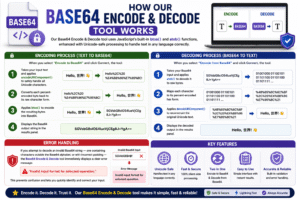
How Our Base64 Encode & Decode Tool Works
Our Base64 Encode & Decode tool uses JavaScript’s built-in btoa() and atob() functions, enhanced with Unicode-safe processing to handle text in any language correctly.
Encoding Process: When you select “Encode to Base64” and click Convert, the tool:
- Takes your input text and applies
encodeURIComponent()to safely handle all Unicode characters - Converts each percent-encoded byte back to its raw character form
- Applies
btoa()to encode the resulting bytes into Base64 - Displays the Base64 output string in the results panel
Decoding Process: When you select “Decode from Base64” and click Convert, the tool:
- Takes your Base64 input and applies
atob()to decode it to raw bytes - Maps each character to its percent-encoded hex form
- Applies
decodeURIComponent()to reconstruct the original Unicode text - Displays the decoded output in the results panel
Error Handling: If you attempt to decode an invalid Base64 string — one containing characters outside the Base64 alphabet, or with incorrect padding — the Base64 Encode & Decode tool immediately displays a clear error message: “Invalid input format for selected operation.” This prevents confusion and lets you quickly identify and correct your input.
How to Use the Base64 Encode & Decode Tool – Step by Step
Using our Base64 Encode & Decode tool takes only a few seconds. Here is the complete step-by-step guide:
Step 1 – Select Your Operation From the Operation dropdown, choose either:
- “Encode to Base64” — to convert plain text into a Base64 string
- “Decode from Base64” — to convert a Base64 string back into plain text
Step 2 – Enter Your Text In the Input Text field, paste or type the text you want to process. The field accepts any text, including special characters, spaces, punctuation, and Unicode characters from any language.
Step 3 – Click “Convert” Press the green Convert button. The Base64 Encode & Decode tool processes your input instantly and displays the result in the right-hand panel.
Step 4 – Read and Copy Your Result The output appears in a monospace font for easy reading and copying. Select all the output text and copy it to use in your project, email, code, or wherever you need it.
Step 5 – Clear and Start Again Click the Clear button to reset the input field and hide the results panel, ready for your next conversion.
Pro Tip: You can resize the input text area by dragging the bottom-right corner — useful when working with long Base64 strings.
Base64 Encoding – How Plain Text Becomes Base64
Understanding the encoding process makes the Base64 Encode & Decode tool even more useful. Here is how it works at a technical level:
The Three-to-Four Rule: Base64 encoding works by grouping input bytes into sets of 3 bytes (24 bits) and converting each group into 4 Base64 characters (6 bits each). This is why Base64 output is always about 33% longer than the input.
Example — Encoding “Man”:
- ASCII values: M = 77, a = 97, n = 110
- Binary: 01001101 01100001 01101110
- Split into 6-bit groups: 010011 010110 000101 101110
- Decimal values: 19, 22, 5, 46
- Base64 characters: T W F u
- Result: “Man” → “TWFu”
Padding: When the input length is not a multiple of 3 bytes, the Base64 Encode & Decode process adds = padding characters to make the output a multiple of 4 characters. One = means 1 byte of padding was needed; == means 2 bytes of padding.
Example: “Ma” (2 bytes) → “TWE=” (one padding character)
Our Base64 Encode & Decode tool handles all padding automatically — you never need to add or remove = characters manually.
Base64 Decoding – How Base64 Becomes Plain Text Again
Decoding reverses the encoding process exactly. Our Base64 Encode & Decode tool takes a Base64 string and reconstructs the original text.
The Decoding Process:
- Each Base64 character is looked up in the Base64 alphabet to get its 6-bit value
- Every group of 4 Base64 characters is recombined into 3 bytes (24 bits)
- Padding characters (
=) are used to determine if the last group had 1 or 2 actual bytes - The resulting bytes are interpreted as the original text encoding (UTF-8 for Unicode text)
Example — Decoding “SGVsbG8gV29ybGQ=”:
- This decodes to the familiar text: “Hello World”
What makes a valid Base64 string? A valid Base64 string for our Base64 Encode & Decode tool must:
- Contain only characters from the Base64 alphabet: A–Z, a–z, 0–9, +, /
- Have a length that is a multiple of 4 (after any padding)
- Use
=only as padding at the very end (maximum two=characters)
If your input does not meet these criteria, the Base64 Encode & Decode tool will display an error — a useful signal that the string has been corrupted or is not valid Base64.
Base64 Character Set – What Characters Are Used?
The Base64 alphabet is the foundation of every Base64 Encode & Decode operation. Here is the complete character set:
| Index | Char | Index | Char | Index | Char | Index | Char |
|---|---|---|---|---|---|---|---|
| 0 | A | 16 | Q | 32 | g | 48 | w |
| 1 | B | 17 | R | 33 | h | 49 | x |
| 2 | C | 18 | S | 34 | i | 50 | y |
| 3 | D | 19 | T | 35 | j | 51 | z |
| 4 | E | 20 | U | 36 | k | 52 | 0 |
| 5 | F | 21 | V | 37 | l | 53 | 1 |
| 6 | G | 22 | W | 38 | m | 54 | 2 |
| 7 | H | 23 | X | 39 | n | 55 | 3 |
| 8 | I | 24 | Y | 40 | o | 56 | 4 |
| 9 | J | 25 | Z | 41 | p | 57 | 5 |
| 10 | K | 26 | a | 42 | q | 58 | 6 |
| 11 | L | 27 | b | 43 | r | 59 | 7 |
| 12 | M | 28 | c | 44 | s | 60 | 8 |
| 13 | N | 29 | d | 45 | t | 61 | 9 |
| 14 | O | 30 | e | 46 | u | 62 | + |
| 15 | P | 31 | f | 47 | v | 63 | / |
Padding character: = (not part of the 64-character alphabet but used in output)
Base64 URL Variant: A URL-safe variant of Base64 Encode & Decode replaces + with - and / with _ to avoid conflicts in URLs and filenames. This variant is used in JSON Web Tokens (JWT) and other URL-based applications. Our tool uses the standard Base64 alphabet.
Unicode Support in Base64 Encode & Decode
One of the most important — and most commonly mishandled — aspects of Base64 Encode & Decode is Unicode support.
JavaScript’s native btoa() function only handles characters in the Latin-1 (ISO-8859-1) range. If you try to encode text containing characters from other languages — Arabic, Chinese, Japanese, Urdu, Emoji, or any character with a code point above 255 — the basic btoa() function throws an error.
Our Base64 Encode & Decode tool solves this completely using a two-step process:
encodeURIComponent()converts the Unicode string into a percent-encoded ASCII representation where each multi-byte UTF-8 character is represented as%XXsequences- These sequences are then reduced to raw bytes before
btoa()encodes them
For decoding, the process is reversed: atob() decodes the Base64, then decodeURIComponent() reconstructs the original Unicode characters.
This means our Base64 Encode & Decode tool correctly handles:
- Arabic text — مرحبا بالعالم
- Chinese characters — 你好世界
- Japanese hiragana and katakana — こんにちは
- Emoji — 🌍🚀💡
- Urdu text — دنیا کو خوش آمدید
- All European accented characters — café, über, naïve
Most online tools fail with these characters. Our Base64 Encode & Decode tool handles them correctly every time.
Common Use Cases of Base64 Encode & Decode
Base64 Encode & Decode is used everywhere in modern computing. Here are the most important real-world applications:
Email Attachments (MIME) The original use case. Email protocols transmit file attachments — images, PDFs, documents — by first converting them to Base64. The receiving email client performs Base64 Encode & Decode in reverse to reconstruct the attachment.
Data URLs in HTML and CSS Images, fonts, and other binary assets can be embedded directly into HTML or CSS files as Base64 data URLs:
This eliminates a separate HTTP request for the image file. The Base64 Encode & Decode process makes this possible.
HTTP Basic Authentication When a web server requires Basic Authentication, the browser encodes the credentials as Base64 and sends them in the Authorization header: Authorization: Basic dXNlcjpwYXNzd29yZA== Decoding dXNlcjpwYXNzd29yZA== with the Base64 Encode & Decode tool reveals user:password.
JSON Web Tokens (JWT) JWTs consist of three Base64 URL-encoded parts separated by dots: header.payload.signature. The Base64 Encode & Decode process lets you decode the header and payload to inspect the token contents — a critical skill for any developer working with authentication systems.
API Data Transmission REST APIs that need to transmit binary data within JSON payloads use Base64 Encode & Decode to convert binary to text. Images uploaded via API, for example, are often Base64-encoded.
Configuration Files and Environment Variables Long binary values — cryptographic keys, certificates, binary blobs — are often stored as Base64 strings in configuration files and environment variables for easy, safe handling.
Web Development and Debugging Developers regularly use Base64 Encode & Decode to inspect JWT tokens, debug authentication headers, convert assets to data URLs, and handle binary data in browser environments.
Base64 Encode & Decode in Programming Languages
Every major programming language has built-in support for Base64 Encode & Decode. Here is a quick reference:
JavaScript (Browser)
JavaScript (Node.js)
Python
PHP
Java
For quick, one-off conversions without writing code, our online Base64 Encode & Decode tool is the fastest solution — no IDE, no terminal, no dependencies needed.
Benefits of Using an Online Base64 Encode & Decode Tool
There are clear advantages to using our Base64 Encode & Decode tool over writing code or using command-line utilities:
Instant, No-Code Conversion No programming knowledge required. Our Base64 Encode & Decode tool works entirely in the browser — type, click, done.
Full Unicode Support Unlike many basic tools, our Base64 Encode & Decode implementation correctly handles all Unicode characters — including Arabic, Chinese, Japanese, Emoji, and every other script.
Both Directions in One Tool Encode and decode in the same interface. Simply change the Operation dropdown and click Convert — our Base64 Encode & Decode tool handles both without switching tools.
Clear Error Messages Invalid input is caught immediately with a descriptive error message, saving you time debugging why a decode is failing.
Privacy-Friendly All processing happens entirely in your browser — your text never leaves your device. Our Base64 Encode & Decode tool performs zero server-side processing.
Free and Unlimited No registration, no subscription, no usage limits. Our Base64 Encode & Decode tool is available to everyone at no cost.
Mobile Friendly The Base64 Encode & Decode tool works perfectly on smartphones and tablets — use it on the go whenever you need a quick conversion.
Limitations and Important Considerations
While Base64 Encode & Decode is powerful, there are important points to keep in mind:
Base64 Is Not Encryption This is the most critical misconception about Base64 Encode & Decode. Base64 is a reversible encoding scheme — anyone with our tool or any Base64 decoder can instantly decode a Base64 string. Never use Base64 to hide or protect sensitive data. It provides zero security. For sensitive data, use proper encryption such as AES or RSA.
Output Is Larger Than Input Base64 encoded output is always approximately 33% larger than the original input. For very large files or data streams, this overhead is worth considering.
Whitespace in Base64 Strings Some systems insert line breaks into long Base64 strings for readability (typically every 76 characters per MIME standard). Our Base64 Encode & Decode tool does not add line breaks to output, and it is best to remove any whitespace from a Base64 string before attempting to decode it.
Standard vs. URL-Safe Base64 Standard Base64 uses + and /, which are special characters in URLs. The URL-safe variant uses - and _ instead. Our Base64 Encode & Decode tool uses the standard alphabet — if you are working with JWTs or URL-embedded Base64, you may need to swap these characters.
Who Should Use a Base64 Encode & Decode Tool?
Our Base64 Encode & Decode tool is designed for a broad range of users:
- Web developers encoding images as data URLs or inspecting JWT tokens
- Backend developers encoding API payloads, credentials, and binary data
- System administrators working with Base64-encoded configuration values and certificates
- Security professionals analyzing HTTP authentication headers and encoded data
- Students and learners studying encoding, cryptography, and web technologies
- QA engineers testing API endpoints that use Base64-encoded parameters
- Email developers working with MIME attachments and Base64 email encoding
- DevOps engineers handling Base64-encoded Kubernetes secrets and environment variables
- Anyone who encounters a Base64 string and needs to quickly find out what it contains
No matter your technical background, our Base64 Encode & Decode tool delivers fast, accurate results without requiring you to write a single line of code.
Frequently Asked Questions (FAQs)
Q1: What is Base64 Encode & Decode used for? Base64 Encode & Decode is used to convert binary or text data into a safe ASCII string format for transmission through systems that only support text — such as email, URLs, HTTP headers, and JSON APIs. Decoding reverses this process to recover the original data.
Q2: Is Base64 Encode & Decode the same as encryption? No. Base64 Encode & Decode is an encoding scheme, not encryption. It does not protect or hide data — anyone with a Base64 decoder can instantly reverse it. For security, use proper encryption algorithms like AES-256. Think of Base64 as a different way to write data, not a way to protect it.
Q3: Why is my Base64 encoded text longer than the original? This is expected. Base64 Encode & Decode encodes every 3 bytes of input as 4 Base64 characters, resulting in output that is approximately 33% larger than the original. This overhead is the trade-off for making binary data safely transmittable as text.
Q4: What does the = sign at the end of Base64 mean? The = character is a padding character used by Base64 Encode & Decode to ensure the output length is always a multiple of 4. One = means the last input group had 2 bytes; == means it had 1 byte. It is a normal part of valid Base64 output.
Q5: Can the Base64 Encode & Decode tool handle Arabic, Chinese, or Urdu text? Yes. Our Base64 Encode & Decode tool uses a Unicode-safe implementation that correctly handles text in any language — including Arabic, Chinese, Japanese, Urdu, and all other scripts. Most basic tools fail with non-Latin characters; ours handles them correctly.
Q6: Why does decoding give me an error? The “Invalid input format” error from our Base64 Encode & Decode tool means your input string is not valid Base64. Common causes include: extra spaces or line breaks in the string, characters outside the Base64 alphabet, incorrect or missing padding characters, or accidentally pasting the wrong content into the decode field.
Q7: Does the Base64 Encode & Decode tool send my data to a server? No. Our Base64 Encode & Decode tool performs all processing entirely in your browser using JavaScript. Your text never leaves your device and is never sent to any server. This makes it safe to use even with sensitive content.
Q8: What is the difference between standard Base64 and Base64 URL encoding? Standard Base64 Encode & Decode uses + and / in its alphabet. URL-safe Base64 replaces these with - and _ to avoid conflicts in URLs and filenames. JWT tokens use Base64 URL encoding. Our tool uses the standard alphabet.
Q9: Can I use the Base64 Encode & Decode tool for images? Our tool works with text input. To encode an image file as Base64, you would first need to get the image’s binary data as text. For direct image-to-Base64 conversion of file uploads, a dedicated image Base64 tool would be more appropriate.
Q10: Is the Base64 Encode & Decode tool free? Yes, our Base64 Encode & Decode tool is completely free with no registration, subscription, or usage limits required. Use it as many times as you need for personal, educational, or professional purposes.
Conclusion
Base64 encoding is one of the foundational technologies of the modern internet — quietly working behind the scenes in email systems, authentication protocols, web APIs, and browser applications every single day. Understanding how Base64 Encode & Decode works gives you deeper insight into the systems you use and build, and our free online tool makes the process instantly accessible to everyone.
Whether you are a developer decoding a JWT token to debug an authentication issue, a system administrator inspecting a Base64-encoded Kubernetes secret, a web designer embedding an image as a data URL, or simply a curious user who wants to know what a strange block of text says — our Base64 Encode & Decode tool delivers accurate, instant results with full Unicode support, clear error handling, and complete privacy.
Key takeaways from this guide:
- Base64 Encode & Decode converts data to and from a 64-character ASCII alphabet for safe transmission through text-based systems
- Our Base64 Encode & Decode tool works in both directions — encoding and decoding — with a single dropdown selector
- Base64 is not encryption — it is a reversible encoding scheme that provides no data security
- Our Base64 Encode & Decode tool fully supports Unicode text in any language through a two-step URI-encoding approach
- Base64 output is approximately 33% larger than the original input — a necessary trade-off for text-safe transmission
- The tool processes all data entirely in your browser — your content never leaves your device
- Our Base64 Encode & Decode tool is free, instant, and requires no registration
Use our Base64 Encode & Decode tool today — paste your text, select your operation, and get your result in one click. Fast, accurate, private, and completely free.