Dew Point Calculator
Planning to go outside? Check the wind chill first with our free Wind Chill Calculator.
Table of Contents
- Introduction
- What Is a Dew Point Calculator?
- Why Dew Point Matters More Than Relative Humidity Alone
- The Science Behind the Dew Point Calculator – Magnus Formula Explained
- How to Use Our Dew Point Calculator – Three Calculation Modes
- Air Temperature Input – Units and Conversions
- Relative Humidity – What It Means and How It Affects Dew Point
- Dew Point Temperature – What the Number Actually Tells You
- Dew Point Comfort Scale – What Does Your Result Mean?
- Dew Point vs. Relative Humidity – Key Differences
- Real-World Applications of the Dew Point Calculator
- Benefits of Using an Online Dew Point Calculator
- Who Should Use a Dew Point Calculator?
- Frequently Asked Questions (FAQs)
- Conclusion
Introduction
Have you ever stepped outside on a warm summer morning and felt that heavy, sticky humidity that seems to cling to your skin? Or wondered why your glasses fog up when you walk from an air-conditioned room into a warm hallway? Both of these experiences are directly related to the dew point — one of the most important and most misunderstood measurements in meteorology and everyday comfort.
A dew point calculator is the tool that makes this invisible measurement instantly visible. By combining air temperature and relative humidity, a dew point calculator tells you the exact temperature at which moisture in the air will begin to condense — forming dew, fog, or moisture on surfaces. This single number tells you more about how the air actually feels than relative humidity ever could.
Our free online dew point calculator goes a step further than most tools. It works in three modes: give it any two of the three variables — air temperature, relative humidity, or dew point temperature — and it calculates the missing third value automatically. It supports Celsius, Fahrenheit, and Kelvin, making it equally useful for scientists, weather enthusiasts, HVAC engineers, and everyday users.
In this complete guide, we will explain the science behind dew point, show you exactly how our dew point calculator works, decode what your results mean for comfort and safety, and answer every question you might have. By the end, you will understand dew point completely — and know how to use the dew point calculator to interpret weather, plan outdoor activities, and make smarter decisions about your environment.
What Is a Dew Point Calculator?
A dew point calculator is a digital tool that uses the relationship between air temperature and relative humidity to compute the dew point temperature — the temperature at which air becomes fully saturated and water vapour begins to condense into liquid water.
Our dew point calculator is built on the Magnus formula, one of the most accurate and widely used approximations for dew point calculation in meteorological applications. It takes two of three input variables and solves for the third, making it a truly flexible and powerful tool.
Three calculation modes of our dew point calculator:
- Mode 1 — Air Temperature + Relative Humidity → Dew Point Temperature The most common use case. Enter the current temperature and humidity level and the dew point calculator tells you the dew point in °C, °F, and Kelvin simultaneously.
- Mode 2 — Air Temperature + Dew Point Temperature → Relative Humidity Useful when you know the temperature and dew point from a weather station and need to find the humidity percentage.
- Mode 3 — Relative Humidity + Dew Point Temperature → Air Temperature Used in technical and scientific applications to back-calculate the air temperature from known humidity conditions.
The dew point calculator displays results in all three temperature units at once — Celsius, Fahrenheit, and Kelvin — so you never need to do a conversion manually. Just enter any two values, click Calculate, and the dew point calculator instantly fills in the third.
Why Dew Point Matters More Than Relative Humidity Alone
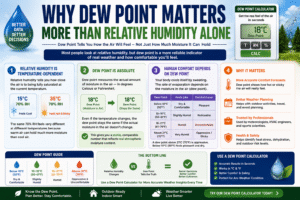
Most people look at relative humidity when checking the weather, but meteorologists and comfort experts know that dew point is a far more reliable indicator of how the air actually feels.
Here is why the dew point calculator gives you a more meaningful number than relative humidity alone:
Relative Humidity Is Temperature-Dependent Relative humidity measures how close the air is to being fully saturated — expressed as a percentage of the maximum moisture the air can hold at the current temperature. The problem is that warm air can hold far more moisture than cool air. So a relative humidity of 70% feels very different at 15°C than it does at 35°C. The number changes dramatically as temperature rises or falls, even if the actual amount of moisture in the air stays the same.
Dew Point Is Absolute The dew point, by contrast, measures the actual amount of moisture in the air — not as a percentage, but as a temperature. If the dew point is 18°C in the morning and the temperature rises throughout the day, the dew point stays at 18°C while the relative humidity falls. This is why a dew point calculator gives you a stable, comparable number that reflects real atmospheric moisture content.
Human Comfort Is Tied to Dew Point Your body cools itself by sweating. When the dew point is high, the air is already heavily laden with moisture, and your sweat evaporates more slowly — making you feel hotter and stickier. A dew point calculator result above 21°C (70°F) is almost universally described as oppressive and uncomfortable. Below 10°C (50°F), the air feels pleasantly dry.
This is why weather forecasters, HVAC engineers, and sports scientists all rely on the dew point calculator rather than relative humidity for assessing real-world comfort conditions.
The Science Behind the Dew Point Calculator – Magnus Formula Explained
Our dew point calculator uses the Magnus formula, a highly accurate empirical approximation that has been used in meteorology for over 150 years. It is precise enough for most practical applications and is the standard formula used in weather stations and atmospheric science.
The Magnus Formula for Dew Point:
When air temperature (T) and relative humidity (RH) are known:
α = (a × T) / (b + T) + ln(RH / 100)
Dew Point = (b × α) / (a − α)
Where:
- a = 17.27 (Magnus constant)
- b = 237.7°C (Magnus constant)
- T = Air temperature in °C
- RH = Relative humidity as a percentage
- ln = Natural logarithm
For Relative Humidity from Temperature and Dew Point:
RH = 100 × exp[(a × Td) / (b + Td) − (a × T) / (b + T)]
Where Td = Dew point temperature in °C.
Our dew point calculator automatically converts all inputs to Celsius, applies the Magnus formula, then converts the results back to your preferred display unit — °C, °F, or Kelvin. This happens in milliseconds, giving you an instant and accurate result every time.
How to Use Our Dew Point Calculator – Three Calculation Modes
Using our dew point calculator is straightforward — simply fill in any two of the three fields and click Calculate.
Mode 1: Calculate Dew Point from Temperature and Humidity
This is the most common use of the dew point calculator:
- Enter the Air Temperature (e.g., 20°C) and select your unit
- Enter the Relative Humidity (e.g., 65%)
- Leave the Dew Point Temperature field empty
- Click Calculate
The dew point calculator will display the dew point in °C, °F, and Kelvin.
Mode 2: Calculate Relative Humidity from Temperature and Dew Point
- Enter the Air Temperature (e.g., 25°C)
- Leave the Relative Humidity field empty
- Enter the Dew Point Temperature (e.g., 15°C)
- Click Calculate
The dew point calculator will display the relative humidity percentage.
Mode 3: Calculate Air Temperature from Humidity and Dew Point
- Leave the Air Temperature field empty
- Enter the Relative Humidity (e.g., 80%)
- Enter the Dew Point Temperature (e.g., 18°C)
- Click Calculate
The dew point calculator will display the air temperature in your selected unit.
Important Rule: The dew point temperature can never be higher than the air temperature. If you enter a dew point greater than the air temperature, the dew point calculator will display an error message. This is a physical impossibility — at 100% relative humidity, the dew point equals the air temperature, but it can never exceed it.
To reset: Click the Clear button to empty all three fields and start a new calculation.
Air Temperature Input – Units and Conversions
Our dew point calculator accepts air temperature in three units:
Celsius (°C) The standard temperature scale used worldwide in science and in most countries’ daily weather forecasts. Most meteorological applications of the dew point calculator use Celsius as the default.
Fahrenheit (°F) The standard scale used in the United States for everyday temperature reporting. Enter your temperature in °F and the dew point calculator automatically converts it to Celsius before applying the Magnus formula, then converts the result back to °F for display.
Kelvin (K) The absolute temperature scale used in physics and scientific research. At standard room temperature, values will be around 293–300 K. The dew point calculator fully supports Kelvin input and output.
Quick Conversion Reference:
- °C to °F: (°C × 9/5) + 32
- °F to °C: (°F − 32) × 5/9
- °C to K: °C + 273.15
- K to °C: K − 273.15
Our dew point calculator handles all of these conversions automatically — you never need to convert manually.
Relative Humidity – What It Means and How It Affects Dew Point
Relative humidity (RH) is one of the two primary inputs in the dew point calculator, and understanding it is key to interpreting your results correctly.
What Is Relative Humidity? Relative humidity is the ratio of the actual amount of water vapour in the air to the maximum amount the air could hold at the current temperature, expressed as a percentage. 100% relative humidity means the air is fully saturated — it cannot hold any more moisture, and condensation will begin to form.
How Relative Humidity Affects the Dew Point Calculator Result:
| Relative Humidity | Effect on Dew Point |
|---|---|
| 100% | Dew point = Air temperature (fully saturated) |
| 80–99% | Dew point close to air temperature — foggy, very humid feel |
| 60–79% | Moderate dew point — humid but manageable |
| 40–59% | Comfortable dew point range for most people |
| 20–39% | Low dew point — dry air conditions |
| Below 20% | Very dry air — arid or desert conditions |
The lower the relative humidity at a given temperature, the lower the dew point — and the more comfortable the air feels. Enter different RH values into the dew point calculator to see exactly how dew point responds.
Dew Point Temperature – What the Number Actually Tells You
The dew point temperature is the output that makes the dew point calculator so valuable. It is the temperature to which the air must be cooled — at constant pressure and moisture content — for condensation to begin.
Practical Meaning of the Dew Point:
- If the air temperature drops to the dew point overnight, you will see dew on grass and car windshields in the morning
- When the dew point equals the air temperature, fog forms
- When surfaces cool below the dew point, condensation appears — this is why a cold glass of water sweats on a humid day
- In aviation, pilots monitor the dew point closely — when the temperature-dew point spread falls below 2–3°C, fog is imminent
The dew point calculator is essential for understanding all of these phenomena. By knowing the current dew point, you can predict when fog will form, whether condensation will occur on surfaces, and how comfortable the outdoor environment will be.
Dew Point Comfort Scale – What Does Your Result Mean?
One of the most practical uses of the dew point calculator is assessing human comfort. Unlike relative humidity, the dew point comfort scale is consistent across temperatures — making it the preferred measure for meteorologists and outdoor activity planners.
| Dew Point (°C) | Dew Point (°F) | Human Comfort Level |
|---|---|---|
| Below 10°C | Below 50°F | Dry and comfortable — pleasant, especially for outdoor activity |
| 10°C – 15°C | 50°F – 59°F | Comfortable — most people feel fine outdoors |
| 16°C – 18°C | 60°F – 65°F | Slightly humid — noticeable but not oppressive |
| 19°C – 21°C | 66°F – 70°F | Humid and uncomfortable — sticky, outdoor activity becomes taxing |
| 22°C – 24°C | 71°F – 75°F | Very humid and oppressive — significant discomfort |
| Above 24°C | Above 75°F | Extremely oppressive — potentially dangerous for vulnerable people |
Use the dew point calculator before outdoor activities, especially in summer, to assess whether conditions are safe and comfortable for exercise or prolonged exposure.
Dew Point vs. Relative Humidity – Key Differences
Many people confuse dew point and relative humidity, but they measure fundamentally different things. Understanding the distinction makes the dew point calculator even more useful.
| Feature | Relative Humidity | Dew Point |
|---|---|---|
| What it measures | Percentage of saturation | Actual moisture content |
| Changes with temperature | Yes — rises as temperature falls | No — stays constant if moisture is unchanged |
| Best for comfort assessment | No — misleading at high temperatures | Yes — directly tied to perceived humidity |
| Best for forecasting | Less useful | Essential for fog and condensation prediction |
| Units | Percentage (%) | Temperature (°C, °F, K) |
Example: On a hot day at 35°C with a dew point of 18°C, the relative humidity might be around 40% — which sounds comfortable. But a dew point of 18°C is actually on the boundary of uncomfortable. The dew point calculator gives you the true picture that relative humidity alone can mask.
Real-World Applications of the Dew Point Calculator
The dew point calculator is used across a wide range of industries and everyday situations:
Weather Forecasting Meteorologists use the dew point calculator to predict fog formation, precipitation likelihood, and humidity-related discomfort. When the dew point and air temperature converge, fog is certain.
HVAC and Building Engineering Engineers use the dew point calculator to design heating, ventilation, and air conditioning systems. Knowing the dew point prevents condensation forming inside walls, on windows, and in ductwork — which can cause mould, structural damage, and health issues.
Aviation Safety Pilots and air traffic controllers use the dew point calculator to assess the temperature-dew point spread. A spread of less than 2–3°C signals imminent fog, which can ground aircraft and close runways.
Agriculture and Horticulture Farmers and greenhouse operators use the dew point calculator to monitor conditions for frost risk, disease pressure (many fungal diseases thrive at high dew points), and irrigation scheduling.
Sports and Outdoor Events Event organizers and athletes use the dew point calculator to assess heat stress risk. High dew points significantly increase the risk of heat-related illness during exercise, even at moderate temperatures.
Industrial Processes Many manufacturing processes — painting, coating, concrete curing, welding — require the air temperature to be a minimum number of degrees above the dew point. The dew point calculator ensures compliance with these specifications.
Home and Indoor Comfort Homeowners use the dew point calculator to determine when to run a dehumidifier, whether to open windows, or why condensation is forming on windows and pipes.
Benefits of Using an Online Dew Point Calculator
There are clear advantages to using our dew point calculator over manual calculation or basic weather apps:
Three-Way Calculation Unlike simple tools that only compute dew point from temperature and humidity, our dew point calculator solves for any one of the three variables when the other two are known.
Multi-Unit Support Results are displayed in °C, °F, and Kelvin simultaneously — no separate conversion needed.
Magnus Formula Accuracy Our dew point calculator uses the industry-standard Magnus formula, the same approximation used by professional meteorological services worldwide.
Instant Results No waiting, no page reload. The dew point calculator delivers precise results in milliseconds.
Completely Free Our dew point calculator requires no registration, no subscription, and no payment. Use it unlimited times.
Mobile Friendly The dew point calculator works perfectly on smartphones, tablets, and desktop computers — use it in the field, on a job site, or at your desk.
Clear Error Handling If you enter physically impossible values — like a dew point higher than the air temperature — the dew point calculator immediately displays a clear error message explaining the issue.
Who Should Use a Dew Point Calculator?
Our dew point calculator is built for a wide range of users:
- Weather enthusiasts who want to understand forecast conditions beyond basic temperature and humidity
- HVAC engineers and technicians designing and maintaining climate control systems
- Pilots and aviation professionals assessing fog risk and visibility conditions
- Farmers and greenhouse operators monitoring crop and plant conditions
- Athletes and coaches assessing heat stress and performance risk
- Industrial coating and painting contractors checking substrate conditions before application
- Homeowners diagnosing condensation and indoor air quality issues
- Teachers and students studying meteorology, physics, and atmospheric science
- Outdoor event organizers assessing comfort and safety for attendees
- Sailors and mariners monitoring marine weather and fog risk at sea
No matter your background or application, our dew point calculator delivers the accurate, instant results you need.
Frequently Asked Questions (FAQs)
Q1: What is a dew point calculator used for? A dew point calculator is used to determine the dew point temperature — the temperature at which air becomes saturated and moisture begins to condense — from air temperature and relative humidity. It is also used in reverse to find relative humidity or air temperature when the other two variables are known.
Q2: What is a comfortable dew point temperature? Most people find dew points below 15°C (59°F) comfortable. Dew points between 16°C and 18°C feel slightly humid. Above 21°C (70°F), conditions become oppressive and physically taxing. Use the dew point calculator to check your local dew point before outdoor activities.
Q3: Can the dew point be higher than the air temperature? No. The dew point can never exceed the air temperature. When they are equal, relative humidity is 100% — the air is fully saturated. Our dew point calculator will display an error if you enter a dew point higher than the air temperature.
Q4: What is the Magnus formula used in the dew point calculator? The Magnus formula is an empirical approximation that relates air temperature, relative humidity, and dew point temperature. It uses the constants a = 17.27 and b = 237.7°C to produce highly accurate dew point estimates for standard atmospheric conditions. Our dew point calculator implements this formula precisely.
Q5: How is dew point different from relative humidity? Relative humidity is a percentage that changes as temperature changes, even if the actual moisture content stays the same. Dew point is an absolute temperature that reflects the true moisture content of the air and remains stable as temperature changes. The dew point calculator gives you the more stable and meaningful of the two values.
Q6: Does the dew point calculator work in Fahrenheit? Yes. Our dew point calculator fully supports Fahrenheit for both input and output. Select Fahrenheit °F from the temperature unit dropdown and all results — including dew point — will be displayed in °F.
Q7: What does a high dew point mean for health? A high dew point — above 21°C (70°F) — means the air is heavily laden with moisture, reducing your body’s ability to cool itself through sweating. This increases the risk of heat exhaustion and heat stroke during physical activity. Use the dew point calculator to check conditions before exercise or outdoor work in warm, humid weather.
Q8: Why does my dew point calculator show the same result as the air temperature? If the dew point calculator shows dew point equal to air temperature, it means the relative humidity is 100% — the air is fully saturated. This typically occurs during fog, rain, or early morning in humid conditions.
Q9: Can I use the dew point calculator for industrial applications? Yes. The dew point calculator is widely used in industrial settings — particularly for surface coating, painting, and welding — where most specifications require the substrate temperature to be at least 3°C above the dew point to prevent moisture contamination. Enter your temperature and humidity readings to verify compliance instantly.
Q10: Is the dew point calculator free to use? Yes, our dew point calculator is completely free with no registration or payment required. Use it as many times as you need for personal, educational, or professional purposes.
Conclusion
Dew point is one of the most informative numbers in meteorology — and our free dew point calculator makes it instantly accessible to everyone. Whether you are checking outdoor comfort levels before a morning run, diagnosing condensation in your home, planning an outdoor event, or managing an industrial coating project, the dew point calculator gives you the precise, reliable information you need in seconds.
Unlike relative humidity — which changes as temperature rises and falls throughout the day — the dew point gives you a stable, absolute measure of how much moisture is really in the air. A calculator result above 21°C tells you it will feel oppressive outside. A result below 10°C tells you the air is crisp and dry. This single number contains more useful information about atmospheric comfort than any other commonly reported weather metric.
Key takeaways from this guide:
- A calculator computes the temperature at which air becomes saturated using the Magnus formula
- Our dew point calculator works in three modes — solving for dew point, relative humidity, or air temperature from any two known values
- Dew point above 21°C (70°F) is uncomfortable; below 10°C (50°F) is dry and pleasant
- The dew point calculator supports °C, °F, and Kelvin for all inputs and outputs
- Dew point is a more reliable comfort indicator than relative humidity because it does not change with temperature
- Our dew point calculator is free, mobile-friendly, and requires no registration
Use our calculator today — enter your temperature and humidity, and instantly understand the true moisture conditions of the air around you. Whether you are a weather enthusiast, an engineer, an athlete, or simply someone who wants to know why today feels so sticky — the dew point calculator gives you the answer.