Base: 0.00
GST Amt: 0.00
CGST: 0.00 | SGST: 0.00
IGST: 0.00
Want to know percentages fast? Click here and calculate instantly Percentage Calculator
Table of Contents
Introduction: Why You Need a GST Calculator
What is a GST Calculator?
Benefits of Using a GST Calculator
How to Use a GST Calculator Step by Step
GST Calculator for Businesses vs Individuals
Common Mistakes to Avoid While Using a GST Calculator
Online vs Offline GST Calculator Tools
Tips to Maximize Accuracy in Your GST Calculations
FAQs About GST Calculator
Conclusion: Why You Should Use a GST Calculator
Introduction
Managing taxes in 2026 has become more critical than ever. A GST Calculator is the perfect tool to simplify your tax calculations. Calculating GST manually can be confusing due to multiple tax slabs and exemptions. Using a GST Calculator ensures accurate results quickly, saves time, and avoids human errors.
Whether you are a business owner preparing invoices or an individual checking your purchase bills, a GST Calculator provides instant clarity. With this tool, you can handle GST-inclusive or GST-exclusive prices efficiently, ensuring smooth financial management.
What is a GST Calculator?
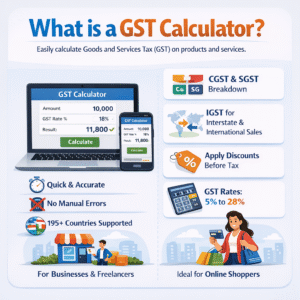
A GST Calculator is a tool that helps you calculate Goods and Services Tax on products or services. It allows users to compute the GST-inclusive or GST-exclusive amount based on the applicable tax rate.
A GST Calculator is an essential online tool that allows individuals, businesses, and freelancers to calculate the Goods and Services Tax (GST) on products and services quickly and accurately. With tax rates varying across countries and sometimes even regions, manually calculating GST can be tedious, time-consuming, and prone to errors. This is where a GST Calculator comes in, making the entire process seamless.
Using a GST Calculator, users can compute both GST-inclusive and GST-exclusive amounts depending on their requirements. For instance, if you know the base price of a product and want to calculate the total amount including GST, the calculator automatically applies the correct GST rate and provides the final payable amount. Similarly, if you have the total price and want to determine the base amount and tax component, the GST Calculator can perform reverse calculations effortlessly.
GST rates in India can vary from 5% to 28% depending on the category. By using a GST Calculator, you can:
Quickly determine the total price including GST
Avoid manual calculation mistakes
Calculate multiple GST slabs for various products
Modern GST Calculators go beyond simple computations. Many tools provide features such as:
CGST and SGST breakdown for domestic transactions
IGST calculation for interstate or international sales
Discount inclusion, allowing users to apply discounts before tax computation
Multi-country support, offering accurate GST/VAT rates for over 195 countries.
By using a GST Calculator, businesses can maintain accurate financial records, ensure compliance with tax regulations, and save hours of manual work. Even individuals and online shoppers benefit, as it provides clarity on the exact amount of tax payable, helping them make informed purchasing or pricing decisions.
In summary, a GST Calculator is more than just a simple calculator—it is a powerful tool designed to simplify tax computations, minimize errors, and improve efficiency, whether you are managing a business, freelancing, or making personal purchases.
Learn more about GST rates on the official GST portal
Benefits of Using a GST Calculator
Using a GST Calculator comes with multiple benefits for both businesses and individuals:
Time-Saving: Get results instantly without manual calculations.
Accuracy: Avoid errors in your GST calculations.
Convenience: Accessible on mobile, tablet, or desktop.
Business Planning: Helps businesses calculate pricing and profits accurately.
Easy Tax Filing: Ensures proper reporting during GST returns.
Supports Multiple Slabs: Easily calculates GST for different rates.
Audit Friendly: Keeps clear records for financial audits.
A GST Calculator is an essential tool for businesses, freelancers, and individuals who want fast, accurate, and hassle-free tax calculations. In today’s world, where transactions are frequent and GST rates vary by region or country, manually calculating taxes can be time-consuming and prone to errors. A GST Calculator solves this problem efficiently by providing instant, precise results.
One of the biggest advantages of a GST Calculator is accuracy. Calculating GST manually, especially when considering CGST, SGST, and IGST, can lead to mistakes. Even minor errors can result in compliance issues or financial discrepancies. Using a GST Calculator, the correct tax amount is calculated automatically based on the latest rates, ensuring that your financial records are accurate and reliable.
Another major benefit is time-saving. Businesses often need to calculate GST for multiple products or services daily. Doing this manually can be slow and cumbersome. A GST Calculator provides instant results, including discounts, tax breakdowns, and total amounts, saving hours of manual work and allowing you to focus on core business activities.
A GST Calculator is also very user-friendly, making it accessible for everyone. Whether you are a small business owner, freelancer, or individual shopper, you can calculate GST quickly by entering the amount, applicable tax rate, and discount. The tool instantly shows the base amount, tax, and total payable amount, simplifying financial planning.
Moreover, modern GST Calculators often support multiple countries, making it ideal for international businesses. They automatically apply the correct GST or VAT rates for over 195 countries, ensuring compliance with local and global tax regulations.
In conclusion, using a GST Calculator ensures accuracy, speed, simplicity, and compliance. It helps businesses and individuals save time, avoid errors, and manage taxes efficiently, making it an indispensable tool for financial management.
How to Use a GST Calculator Step by Step
Using a GST Calculator is one of the easiest ways to accurately compute taxes for products or services. Whether you are a business owner, freelancer, or an individual shopper, this tool helps you save time, reduce errors, and understand your tax obligations clearly. Here’s a detailed step-by-step guide on how to use a GST Calculator effectively.
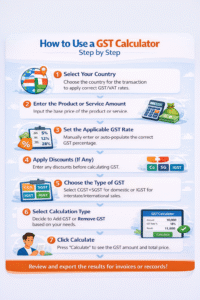
Step 1: Select Your Country
The first step is to choose the country where the transaction is taking place. Modern GST Calculators support 195 countries, automatically applying the correct GST or VAT rates for each region. Selecting your country ensures that the calculator uses accurate tax percentages according to local regulations.
Step 2: Enter the Product or Service Amount
Next, input the original price of the product or service. This is the base amount on which the GST will be calculated. Make sure to enter the amount in the correct currency for accurate results.
Step 3: Set the Applicable GST Rate
Depending on your country and type of product or service, the GST rate may vary. Enter the GST percentage manually or let the calculator auto-populate the rate based on the selected country. This ensures that the tax calculation is accurate and compliant with local laws.
Step 4: Apply Discounts (If Any)
If your product or service has a discount, enter it before the GST calculation. The Calculator automatically adjusts the base amount and recalculates the tax, giving you the correct GST amount after discounts.
Step 5: Choose the Type of GST
For domestic transactions in countries like India, choose CGST + SGST. For interstate or international transactions, select IGST. This feature ensures the tax breakdown is accurate and ready for invoicing.
Step 6: Select Calculation Type
Decide whether you want to Add GST (calculate GST-exclusive amount to include tax) or Remove GST (calculate GST-inclusive amount to determine base price and tax separately).
Step 7: Click Calculate
Once all inputs are provided, click the Calculate button. The GST Calculator instantly displays the results, including:
Base amount (after discount)
GST amount
CGST and SGST or IGST breakdown
Total payable amount
Step 8: Review and Save Results
Finally, review the calculation for accuracy. Many calculators allow exporting results for invoices or record-keeping. This makes tax management easier and ensures compliance during audits.
By following these steps, the Calculator provides a fast, accurate, and user-friendly way to handle all tax calculations. Whether for small business operations or personal purchases, this tool simplifies GST computations, saves time, and reduces errors significantly.
GST Calculator for Businesses vs Individuals
Businesses need accurate GST calculations for multiple products, invoices, and tax filings. A GST Calculator helps them plan pricing, manage inventory, and comply with tax rules.
Individuals primarily use a GST Calculator to check bills, online purchases, or personal expense taxes. Even small calculations become easier and error-free using this tool.
Common Mistakes to Avoid While Using a GST Calculator
A GST Calculator is a powerful tool for accurately calculating taxes, but improper use can still lead to errors. Knowing the common mistakes and avoiding them ensures that your tax calculations are precise, compliant, and reliable.
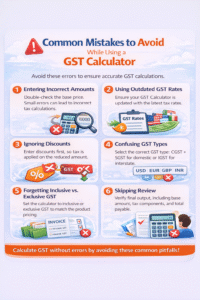
1. Entering Incorrect Amounts
One of the most frequent mistakes is entering the wrong base amount. Even a small typo can significantly alter the tax calculation. Always double-check the product or service amount before clicking calculate in your GST Calculator.
2. Using Outdated GST Rates
Tax rates can change periodically. Using an outdated GST rate in your calculator can result in incorrect tax amounts. Always ensure your GST Calculator is updated with the latest GST or VAT rates, especially if you operate in multiple countries.
3. Ignoring Discounts
Another common error is applying GST before considering discounts. A Calculator allows you to enter discounts first so that taxes are calculated on the reduced amount. Forgetting this step can overstate the GST, leading to inaccurate totals.
4. Confusing GST Types
In countries like India, domestic sales require CGST + SGST, while interstate transactions require IGST. Selecting the wrong type in your GST Calculator can misrepresent the tax breakdown and create accounting issues.
5. Forgetting Inclusive vs. Exclusive GST
Some products list prices inclusive of GST, while others are exclusive. Always ensure your Calculator is set to the correct calculation type; otherwise, the total amount or tax component may be incorrect.
6. Skipping Review
Even with a reliable GST Calculator, it’s important to review the final output. Verify the base amount, tax components, and total payable to ensure everything is accurate.
By avoiding these mistakes, your GST Calculator experience becomes accurate, fast, and stress-free, helping you save time and maintain tax compliance efficiently.
Online vs Offline GST Calculator Tools
When it comes to calculating GST, users can choose between online and offline GST Calculator tools. Online GST Calculators are web-based, allowing instant calculations from any device with internet access. They often include up-to-date tax rates for 195 countries, support CGST, SGST, and IGST breakdowns, and provide features like discounts and multiple currency options.
On the other hand, offline GST Calculators are software or spreadsheet-based tools that work without an internet connection. While they are convenient for offline use, they may require manual updates to stay compliant with the latest GST rates.
Overall, using an online Calculator is more convenient, faster, and accurate for businesses and individuals, especially for multi-country transactions. Offline tools are useful for limited or personal use but may lack advanced features and automatic updates.
Tips to Maximize Accuracy in Your GST Calculations
Accurate tax calculation is critical for businesses, freelancers, and even individuals dealing with purchases. Using a GST Calculator makes the process easier, but there are several best practices you can follow to ensure maximum accuracy and reliability in your calculations. By applying these tips, you can avoid errors, save time, and maintain compliance with tax regulations.
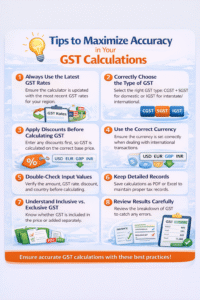
1. Always Use the Latest GST Rates
Tax rates can change frequently depending on government regulations. To ensure accurate calculations, always make sure your Calculator is updated with the latest GST or VAT rates applicable to your country or region. Many online calculators automatically update rates for over 195 countries, but it’s always good to double-check before major transactions.
2. Correctly Choose the Type of GST
For domestic transactions in countries like India, the GST is usually divided into CGST and SGST, while interstate or international transactions require IGST. Selecting the correct type in your Calculator ensures that the tax breakdown is accurate, helping you avoid errors in invoices and compliance reporting.
3. Apply Discounts Before Calculating GST
One common mistake is calculating GST before applying discounts. Always enter any discounts in your Calculator first. The calculator will then compute the base amount after the discount, ensuring that GST is applied correctly. This step is essential for accurate tax reporting and financial record-keeping.
4. Use the Correct Currency
When dealing with international transactions, make sure to select the correct currency in your Calculator. This is particularly important for businesses operating in multiple countries. Multi-country GST Calculators automatically convert amounts based on the selected currency and local tax rates, ensuring that the calculations are precise.
5. Double-Check Input Values
Even with an advanced GST Calculator, incorrect input can lead to errors. Always double-check the amount, GST rate, discount, and country before clicking calculate. Small mistakes in input data can significantly affect the output, especially when calculating taxes for multiple products or large transactions.
6. Keep Detailed Records
After calculating GST, save the results for your records. Many calculators allow exporting the calculations in formats like PDF or Excel. Keeping detailed records ensures you have proof of accurate tax calculation and can simplify audits or financial reporting.
7. Understand the Differences Between Inclusive and Exclusive GST
Some invoices include GST in the listed price (inclusive), while others add GST on top of the base price (exclusive). Make sure your Calculator is set to the correct calculation type, so the results reflect the exact tax amount.
8. Review Results Carefully
Always review the breakdown of your GST calculation, including base amount, tax components (CGST, SGST, IGST), and total amount. This helps catch any anomalies and ensures accurate reporting.
By following these tips, a Calculator becomes more than just a tool—it becomes a reliable partner in managing taxes accurately. Using it correctly saves time, reduces errors, improves compliance, and gives you peace of mind when handling financial transactions
FAQs About GST Calculator
Q1: Is the GST Calculator free to use?
Yes, most online GST Calculators are free and easy to use.
Q2: Can I calculate GST for multiple items at once?
Some calculators support batch calculations. Check the tool’s features before use.
Q3: Is a GST Calculator accurate?
Yes, if you input correct data and GST rates, the results are highly accurate.
Q4: Can I use a GST Calculator for international products?
Most calculators are designed for Indian GST rates; check international GST rates separately.
Conclusion
The Calculator is an essential tool for businesses, freelancers, and individuals who want to save time, ensure accuracy, and maintain compliance with tax regulations. In today’s fast-paced business environment, calculating GST, CGST, SGST, and IGST manually can be a complex and error-prone task. From determining the correct GST amount to calculating total costs after discounts and applying CGST and SGST breakdowns, manual calculations are not only time-consuming but also increase the risk of mistakes that could lead to compliance issues.
By using a Calculator, users can instantly compute taxes with precise accuracy. This tool automatically applies the correct GST rates for your country and even supports multi-country calculations for 195 countries worldwide, making it an invaluable asset for international businesses. Whether you are selling products online, providing services domestically, or conducting cross-border transactions, the GST Calculator ensures that your tax calculations are accurate, transparent, and compliant with the latest regulations.