Find the Perfect AC Size for Maximum Comfort with Our Free BTU Calculator
Table of Contents
- Introduction
- What Is a Time Card Calculator?
- How a Time Card Calculator Works
- Key Features of an Effective Time Card Calculator
- Time Card Calculator for Hourly Employees
- How to Calculate Overtime with a Time Card Calculator
- Time Card Calculator for Small Business Owners
- Weekly vs. Bi-Weekly Time Card Calculations
- Common Time Card Errors and How to Avoid Them
- Time Card Calculator vs. Manual Timekeeping
- Legal Compliance and Time Card Requirements
- FAQs
- Conclusion
Introduction
Accurate timekeeping is the foundation of fair pay — for employees and employers alike. Whether you run a small business with a handful of hourly workers, manage a team across multiple shifts, or track your own freelance hours, knowing exactly how much time has been worked and what it translates to in pay is not optional. It is essential. That is precisely where a Time Card Calculator becomes indispensable.
A Time Card Calculator eliminates the errors, guesswork, and tedium of manual time tracking. Instead of adding up hours by hand, converting minutes to decimal fractions, and hoping the math is right, you simply enter your clock-in and clock-out times and receive an instant, accurate total. Apply your hourly rate and the tool calculates your gross pay — including regular hours, overtime, and break deductions — in seconds.
This guide covers everything you need to know about the Time Card Calculator: what it is, how it works, who benefits from it, and how to use it correctly for accurate payroll, overtime compliance, and time management. Whether you are an employee verifying your paycheck, a manager processing payroll, or a freelancer invoicing clients, a Time Card Calculator is the tool that makes time-to-pay calculations fast, accurate, and stress-free.
What Is a Time Card Calculator?
A Time Card Calculator is a digital tool that calculates total hours worked during a shift, day, week, or pay period based on clock-in and clock-out times entered by the user. It converts raw time entries into decimal hours, applies overtime rules where applicable, and multiplies the result by a provided hourly rate to calculate gross pay.
The name comes from the physical time card — the paper or punch-card record workers used to clock in and out before digital systems existed. A Time Card Calculator replicates and improves on that process entirely in digital form, making it faster, more accurate, and accessible on any device.
A Time Card Calculator is used by:
- Hourly employees verifying that their paycheck matches their hours worked
- Small business owners calculating weekly payroll for part-time or hourly staff
- Freelancers and contractors totaling billable hours for client invoices
- HR managers processing time records before payroll submission
- Shift supervisors tracking attendance and hours across a team
- Remote workers logging time for project billing and productivity reporting
The core function of a Time Card Calculator is simple: turn time entries (clock-in, clock-out, breaks) into accurate hour totals and, when combined with a pay rate, into accurate gross earnings figures. Everything else — overtime detection, weekly summaries, decimal conversion — builds on that foundation.
How a Time Card Calculator Works
The mechanics of a time tracking tool are straightforward but require careful handling of time arithmetic, which is where manual calculations most commonly go wrong.
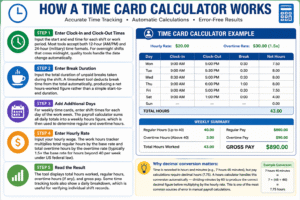
Step 1 – Enter Clock-In and Clock-Out Times Input the start and end time for each shift or work period. Most hours calculator tools accept both 12-hour (AM/PM) and 24-hour (military) time formats. For overnight shifts that cross midnight, quality tools handle the date change automatically.
Step 2 – Enter Break Duration Input the total duration of unpaid breaks taken during the shift. A timesheet tool deducts break time from the total automatically, producing a net hours-worked figure rather than a simple start-to-end duration.
Step 3 – Add Additional Days For weekly time cards, enter shift times for each day of the work week. The payroll calculator sums all daily totals into a weekly hours figure, which is then used to determine regular and overtime hours.
Step 4 – Enter Hourly Rate Input your hourly wage. The work hours tracker multiplies total regular hours by the base rate and total overtime hours by the overtime rate (typically 1.5× the base rate for hours beyond 40 per week under US federal law).
Step 5 – Read the Result The tool displays total hours worked, regular hours, overtime hours (if any), and gross pay. Some time tracking tool tools also show a daily breakdown, which is useful for verifying individual shift records.
Why decimal conversion matters: Time is recorded in hours and minutes (e.g., 7 hours 45 minutes), but pay calculations require decimal hours (7.75). A hours calculator handles this conversion automatically — dividing minutes by 60 to produce the correct decimal figure before multiplying by the hourly rate. This is one of the most common sources of error in manual payroll calculations.
Key Features of an Effective Time Card Calculator
Not all time tracking tools are equal. A well-designed Time Card Calculator includes features that cover the full range of real-world payroll scenarios rather than just basic shift totals.
Multi-Day Entry A quality timesheet tool handles a full seven-day work week in a single view, with daily clock-in/out entries, individual day totals, and a running weekly sum. This mirrors the structure of actual payroll records.
Automatic Overtime Detection Overtime rules vary by jurisdiction, but the most common threshold is 40 hours per week under the US Fair Labor Standards Act (FLSA). A good payroll calculator automatically identifies hours beyond the threshold and applies the appropriate multiplier.
Break Deduction Unpaid breaks must be excluded from paid work time. A work hours tracker with per-shift break entry ensures that lunch and rest periods are properly deducted before hours are totaled and multiplied by the pay rate.
Decimal and Hours:Minutes Display Some payroll systems require decimal hours; others use hours and minutes. A flexible time tracking tool displays both formats, allowing you to match the output to whatever your payroll software or invoice template requires.
Gross Pay Calculation Entering an hourly rate and having the hours calculator produce a gross pay figure — broken out into regular and overtime pay — saves a separate calculation step and reduces the chance of arithmetic error.
Printable or Exportable Output For record-keeping, payroll submission, or client invoicing, the ability to print or export the completed time card is essential. A timesheet tool that produces a clean, formatted output saves significant administrative time.
Time Card Calculator for Hourly Employees
Hourly employees have the most direct stake in accurate time tracking. Every minute of miscalculation translates directly into underpayment or overpayment, and paycheck discrepancies are one of the most common sources of workplace disputes.
Using a Time Card Calculator as an employee gives you an independent verification of your paycheck before it arrives. Simply log your clock-in and clock-out times each day, enter your break duration and hourly rate, and compare the result to what your employer pays. Discrepancies caught early are far easier to resolve than errors discovered weeks later.
Key time card scenarios for hourly employees:
- Standard shifts: Enter start and end times with lunch break deducted. A payroll calculator gives you the exact paid hours for the shift.
- Split shifts: If you work two separate periods in one day (e.g., 8am–12pm and 2pm–6pm), enter both periods and the tool sums them for the correct daily total.
- Overnight shifts: A work hours tracker that handles cross-midnight entries correctly calculates the true shift length without requiring you to manually adjust for the date change.
- Irregular hours: Freelancers and gig workers with variable shift lengths benefit especially from a time tracking tool — no two weeks look the same, so manual tracking is particularly error-prone.
Keeping your own time records using a hours calculator is always a smart practice, regardless of whether your employer uses digital timekeeping. It gives you a verifiable record of your hours that you control.
How to Calculate Overtime with a Time Card Calculator
Overtime calculation is one of the most important — and most frequently misunderstood — functions of any timesheet tool. Getting overtime right matters enormously: underpayment exposes employers to legal liability, and overpayment is a direct cost that compounds over time.
Federal overtime rules under the FLSA (United States):
- Standard overtime threshold: 40 hours per workweek
- Overtime rate: 1.5× the regular hourly rate (commonly called “time and a half”)
- Double time: Not required by federal law, but mandated in some states (notably California) for hours beyond 12 in a single day
How a payroll calculator handles overtime:
- It sums all hours worked across the week.
- Hours up to 40 are calculated at the regular rate.
- Hours beyond 40 are flagged as overtime and calculated at 1.5× (or the applicable rate).
- Both figures are displayed separately, with a combined gross pay total.
State-specific overtime rules: Some states apply daily overtime (over 8 hours in a day) in addition to weekly overtime. A work hours tracker designed for California use, for example, applies both daily and weekly overtime thresholds. Always verify which overtime rules apply in your jurisdiction before finalizing payroll.
Overtime example: An employee works: Mon 9h, Tue 9h, Wed 9h, Thu 9h, Fri 8h = 44 total hours.
- Regular pay: 40h × $18.00 = $720.00
- Overtime pay: 4h × $27.00 = $108.00
- Gross total: $828.00
A time tracking tool performs this calculation instantly and accurately, with no manual arithmetic required.
hours calculator for Small Business Owners
For small business owners who manage hourly staff, a timesheet tool is a critical payroll tool. Without a dedicated HRIS platform, many small businesses rely on manual time records — spreadsheets, paper logs, or mental notes — which are slow, error-prone, and difficult to audit.
A payroll calculator brings payroll-grade accuracy to businesses of any size, without the cost or complexity of enterprise software. Use it to:
- Calculate weekly payroll for each hourly employee by entering their shift times and hourly rate
- Verify employee-submitted time records by checking reported hours against known shift schedules
- Track part-time and variable-hours workers whose schedules change week to week
- Produce pay stubs by combining work hours tracker output with basic payroll information
- Audit overtime to ensure that overtime pay is being applied correctly and that no unplanned overtime is accumulating
Consistency is the most important practice for small business payroll. Run every employee’s hours through a time tracking tool each pay period using the same process, inputs, and rate structure. This produces a verifiable, consistent payroll record that protects both the business and its employees.
For businesses growing toward a full payroll system, a hours calculator serves as an excellent bridge — providing professional-level accuracy during the period before dedicated payroll software is warranted.
Weekly vs. Bi-Weekly Time Card Calculations
The pay period structure you use determines how you apply a Time Card Calculator and how overtime is assessed.
Weekly Pay Period The simplest structure for time card calculation. A Time Card Calculator covers one full work week (typically Monday–Sunday or Sunday–Saturday), totals all hours, applies overtime at the 40-hour threshold, and produces one gross pay figure per week. Payroll is processed and distributed every seven days.
Bi-Weekly Pay Period The most common pay period structure in the United States. Workers are paid every two weeks — 26 pay periods per year. For bi-weekly payroll, run a timesheet tool separately for each of the two weeks, then combine the regular and overtime figures for the bi-weekly gross pay total. Never add two weeks of hours together and then apply overtime — overtime is assessed weekly, not bi-weekly, under federal law. Combining hours before applying the overtime threshold can significantly understate overtime pay owed.
Semi-Monthly Pay Period Workers are paid twice a month — on fixed dates (e.g., the 1st and 15th). Semi-monthly periods do not align neatly with work weeks, making overtime calculation more complex. A payroll calculator helps by isolating individual work weeks within the pay period and applying overtime correctly to each.
Monthly Pay Period Less common for hourly workers. Use a work hours tracker week by week and sum the results for the month, ensuring overtime is calculated per work week throughout.
Common Time Card Errors and How to Avoid Them
Even with a Time Card Calculator, certain mistakes can produce inaccurate results. Knowing the most common errors helps you use the tool correctly every time.
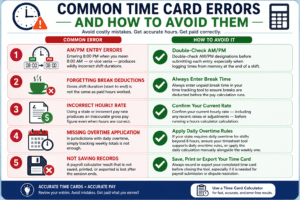
AM/PM Entry Errors Entering 8:00 PM when you mean 8:00 AM — or vice versa — produces wildly incorrect shift durations. Double-check AM/PM designations before submitting each entry, especially when logging times from memory at the end of a shift.
Forgetting Break Deductions Gross shift duration (start to end) is not the same as paid hours worked. Always enter unpaid break time in your time tracking tool to ensure breaks are deducted before the pay calculation runs.
Incorrect Hourly Rate Using a stale or incorrect pay rate produces an inaccurate gross pay figure even when hours are correct. Confirm your current hourly rate — including any recent raises or adjustments — before running a hours calculator calculation.
Missing Overtime Application In jurisdictions with daily overtime, simply tracking weekly totals is not enough. If your state requires daily overtime for shifts beyond 8 hours, ensure your timesheet tool supports daily overtime rules, or apply the daily calculation manually alongside the weekly one.
Not Saving Records A payroll calculator result that is not saved, printed, or exported is lost after the session ends. Always record or export your completed time card before closing the tool, especially if it is needed for payroll submission or dispute resolution.
Time Card Calculator vs. Manual Timekeeping
Before digital tools, timekeeping meant paper logs, punch clocks, and manual arithmetic — a process prone to errors at every step. A Time Card Calculator replaces this entirely with instant, accurate, and repeatable results.
| Method | Accuracy | Speed | Audit Trail | Overtime Handling |
|---|---|---|---|---|
| Paper time cards | Low | Slow | Limited | Manual |
| Spreadsheet | Medium | Moderate | Partial | Manual |
| work hours tracker | High | Instant | Clear output | Automatic |
| HRIS/Payroll software | Very high | Instant | Full | Automatic |
A Time Card Calculator sits in the ideal position for most small businesses and individual workers — more accurate and faster than paper or spreadsheet methods, without the cost and complexity of full payroll software.
The main advantage over spreadsheets is that a time tracking tool is purpose-built for this specific task. It handles time arithmetic correctly by design, applies overtime rules automatically, and does not require the user to set up or maintain any formulas. The risk of a broken formula or miscalculated cell — a persistent risk in any payroll spreadsheet — is eliminated entirely.
Legal Compliance and Time Card Requirements
Accurate time records are not just a good practice — they are a legal requirement for most employers. Understanding the compliance landscape helps you use a hours calculator as part of a broader commitment to lawful timekeeping.
FLSA Record-Keeping Requirements (United States) Under the Fair Labor Standards Act, employers must maintain time records for non-exempt (hourly) employees for at least two years. Records must include:
- Hours worked each day and each workweek
- Total daily or weekly straight-time earnings
- Total overtime earnings for the workweek
- All additions to or deductions from wages
A timesheet tool produces all of these figures when given accurate clock-in/out inputs and a correct pay rate. The output should be saved and stored as part of your formal payroll records for each pay period.
Employee Rights Employees have the legal right to review their time records. Using a payroll calculator to maintain your own parallel records gives you a verifiable comparison against employer-maintained records and a basis for challenging any discrepancy.
Wage Theft Protection Deliberate undercounting of hours worked is wage theft — illegal under federal and state law. A work hours tracker that employees use independently creates a transparent, employee-controlled record that makes discrepancies immediately visible and easier to resolve.
FAQs
What is a Time Card Calculator used for? A Time Card Calculator is used to calculate total hours worked during a shift, day, or pay period based on clock-in and clock-out entries. It converts time records into decimal hours, applies overtime rules, and calculates gross pay when an hourly rate is provided.
How do I calculate hours worked using a time tracking tool? Enter your clock-in time, clock-out time, and any unpaid break duration for each shift. The hours calculator subtracts the break from the total shift duration and returns the net hours worked. For a weekly total, enter all daily shifts and the tool sums them automatically.
Does a timesheet tool handle overnight shifts? Yes. A well-designed payroll calculator recognizes shifts that cross midnight and calculates the correct duration without requiring manual date adjustments. For example, a shift from 10:00 PM to 6:00 AM is correctly calculated as 8 hours.
How does overtime work in a Time Card Calculator? A work hours tracker compares total weekly hours to the applicable overtime threshold (typically 40 hours under US federal law). Hours above the threshold are multiplied by the overtime rate (1.5× the base rate by default). The tool displays regular pay, overtime pay, and gross pay separately.
Can I use a time tracking tool for multiple employees? Most online hours calculator tools are designed for individual use — one employee per session. For multiple employees, run the calculation separately for each worker, or consider a payroll platform that handles multi-employee time tracking in a single system.
Is a timesheet tool accurate enough for payroll? Yes, when given accurate inputs. A payroll calculator applies correct time arithmetic and overtime rules automatically, producing results that are suitable for payroll processing. The primary sources of error are incorrect inputs — wrong clock times, missing break entries, or outdated pay rates.
How do I handle breaks in a work hours tracker? Enter the total unpaid break time for each shift in the break field. The time tracking tool automatically deducts this from the gross shift duration. Only unpaid breaks should be deducted — paid rest breaks count as work time and should not be subtracted.
What is the difference between decimal hours and hours:minutes in a hours calculator? Hours:minutes format shows time as, for example, 7h 45m. Decimal format converts this to 7.75 hours by dividing minutes by 60. A timesheet tool converts automatically between the two, but payroll calculations always use decimal hours. Make sure your pay rate is applied to the decimal figure, not the hours:minutes display.
Conclusion
A Time Card Calculator is one of the most practically useful tools available to any hourly worker, employer, or freelancer who values accurate, transparent time-to-pay records. It removes the arithmetic burden from timekeeping entirely, handles the complexity of overtime calculation automatically, and delivers a clear, auditable result in seconds.
In a world where timekeeping errors cost employees billions of dollars in underpaid wages and expose employers to significant legal and financial risk, a payroll calculator is not a luxury — it is a basic necessity. Every business that pays hourly workers and every worker who is paid by the hour deserves a fast, reliable way to verify that time records are correct and pay is accurate.
The benefits extend beyond payroll accuracy. A consistent time card process — supported by a reliable work hours tracker — builds trust between employers and employees, simplifies audit responses, and creates a clear paper trail that protects everyone involved.
Use a Time Card Calculator for every pay period, every shift, and every hourly engagement. The combination of accurate inputs, automatic overtime detection, and instant gross pay calculation — delivered consistently by a dependable Time Card Calculator — is the foundation of fair, transparent, and legally compliant timekeeping for workers and businesses of every size.