Calculate Network Speed Instantly – Bandwidth Calculator
Table of Contents
- Introduction
- What Is URL Encode & Decode?
- The Technical Standard Behind URL Encode & Decode
- How to Use the URL Encode & Decode Tool Step by Step
- Which Characters Need Encoding and Why
- URL Encode & Decode: Understanding the Output
- URL Encoding vs. Form Encoding – What Is the Difference?
- Real-World Examples of URL Encode & Decode in Action
- Why URL Encode & Decode Matters for Web Development and SEO
- Applications of URL Encode & Decode Across Different Fields
- Common Mistakes in URL Encoding and Decoding
- Tips for Working With URL Encoding Effectively
- FAQs
- Conclusion
Introduction
Anyone who works with web addresses, APIs, query strings, or any system that transmits data through URLs will inevitably encounter one of the web’s most fundamental and frequently misunderstood standards: URL encoding. Special characters, spaces, accented letters, and symbols cannot be placed directly inside a URL — they must first be converted into a safe, standardized format that web servers, browsers, and APIs can reliably transmit and parse. The process that makes this possible is URL Encode & Decode, and understanding it is essential for anyone building, managing, or debugging web-based systems.
URL Encode & Decode is the bidirectional process of converting text to and from URL-safe percent-encoded format. When you encode a string, every character that is not safe in a URL — including spaces, ampersands, equals signs, slashes, hash marks, and all non-ASCII characters like accented letters and Unicode symbols — is replaced by a percent sign followed by its two-digit hexadecimal ASCII value. When you decode a string, that process is reversed: every percent-encoded sequence is converted back to the character it represents, making the string readable again. URL Encode & Decode is the foundation of safe, reliable URL construction across all of web development.
This complete guide explains everything you need to know about URL Encode & Decode — the standard it is built on, the rules for which characters must be encoded, step-by-step instructions for the tool, real-world examples across web development and digital marketing, common mistakes and how to avoid them, and why correct URL Encode & Decode practice directly affects application reliability, API performance, and even search engine optimization. By the end, you will have a thorough understanding of URL encoding and the confidence to apply it correctly in any web-related workflow.
What Is URL Encode & Decode?
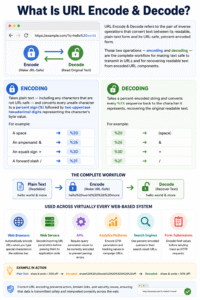
URL Encode & Decode refers to the pair of inverse operations that convert text between its readable, plain-text form and its URL-safe, percent-encoded form. These two operations — encoding and decoding — are the complete workflow for making text safe to transmit in URLs and for recovering readable text from encoded URL components.
Encoding takes plain text — including any characters that are not URL-safe — and converts every unsafe character to a percent sign followed by two uppercase hexadecimal digits representing the character’s byte value. For example:
- A space becomes
%20 - An ampersand
&becomes%26 - An equals sign
=becomes%3D - A forward slash
/becomes%2F
Decoding takes a percent-encoded string and converts every %XX sequence back to the character it represents, recovering the original readable text. URL Encode & Decode covers both directions, making it equally useful for preparing text to go into a URL and for reading encoded values coming out of one.
This process is used across virtually every web-based system:
- Web browsers automatically encode URLs when you type special characters in the address bar
- Web servers decode incoming URL parameters before passing them to application code
- APIs require query parameter values to be correctly encoded to prevent parsing errors
- Analytics platforms encode UTM parameters and tracking values in campaign URLs
- Search engines use percent-encoded queries in their search result URLs
- Form submissions encode field values before sending them as HTTP requests

The Technical Standard Behind URL Encode & Decode
URL Encode & Decode is governed by RFC 3986, the Internet Engineering Task Force specification that defines the structure of Uniform Resource Identifiers. Understanding the standard helps you apply encoding correctly and avoid common mistakes.
The Safe Character Set RFC 3986 defines a set of “unreserved characters” that never need to be encoded because they are always safe in any position within a URL. These are:
- Letters: A–Z and a–z
- Digits: 0–9
- Symbols: hyphen (
-), underscore (_), period (.), tilde (~)
Every other character — including all punctuation, spaces, non-ASCII characters, and the characters that have special meaning in URL syntax (?, &, =, #, /, :) — must be percent-encoded when included in a URL component value.
The encodeURIComponent Standard The tool uses JavaScript’s encodeURIComponent function, which is the correct standard for URL Encode & Decode of individual URL component values such as query parameter values and path segments. It encodes everything except letters, digits, and the following symbols: -, _, ., !, ~, *, ', (, ).
How Multi-Byte Characters Are Handled Non-ASCII characters — accented Latin letters, Arabic, Chinese, Japanese, emoji, and all other Unicode characters outside the basic ASCII range — are encoded as UTF-8 byte sequences. Each byte of the UTF-8 encoding is separately percent-encoded. For example, the French letter é has the UTF-8 representation 0xC3 0xA9, which becomes %C3%A9 after URL Encode & Decode encoding.
How to Use the URL Encode & Decode Tool Step by Step
The URL Encode & Decode tool is simple to use and produces instant results. Here is the complete step-by-step process for both operations.
Encoding Text or a URL
Step One — Enter Your Input Paste or type the text you want to encode into the Input Text / URL field. This can be anything: a search query with spaces and symbols, a form field value, a URL parameter containing special characters, a JSON string, or text in any language.
Step Two — Click the Encode Button Press the Encode button. The URL Encode & Decode tool instantly applies encodeURIComponent to your input and displays the percent-encoded result in the output panel on the right.
Step Three — Copy and Use the Encoded Output The result panel shows the fully encoded string. The Output Status line confirms “Encoded” when the operation is successful. Copy the encoded string and use it in your URL, API call, query parameter, or wherever web-safe text is required.
Decoding an Encoded URL or String
Step One — Paste the Encoded String Paste the percent-encoded text into the Input Text / URL field. This might be a URL copied from a browser address bar, an encoded parameter value extracted from a server log, or a query string value copied from an analytics export.
Step Two — Click the Decode Button Press the Decode button. The URL Encode & Decode tool applies decodeURIComponent to your input and displays the original readable text in the output panel.
Step Three — Read the Decoded Result The result shows the human-readable version of the encoded string. If the input contains an invalid or malformed percent-encoded sequence, the tool displays an error message — “Error: Invalid input for decoding” — indicating the input was not valid percent-encoded text.
Which Characters Need Encoding and Why
Understanding which characters require encoding is central to applying URL Encode & Decode correctly in practice.
Reserved Characters With Special URL Meaning These characters have structural significance in URL syntax. When they appear inside a query parameter value rather than as URL structure, they must be encoded — otherwise the URL parser misreads them as delimiters:
| Character | Encoded Form | Role in URL Structure |
|---|---|---|
? | %3F | Begins the query string |
& | %26 | Separates query parameters |
= | %3D | Separates key from value |
# | %23 | Begins fragment identifier |
/ | %2F | Separates URL path segments |
: | %3A | Separates scheme and host |
@ | %40 | Used in authentication URLs |
Unsafe Characters Spaces and most punctuation characters are classified as unsafe in URLs because they can be misinterpreted, stripped, or corrupted by web infrastructure. A space in a URL has no single universally agreed encoding — some systems use %20, others use + — which is why the URL Encode & Decode standard explicitly requires percent-encoding spaces as %20.
Non-ASCII and Unicode Characters All characters outside the basic ASCII range must be encoded. This includes accented characters (é, ü, ñ), Arabic and Chinese characters, emoji, mathematical symbols, and any other character with a Unicode code point above 127. These are converted to their multi-byte UTF-8 representations before percent-encoding.
URL Encode & Decode: Understanding the Output
The output panel of the URL Encode & Decode tool provides two pieces of information: the processed text and the output status indicator.
The Main Result Area The result area displays the complete encoded or decoded output string. For encoding, this is the percent-encoded version of your input — every unsafe character replaced by its %XX sequence. For decoding, this is the original readable text recovered from the percent-encoded input.
Long encoded strings wrap automatically thanks to word-break styling, so even very long encoded outputs are fully visible and selectable for copying. The entire output can be selected and copied regardless of length.
The Output Status Indicator The status line at the bottom of the result panel provides an immediate confirmation:
- “Encoded” — encoding completed successfully; the output is a valid percent-encoded string
- “Decoded” — decoding completed successfully; the output is the original readable text
- “Failed” — the decode operation encountered an error because the input contained an invalid percent-encoded sequence
What the Failed Status Means A Failed status means the input to the decode operation was not valid URL-encoded text. Common causes include: a % character followed by non-hexadecimal characters, an incomplete percent sequence like %2 (missing the second hex digit), or text that was double-encoded and contains literal %25 sequences that confuse the decoder.
URL Encoding vs. Form Encoding – What Is the Difference?
Two different encoding standards are commonly used for web data transmission, and confusing them is a frequent source of errors when working with this process.
Percent-Encoding (RFC 3986) Percent-encoding is the standard used by the this standard tool, and it is defined in RFC 3986. In this standard, spaces are encoded as %20, and all unsafe characters are encoded as %XX sequences with uppercase hexadecimal digits. This is the correct standard for encoding values in URL query strings, path segments, and API parameters.
Form Encoding (application/x-www-form-urlencoded) Form encoding is an older standard used for HTML form submissions. The key difference is that spaces are encoded as + rather than %20, and the encoding is applied to both keys and values in form fields. If you submit a form with a space in a field, the browser sends it as +, not %20. When using this process for API work or manual URL construction, always use percent-encoding (%20 for spaces), not form encoding.
Why the Distinction Matters If a server is expecting form-encoded data and receives percent-encoded data — or vice versa — parameter values will be misread. A + in a URL that should be a literal plus sign (encoded as %2B) will be misread as a space by form-encoding parsers. Understanding this distinction prevents a common class of integration bugs that appear correct in encoding but fail in parsing.
Real-World Examples of this process in Action
Working through real examples makes the practical application of this process immediately clear.
Example 1: Encoding a Search Query Plain text: best laptops under $1,000 & tablets Encoded: best%20laptops%20under%20%241%2C000%20%26%20tablets Every space, dollar sign, comma, and ampersand is encoded, making this string safe to append to a URL as a query parameter value without breaking the URL structure.
Example 2: Encoding Non-ASCII Text Plain text: café résumé naïve Encoded: caf%C3%A9%20r%C3%A9sum%C3%A9%20na%C3%AFve Each accented character is encoded as a multi-byte UTF-8 sequence. This ensures the text transmits correctly across servers and systems with different character set configurations.
Example 3: Decoding a Server Log Entry Encoded log value: q=machine%20learning%20%26%20AI%20tools%202024 Decoded: q=machine learning & AI tools 2024 Running this encoded log entry through this tool instantly reveals the original search query, which would be difficult to read in its percent-encoded form, especially for long or heavily encoded strings.
Example 4: Encoding a JSON String for a URL Parameter Plain text: {"filter":"active","sort":"date","order":"desc"} Encoded: %7B%22filter%22%3A%22active%22%2C%22sort%22%3A%22date%22%2C%22order%22%3A%22desc%22%7D Curly braces, quotation marks, and colons are all reserved characters that must be encoded. This shows why JSON objects must never be placed directly in URL query strings without encoding.
Example 5: Decoding a UTM Tracking Parameter Encoded: utm_campaign=summer%20sale%202024%20%E2%80%94%20email%20series Decoded: utm_campaign=summer sale 2024 — email series The em dash (—) is a Unicode character encoded as three bytes (%E2%80%94), which this tool decodes back to the original readable campaign name in a single click.
Why URL Encode & Decode Matters for Web Development and SEO
Correct URL Encode & Decode practice has direct, measurable consequences for application reliability, API performance, and search engine optimization.
Application Stability and Bug Prevention Unencoded special characters in URL parameters are one of the leading causes of web application bugs. An unencoded ampersand inside a parameter value splits it into two parameters. An unencoded hash sends everything after it to the browser’s fragment handler, stripping it from the server request. An unencoded question mark starts a second query string. Every one of these issues is completely prevented by applying this practice to parameter values before inserting them into URLs.
API Reliability and Integration Quality REST APIs pass data in URL query strings, and incorrect encoding is one of the most common causes of API integration failures. When building API requests that include user-provided values, email addresses, search keywords, or any dynamic text, encoding every value before constructing the final URL ensures the API receives and parses the parameters exactly as intended.
SEO and Search Engine Crawlability Search engine crawlers expect well-formed URLs, and improperly encoded characters can cause indexing failures and duplicate content problems. URLs containing raw spaces, unencoded special characters, or malformed percent sequences may generate crawl errors, fail to be indexed, or be treated as different URLs from their encoded equivalents. Applying correct this practice practice to all page URLs, canonical tags, and sitemap entries ensures clean crawlability and consistent indexing.
Security and Input Sanitization URL encoding plays a role in web application security by preventing certain classes of injection attacks. Encoding user input before incorporating it into URLs or SQL queries limits the attack surface available to malicious actors who might try to inject control characters or reserved sequences into application-processed strings.
Applications of this process Across Different Fields
The practical use of this process extends across many professional disciplines, not only software development.
Web Development and Backend Engineering Every web application that accepts user input and incorporates it into URLs must apply this process to that input before use. Search fields, filter parameters, user profile names, file upload identifiers, and form data all pass through URL encoding in correctly built applications.
Digital Marketing and Campaign Tracking UTM parameters — source, medium, campaign, term, and content — frequently contain spaces, ampersands, and special characters that must be properly encoded in campaign URLs. Decoding UTM values from analytics exports also allows marketers to read campaign names and labels that were stored in encoded form in log files and reporting databases.
Quality Assurance and Testing QA engineers use this tool to verify that applications correctly handle encoded inputs, test edge cases involving special characters, and check that URL parameter encoding is applied consistently across all input paths before release.
Data Engineering and Log Analysis Server logs, CDN access logs, and analytics exports regularly contain URL-encoded parameter values. Decoding log entries to extract readable query values and user inputs is a standard data engineering task made fast and straightforward by the this tool tool.
Content Management and Editorial Workflows Content managers who work with URL slugs, anchor links, and embedded links often encounter encoded characters that appear garbled in their encoded form. Decoding these values through a tool makes the content readable and editable without requiring any programming knowledge.
Common Mistakes in URL Encoding and Decoding
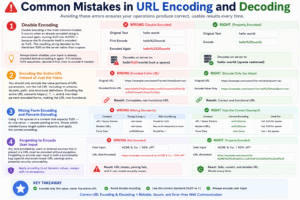
Avoiding these errors ensures your this process operations produce correct, usable results every time.
Double Encoding Double encoding is the most common URL encoding mistake. It occurs when an already-encoded string is encoded again, turning %20 into %2520 — because the % character itself is encoded as %25. The resulting string appears correctly encoded but decodes to the literal text %20 on the server rather than a space. Always check whether your input is already encoded before encoding it again. If it contains %XX sequences, decode it first, then re-encode if needed.
Encoding the Entire URL Instead of Just the Value You should only encode the value portions of URL parameters, not the full URL including its scheme, domain, path, and structural delimiters. Encoding the entire URL converts https://, ?, =, and & into their percent-encoded forms, making the URL completely non-functional. this process applies to parameter values, not to URL structure.
Mixing Form Encoding and Percent-Encoding Using + for spaces in a context that expects %20 — or vice versa — causes parsing errors. Know which standard your target system expects and apply the correct encoding. The this tool tool uses %20 for spaces, which is the correct choice for API query parameters and modern URL construction.
Forgetting to Encode User Input Any text provided by users or external sources that is placed in a URL must be encoded without exception. Forgetting to encode user input is both a functionality bug (special characters break URL parsing) and a potential security vulnerability. Apply this process to all dynamic values, always, with no exceptions.
Tips for Working With URL Encoding Effectively
These practical habits make working with this process faster, more accurate, and less error-prone.
Decode Before Reading Encoded URLs When you encounter a percent-encoded URL in a log file, email, or analytics report, decode it first before trying to read or analyze it. Percent-encoded strings — especially those containing multi-byte Unicode characters — are significantly harder to read and understand than their decoded equivalents, and decoding takes only seconds.
Encode Values, Not Keys In a standard query string like ?city=New%20York&country=US, the keys (city, country) are programmer-defined identifiers that typically need no encoding. Encode the value portion only — that is where user-provided and dynamic content appears.
Test Encoded URLs in a Browser Before Deploying Always paste a full URL containing encoded parameters into a browser address bar and verify the application receives and parses the parameters correctly before pushing to production. This one-minute check catches double-encoding, missing encoding, and unit mismatch issues before they reach users.
Re-verify After Concatenating Strings When building URLs by concatenating strings in code, re-verify the final URL using the this tool tool to ensure no encoding has been applied at the wrong level or skipped entirely. String concatenation bugs that produce double-encoded or unencoded URLs are a common source of hard-to-diagnose production issues.
FAQs
What is URL Encode & Decode? URL Encode & Decode is the process of converting text to and from URL-safe percent-encoded format. Encoding replaces unsafe characters with %XX sequences so they can be safely transmitted in URLs. Decoding reverses the process, converting %XX sequences back to their original characters. This bidirectional process is fundamental to safe URL construction and is used in every web application that passes data through URL parameters.
Why does a space become %20 in URL encoding? Spaces are not safe in URLs because they can be interpreted differently by different web infrastructure components, stripped during transmission, or confused with other delimiter characters. The RFC 3986 standard encodes the space character as %20 — the hexadecimal value 20 being the ASCII code for space (decimal 32). Some older form-based systems use + for spaces, but %20 is the correct modern standard used by this standard.
What is the difference between URL encoding and Base64 encoding? URL encoding (percent-encoding) is designed for making text safe within URLs and preserves much of the original string’s readability, replacing only the unsafe characters with %XX codes. Base64 encoding transforms any data (including binary) into a completely different, entirely alphanumeric representation. They serve different purposes and are not interchangeable. Use URL encoding for URL parameters; use Base64 for embedding binary data in JSON, emails, or data URIs.
Can I use this tool to decode any URL from a browser? Yes — you can paste any percent-encoded URL or URL component into the tool and click Decode to see the readable version. Copy the full URL or just the query string portion from your browser’s address bar, paste it into the input field, and click Decode. Note that if the URL contains & and = as structural delimiters (rather than encoded values), these will also be decoded — so for full URLs, decoding just the value portion of a specific parameter gives the cleanest result.
What causes the “Error: Invalid input for decoding” message? This error appears when the input to the decode operation contains a malformed percent-encoded sequence. Common causes are: a lone % character not followed by two hexadecimal digits, a % followed by non-hexadecimal characters (like %ZZ), or an incomplete sequence at the end of the string (%2 instead of %2F). Double-encoded text can also trigger this error if the inner encoding produces sequences that the outer decoder cannot handle.
Does the tool handle emoji and Unicode characters? Yes — the this tool tool correctly handles all Unicode characters including emoji, Chinese, Arabic, Japanese, and all other scripts. Unicode characters are converted to their UTF-8 byte sequences, and each byte is separately percent-encoded. For example, the thumbs-up emoji 👍 encodes as %F0%9F%91%8D — four bytes because this emoji requires four bytes in UTF-8 encoding.
Should I encode the entire URL or just the parameter values? Encode only the individual parameter values, not the entire URL. The URL structure — scheme (https://), domain, path, and query string delimiters (?, &, =) — must remain unencoded for the URL to be functional. Apply this process only to the content of each parameter value before inserting it into the URL string.
Conclusion
URL encoding is one of the most foundational and most frequently misunderstood aspects of web development, and the consequences of getting it wrong — broken query strings, failed API calls, garbled parameter values, and crawl errors — are immediate and often difficult to diagnose without knowing what to look for. URL Encode & Decode is the core practice that prevents all of these problems by ensuring every character that appears in a URL is in the exact safe format that browsers, servers, and APIs expect.
The standard behind this standard — RFC 3986 percent-encoding — is simple to understand and consistent in its application. Every character outside the safe unreserved set is replaced with a percent sign and two hexadecimal digits. Non-ASCII characters are converted to UTF-8 bytes first. The process is perfectly reversible, and the tool handles both directions instantly with no programming knowledge required. URL Encode & Decode is not a complex concept — but it is a critically important one, and mastering it makes you a more effective web developer, marketer, data analyst, or content manager.
Throughout this guide, we have covered the complete scope of this process — from the RFC 3986 standard and the encodeURIComponent function, through character encoding rules, step-by-step tool usage, real-world examples in five different scenarios, the distinction between percent-encoding and form encoding, and practical tips for avoiding the most common encoding mistakes. Whether you are encoding a search query, debugging an API integration, decoding a server log, or verifying a campaign tracking URL, this process gives you the foundational capability to work with URLs correctly and confidently in any context.
Use URL Encode & Decode as a standard part of every workflow that involves constructing, transmitting, or analyzing URLs. Encode every dynamic value. Decode every encoded value before reading it. Test every encoded URL before deployment. That consistent discipline — always applying correct this practice practice — is the difference between web infrastructure that works reliably and one that produces mysterious, intermittent bugs at the worst possible moments.