Calculate mass instantly with our fast and accurate Mass Calculator
Table of Contents
- Introduction
- What Is a Speed Calculator?
- The Speed, Distance, and Time Formula
- How to Use a Speed Calculator
- Speed Units Explained
- Speed Calculator Formulas in Detail
- Real-World Applications of Speed Calculation
- Speed Calculator for Different Vehicles
- Converting Between Speed Units
- Average Speed vs. Instantaneous Speed
- Speed, Distance, and Time Word Problems
- Common Mistakes When Calculating Speed
- FAQs
- Conclusion
Introduction
Speed is one of the most fundamental concepts in physics, travel, sports, engineering, and everyday life. Whether you are planning a road trip and need to estimate your arrival time, training as an athlete to improve your performance, or calculating the velocity of a moving object for a science project, knowing how to work with speed, distance, and time is an essential skill. This is where a Speed Calculator becomes your most powerful and time-saving tool.
Many people struggle with the relationship between speed, distance, and time. The formula itself is straightforward, but applying it correctly — especially when different units of measurement are involved — can quickly become confusing and error-prone. A Speed Calculator removes all of that friction by handling the conversions and calculations instantly, giving you reliable results in seconds without the risk of a manual arithmetic mistake.
In this comprehensive guide, you will discover everything there is to know about speed calculation. We will break down the core formula, explore every unit of speed measurement, walk you through how to use a Speed Calculator step by step, and cover real-world applications from road travel and aviation to athletics and engineering. By the end, you will have the knowledge and tools to calculate speed, distance, or time with total confidence in any situation.
What Is a Speed Calculator?
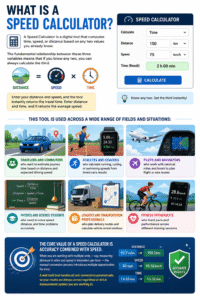
A Speed Calculator is a digital tool that computes time, speed, or distance based on any two values you already know. The fundamental relationship between these three variables means that if you know any two, you can always calculate the third. Enter your distance and speed, and the tool instantly returns the travel time. Enter distance and time, and it returns the average speed.
This tool is used across a wide range of fields and situations:
- Travelers and commuters who want to estimate journey time based on distance and expected driving speed
- Athletes and coaches who calculate running, cycling, or swimming speeds from timed race results
- Pilots and navigators who work with nautical miles and knots to plan flight or sea routes
- Physics and science students who need to solve speed, distance, and time problems accurately
- Logistics and transportation professionals who plan delivery routes and calculate vehicle arrival windows
- Fitness enthusiasts who track pace and performance across different training sessions
The core value of a Speed Calculator is accuracy combined with speed. When you are working with multiple units — say, measuring distance in miles and speed in kilometers per hour — the manual conversion process introduces multiple opportunities for error. A well-built tool handles all unit conversions automatically, so your results are always correct regardless of which measurement system you are working in.
The Speed, Distance, and Time Formula
Before diving into how to use the tool, it is important to understand the mathematical relationship that powers this calculation.
The three core formulas are:
Speed = Distance ÷ Time
Distance = Speed × Time
Time = Distance ÷ Speed
These three formulas are simply rearrangements of one another, and they form the complete mathematical triangle of motion. Knowing any two values always allows you to find the third.
A simple example:
- Distance: 100 km
- Speed: 50 km/h
- Time = 100 ÷ 50 = 2 hours
Another example:
- Distance: 200 miles
- Time: 4 hours
- Speed = 200 ÷ 4 = 50 mph
The challenge arises when your distance and speed are not in compatible units. For example, if your distance is measured in meters and your speed is measured in kilometers per hour, you must first convert one of the values before applying the formula. This is exactly why a Speed Calculator with built-in unit conversion is so valuable — it handles this step automatically and eliminates the most common source of errors.
How to Use a Speed Calculator
Using a Speed Calculator is fast and simple, even if you have never used one before. Here is a step-by-step guide for getting the most accurate results:
Step One — Enter Your Distance Type the distance value into the distance field. This might be the number of kilometers between two cities, the length of a race course in meters, or the distance traveled during a training session in miles.
Step Two — Select Your Distance Unit Choose the correct unit from the distance unit dropdown. Available options typically include kilometers (km), meters (m), miles, feet (ft), inches, nautical miles, hectometers, decameters, and centimeters. Always double-check that your selected unit matches the measurement you entered.
Step Three — Enter Your Speed Type the known speed value into the speed field. For example, if you are driving at highway speed in a country that uses kilometers per hour, enter the speed limit or your actual traveling speed.
Step Four — Select Your Speed Unit Choose the matching speed unit: km/h, m/s, mph, knots, km/min, m/min, m/h, miles/min, or km/s. The Speed Calculator automatically converts all values to a common baseline unit (km/h) before performing the calculation, so you never need to do manual unit conversion.
Step Five — Click Calculate Press the Calculate button to see your results instantly. The tool displays:
- The time in hours required to cover the entered distance at the entered speed
- A breakdown showing the converted distance in km and speed in km/h
- The applied formula so you can verify the logic
Step Six — Interpret and Use Your Result The result is displayed as a decimal number of hours. For example, a result of 2.50 hours means 2 hours and 30 minutes. Use a Speed Calculator every time you need a fast, reliable answer for any travel, physics, or performance-related calculation.
Speed Units Explained
One of the most useful features of a modern speed tool is its support for multiple speed units. Understanding what each unit represents helps you choose the right one for your specific application.
Kilometers per Hour (km/h) The most commonly used speed unit in most countries for road travel and general everyday use. When a speed limit sign reads 100, it means 100 km/h — the distance in kilometers a vehicle would cover in one hour at that speed.
Meters per Second (m/s) The standard unit of speed in scientific and physics contexts. One m/s is equal to 3.6 km/h. This unit is commonly used in laboratory experiments, fluid dynamics, and academic problem-solving.
Miles per Hour (mph) Used primarily in the United States, United Kingdom, and a small number of other countries for road travel. One mph is equal to approximately 1.609 km/h.
Knots The standard speed unit used in maritime and aviation navigation. One knot equals one nautical mile per hour, which is approximately 1.852 km/h. Knots are used by ships, aircraft, and weather systems worldwide.
Kilometers per Minute (km/min) Used in contexts requiring very high speeds, such as rocket trajectory calculations or certain industrial applications.
Meters per Minute (m/min) Common in manufacturing, conveyor belt systems, and slow-moving industrial processes.
Kilometers per Second (km/s) Used in astronomy, orbital mechanics, and particle physics. The speed of light, for example, is approximately 300,000 km/s.
A Speed Calculator that supports all of these units gives you the flexibility to work with data in whatever form it comes — whether you are reading a weather report in knots, a track result in m/s, or a road sign in mph — without manual unit conversion slowing you down.
Speed Calculator Formulas in Detail
Understanding the formulas behind the tool helps you verify results, solve problems independently, and build deeper mathematical intuition.
Time from Distance and Speed
Time (hours) = Distance (km) ÷ Speed (km/h)
For our tool, all inputs are first converted to kilometers and km/h before applying this formula. So if you enter 100 miles at 60 mph:
- Distance in km = 100 × 1.609 = 160.9 km
- Speed in km/h = 60 × 1.609 = 96.56 km/h
- Time = 160.9 ÷ 96.56 = 1.666 hours = 1 hour 40 minutes
Speed from Distance and Time
Speed (km/h) = Distance (km) ÷ Time (hours)
Distance from Speed and Time
Distance (km) = Speed (km/h) × Time (hours)
Converting Hours to Hours and Minutes Take the decimal portion of the time result and multiply by 60.
- 2.75 hours = 2 hours + (0.75 × 60) = 2 hours 45 minutes
- 1.333 hours = 1 hour + (0.333 × 60) = 1 hour 20 minutes
These formulas, applied through this tool, give you complete flexibility to solve any motion problem regardless of the specific quantities you start with.
Real-World Applications of Speed Calculation
Speed calculation is not just a textbook exercise — it has practical value in dozens of everyday situations.
Road Travel and Journey Planning The most common real-world use of a Speed Calculator is estimating travel time for road trips and daily commutes. Enter your journey distance and your expected average driving speed, and the tool instantly tells you how long the trip will take. This helps with planning departure times, coordinating meeting arrivals, and estimating fuel consumption.
Aviation and Maritime Navigation Pilots and ship captains use speed calculations constantly. With a flight distance of 1,200 nautical miles and a cruising speed of 450 knots, the time calculation gives approximately 2.67 hours of flight time. A Speed Calculator that supports nautical miles and knots is essential for anyone working in aviation or maritime contexts.
Sports and Athletic Performance Coaches and athletes use speed calculations to analyze performance and set training targets. If a runner completes a 5 km race in 22 minutes, their average speed was 5 ÷ (22/60) = 13.64 km/h — or a pace of approximately 4 minutes 24 seconds per kilometer. This tool makes these performance metrics easy to derive from raw race data.
Physics and Science Education Students at every level use speed, distance, and time calculations regularly. From basic middle-school problems to university-level mechanics, the formula is the foundation of kinematics. This tool helps students check their manual work and build confidence with the formula through repeated practice.
Logistics and Delivery Freight companies, courier services, and delivery fleets calculate travel times constantly to optimize routes, estimate delivery windows, and meet customer commitments. Accurate speed and time calculation is central to the logistics industry’s efficiency.
Speed Calculator for Different Vehicles
Different types of vehicles operate at very different speeds, and a Speed Calculator is equally useful across all of them.
Passenger Cars Average highway driving speed is typically 100 to 120 km/h in countries using the metric system, or 60 to 75 mph in countries using imperial measurements. For a 400 km highway journey at 100 km/h, the Speed Calculator returns a travel time of exactly 4 hours — simple and useful for planning purposes.
Commercial Trucks and Freight Vehicles Heavy vehicles often travel at lower speeds due to legal limits and the nature of their cargo. At 80 km/h, that same 400 km journey takes 5 hours — an important difference when planning freight deliveries.
Aircraft A commercial jetliner typically cruises at around 900 km/h (approximately 560 mph or 485 knots). At that speed, a 5,400 km transatlantic flight takes exactly 6 hours — the type of calculation airline operations teams run hundreds of times per day.
Ships and Vessels Commercial shipping vessels typically travel between 14 and 25 knots. A cargo ship traveling at 18 knots would cover 432 nautical miles in 24 hours. This tool handling knot-to-distance conversions makes these maritime calculations accurate and instant.
Cyclists and Runners A competitive cyclist averaging 35 km/h will cover a 100 km race course in approximately 2 hours 51 minutes. For personal training and race planning, this kind of tool is indispensable for athletes tracking performance and setting goals.
Converting Between Speed Units
One of the most frequent sources of confusion in speed calculations is unit conversion. Here is a reference table for the most common speed unit conversions:
| From | To | Multiply By |
|---|---|---|
| km/h | m/s | ÷ 3.6 |
| m/s | km/h | × 3.6 |
| km/h | mph | ÷ 1.609 |
| mph | km/h | × 1.609 |
| knots | km/h | × 1.852 |
| km/h | knots | ÷ 1.852 |
| mph | m/s | × 0.447 |
| m/s | mph | × 2.237 |
A tool with built-in unit support eliminates the need for manual conversion entirely. Simply select your input units and the tool applies the correct conversion factor automatically before calculating.
Average Speed vs. Instantaneous Speed
Understanding the difference between average speed and instantaneous speed is important for interpreting Speed Calculator results correctly.
Instantaneous Speed This is the speed of an object at one specific moment in time — for example, the reading on your car’s speedometer at any given second. Instantaneous speed can vary constantly, especially in real-world driving where you accelerate, brake, and navigate traffic.
Average Speed This is the total distance traveled divided by the total time taken. This tool always calculates average speed, because it uses total distance and total time as inputs. Average speed smooths out all the variations in instantaneous speed throughout the journey.
Why This Matters If you drive 200 km in 2 hours, your average speed is 100 km/h — but at various points during the journey you may have been traveling at 120 km/h on the highway, 60 km/h in a town, and briefly at 0 km/h at traffic lights. The tool result of 100 km/h represents the average across all of those variations, not any single moment during the trip.
For athletes, average speed is often the most meaningful metric — it is the number that defines race performance, training pace, and benchmark comparisons over time Speed Calculator.
Speed, Distance, and Time Word Problems
Applying the formula to real word problems is the best way to fully understand how this tool works in practice.
Problem One — Road Journey A car travels from City A to City B, a distance of 240 km, at an average speed of 80 km/h. How long does the journey take? Solution: Time = 240 ÷ 80 = 3 hours
Problem Two — Running Pace A runner completes a 10 km race in 48 minutes. What is their average speed in km/h? Solution: Time = 48 ÷ 60 = 0.8 hours. Speed = 10 ÷ 0.8 = 12.5 km/h
Problem Three — Flight Distance An aircraft travels at 850 km/h for 3.5 hours. What distance does it cover? Solution: Distance = 850 × 3.5 = 2,975 km
Problem Four — Maritime Navigation A ship travels at 20 knots for 12 hours. How many nautical miles does it cover? Solution: Distance = 20 × 12 = 240 nautical miles
All four of these problems can be solved in under three seconds using a Speed Calculator — simply enter two of the three variables, select the correct units, and read the answer instantly Speed Calculator.
Common Mistakes When Calculating Speed
Even with a reliable tool, certain errors can lead to incorrect results if you are not careful.
Using Mismatched Units This is the single most common and most costly mistake in manual speed calculations. Adding a distance in meters to a formula that expects kilometers — or mixing mph with km values — produces a completely wrong answer. Always verify your unit selections before calculating.
Confusing Distance with Displacement Distance is the total path length traveled. Displacement is the straight-line distance between start and end points. This tool uses total distance traveled, not displacement, to calculate average speed for a journey.
Forgetting to Convert Time Time must always be in the same unit as the speed denominator. If your speed is in km/h, your time must be in hours. If your time is given in minutes, divide by 60 first. Most tools of this kind handle this automatically, but it is still worth understanding the underlying logic.
Rounding Too Early When intermediate values are rounded mid-calculation, small errors compound and the final answer can be noticeably off. Always use the full decimal value from your tool’s output rather than rounding to whole numbers too early in a chain of calculations.
Entering Zero for Speed Mathematically, dividing by zero is undefined — and entering a speed of zero into a time calculation is equivalent to that. A well-designed tool will flag this as an error and prompt you to enter a valid non-zero speed value before proceeding Speed Calculator.
FAQs
What does a Speed Calculator calculate? A Speed Calculator computes the time needed to travel a given distance at a known speed. It applies the formula Time = Distance ÷ Speed, with automatic unit conversion so you can work with any combination of distance and speed units. It can also be used conceptually to solve for speed (Speed = Distance ÷ Time) or distance (Distance = Speed × Time).
How do I calculate travel time using a Speed Calculator? Enter your total distance and your average travel speed, select the correct units for each, and click Calculate. The tool instantly returns the time in hours. To convert the decimal result to hours and minutes, multiply the decimal portion by 60. For example, 2.75 hours = 2 hours 45 minutes.
What units does this speed tool support? This tool typically supports kilometers, meters, miles, feet, inches, nautical miles, hectometers, decameters, and centimeters for distance, and km/h, m/s, mph, knots, km/min, m/min, m/h, miles/min, and km/s for speed. All values are automatically converted to a common unit before the calculation is performed.
Can I use a Speed Calculator for running or cycling? Yes, absolutely. This tool is widely used by runners, cyclists, swimmers, and other athletes to convert race times into average speeds, compare performance across different distances, and set training pace targets.
What is the difference between speed and velocity? Speed is a scalar quantity — it only measures how fast an object is moving, without any reference to direction. Velocity is a vector quantity — it measures both speed and direction. This tool calculates speed, not velocity, as direction is not a factor in distance-time-speed problems.
How do I convert knots to km/h? Multiply the speed in knots by 1.852 to get the equivalent in km/h. For example, 20 knots × 1.852 = 37.04 km/h. This tool handles this conversion automatically when you select “knots” as your speed unit.
Why does my Speed Calculator show a decimal time result? The result is displayed in decimal hours, where the decimal part represents a fraction of an hour. To convert: multiply the decimal by 60 to get minutes. For example, 1.5 hours = 1 hour 30 minutes. A result of 0.333 hours = 0.333 × 60 = approximately 20 minutes.
Is this tool accurate for long-distance travel? This tool gives mathematically accurate results based on the inputs you provide. For real-world travel, accuracy depends on how realistic your average speed input is. Actual journey times may vary due to traffic, rest stops, speed changes, and route conditions — but the calculator gives you a reliable baseline estimate Speed Calculator
Conclusion
Speed, distance, and time are three of the most practically important concepts in everyday life, and the ability to work with them quickly and accurately is a genuinely useful skill for almost anyone. Whether you are a driver planning a long journey, an athlete chasing a personal best, a student solving physics problems, or a professional managing logistics, accurate speed calculation is something you will need repeatedly throughout your life.
This powerful tool makes every one of these calculations instant, effortless, and error-free. Instead of spending time on unit conversions, formula rearrangements, and mental arithmetic, you enter two values, select your units, and receive a precise answer in less than a second. This is not just convenient — it is the kind of tool that eliminates mistakes that could affect travel plans, athletic performance analysis, or professional decision-making.
Throughout this guide, we have covered the full picture of speed calculation — from the core formula and all supported units to real-world applications, vehicle-specific examples, common mistakes, and detailed word problems. Every section is designed to make you more confident and capable when working with speed, distance, and time in any real-world context.
Use this tool every time you need to solve a motion problem, whether it is simple or complex. Verify your distance and speed units carefully, interpret the decimal time result correctly, and use the formula breakdowns in this guide to deepen your understanding of the mathematics behind the tool.
The formula is simple. The tool is fast. The results are reliable. That combination makes this calculator one of the most versatile and frequently useful online tools available for students, professionals, travelers, and athletes alike. Make it your first stop for any speed, distance, or time question — and you will always have an accurate answer at your fingertips, no matter the units, no matter the context Speed Calculator.