Calculate mileage instantly with our fast and accurate Mileage Calculator
Table of Contents
- Introduction
- What Is a Mass Index Calculator?
- The Formula Behind a Mass Index Calculator
- How to Use a Mass Index Calculator Step by Step
- Mass Index Calculator: Supported Units and Conversions
- Real-World Examples Using the Mass Index Calculator
- Why Mass Calculations Matter in Science and Engineering
- Mass vs. Weight – Understanding the Difference
- Density Reference Table for Common Materials
- Applications of a Mass Index Calculator Across Industries
- Mass Index Calculator in Physics, Chemistry, and Engineering
- Common Mistakes When Using a Mass Index Calculator
- FAQs
- Conclusion
Introduction
Mass is one of the most fundamental physical quantities in science, engineering, and everyday life. Whether you are calculating the mass of a block of steel for a construction project, determining the mass of a chemical reagent for a laboratory experiment, or working out the quantity of material needed for a manufacturing process, the relationship between mass, density, and volume sits at the heart of every calculation. For anyone who works with physical materials — in any field, at any level — a reliable Mass Index Calculator is one of the most practical and frequently needed tools available.
The relationship connecting mass, density, and volume is expressed in a single powerful formula: Mass = Density × Volume. This formula appears across physics, chemistry, engineering, architecture, logistics, and manufacturing. Yet applying it correctly requires not just knowing the formula itself, but also ensuring that density and volume values are expressed in compatible units — something that involves multiple conversion steps and significant room for error when done manually. A Mass Index Calculator eliminates that complexity entirely by handling all unit conversions automatically and delivering precise results in seconds.
This comprehensive guide covers everything you need to know about mass calculations. We will explain what mass is and how it relates to density and volume, walk through the formulas step by step, show you exactly how to use a Mass Index Calculator across a wide range of unit systems, and explore real-world applications in science, engineering, construction, and manufacturing. Whether you are a student learning physics for the first time, a laboratory technician preparing experiments, or an engineer designing physical systems, this guide will give you the knowledge and tools to work with mass calculations confidently and accurately every time.
What Is a Mass Index Calculator?
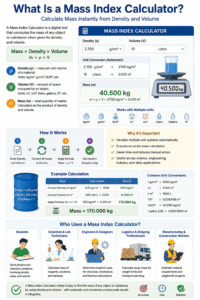
A Mass Index Calculator is a digital tool that computes the mass of any object or substance when given its density and volume. It applies the fundamental physics formula Mass = Density × Volume, performs all necessary unit conversions automatically, and returns the result in kilograms — the SI standard unit of mass.
The three physical quantities a Mass Index Calculator works with are:
- Density (ρ) — the mass per unit volume of a material, measured in units such as kg/m³, g/cm³, or lb/ft³
- Volume (V) — the amount of three-dimensional space occupied by the object or substance, measured in units such as m³, cm³, liters, gallons, or cubic feet
- Mass (m) — the total quantity of matter in the object, calculated as the product of density and volume
What makes a Mass Index Calculator especially valuable is its ability to handle multiple unit systems simultaneously. In practice, density and volume values come from different sources — a material data sheet might list density in g/cm³ while a container specification gives volume in liters, or a construction drawing might specify volume in cubic feet while material data uses kg/m³. A Mass Index Calculator converts every input to SI base units before multiplying, ensuring accurate results regardless of which unit combination you start with.
This tool is used by:
- Students working through physics and chemistry problems involving density, mass, and volume
- Scientists and laboratory technicians calculating the mass of reagents, solutions, and samples
- Engineers and designers determining material mass for structural, mechanical, and thermal calculations
- Logistics and shipping professionals calculating cargo mass for weight limits and transport planning
- Manufacturing and construction workers estimating material requirements and weights for projects

The Formula Behind a Mass Index Calculator
Understanding the formula that powers a Mass Index Calculator gives you the foundation to interpret results correctly and apply them confidently.
The Core Formula
Mass (m) = Density (ρ) × Volume (V)
This formula states that the mass of an object equals the product of its density and its volume. Every Mass Index Calculator applies this exact relationship as its core computation.
What This Formula Means Physically
- Density tells you how much mass is packed into each unit of volume. A material with high density — like steel at approximately 7,850 kg/m³ — has a great deal of mass per cubic meter. A material with low density — like cork at about 120 kg/m³ — has very little mass per unit volume.
- Volume tells you how much space the material occupies. Two identical volumes of different materials will have very different masses if their densities differ significantly.
- Mass is the result: the total quantity of matter present. A Mass Index Calculator multiplies these two quantities to give you the mass in kilograms.
Rearranging the Formula The same relationship can be rearranged to solve for density or volume when needed:
- Density = Mass ÷ Volume — useful when you know mass and volume and want to identify or verify a material
- Volume = Mass ÷ Density — useful when you need to find the volume occupied by a known mass of material
Understanding the formula means you can use a Mass Index Calculator not just as a black box but as a tool you can verify and extend to related calculations. It also means you can rearrange the inputs — entering mass and volume to find density, for example — by interpreting the formula in reverse.
Unit Conversion Step Before multiplying, all inputs must be converted to matching SI units: kg/m³ for density and m³ for volume. A Mass Index Calculator performs this conversion automatically using predefined conversion factors for every supported unit, so you never need to worry about unit mismatches.
How to Use a Mass Index Calculator Step by Step
Using a Mass Index Calculator is quick and straightforward. Here is a complete walkthrough:
Step One — Enter the Density Value Type the numerical density of your material into the Density field. For example, if you are working with water, the density is 1000 (in kg/m³) or 1.0 (in g/cm³). Always confirm the density of your material from a reliable reference — material data sheets, chemistry handbooks, or manufacturer specifications are the most accurate sources.
Step Two — Select the Density Unit Choose the unit your density value is expressed in from the Density Unit dropdown. The Mass Index Calculator supports a wide range of density units:
- kg/m³ (SI standard)
- g/cm³ (common in chemistry and materials science)
- lb/ft³ (common in US engineering)
- lb/in³ (used for dense metals and alloys)
- kg/L (used for liquid materials)
- mg/mm³ and g/mm³ (used in precision and micro-scale applications)
Step Three — Enter the Volume Value Type the volume of the object or container in the Volume field. For example, if you have a 2-liter bottle of liquid, enter 2.
Step Four — Select the Volume Unit Choose the unit your volume is expressed in from the Volume Unit dropdown. Supported volume units include:
- m³ (SI standard cubic meter)
- cm³ (cubic centimeters, common in chemistry)
- Liters (most common unit for liquids)
- Gallons US and UK
- ft³ and in³ (common in US engineering and construction)
- mm³ (for very small or precision volumes)
- Quarts and Decaliters
Step Five — Click Calculate Press the Calculate button. The Mass Index Calculator converts both inputs to SI units, applies the Mass = Density × Volume formula, and displays the mass result in kilograms. The results panel also shows the step-by-step working — including the converted SI values used in the calculation — so you can verify every step independently.
Step Six — Read and Apply the Result The calculated mass appears in kilograms. Use this value directly in downstream calculations — structural load analysis, shipping weight estimation, stoichiometric calculations, or any other application that requires mass data.
Mass Index Calculator: Supported Units and Conversions
The range of unit combinations supported by a Mass Index Calculator is one of its most practically important features. Here is a summary of the key conversion factors the tool applies:
Density Unit Conversions to kg/m³:
| Density Unit | Conversion Factor to kg/m³ |
|---|---|
| kg/m³ | × 1 |
| g/cm³ | × 1,000 |
| lb/ft³ | × 16.02 |
| lb/in³ | × 27,680 |
| kg/L | × 1,000 |
| mg/mm³ | × 1,000,000 |
Volume Unit Conversions to m³:
| Volume Unit | Conversion Factor to m³ |
|---|---|
| m³ | × 1 |
| cm³ | × 0.000001 |
| Liters | × 0.001 |
| Gallons (US) | × 0.003785 |
| Gallons (UK) | × 0.004546 |
| ft³ | × 0.02832 |
| in³ | × 0.000016387 |
A Mass Index Calculator applies these factors automatically, so even if your density is in g/cm³ and your volume is in gallons, the tool handles the complete two-step conversion and delivers the correct mass result with no manual unit work required.
Real-World Examples Using the Mass Index Calculator
Working through concrete examples is the best way to see how a this tool is applied in practice.
Example 1: Mass of Water in a Storage Tank
- Density of water: 1,000 kg/m³
- Tank volume: 500 liters = 0.5 m³
- Mass = 1,000 × 0.5 = 500 kg
This calculation is used by engineers designing water storage systems, transportation vehicles carrying liquid cargo, and civil engineers calculating structural loads.
Example 2: Mass of a Steel Block
- Density of steel: 7,850 kg/m³
- Block volume: 0.02 m³
- Mass = 7,850 × 0.02 = 157 kg
Structural engineers use this type of calculation to determine the self-weight of steel beams, plates, and frames — a critical input for structural load design.
Example 3: Mass of Ethanol in a Barrel
- Density of ethanol: 789 kg/m³
- Volume: 55 gallons (US) = 0.208 m³
- Mass = 789 × 0.208 = 164.1 kg
The chemical and beverage industries use this calculation for inventory tracking, shipping weight, and process chemistry purposes.
Example 4: Mass of Concrete for a Foundation
- Density of concrete: 2,400 kg/m³
- Volume: 10 m³
- Mass = 2,400 × 10 = 24,000 kg (24 tonnes)
Civil and structural engineers calculate concrete mass to determine foundation loads, reinforcement requirements, and crane lifting capacities.
In every one of these examples, a this tool delivers the answer in seconds that would otherwise require multiple manual unit conversion steps and arithmetic operations with significant risk of human error.
Why Mass Calculations Matter in Science and Engineering
Mass is not just a number — it is a fundamental physical quantity that determines how materials and objects behave in virtually every scientific and engineering context.
Structural Engineering and Construction Every building, bridge, and structure must support its own weight — the self-weight of its structural components. Accurate mass calculation is the first step in determining structural loads, which then determine the size of foundations, the capacity of support elements, and the safety of the entire structure. Without correct mass data, structural analysis cannot begin.
Fluid Dynamics and Transport The mass of fluid in pipes, tanks, and vessels determines flow rates, pressure, buoyancy forces, and pump requirements. Naval architects, pipeline engineers, and process engineers all rely on mass calculations from density and volume data to design safe and efficient fluid systems.
Chemistry and Stoichiometry In chemistry, the mass of a substance is directly related to the number of moles through the molar mass formula. Knowing the mass of a substance — calculated from its density and volume — is the starting point for all stoichiometric calculations in laboratory and industrial chemistry. Without mass, you cannot convert to moles, and without moles, you cannot balance reaction quantities.
Logistics and Freight Airlines, shipping companies, and freight carriers all enforce weight limits for safety and regulatory compliance. Calculating the mass of cargo from density and volume data allows logistics planners to verify compliance with weight limits before loading, avoiding costly violations and safety incidents.
Mass vs. Weight – Understanding the Difference
One of the most common points of confusion in physics is the difference between mass and weight — and understanding it helps you interpret results correctly.
Mass is the total amount of matter in an object. It is measured in kilograms (kg) and does not change regardless of location — on Earth, on the Moon, or in deep space, an object’s mass is always the same.
Weight is the gravitational force exerted on an object. It is measured in Newtons (N) and is calculated as:
Weight = Mass × Gravitational Acceleration (g)
On Earth’s surface, g ≈ 9.81 m/s², so a 10 kg object has a weight of approximately 98.1 N. On the Moon (g ≈ 1.62 m/s²), the same 10 kg object weighs only about 16.2 N — but its mass is still 10 kg.
A this tool correctly calculates mass in kilograms — not weight in Newtons. In everyday language, people often use “weight” to mean “mass” (saying they “weigh 70 kg”), but scientifically these are distinct quantities. For engineering, physics, and chemistry calculations, always use mass in kilograms as the tool returns it.
Density Reference Table for Common Materials
Knowing the density of common materials lets you apply a this tool immediately to any object made from these substances.
| Material | Density (kg/m³) |
|---|---|
| Water (4°C) | 1,000 |
| Seawater | 1,025 |
| Concrete | 2,300 – 2,400 |
| Steel | 7,750 – 8,050 |
| Aluminium | 2,700 |
| Copper | 8,960 |
| Wood (oak) | 700 – 900 |
| Air (sea level) | 1.225 |
| Ethanol | 789 |
| Olive Oil | 900 – 920 |
| Glass | 2,500 |
| Ice | 917 |
| Sand (dry) | 1,600 |
| Granite | 2,700 |
Enter any of these density values alongside your volume measurement into a this tool to instantly find the mass of any quantity of material from this list. This reference table covers the materials most commonly encountered in construction, engineering, chemistry, and everyday applications.
Applications of a this tool Across Industries
The practical uses of a this tool span nearly every field that works with physical materials.
Construction and Architecture Architects and structural engineers use mass calculations to assess dead loads — the permanent weight of structural materials like concrete, steel, timber, and masonry. Every element of a building’s structure must be accounted for in load analysis, and a this tool is the fastest way to compute element masses from dimension and density data.
Manufacturing and Fabrication Production engineers calculate the mass of raw materials needed for components, the weight of finished products, and the loads on manufacturing equipment and conveyors. Accurate mass data feeds into process design, tooling selection, and logistics planning throughout the manufacturing workflow.
Shipping and Packaging Packaging designers and logistics managers use mass calculations to determine the weight of filled containers, pallets, and shipments. Staying within vehicle and carrier weight limits requires precise mass data, and density-volume calculations are the most reliable way to estimate mass before items are physically weighed.
Food and Beverage Industry The food industry routinely calculates the mass of bulk liquids, dry goods, and packaged products from density and volume measurements. Recipe scaling, nutritional labeling, and regulatory compliance all require accurate mass data that a this tool can deliver instantly.
this tool in Physics, Chemistry, and Engineering
Across the three major quantitative sciences, a this tool is a tool that students and professionals return to repeatedly.
Physics In classical mechanics, mass is one of the two fundamental quantities that determine force (Newton’s Second Law: F = ma). Physics students and researchers use a this tool to find the mass of objects when density and volume are the given quantities, then apply that mass in force, momentum, and energy calculations.
Chemistry The density of solutions, reagents, and solvents is standard data provided in chemical safety data sheets (SDS) and databases. Chemists use a this tool to convert volume measurements into mass values, which are then converted to moles using molar mass for stoichiometric reaction calculations.
Civil and Mechanical Engineering Engineering calculations routinely start with material mass — for load analysis, thermal mass estimation, inertia calculations, and component sizing. A this tool that handles multiple unit systems is especially valuable in engineering contexts, where data from different countries and standards may use different unit conventions for the same physical quantities.
Common Mistakes When Using a this tool
Avoiding these common errors ensures that your results are always accurate and reliable.
Selecting the Wrong Units The most common source of error when using a this tool is selecting the wrong unit for density or volume. For example, entering a density in g/cm³ but selecting kg/m³ in the unit dropdown will produce a result that is off by a factor of 1,000. Always double-check both unit dropdowns before clicking Calculate.
Using Density Values for the Wrong State Many materials have significantly different densities in different physical states — water is 1,000 kg/m³ as a liquid but only 917 kg/m³ as ice. Always use the density value that corresponds to the actual state of your material at the temperature and pressure conditions of your application.
Entering Container Volume Instead of Material Volume When calculating the mass of a liquid or granular material, enter the volume of the material itself, not the container. If a 10-liter container is only 75% full, the correct volume to enter is 7.5 liters — not 10. Using the container volume will overestimate the mass of the material.
Applying a Generic Density to a Non-Uniform Material For heterogeneous materials — mixtures, composites, or materials with internal voids — the effective density varies across the volume. Use the bulk density or average density measured for your specific material and conditions, not a generic published value, for the most accurate results.
FAQs
What does a Mass Index Calculator do? A Mass Index Calculator computes the mass of any object or substance by multiplying its density by its volume, applying the formula Mass = Density × Volume. It automatically converts all inputs to SI base units before calculating, so you can enter values in any supported unit combination and receive an accurate mass result in kilograms.
What units does a Mass Index Calculator use for output? The standard output of a Mass Index Calculator is kilograms (kg), the SI base unit for mass. This is the most universally applicable unit for engineering, scientific, and logistical calculations. To convert to other common units: 1 kg = 1,000 g = 2.2046 lb = 0.001 metric tonnes.
What formula does a The standard output of this tool is kilograms (kg) use? Mass = Density × Volume. This is the fundamental physics relationship between the three quantities. A Mass = Density × Volume. This tool applies this formula after first converting density to kg/m³ and volume to m³, ensuring full unit consistency and accurate results regardless of the input units you select.
Can a this tool handle liquid materials? Yes — a this tool works equally well for solids, liquids, and gases, as long as you use the correct density for the material in its actual state and conditions. Liquid densities are widely available from chemical data sources, safety data sheets, and published reference tables.
Why do I need to choose a unit for each input separately? Density and volume values come from many different sources that use different unit conventions. A this tool requires you to specify the unit for each input so it can apply the correct conversion factor. Selecting the wrong unit is the most common cause of calculation errors, so always verify both unit selections before running the calculation.
Is mass the same as weight? No — mass and weight are distinct physical quantities. Mass, measured in kilograms, is the amount of matter in an object and is constant regardless of location. Weight, measured in Newtons, is the gravitational force acting on an object and varies with gravitational acceleration. A this tool computes mass — not weight.
Can a this tool be used for gases? Yes — gases have well-defined densities at specified temperature and pressure conditions. For example, air at sea level has a density of about 1.225 kg/m³. Enter this density and the volume of your container into a this tool to find the mass of the gas it contains.
Conclusion
Mass is a quantity that underpins virtually every calculation involving physical materials — in construction, chemistry, engineering, logistics, manufacturing, and scientific research. Knowing how to calculate mass accurately from density and volume, and having a reliable this tool that handles unit conversions automatically, is a skill and tool that delivers value across an enormous range of real-world applications.
A this tool removes the friction from physical material calculations. Instead of manually consulting conversion tables, performing multi-step unit conversions, and then multiplying, you simply enter two values, select their units, and receive an accurate result in seconds. The step-by-step working displayed by the tool also makes it a powerful learning resource — helping students and practitioners understand not just the answer but how it was derived at every stage.
Throughout this guide, we have covered the complete landscape of mass calculations — from the fundamental formula and the physics distinction between mass and weight, through step-by-step real-world examples in construction, chemistry, manufacturing, and logistics, to the full range of units and materials the tool supports. The density reference table and conversion tables give you everything you need to apply a this tool to any material in any unit system you encounter.
Use a this tool for every density-volume-mass problem you face. Verify your density value for the correct material and state, select the right units for each input, and check the step-by-step working to confirm the calculation. That disciplined approach — accurate values, correct unit selection, and a reliable this tool — is the complete formula for confident, precise material mass calculations at every level of expertise mass index calculator.