Calculate voltage drop instantly with our fast and accurate Voltage Drop Calculator
Table of Contents
- Introduction
- What Are Time Zones?
- What Is This Tool?
- Why You Should Use This Tool
- Step-by-Step Usage Guide
- How the Tool Works Behind the Scenes
- IANA Time Zone Database Explained
- Real-World Applications
- Tips for Accurate Time Conversions
- Common Mistakes to Avoid
- Frequently Asked Questions (FAQs)
- Conclusion
Introduction
The world runs on 24 distinct time zones, and navigating them is one of the most common challenges in global business, travel, and communication. When it is 9:00 AM in New York, it is 2:00 PM in London, 10:00 PM in Tokyo, and well past midnight in Sydney. Getting those conversions wrong means missed meetings, late calls, confused schedules, and frustrated colleagues across the world. A Time Zone Calculator eliminates all of that confusion instantly.
Whether you are a remote worker scheduling a video call with teammates in three different countries, a traveler planning departure and arrival times across continents, a developer coordinating deployments across global servers, or a student following an online course delivered from a different timezone — a Time Zone Calculator gives you the exact converted time in seconds. Select your date, enter your time, choose your source and destination zones, and click Convert.
In this complete guide, you will learn what time zones are and why they exist, how a Time Zone Calculator works, where time zone conversions matter most, and how to use this tool accurately every time. By the end, you will have everything you need to manage time across the globe with complete confidence.
What Are Time Zones?
A time zone is a region of the globe that observes the same standard time. The concept was introduced in the 19th century to standardize timekeeping across railways and telegraphs, replacing the chaotic patchwork of local solar times that each city previously used.
The foundation of all time zones is Coordinated Universal Time (UTC) — formerly known as Greenwich Mean Time (GMT). UTC is the world’s primary time standard, maintained by atomic clocks and not subject to daylight saving adjustments. Every time zone in the world is defined as an offset from UTC — either ahead (positive) or behind (negative).
Common UTC offsets include:
- UTC−5 — Eastern Standard Time (New York, Toronto, Bogotá)
- UTC+0 — Greenwich Mean Time (London in winter, Reykjavik year-round)
- UTC+1 — Central European Time (Paris, Berlin, Rome)
- UTC+5:30 — India Standard Time (Mumbai, Delhi — note the non-standard 30-minute offset)
- UTC+8 — China Standard Time (Beijing, Shanghai, Singapore)
- UTC+9 — Japan Standard Time (Tokyo, Osaka)
- UTC+12 — New Zealand Standard Time (Auckland)
The world is not neatly divided into 24 equal zones, however. Many countries use half-hour or even 15-minute offsets, and the boundaries of time zones follow political and geographic lines rather than strict meridians. The result is a complex global map that is far harder to navigate mentally than most people expect — which is exactly why a Time Zone Calculator is so valuable.
What Is a Time Zone Calculator?
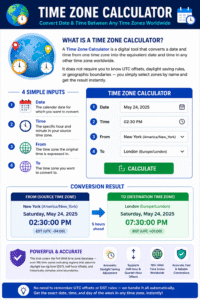
A Time Zone Calculator is a digital tool that converts a date and time from one time zone into the equivalent date and time in any other time zone worldwide. It does not require you to know UTC offsets, daylight saving rules, or geographic boundaries — you simply select zones by name and get the result instantly.
This tool provides four inputs:
- Date — the calendar date for which you want to convert
- Time — the specific hour and minute in your source time zone
- From — the time zone the original time is expressed in
- To — the time zone you want to convert to
The result is the exact date and time in the destination zone, displayed in full — including the day of the week, the date, and the time with seconds. This level of detail matters when a conversion crosses midnight and changes the calendar date.
This tool covers the full IANA time zone database — over 195 time zones including regions that observe daylight saving time (DST), half-hour offsets, and historically complex zone boundaries. You do not need to remember which zones are currently observing DST — the tool handles it automatically.
Why You Should Use a Time Zone Calculator
Manual time zone conversion is surprisingly error-prone. Even people who convert time zones regularly — frequent travelers, remote workers, international project managers — make mistakes, especially around daylight saving transitions, half-hour offsets, and cross-date conversions. Here is why a Time Zone Calculator is the smarter approach.
Instant, Zero-Error Results Mental time zone arithmetic involves multiple steps — find the UTC offset for zone A, find the UTC offset for zone B, compute the difference, add or subtract, and then check whether the result crossed midnight and changed the date. A Time Zone Calculator collapses all of this into a single click.
Daylight Saving Time Is Handled Automatically DST is the single biggest source of manual conversion errors. The United States, European Union, Australia, and many other regions shift clocks forward and back seasonally — but not all on the same date, and not all by the same amount. A Time Zone Calculator uses accurate IANA zone data to know exactly which zones are on DST at any given date, without you needing to track any of it.
Supports All Major and Minor Time Zones From large regions like America/New_York and Europe/London, to small territories like Pacific/Chatham (UTC+12:45) and Asia/Kolkata (UTC+5:30), this tool covers every IANA-defined zone. Wherever your colleague or client is located, you can convert to their local time precisely.
Cross-Date Conversions Are Clear When a conversion crosses midnight, the output date changes — and that is easy to miss in a mental calculation. The Time Zone Calculator always shows the full date and day of the week in the result, making it immediately obvious when a time in one zone corresponds to the next (or previous) day in the destination zone.
Saves Time at Scale When you are managing schedules across multiple time zones daily, the cumulative time saved by using a Time Zone Calculator instead of calculating manually is significant. What takes 30–60 seconds of mental arithmetic per conversion takes under two seconds with this tool Time Zone Calculator.
Step-by-Step Usage Guide
Using this tool is straightforward and takes less than a minute. Follow these steps for accurate conversions every time.
Step 1 — Set the Date Click the Date field and select the date for which you want to convert the time. The date matters because time zones that observe DST can have different UTC offsets on different dates. Using today’s date or a future date will give you the correct current or upcoming offset.
Step 2 — Enter the Time Type the time you want to convert in the Time field. Use 24-hour format (e.g., 14:30 for 2:30 PM) or the format your browser supports. Be precise — even a 15-minute error can cause missed appointments in real-world scheduling.
Step 3 — Select the Source Time Zone Choose the time zone the original time is expressed in from the From dropdown. The dropdown contains all IANA time zones sorted alphabetically by region and city (e.g., America/Chicago, Europe/Paris, Asia/Tokyo). Type to search if your browser supports dropdown filtering.
Step 4 — Select the Destination Time Zone Choose the time zone you want to convert to from the To dropdown. This is the zone where your recipient, destination, or event is located.
Step 5 — Click Convert Press the Convert button. The result panel displays the full converted date and time, including the day of the week, the complete date, and the time in the destination zone. If the conversion crosses midnight, the date shown will reflect the correct calendar day.
Step 6 — Reset for a New Conversion Click Clear to reset the result. You can immediately enter new parameters and convert again without needing to reload the page Time Zone Calculator .
How the Tool Works Behind the Scenes
Understanding the technology behind this tool helps you appreciate why it is so reliable and why manual mental calculations so often go wrong.
IANA Time Zone Data The tool uses the browser’s built-in Intl.DateTimeFormat API, which is backed by the IANA (Internet Assigned Numbers Authority) Time Zone Database. This database — maintained as an open standard — contains the complete history and current rules for every time zone in the world, including all DST transition dates and historical changes.
JavaScript’s Date Object and UTC Anchor The conversion works by anchoring the input date and time to UTC — the universal reference point that every time zone is defined relative to. The input time is parsed in the “From” time zone, converted to its UTC equivalent, and then re-expressed in the “To” time zone. This two-step UTC anchor method ensures accuracy even across complex zone pairs.
Intl.supportedValuesOf(‘timeZone’) The dropdown is populated using Intl.supportedValuesOf(‘timeZone’) — a browser API that returns all IANA time zone names the current environment supports. This gives you access to 195+ zones without any external database or API call. The result is a fast, dependency-free Time Zone Calculator that works entirely in your browser.
Full Date and Time Output The result is formatted using Intl.DateTimeFormat with dateStyle: ‘full’ and timeStyle: ‘medium’ — producing a human-readable output that includes the weekday, full date, and time including seconds. This level of detail ensures you never miss a date rollover.
IANA Time Zone Database Explained
The IANA Time Zone Database (also called the tz database or tzdata) is the global standard for time zone definitions. It is the same database used by Linux, macOS, iOS, Android, Java, Python, and virtually every modern computing platform.
Each IANA zone name follows the format Region/City:
- America/New_York — Eastern Time (US East Coast)
- Europe/London — British Time (GMT/BST)
- Asia/Kolkata — India Standard Time
- Australia/Sydney — Australian Eastern Time
- Pacific/Auckland — New Zealand Time
The city name is chosen to represent a zone, not necessarily because the city is the most important in its region, but because it provides an unambiguous, stable identifier. When political boundaries change or countries rename themselves, the IANA database retains the original city-based names for backward compatibility.
Why this matters for a Time Zone Calculator: because IANA zones encode the full history of DST transitions and offset changes for each region, the tool can accurately convert any date — past, present, or future — using the rules that applied or will apply at that exact moment. This makes it far more reliable than simple UTC-offset arithmetic Time Zone Calculator
Real-World Applications
This tool is essential in a wide range of personal and professional contexts. Here are the most important real-world applications.
Remote Work and International Teams The explosion of remote work has made cross-timezone scheduling one of the most common daily challenges in modern business. Scheduling a video call that works for participants in San Francisco (UTC−8), London (UTC+0), and Mumbai (UTC+5:30) requires converting across three different zones simultaneously. A Time Zone Calculator makes this coordination instant and error-free.
International Travel Planning Travelers use time zone conversion to calculate arrival times, plan transit connections, and set alarms correctly. A flight from London to Los Angeles that departs at 11:00 AM BST and arrives 11 hours later lands at 9:00 PM PDT on the same calendar day — even though the flight crosses 8 time zone hours. Getting this right requires a precise tool.
Global Financial Markets Stock exchanges around the world open and close at different local times. The New York Stock Exchange opens at 9:30 AM EST, the London Stock Exchange at 8:00 AM GMT, and the Tokyo Stock Exchange at 9:00 AM JST. Traders tracking multiple markets need instant, accurate time zone conversions throughout the trading day.
Live Events and Broadcasts Sports events, product launches, webinars, and live streams are announced in a single time zone — and every viewer in another time zone needs to convert that time accurately to know when to tune in. A Time Zone Calculator serves this need precisely.
Software Deployment and DevOps Developers schedule server maintenance windows, deployments, and database migrations during off-peak hours. When a team spans multiple continents, “off-peak” means different things in different zones. Coordinating these windows requires reliable time conversion.
Healthcare and Telemedicine Patients booking appointments with remote specialists, or researchers coordinating international clinical trial schedules, depend on accurate time zone conversion to ensure everyone shows up at the right moment Time Zone Calculator
Tips for Accurate Time Conversions
Follow these guidelines to get the most reliable results from this tool every time.
Always Set the Correct Date Daylight saving time transitions happen on specific dates — and a conversion that is accurate in January may differ by one hour in July for zones that observe DST. Always enter the actual date of your event or meeting to ensure the tool applies the correct DST rules.
Use IANA Zone Names, Not Abbreviations Time zone abbreviations like EST, CST, IST, and BST are ambiguous. IST, for example, refers to India Standard Time, Irish Standard Time, and Israel Standard Time — three different zones. IANA names like Asia/Kolkata, Europe/Dublin, and Asia/Jerusalem are unambiguous. This tool uses IANA names exclusively, eliminating all abbreviation ambiguity.
Verify Cross-Midnight Conversions Carefully When converting a time that is late at night in the source zone, the destination may be the next day — or when converting early morning, the destination may still be the previous day. Always read the full date in the result panel, not just the time.
Account for Zones Without DST Not all regions observe daylight saving time. India, China, Japan, most of Africa, and many other regions use a fixed UTC offset year-round. When converting between a DST-observing zone and a non-DST zone, the offset difference changes by one hour depending on the time of year Time Zone Calculator
Common Mistakes to Avoid
Even frequent time zone converters make these errors. Understanding them helps you avoid costly scheduling mistakes.
Mistake 1 — Using “EST” When You Mean “ET” Eastern Standard Time (EST) and Eastern Daylight Time (EDT) are not the same. EST is UTC−5 and is only in effect during winter. During summer, the US East Coast observes EDT at UTC−4. Using “EST” year-round introduces a one-hour error for half the year. Always use IANA zone names to let the tool handle DST automatically.
Mistake 2 — Forgetting That Some Countries Are Half-Hour Offset India (UTC+5:30), Iran (UTC+3:30), Afghanistan (UTC+4:30), and Australia/Adelaide (UTC+9:30) all use non-standard half-hour offsets. Mental arithmetic that assumes whole-hour steps misses these. The tool handles all offsets precisely.
Mistake 3 — Not Accounting for Date Rollovers A 10:00 PM time in Los Angeles (UTC−8) is 6:00 AM the next day in London (UTC+0). Assuming the date stays the same in any conversion is a common and serious mistake. Always read the full result including the date.
Mistake 4 — Confusing “From” and “To” Zones Swapping the source and destination zones produces the exact inverse of the correct result. If you want to know what 3:00 PM New York time is in Tokyo, make sure New York is in the From field and Tokyo is in the To field — not the other way around.
Mistake 5 — Using a Fixed UTC Offset Instead of a Zone Name UTC offsets like +5:30 or −8:00 do not account for DST transitions. A fixed offset is only accurate if the target zone never changes its offset — which is only true for a minority of time zones. Using full IANA zone names ensures DST transitions are applied correctly Time Zone Calculator
Frequently Asked Questions (FAQs)
What is a Time Zone Calculator used for? A Time Zone Calculator converts a date and time from one time zone to another. It is used for scheduling international meetings, planning travel, tracking global markets, coordinating deployments, and any situation where you need to express a time in a different region’s local time.
How many time zones does this tool support? This tool uses the browser’s IANA time zone database via Intl.supportedValuesOf(‘timeZone’), which covers 195+ time zones worldwide — including all regions that observe DST, half-hour offsets, and politically or historically complex zones.
Does the tool account for Daylight Saving Time? Yes. Because this tool uses IANA zone data, it automatically applies the correct DST rules for any zone and any date you enter. You do not need to manually track DST start and end dates — the Time Zone Calculator handles it entirely.
What if the conversion crosses midnight? The result panel displays the full date and day of the week in addition to the converted time. Cross-midnight conversions are clearly shown as the next or previous calendar day, so you never have to guess whether the date has rolled over.
Why are zones listed by city name instead of country or offset? IANA zone names use city identifiers because they are stable, unambiguous, and encode the full historical record of offset and DST changes for that region. Country names and UTC offsets change over time; city-based zone names provide a consistent, universal standard.
Can I use this tool to convert historical dates? Yes. Because the IANA database includes historical zone data, the Time Zone Calculator can accurately convert times for past dates — applying the UTC offsets and DST rules that were in effect at that specific historical moment Time Zone Calculator
Conclusion
Time zones are an inescapable reality of our globally connected world — and getting conversions wrong has real consequences, from missed video calls to misaligned trading decisions to confused travel plans. A Time Zone Calculator removes the guesswork entirely, giving you instant, accurate, and fully daylight-saving-aware results for any zone pair on any date.
In this guide, we covered:
- What time zones are and how they are defined relative to UTC
- What this tool is and how it converts across all global zones
- Why using a Time Zone Calculator is faster and more reliable than manual calculation
- Step-by-step instructions for using the tool correctly
- How the IANA time zone database powers accurate conversions
- Real-world applications from remote work to financial markets to travel
- Tips for avoiding common conversion errors
- Answers to the most frequently asked questions
Whether you are planning a call with a colleague in Singapore, catching a live event from Tokyo, or booking a flight that crosses a dozen time zones — a Time Zone Calculator is the fastest, most reliable way to get the answer right the first time.
Start using the Time Zone Calculator now — select your date, enter your time, choose your zones, and convert in seconds.