VAT Calculator
Estimate your retirement savings growth and future wealth with our IRA Calculator
Table of Contents
- Introduction
- What Is a VAT Calculator?
- Why You Need a VAT Calculator for Every Transaction
- Key Inputs in a VAT Calculator Explained
- How to Use a VAT Calculator Step by Step
- Understanding Your VAT Calculator Results
- How VAT Works in Different Countries
- VAT vs. Sales Tax — Key Differences the VAT Calculator Reveals
- How Import Duty, Shipping, and Insurance Affect VAT Calculations
- Smart Business Strategies Using a VAT Calculator
- Common Mistakes to Avoid When Using a VAT Calculator
- Frequently Asked Questions (FAQs)
- Conclusion
Introduction
Every business transaction, every import, and every purchase that involves Value Added Tax requires one thing above all else — accuracy.
A single miscalculation of VAT can result in penalties, audits, incorrect pricing, or thousands of dollars in overcharged or undercharged tax.
That is exactly why a VAT Calculator is an essential tool for every business owner, freelancer, importer, accountant, and consumer who deals with VAT-inclusive pricing in their daily financial life.
A VAT Calculator removes all guesswork from tax calculations. It computes your VAT amount, your subtotal after discount, your import duty, your shipping and handling costs, your insurance charges, and your complete total cost — all in one precise calculation.
Whether you are pricing a product, reconciling an invoice, planning an import transaction, or simply trying to understand how much VAT you owe, a VAT Calculator delivers instant, accurate answers.
This complete guide covers everything you need to know — from understanding every input and every result to applying smart strategies that help businesses and individuals manage VAT obligations with confidence and precision.
What Is a VAT Calculator?
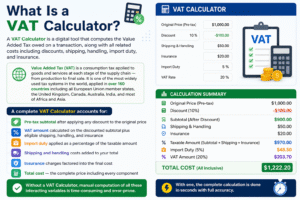
A VAT Calculator is a digital tool that computes the Value Added Tax owed on a transaction, along with all related costs including discounts, shipping, handling, import duty, and insurance.
Value Added Tax (VAT) is a consumption tax applied to goods and services at each stage of the supply chain — from production to final sale. It is one of the most widely used tax systems in the world, applied in over 160 countries including all European Union member states, the United Kingdom, Canada, Australia, India, and most of Africa and Asia.
A VAT Calculator does far more than simply multiply an amount by a tax rate.
A complete VAT Calculator accounts for:
- Pre-tax subtotal after applying any discount to the original price
- VAT amount calculated on the discounted subtotal plus eligible shipping, handling, and insurance
- Import duty applied as a percentage of the taxable amount
- Shipping and handling costs added to your total
- Insurance charges factored into the final cost
- Total cost — the complete price including every component
Without a VAT Calculator, manual computation of all these interacting variables is time-consuming and error-prone. With one, the complete calculation is done in seconds with full accuracy.
Why You Need a VAT Calculator for Every Transaction
The consequences of getting VAT wrong are serious — for businesses and individuals alike.
Businesses that overcharge VAT face refund obligations and damaged customer trust. Businesses that undercharge VAT face tax shortfalls, interest charges, and potential audits. A VAT Calculator eliminates both risks.
Here is exactly why using a VAT Calculator is essential for every transaction:
It ensures pricing accuracy. When setting retail prices, businesses must know the exact VAT-inclusive price. A VAT Calculator lets you work forward from the pre-tax price to the final consumer price — or backward from the VAT-inclusive price to extract the net amount.
It simplifies import cost planning. Cross-border purchases involve multiple overlapping costs — purchase price, discount, import duty, shipping, insurance, and VAT on all applicable components. A VAT Calculator handles all of these simultaneously, giving importers a complete total landed cost before they commit to a purchase.
It prevents invoice errors. Invoices with incorrect VAT calculations are rejected by tax authorities, delayed by clients, and create administrative headaches. Running every invoice through a VAT Calculator before sending it ensures the numbers are correct every single time.
It supports confident financial decision-making. Whether you are comparing supplier prices, budgeting for an import, or evaluating the cost of a business purchase, knowing the complete VAT-inclusive total cost upfront is essential. A VAT Calculator gives you that complete picture instantly.
It saves time and eliminates mental arithmetic errors. Complex VAT calculations involving multiple rates, discounts, duty percentages, and additional costs are impossible to calculate reliably by hand. A VAT Calculator completes the entire calculation in under a second with zero arithmetic risk.
Key Inputs in a VAT Calculator Explained
Understanding every field ensures you get accurate, complete results. Here is a detailed breakdown of every input in the VAT Calculator:
Amount ($)
The base pre-tax price of the goods or services being purchased or sold.
This is the starting point for the entire VAT calculation. It is the price before any discount, before VAT, before duty, and before any additional costs.
Enter the exact pre-tax price. For imported goods, this is typically the invoice value or customs value declared at the point of import.
VAT Rate (%)
The applicable VAT percentage rate for the transaction.
VAT rates vary dramatically by country, product category, and service type. In the United Kingdom, the standard VAT rate is 20% for most goods and services. In Germany, it is 19%. In India, GST rates range from 5% to 28%. In many Gulf countries, VAT is 5%.
Always use the rate applicable to your specific transaction type and jurisdiction. The VAT Calculator applies this rate to the taxable amount — including eligible shipping, handling, and insurance — to produce the exact VAT amount owed.
Discount (%)
A percentage discount applied to the original amount before VAT is calculated.
Discounts reduce the taxable base. If a product is priced at $1,000 with a 10% discount, VAT is calculated on $900 — not on the original $1,000. The VAT Calculator automatically deducts the discount first and then applies VAT only to the reduced taxable subtotal.
This is an important distinction that many manual calculators get wrong — applying VAT before the discount rather than after, resulting in an overstatement of the tax amount.
Shipping ($)
The cost of delivering the goods from the seller to the buyer.
In many jurisdictions, shipping costs are included in the VAT base — meaning VAT is calculated on the shipping charge in addition to the product price. The VAT Calculator includes shipping in the taxable amount when computing the total VAT owed.
Enter the exact shipping cost as quoted by your carrier or supplier.
Handling ($)
Additional charges for packaging, order processing, or special handling of the goods.
Like shipping, handling charges are often subject to VAT and are included in the taxable base alongside the product price. The VAT Calculator includes handling in the VAT calculation to ensure full compliance with the tax rules applicable in most jurisdictions.
Duty (%)
Import duty — a customs tariff applied as a percentage of the taxable value of imported goods.
Import duty is separate from VAT but often calculated alongside it. Duty is typically applied to the customs value of the goods (the pre-shipping price), while VAT is then calculated on the combined total including duty in some countries.
The VAT Calculator computes duty separately as a percentage of the taxable subtotal, making it easy to see the exact cost of import duty before committing to a cross-border purchase.
Insurance ($)
The cost of insurance covering the goods during transit.
In many VAT systems and customs frameworks, insurance costs are included in the customs value and therefore contribute to the VAT base. The VAT Calculator includes insurance in the total taxable amount to ensure your calculation reflects the complete landed cost of the shipment.
How to Use a VAT Calculator Step by Step
Follow these steps for accurate, complete VAT calculations every time:
Step 1 — Identify the pre-tax amount. Start with the base price of the goods or services before any tax. For a retail transaction, this is the listed price before VAT. For an import, this is the declared customs value on the commercial invoice.
Step 2 — Confirm the applicable VAT rate. Look up the correct VAT rate for your country, product category, and transaction type. Do not assume — rates vary by jurisdiction and product classification. Enter the verified rate into the VAT Calculator.
Step 3 — Enter any applicable discount. If the seller is offering a percentage discount, enter it in the Discount field. The VAT Calculator will automatically deduct the discount from the base amount before applying VAT, ensuring your taxable subtotal is correctly reduced.
Step 4 — Add shipping and handling costs. Enter the exact shipping cost and handling fee from your supplier’s quote or carrier invoice. These charges are part of the VAT calculation in most jurisdictions — the VAT Calculator includes them in the taxable base automatically.
Step 5 — Enter the import duty rate if applicable. For cross-border purchases, enter the applicable customs duty rate as a percentage. Check the tariff schedule for your country and the specific HS code of the goods being imported to determine the correct duty rate.
Step 6 — Enter insurance costs. If your shipment carries insurance, enter the insurance premium amount. The VAT Calculator includes this in the taxable base where applicable under your jurisdiction’s customs rules.
Step 7 — Click Calculate and review every result. The VAT Calculator will instantly display your subtotal, VAT amount, import duty, shipping and handling costs, insurance, and total cost. Review every line item — not just the final total — to verify that each component has been calculated correctly before using the figures on an invoice or customs declaration.
Step 8 — Use the pie chart for a visual breakdown. The VAT Calculator generates a pie chart showing the proportional breakdown of your total cost between the taxable subtotal, VAT, import duty, and other charges. This visual is especially useful for quickly explaining cost structures to clients, management teams, or import partners.
Understanding Your VAT Calculator Results
Every line in the VAT Calculator output carries important meaning. Here is how to read and use each result:
Subtotal is your base amount after applying the discount. This is the taxable value of the goods — the amount on which both VAT and duty are calculated. This figure should match the net amount on your supplier invoice after any agreed discount has been applied.
VAT Amount is the exact tax owed on the transaction — calculated by applying your VAT rate to the taxable subtotal plus shipping, handling, and insurance. This is the number that goes on your VAT invoice and must match what you remit to your tax authority.
Import Duty is the customs tariff charge applied as a percentage of your taxable subtotal. Import duty is a cost of doing business internationally — it is not refundable like VAT input credits in many jurisdictions. This figure directly impacts your total landed cost and your ability to price competitively in the local market.
Shipping and Handling is the combined cost of freight and order processing charges. The VAT Calculator displays this as a separate line to confirm these costs are included in your total — and, where applicable, in your VAT base.
Insurance is the transit insurance cost, displayed separately for transparency. Some customs authorities require insurance to be included in the customs value used for duty and VAT calculations.
Total Cost is the complete, all-inclusive amount payable — your taxable subtotal plus VAT, plus import duty, plus shipping, plus handling, plus insurance. This is the true landed cost of your purchase — the number you need for budgeting, pricing, and financial planning.
How VAT Works in Different Countries
VAT is not a uniform global system — rates, rules, and structures differ significantly by country. Understanding these differences makes the VAT Calculator an even more valuable tool for international business.
European Union: EU countries apply VAT under a harmonized framework but at different standard rates. Ireland applies 23%, France and UK both historically applied 20%, Hungary applies 27% — the highest in the EU. The VAT Calculator supports any rate, making it equally useful across all EU jurisdictions.
United Kingdom: The standard UK VAT rate is 20% for most goods and services. A reduced rate of 5% applies to certain energy-saving products and children’s car seats. Zero-rated goods — including most food and children’s clothing — carry 0% VAT. Always confirm the correct rate for your specific product before entering it into the VAT Calculator.
India (GST): India’s Goods and Services Tax replaced the old VAT system with rates of 0%, 5%, 12%, 18%, and 28% depending on the product category. The VAT Calculator handles any of these rates accurately — simply enter the applicable GST rate for your product.
Gulf Countries (GCC VAT): Saudi Arabia, the UAE, and other Gulf Cooperation Council countries implement a standard 15% VAT rate (Saudi Arabia increased from 5% to 15% in 2020). The UAE standard rate is 5%. The VAT Calculator’s flexible rate field accommodates all of these variations.
Australia (GST): Australia applies a Goods and Services Tax at a flat 10% rate on most goods and services. The VAT Calculator works equally well for Australian GST calculations — simply enter 10% in the VAT Rate field.
Zero-Rated vs. Exempt: In most VAT systems, zero-rated supplies are taxable at 0% — meaning the business can still claim input VAT credits. Exempt supplies carry no VAT charge and no input credit entitlement. The VAT Calculator handles zero-rated transactions simply by entering 0% as the VAT rate.
VAT vs. Sales Tax — Key Differences the VAT Calculator Reveals
Many people confuse VAT with sales tax — but they are fundamentally different systems, and the VAT Calculator highlights this distinction clearly.
Sales Tax (used primarily in the United States) is applied only at the final point of sale to the end consumer. It is a single-stage tax collected only by the retailer. Intermediate businesses in the supply chain pay no sales tax on their purchases.
VAT is a multi-stage tax collected at every step of the supply chain — manufacturer, distributor, wholesaler, and retailer all charge VAT. However, each business in the chain reclaims the VAT it paid on its purchases as an “input credit,” paying only the net difference to the tax authority. The end consumer bears the full VAT cost — but no business in the chain bears the full cost, because each one reclaims what it paid.
The VAT Calculator shows the total VAT amount charged on a transaction — which, from a consumer’s perspective, is equivalent to a sales tax in its financial impact. But for businesses, the input credit mechanism means the VAT Calculator is equally important for tracking reclaimable input VAT as it is for calculating output VAT charged to customers.
The key practical difference revealed by the VAT Calculator: a $1,000 product with 15% VAT costs the end consumer $1,150 — the same as if a 15% sales tax had been applied at point of sale. But every business in the supply chain is a collection agent, not a tax bearer, because input credits offset what they paid.
How Import Duty, Shipping, and Insurance Affect VAT Calculations
For importers and cross-border buyers, the VAT Calculator is especially critical — because multiple costs interact in ways that significantly change the total tax obligation.
Import duty is typically calculated first — applied as a percentage of the customs value of the goods (usually the invoice price). Once duty is calculated, VAT is then applied to the combined total of customs value plus duty in many countries — meaning you pay VAT on the duty amount too.
This “VAT on duty” effect is one of the most commonly misunderstood aspects of import taxation. The VAT Calculator models this correctly — showing you the full tax impact of importing goods including the VAT calculated on duty, shipping, and insurance where applicable.
Shipping and handling costs are typically VAT-able. In most VAT jurisdictions, the tax applies not just to the goods themselves but to all costs incurred in delivering those goods to their destination. Entering your shipping and handling costs into the VAT Calculator ensures your total cost calculation includes the VAT on these charges — a cost many importers overlook when budgeting.
Insurance is similarly included in the customs value under many trade frameworks — particularly the CIF (Cost, Insurance, and Freight) valuation method used by customs authorities worldwide. The VAT Calculator includes insurance in its taxable base calculation, giving you a complete and compliant customs valuation figure.
Smart Business Strategies Using a VAT Calculator
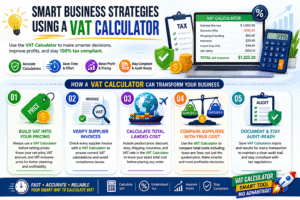
Once you master the VAT Calculator, use these strategies to improve pricing, profitability, and compliance:
Build VAT into your pricing from day one. Never price your products or services without first running the numbers through a VAT Calculator. Know your net price, your VAT amount, and your VAT-inclusive consumer price before publishing any price list or quoting any customer.
Use the VAT Calculator to verify supplier invoices. Before approving any supplier payment, run their invoice details through your VAT Calculator to verify the VAT calculation is correct. Incorrectly calculated VAT on supplier invoices can create compliance problems when you attempt to claim input VAT credits.
Model the total landed cost of every import before committing. Before placing any international order, enter all costs — product price, discount, duty rate, shipping, insurance, and VAT rate — into the VAT Calculator. Know your exact total landed cost before you buy, not after the shipment arrives and the customs bill surprises you.
Compare suppliers using true total cost. When comparing suppliers offering different prices, discount structures, and shipping arrangements, the VAT Calculator lets you compute the true total cost of each option — including all taxes and fees — so your comparison is based on actual landed cost, not just quoted price.
Document your VAT calculations for audit readiness. Tax authorities can and do audit VAT calculations. Keep records of your VAT Calculator inputs and outputs for every significant transaction — this creates a clear audit trail demonstrating your calculations were performed systematically and correctly.
Common Mistakes to Avoid When Using a VAT Calculator
These are the most frequent errors that lead to incorrect VAT calculations — avoid every one of them:
Mistake 1 — Applying VAT before deducting the discount. VAT must be calculated on the post-discount price — not the original price. The VAT Calculator handles this automatically, but if you are doing manual calculations elsewhere, always deduct the discount first. Applying VAT to the full pre-discount amount overstates your tax obligation.
Mistake 2 — Using the wrong VAT rate for the product category. Many jurisdictions apply different VAT rates to different goods. Food might be zero-rated while electronics carry the full standard rate. Always verify the correct rate for your specific product classification before entering it into the VAT Calculator — using the wrong rate creates both over-payment and under-payment risks.
Mistake 3 — Forgetting to include shipping and handling in the VAT base. Many people calculate VAT only on the product price and forget that shipping and handling are also VAT-able in most jurisdictions. The VAT Calculator includes these costs in the taxable base automatically — but if you are checking a supplier’s VAT calculation manually, verify that they have done the same.
Mistake 4 — Confusing VAT-inclusive and VAT-exclusive prices. When a price is quoted “inclusive of VAT,” the VAT is already embedded in the stated price. When a price is quoted “exclusive of VAT,” the VAT is added on top. Using the wrong interpretation in a VAT Calculator produces a completely wrong tax calculation. Always confirm with your supplier whether quoted prices include or exclude VAT.
Mistake 5 — Not accounting for import duty in your VAT base. In many countries, VAT is calculated on the customs value including import duty — meaning you pay VAT on the duty amount too. The VAT Calculator handles this correctly when you enter both the duty rate and the VAT rate — but manual calculations frequently miss this “VAT on duty” component, resulting in an understated tax obligation.
Frequently Asked Questions (FAQs)
Q1: What does a VAT Calculator calculate?
A VAT Calculator computes the complete cost breakdown of a VAT-applicable transaction. It calculates the discounted subtotal, the VAT amount, the import duty, shipping and handling costs, insurance charges, and the grand total cost. It shows every component separately so you have full transparency into how your final price is composed — and exactly how much of it represents tax.
Q2: How do I calculate VAT inclusive and VAT exclusive prices?
To calculate the VAT-exclusive price (the price before VAT): divide the VAT-inclusive price by (1 + VAT rate). For a $115 price with 15% VAT: $115 ÷ 1.15 = $100 net price.
To calculate the VAT-inclusive price (the price after adding VAT): multiply the net price by (1 + VAT rate). For a $100 price with 15% VAT: $100 × 1.15 = $115.
The VAT Calculator handles both directions automatically — enter your base amount and rate, and it computes both the VAT amount and the inclusive total.
Q3: Why is discount applied before VAT in the VAT Calculator?
Discounts reduce the taxable value of the transaction. VAT law in virtually every jurisdiction requires that VAT be calculated on the actual consideration paid — meaning the post-discount price. Applying VAT to the pre-discount price would mean the buyer pays tax on money they never actually spent. The VAT Calculator correctly deducts the discount first, then applies VAT only to the reduced taxable subtotal.
Q4: Does shipping cost affect the VAT amount in the VAT Calculator?
Yes — in most VAT jurisdictions, shipping and handling costs are included in the VAT taxable base. This means VAT is calculated on the total of the goods price plus shipping plus handling plus insurance. The VAT Calculator includes all of these costs in its VAT calculation automatically, ensuring your result reflects the complete and legally correct tax obligation.
Q5: What VAT rates should I enter into the VAT Calculator?
Enter the VAT rate applicable to your specific country and product category. Common standard rates include: UK — 20%, Germany — 19%, France — 20%, India (GST) — 5% to 28%, UAE — 5%, Saudi Arabia — 15%, Australia (GST) — 10%, Canada (GST) — 5%. For zero-rated goods (food, children’s clothing in many countries), enter 0%. Always verify the correct rate for your specific product classification — reduced and zero rates apply to specific categories that vary by jurisdiction.
Q6: Can I use the VAT Calculator for import duty calculations?
Yes — the VAT Calculator includes a Duty (%) field specifically for import duty calculations. Enter your applicable customs tariff rate and the VAT Calculator computes the exact duty amount and adds it to your total landed cost. This makes the VAT Calculator a comprehensive import cost planning tool — covering not just VAT but also duty, shipping, insurance, and handling in a single unified calculation.
Q7: What is the difference between VAT and sales tax?
VAT is a multi-stage tax collected at every point in the supply chain — manufacturer, wholesaler, distributor, and retailer all charge VAT but reclaim input credits on what they paid, so the net burden falls on the final consumer. Sales tax is a single-stage tax applied only at the final retail sale.
From a consumer’s perspective, both result in the same additional cost on top of the base price. The VAT Calculator computes the tax amount for VAT systems — for sales tax, the same calculation applies, using the local sales tax rate instead of a VAT rate.
Q8: How often should I use a VAT Calculator?
Every single time you process a transaction that involves VAT. For businesses, this means every sale invoice, every purchase invoice verification, every import cost projection, and every price list update. For individuals, use the VAT Calculator whenever you want to understand the complete cost of a VAT-applicable purchase — including online cross-border purchases where duty, shipping, and VAT all apply simultaneously.
Consistent use of the VAT Calculator eliminates cumulative errors that build up across hundreds or thousands of transactions — errors that become extremely costly and difficult to reverse when discovered during a tax audit.
This content is provided for educational and financial compliance purposes to help businesses and individuals understand, calculate, and manage Value Added Tax obligations accurately.
Conclusion
VAT is one of the most pervasive taxes in the global economy — affecting businesses, importers, retailers, and consumers in virtually every country that operates a modern tax system.
Getting VAT right is not optional. Errors in VAT calculation lead to financial losses, compliance failures, audit exposure, and damaged business relationships.
The VAT Calculator eliminates all of these risks by computing every component of a complete VAT transaction — discount, subtotal, VAT amount, import duty, shipping, handling, insurance, and total cost — accurately, instantly, and without any possibility of arithmetic error.
Whether you are a small business owner pricing products, an importer planning a shipment, an accountant reconciling a complex invoice, or an individual trying to understand your tax obligations on a purchase, the VAT Calculator is the tool that gives you precision where precision is required.
Use the VAT Calculator for every transaction that involves VAT. Verify supplier invoices with it. Plan imports using it. Build pricing structures around it. And use it to maintain the audit-ready documentation that responsible VAT compliance demands.
Accurate VAT calculation is not a luxury — it is a legal obligation. And with a VAT Calculator, meeting that obligation takes seconds rather than minutes, and produces correct results rather than costly errors.
Start calculating accurately today. Every transaction deserves it.